How Often Should I Change My Key Fob Battery Before It Dies
Your key fob battery typically lasts between three and four years, but driving habits and usage frequency can shorten or extend that timeline. Recognizing the early signs of a dying key fob battery saves you from getting locked out of your vehicle. This guide walks you through everything you need to know about key fob battery replacement timing, symptoms, and costs.
You are heading out the door, late for work, and you press the button on your key fob. Nothing happens. You press it again. Still nothing. That sinking feeling in your stomach is all too familiar for anyone who has dealt with a key fob battery that gave up without warning.
The good news is that replacing a car key battery is one of the simplest maintenance tasks you can do. It costs almost nothing and takes just a few minutes. But here is the real question most car owners ask: how often should you change your key fob battery before it dies?
This guide answers that question in full detail. We will cover how long remote key batteries actually last, the warning signs that tell you it is time for a replacement, and step-by-step tips to keep your vehicle key battery running strong. Whether you drive a Toyota, Honda, Ford, or any other brand, this article has you covered.
Key Takeaways
- Average lifespan: Most key fob batteries last three to four years under normal use.
- Watch for warning signs: Reduced signal range and delayed response are the first clues your battery is dying.
- Replacement is easy: Most owners can replace the battery themselves in under five minutes.
- Cost is minimal: A new key fob battery typically costs between $2 and $10.
- Reset may be needed: After replacing the battery, you might need to reset your car key to restore full function.
- Driving with a dead fob: You can still start your car in most modern vehicles, but it is not ideal for long-term use.
📑 Table of Contents
- How Long Does a Key Fob Battery Really Last?
- Warning Signs Your Key Fob Battery Is Dying
- How to Replace Your Key Fob Battery Step by Step
- Can You Drive With a Dead Key Fob Battery?
- Key Fob Battery Replacement Cost
- Pro Tips to Extend Your Key Fob Battery Life
- Common Mistakes People Make With Key Fob Batteries
- When to Seek Professional Help
- Final Thoughts
How Long Does a Key Fob Battery Really Last?
Most key fob batteries are designed to last somewhere between three and four years. However, that number is not set in stone. Several factors can push that timeline shorter or stretch it further. Understanding these factors helps you plan your key fob battery replacement before you end up stranded.
What Affects Key Fob Battery Life?
The lifespan of your remote start battery depends on how you use it every day. Here are the main factors that play a role:
- Frequency of use: If you press your fob buttons dozens of times a day, the battery wears out faster than someone who uses it sparingly.
- Signal distance: Trying to unlock your car from far away forces the battery to work harder, which drains it quicker over time.
- Battery quality: Not all CR2032 batteries are created equal. Cheap batteries tend to die faster than trusted brands like Energizer or Duracell.
- Climate: Extreme cold and extreme heat both reduce battery performance significantly.
- Fob design: Some key fobs have multiple buttons, backlit displays, or proximity sensors that draw more power than basic models.
- Stored proximity: Many modern fobs constantly emit a low signal when kept near the vehicle, even when you are not actively using them.
As a general rule of thumb, plan to replace your push button start battery every three years as a preventive measure. This simple habit keeps you ahead of any unexpected failures.
Warning Signs Your Key Fob Battery Is Dying
Catching the early warning signs of a low key fob battery can save you a lot of frustration. Most modern vehicles give you clear signals before the battery dies completely. Here are the most common symptoms to watch for.
Reduced Signal Range
This is the number one early warning sign. If you used to unlock your car from 30 feet away and now you need to stand right next to the door, your key fob battery is losing strength. The signal range shrinks gradually, so pay attention to any changes in how far away you can be and still get a response.
Delayed or Intermittent Response
Sometimes the fob works but with a delay. You press the button and nothing happens for a second or two before the car responds. Other times, you need to press the button two or three times to get the same result. This key fob troubleshooting pattern almost always points to a weakening battery.
Warning Messages on the Dashboard
Many newer vehicles display a key fob battery low warning on the instrument cluster or infotainment screen. If you see this message, do not ignore it. Replace the battery as soon as possible to avoid being caught off guard.
Unresponsive Lock or Unlock Buttons
If one button works but the other does not, or if neither button responds at all, the battery is likely the culprit. Before assuming something is wrong with the fob itself, try a fresh battery first. This simple fix solves the problem more often than people realize.
How to Replace Your Key Fob Battery Step by Step
Replacing a car key battery is one of the easiest DIY maintenance tasks. Most people can do it in under five minutes without any special tools. Here is a clear walkthrough that works for the majority of key fobs on the road today.
Step 1: Gather Your Supplies
You will need a CR2032 battery for most key fobs. These are available at any grocery store, pharmacy, or gas station for about $2 to $5. You may also need a small flathead screwdriver or a coin to open the fob casing, depending on the model.
Step 2: Open the Key Fob
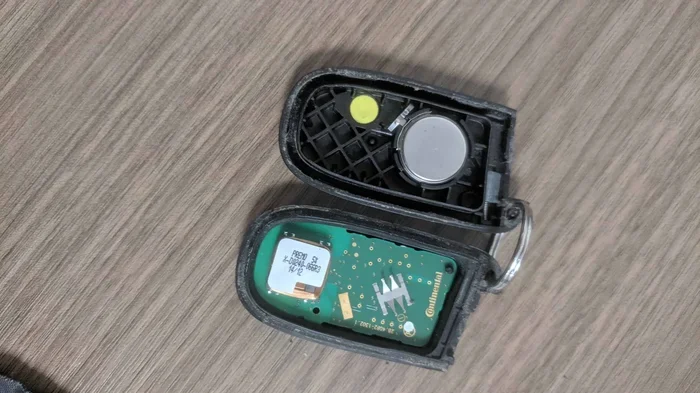
Look for a small seam or notch along the edge of the fob. Use your fingernail or a flat tool to gently pry it open. Work slowly around the perimeter to avoid cracking the plastic. Some fobs use a small release button on the back that slides the two halves apart.
Step 3: Remove the Old Battery
Take note of which side the battery faces before removing it. Use a non-metallic tool like a plastic spudger or a wooden toothpick to pop the old battery out. Avoid using metal tools, as they can damage the circuit board inside the fob.
Step 4: Insert the New Battery
Place the new CR2032 battery in the same orientation as the old one. The positive side typically faces up. Press it firmly into place until it clicks into the metal contact.
Step 5: Reassemble and Test
Snap the two halves of the fob back together. Test all buttons immediately to make sure everything works. If the fob does not respond right away, try standing close to the vehicle and pressing the button. After a successful test, you are all set.
After completing the replacement, keep in mind that some vehicles require a brief reset procedure. If your fob does not work right away, check whether you need to reset the car key after changing the battery. This step is quick and prevents unnecessary worry.
Can You Drive With a Dead Key Fob Battery?
This is one of the most common questions car owners ask. The short answer is yes, in most cases you can still drive your vehicle. But the experience varies depending on your car’s make and model.
For vehicles with push button start, a dead fob battery means the system may not detect the key fob inside the car. Most manufacturers include a backup solution, such as placing the fob directly on the start button or in a specific detection zone. This allows the engine to start even when the fob battery is completely dead.
However, relying on this backup method is not comfortable for daily driving. You lose the convenience of remote start, keyless entry, and trunk release. That is why staying ahead of a dying key fob battery matters so much.
If your fob battery dies while you are already driving, you can generally continue to operate the vehicle normally. The car does not shut off simply because the fob lost power while in motion. But once you turn off the engine, you may have trouble restarting it without the backup method.
For a deeper look at what happens when the battery dies completely, check out our guide on Can You Drive A Car If The Key Fob Battery Dies. It covers specific scenarios for different vehicle models and brands.
Key Fob Battery Replacement Cost
The cost to replace a key fob battery is one of the lowest maintenance expenses you will encounter as a car owner. A standard CR2032 battery costs between $2 and $5 at most retail stores. Even premium batteries rarely exceed $10.
If you take your vehicle to a dealership or locksmith for the replacement, you will pay more for labor. Dealerships typically charge between $20 and $75 for a battery swap. Locksmiths may charge a similar range. But here is the truth: you do not need to pay for professional labor when the job takes less than five minutes and costs under $5 in parts.
For those who prefer a hands-off approach, some auto parts stores and dealerships will replace the battery for free or at a minimal charge. It is always worth asking before paying full price.
| Replacement Method | Cost Range | Time Required |
|---|---|---|
| DIY at home | $2 – $5 | 5 minutes |
| Auto parts store | Free – $10 | 10 minutes |
| Dealership | $20 – $75 | 15-30 minutes |
| Locksmith | $20 – $50 | 10-20 minutes |
As you can see, doing it yourself is the clear winner on both cost and convenience. If you are unsure about opening your specific fob model, search for a guide tailored to your vehicle. Most fob designs follow the same basic principles, so the process translates across brands.
Pro Tips to Extend Your Key Fob Battery Life
Want to get the most out of every remote key battery you install? These practical tips help you squeeze extra life out of your vehicle key battery and reduce how often you need to replace it.
Store Your Fob Properly
Do not leave your key fob near electronic devices, metal objects, or strong magnetic fields. These can interfere with the signal and cause the fob to emit power unnecessarily. Keep it in a dedicated spot, like a bowl or hook near your door, when you are at home.
Avoid Pressing Buttons Unnecessarily
It is tempting to press the unlock button multiple times when you are in a hurry. Each press drains a small amount of power. Get in the habit of pressing the button once firmly and waiting for the response before pressing again.
Keep Spare Batteries on Hand
Stock up on CR2032 batteries before you need them. Having a spare in your glove box means you are never stuck waiting in line at a store when your fob dies unexpectedly. This is one of the simplest key fob troubleshooting habits that pays off big time.
Replace Both Batteries if Your Fob Uses Two
Some key fobs use two batteries instead of one. When one battery dies, the other is usually close behind. Replace both at the same time to avoid dealing with a second dead battery a few weeks later. This saves you time and prevents the inconvenience of a partial failure.
Keep the Fob Clean
Dust, dirt, and moisture can affect the electrical contacts inside your fob. Wipe the exterior with a dry cloth occasionally. If the contacts look corroded, a quick clean with a cotton swab and a tiny bit of rubbing alcohol can restore solid connections.
Common Mistakes People Make With Key Fob Batteries
Even with the best intentions, car owners make mistakes when it comes to key fob battery maintenance. Avoiding these common errors keeps your fob working reliably and saves you from unnecessary headaches.
Waiting Until the Fob Stops Working Completely
The biggest mistake is ignoring the early warning signs. By the time your fob stops working, you may be standing outside your car in the rain or late for an important appointment. Proactive replacement based on age or early symptoms is always the smarter approach.
Using the Wrong Battery Type
Not all key fobs use a CR2032. Some models require different battery types like CR2025 or CR2016. Using the wrong size or chemistry can damage the fob or cause it to malfunction. Always check your owner’s manual before purchasing a replacement battery.
Touching the Battery Contacts with Metal Tools
Using a metal screwdriver or tweezer to handle the battery can short-circuit the contacts. This damages the fob’s internal electronics and creates problems that go far beyond a dead battery. Stick to plastic or wooden tools when handling the battery and internal components.
Forgetting to Reset the System After Replacement
Some vehicles require a reset after a key fob battery replacement. If you install a fresh battery and the fob still does not work, the system may need to re-sync. This is not complicated, but it does require a few simple steps that vary by vehicle model.
When to Seek Professional Help
Most key fob battery replacements are straightforward DIY jobs. But there are times when professional help makes sense. If you open your fob and the battery looks fine but the fob still does not work, the problem may be with the internal electronics rather than the battery.
Water damage is another common culprit. If your fob has been exposed to moisture, the corrosion may have damaged components beyond what a battery swap can fix. In these cases, a dealership or qualified locksmith can diagnose the issue and recommend the right solution.
Additionally, if you have tried replacing the battery and your vehicle still does not recognize the fob, the key fob may need to be reprogrammed. This is a common situation after battery replacement on certain vehicle models, and it is nothing to worry about. A quick visit to the dealership or a reliable locksmith typically resolves the issue in minutes.
For owners considering an upgrade to a newer fob model or smart key system, our guide on How Do I Upgrade My Vehicle provides helpful insights on modern keyless entry options.
Final Thoughts
Changing your key fob battery on a regular schedule is one of the easiest ways to avoid the frustration of a dead remote. Most remote key batteries last three to four years, but paying attention to the warning signs and replacing the battery proactively keeps you ahead of any problems.
The entire process costs just a few dollars and takes less than five minutes when you do it yourself. You do not need expensive tools, specialized knowledge, or a trip to the dealership. A fresh CR2032 battery, a steady hand, and a few minutes of your time is all it takes.
Make it a habit to check your fob battery every two to three years, even if everything seems to be working fine. This preventive approach means you never have to deal with the stress of a key fob battery dies situation at the worst possible moment. Keep a spare battery in your glove box, watch for the early warning signs, and your push button start battery will keep you connected to your vehicle for years to come.
Stay proactive, stay prepared, and your key fob will always be ready when you need it most.
Frequently Asked Questions
How do I know when my key fob battery needs replacing?
The most common signs include reduced signal range, delayed button response, intermittent operation, and a battery low warning on your dashboard. If you notice any of these symptoms, it is time to swap in a fresh battery before the fob stops working entirely.
What type of battery does my key fob use?
Most key fobs use a CR2032 battery, but some models require CR2025 or CR2016. Check your vehicle owner’s manual or look at the old battery to confirm the correct type before purchasing a replacement.
Can I drive my car if the key fob battery dies?
Yes, in most cases you can still drive your car. Modern vehicles with push button start usually have a backup detection method, such as placing the fob directly on the start button. However, you lose remote functions like keyless entry and trunk release.
How much does it cost to replace a key fob battery?
A CR2032 battery costs between $2 and $5 at most retail stores. If you pay a dealership or locksmith to do the replacement, expect to pay $20 to $75 for labor. Doing it yourself is by far the most cost-effective option.
Should I replace both batteries if my fob uses two?
Yes, if your key fob uses two batteries, replace both at the same time. When one battery weakens, the other is usually close behind. Replacing both together prevents a partial failure and saves you from dealing with the issue again in a few weeks.
Do I need to reset my car after changing the key fob battery?
Some vehicles require a reset after battery replacement to re-sync the fob with the car. If your fob does not work right away after installing a new battery, consult your owner’s manual or check our guide on resetting the car key after a battery change.