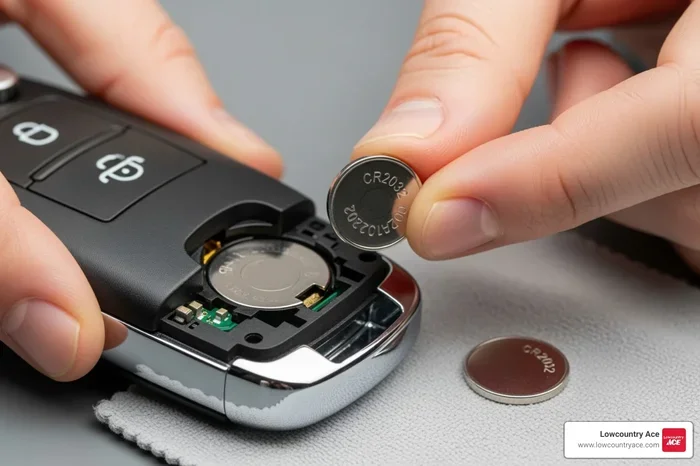
Can You Replace a Key Fob Battery Yourself at Home
Yes, you can absolutely replace a key fob battery yourself at home with just a few simple tools and about five minutes of your time. Most key fobs use a common CR2032 coin cell battery that costs less than a few dollars. This guide walks you through the entire key fob battery replacement process step by step. You will learn how to open your fob, swap the old battery, and get your remote working again. No mechanic or dealership visit is needed for this easy DIY task.
Have you ever stood by your car, pressing the key fob button over and over, hoping it will finally unlock the door? It is a frustrating moment that almost every driver has experienced. The good news is that the problem is often as simple as a dead battery inside the fob itself. Many people rush to the dealership or a locksmith when their remote key battery dies, but the truth is that you can handle this fix yourself. Key fob battery replacement at home is quick, affordable, and surprisingly easy. You do not need any special skills or expensive tools. In this guide, we will walk you through everything you need to know to swap out that old battery and get your fob working like new again.
A key fob battery might seem like a tiny detail, but it plays a huge role in your daily routine. Without a working fob, you cannot lock your car from a distance, start the engine with the push of a button, or even unlock the trunk hands-free. When that small battery dies, it can throw a wrench into your entire day. The good part is that most key fobs use standard coin cell batteries that cost under five dollars. Learning how to replace the battery yourself saves you time and money. It also means you never have to wait for a service appointment or pay for a simple fix. Let us dive into the world of key fob battery replacement and show you exactly how it is done.
Key Takeaways
- Replacing a key fob battery is a simple DIY task that anyone can do at home with basic tools.
- The most common battery type is the CR2032 coin cell, which is inexpensive and widely available.
- Watch for signs of a dying key fob battery such as reduced range, intermittent signal, or the need to press the button harder.
- Always match the battery polarity correctly when inserting the new battery to avoid damage.
- Keep spare batteries on hand so you are never stuck with a dead key fob.
- Some advanced key fobs may need reprogramming after battery replacement, but most do not.
📑 Table of Contents
- Understanding Your Key Fob and Its Battery
- Signs Your Key Fob Battery Needs Replacing
- Tools and Materials You Will Need
- Step-by-Step Guide to Replacing Your Key Fob Battery
- Common Key Fob Battery Types and Comparison
- When Your Key Fob Still Does Not Work After Battery Replacement
- Key Fob Battery Maintenance Tips
- Expert Insights on Key Fob Battery Replacement
- Key Takeaways
- Conclusion
Understanding Your Key Fob and Its Battery
Before you open up your fob, it helps to understand what is inside. Most modern key fobs are small, compact devices that send a radio signal to your car. Inside each fob is a small circuit board, a transmitter, and a battery. The battery powers the signal that tells your car to lock, unlock, or start. When that battery weakens, the signal becomes weaker too. This is why you might notice your key fob not working from across the parking lot anymore.
What Type of Battery Does Your Key Fob Use?
The vast majority of key fobs use a CR2032 battery. This is a standard coin cell battery that you can find at almost any grocery store or pharmacy. Some older models or European cars may use a CR2025 or CR2016 battery. These are slightly thinner but work the same way. Always check your vehicle owner’s manual or look at the old battery before purchasing a replacement. Using the wrong type of battery can damage your fob or cause it to malfunction.
How Long Does a Key Fob Battery Last?
A typical key fob battery lasts between two and four years. However, this can vary based on how often you use your fob, the distance between you and your car, and the temperature where you live. Cold weather can drain batteries faster. If you use your fob multiple times a day, the battery may need replacing sooner. Regular key fob maintenance can help you stay ahead of a dead battery. Keep an eye on the battery life and replace it before it fully dies to avoid being locked out.
Signs Your Key Fob Battery Needs Replacing
Your key fob usually gives you warning signs before the battery completely dies. Catching these early can save you from an unexpected lockout. Here are the most common signs of a weak key fob battery:
- Reduced range: You have to stand closer to your car for the fob to work. If you used to unlock the door from twenty feet away and now you need to be right next to it, the battery is likely weakening.
- Intermittent signal: The fob works sometimes but not others. This inconsistency is a classic sign of a dying remote key battery.
- Multiple presses needed: You find yourself pressing the button two or three times before the car responds. This means the signal is too weak to reach the car on the first try.
- Dashboard warning light: Some newer vehicles display a key fob warning on the dashboard when the battery is low.
- Slow response: There is a noticeable delay between pressing the button and the car reacting.
If you notice any of these signs, do not wait too long to replace the battery. A completely dead fob means you may not be able to unlock your car remotely. Key fob troubleshooting starts with checking the battery, and that is the easiest fix of all.
Tools and Materials You Will Need
One of the best things about key fob battery replacement at home is how little you need. You probably already have everything on this list in your kitchen drawer or junk drawer.
Essential Tools
- A replacement battery: Most likely a CR2032 coin cell battery. Buy a quality brand like Duracell or Energizer for best results.
- A small flathead screwdriver: This helps pry open the fob case. A thin plastic pry tool works even better to avoid scratching the fob.
- A coin: Some fobs have a small slot on the back where you can insert a coin to pop open the battery compartment.
- A clean, soft cloth: Use this to wipe the inside of the fob before closing it back up.
Optional but Helpful Items
- A small tray or plate: This keeps tiny screws and battery compartments from rolling away while you work.
- Tweezers: These make it easier to handle the small battery without touching it with your fingers. Oils from your skin can shorten battery life.
- Your vehicle owner’s manual: This can help you identify the correct battery type for your specific fob model.
Once you have your replace key fob battery supplies ready, you are set to go. The whole process usually takes less than five minutes.
Step-by-Step Guide to Replacing Your Key Fob Battery
Now for the part you have been waiting for. Replacing your key fob battery yourself is easier than you might think. Follow these steps carefully and you will have a working fob in no time.
Step 1: Identify the Battery Compartment
Look at the back of your key fob. Most fobs have a small seam or groove running along the edge. This is where the two halves of the fob separate. Some models have a tiny arrow or icon that shows you which direction to pry. If your fob has a slot on the back, insert a coin and twist gently. The cover should pop right off.
Step 2: Open the Fob Carefully
Insert your flathead screwdriver or plastic pry tool into the seam. Work it around the edge slowly. Do not use too much force. Key fobs are small and the plastic can crack if you are rough. If your fob has screws holding it together, use a small Phillips-head screwdriver to remove them first. Keep the screws in a safe place so they do not get lost.
Step 3: Remove the Old Battery
Once the fob is open, you will see the battery sitting in a small compartment. Note which side is facing up. Most CR2032 batteries have a positive side marked with a “+” and a negative side that is flat. Use a toothpick or the tip of a screwdriver to gently push the battery out. Some fobs have a small clip that holds the battery in place. Press the clip down while sliding the battery out. Dispose of the old battery properly by taking it to a recycling center. Do not throw it in the regular trash.
Step 4: Insert the New Battery
Take your new CR2032 battery and hold it with the positive side facing up. Slide it into the compartment the same way the old battery sat. Make sure it sits flat and secure. The positive side should face the same direction as the old battery. Double-check the battery polarity markings inside the fob before closing it. Putting the battery in backwards will not work and could damage the circuit board.
Step 5: Close the Fob and Test It
Snap the two halves of the fob back together. Press firmly along the seam until you hear or feel it click into place. If your fob had screws, put them back in now. Then step back and test your fob. Stand a few feet away from your car and press the unlock button. If the car responds, you did it correctly. If not, open the fob again and check the battery placement. Sometimes the battery needs a little adjustment to make proper contact.
Quick Tip: If your fob still does not work after replacing the battery, try holding the button down for a few seconds. Some fobs need a longer press after a battery swap. Also, check that the battery is not upside down. This is the most common mistake in key fob battery replacement.
Common Key Fob Battery Types and Comparison
Not all key fobs use the same battery. Here is a quick look at the most common battery types used in key fobs and how they compare.
| Battery Type | Common Use | Voltage | Typical Lifespan |
|---|---|---|---|
| CR2032 | Most car key fobs, garage remotes | 3V | 2-4 years |
| CR2025 | Some European car models | 3V | 2-3 years |
| CR2016 | Thin fob models, older remotes | 3V | 1-3 years |
| CR1632 | Some truck and SUV fobs | 3V | 2-4 years |
The CR2032 is by far the most common and easiest to find. You can buy a pack of several for just a few dollars at any convenience store. When shopping for a replacement car key battery, always check the number printed on your old battery before buying a new one.
When Your Key Fob Still Does Not Work After Battery Replacement
Sometimes you replace the battery and the fob still does not work. This can be frustrating, but there are a few things you can check before calling a professional.
Check the Battery Orientation
The most common reason a new battery does not work is incorrect orientation. Open the fob and make sure the positive and negative sides match what was inside before. Even one small mistake in battery polarity can prevent the fob from working.
Clean the Battery Contacts
Over time, tiny corrosion can build up on the battery contacts inside the fob. Use a dry cloth or a cotton swab to gently clean the metal contacts. If there is visible corrosion, a small amount of white vinegar on a cloth can help dissolve it. Let it dry completely before inserting the new battery.
Reprogram the Key Fob
Some vehicles require key fob programming after a battery replacement, especially newer models with advanced security systems. Check your owner’s manual for reprogramming steps. In many cases, simply pressing the lock and unlock buttons simultaneously for a few seconds will reset the fob. If reprogramming does not fix the issue, there may be a deeper problem with the fob itself or the car’s receiver.
When to Seek Professional Help
If you have tried all the above steps and your fob still does not work, it may be time to consult a professional. A dead battery is the most common cause of fob problems, but sometimes the issue is a damaged circuit board or a faulty transmitter. A locksmith or dealership can diagnose and fix more complex key fob repair issues. However, for the vast majority of cases, a simple battery swap solves the problem completely.
Key Fob Battery Maintenance Tips
Taking care of your key fob can extend its life and prevent unexpected battery failures. Here are some simple key fob maintenance tips to keep your fob working reliably:
- Replace the battery before it dies completely: When you notice reduced range, swap the battery right away. This prevents you from getting locked out.
- Store your fob away from extreme temperatures: Heat and cold can drain batteries faster. Do not leave your fob on the dashboard in direct sunlight or in a freezing car.
- Keep spare batteries on hand: Buy a pack of CR2032 batteries and keep one in your glove box and one at home. You never know when you will need a quick swap.
- Avoid touching the battery with bare fingers: The oils on your skin can corrode the battery and reduce its lifespan. Use a cloth or tweezers when handling batteries.
- Keep your fob clean: Dirt and debris can get into the battery compartment and cause connection issues. Wipe your fob down regularly with a soft cloth.
- Test your fob regularly: Stand at the edge of your parking lot and test the range once a month. This helps you catch a weak battery early.
Expert Insights on Key Fob Battery Replacement
Automotive experts agree that replacing a key fob battery at home is one of the easiest and most cost-effective DIY maintenance tasks you can do. According to certified auto technicians, over 90 percent of key fob issues are simply caused by a dead battery. Many car owners waste time and money visiting dealerships or locksmiths for a problem that takes minutes to fix at home.
Experienced mechanics recommend keeping a log of when you replaced your key fob battery. This helps you stay ahead of the next replacement and avoid being caught off guard. Some techs also suggest using lithium batteries over generic zinc-carbon batteries, as they last longer and perform better in cold weather. The smart key battery in newer push-button-start vehicles can be especially sensitive to low charge, so proactive replacement is key.
One common mistake that many people make is forcing the fob open with sharp metal tools. This can scratch the casing, damage the internal electronics, or even crack the circuit board. Always use a plastic pry tool or your fingernail first. If the fob does not open easily, check for hidden screws or clips before applying more force.
Key Takeaways
- Replacing a key fob battery yourself at home is simple, fast, and costs just a few dollars.
- The most common battery type is the CR2032 coin cell battery, which is available everywhere.
- Watch for warning signs like reduced range, intermittent signal, and needing multiple presses.
- Always match battery polarity when inserting the new battery to avoid damage.
- Keep spare batteries on hand and replace them proactively before they die completely.
- Some advanced fobs may need reprogramming after a battery swap, but most work immediately.
- Regular key fob maintenance can extend the life of your fob and prevent unexpected issues.
Conclusion
Replacing a key fob battery yourself at home is one of the easiest car maintenance tasks you will ever do. It takes just a few minutes, costs almost nothing, and requires no special skills or training. With a replacement CR2032 battery and a small screwdriver, you can bring your dead fob back to life in minutes. No more standing by your car, pressing the button over and over, hoping for a miracle.
The entire process is straightforward. You open the fob, swap the old battery for the new one, make sure the polarity is correct, and snap it back together. Then you test it and you are done. Key fob battery replacement is a task that anyone can master with this simple guide. The next time your fob starts acting up, do not panic. Grab a new battery and follow the steps above. You will be back to locking and unlocking your car with ease in no time.
Remember to keep spare batteries on hand, practice good key fob maintenance, and replace the battery as soon as you notice warning signs. A little proactive care goes a long way in keeping your fob working smoothly for years to come. Take charge of your car key battery replacement today and enjoy the satisfaction of fixing something yourself.
Frequently Asked Questions
How do I know which battery my key fob needs?
Check the old battery inside your fob for the model number printed on it. The most common is CR2032, but some fobs use CR2025 or CR2016. Your vehicle owner’s manual can also confirm the correct battery type for your specific fob model.
Can a dead key fob battery prevent my car from starting?
Yes, in many modern vehicles with push-button start systems, a dead smart key battery will prevent the car from recognizing the fob and starting the engine. You can usually start the car by placing the fob directly against the start button as a temporary workaround.
Do I need to reprogram my key fob after replacing the battery?
In most cases, no. The fob should work immediately after you insert the new battery. However, some vehicles with advanced security systems may require a simple reprogramming step. Check your owner’s manual for specific instructions on key fob programming after a battery swap.
How much does it cost to replace a key fob battery yourself?
A CR2032 battery costs between one and three dollars at most stores. Even if you buy a premium brand, the total cost is under five dollars. This is a fraction of what a dealership or locksmith would charge for the same fix.
How often should I replace my key fob battery?
Most key fob batteries last between two and four years. If you use your fob frequently or live in a cold climate, the battery may need replacing sooner. Watch for signs of a weak battery and replace it proactively to avoid being locked out.
What should I do if my key fob still does not work after replacing the battery?
First, double-check the battery orientation and make sure it is inserted correctly. Clean the battery contacts inside the fob with a dry cloth. If the fob still does not work, the issue may be with the circuit board or transmitter, and you should consult a professional for key fob repair.