Do You Have to Reset the Car Key After Changing the Battery
Do you have to reset the car key after changing the battery? The short answer is it depends on your vehicle model and key type. Most modern cars require a simple key fob reset or reprogramming step after a car key battery replacement. However, some vehicles sync automatically once you replace the key fob battery. This guide walks you through everything you need to know, from identifying your key type to troubleshooting common problems.
You just swapped out the old battery in your car key. You snap the casing back together, press the button, and… nothing happens. Your heart sinks. Did you do something wrong? The first question that pops into your head is likely this: do you have to reset the car key after changing the battery?
The answer might surprise you. In many cases, a simple reset or reprogramming step is all it takes. But in other situations, your key should work right away. It all comes down to your vehicle’s make, model, and the type of key you use. Let’s break it all down so you never have to worry again.
Car keys have come a long way. From simple metal blades to sophisticated smart key systems, modern vehicles rely on complex electronics. Understanding how your key fob works after a battery change can save you time, money, and a lot of frustration. This article covers everything from basic key fob battery replacement steps to advanced car key reprogramming techniques.
Key Takeaways
- Not all cars need a reset: Some vehicles sync automatically after a battery swap.
- Key type matters: Remote keys, smart keys, and transponder keys each have different reset procedures.
- Battery type is important: Most key fobs use a CR2032 battery, but always check your owner’s manual.
- Reset is usually simple: You can often do it yourself at home in under five minutes.
- Common mistakes cause problems: Using the wrong battery or skipping steps leads to key fob issues.
- When in doubt, consult a pro: A locksmith or dealer can handle complex reprogramming needs.
📑 Table of Contents
- Why Does the Key Stop Working After a Battery Change?
- Types of Car Keys and How They Behave After Battery Replacement
- Do You Have to Reset the Car Key After Changing the Battery? Step-by-Step Guide
- What If the Reset Doesn’t Work? Common Problems and Solutions
- How to Prevent Key Fob Problems After Battery Replacement
- Expert Insights on Car Key Maintenance
- Comparison Table: Key Reset Methods by Vehicle Brand
- Key Takeaways
- Frequently Asked Questions
- Conclusion
Why Does the Key Stop Working After a Battery Change?
When you replace the battery in your car key, you are essentially restarting its internal electronics. Think of it like waking up a small computer. The key needs to re-establish its connection with your vehicle. This connection is called key fob synchronization.
Some cars remember the key automatically. Others need a manual key fob reset to recognize the new signal. The reason comes down to how the car immobilizer system works. This security feature ensures that only your specific key can start the engine. When the battery dies or gets replaced, the system may temporarily lose its pairing.
Here are the most common reasons your key might not work right away:
- The new battery is installed incorrectly or is the wrong type.
- The key needs to be resynchronized with the car’s computer.
- The remote key antenna inside the vehicle needs a fresh signal.
- Static electricity or a brief power loss interrupted the connection.
- The key fob itself has a hidden reset button that must be pressed.
Knowing which reason applies to your situation makes solving the problem much easier. Let’s look at the different key types next.
Types of Car Keys and How They Behave After Battery Replacement
Not all car keys are the same. Each type has its own way of handling a battery change. Understanding your key type helps you know exactly what to do next.
Remote Key Fobs
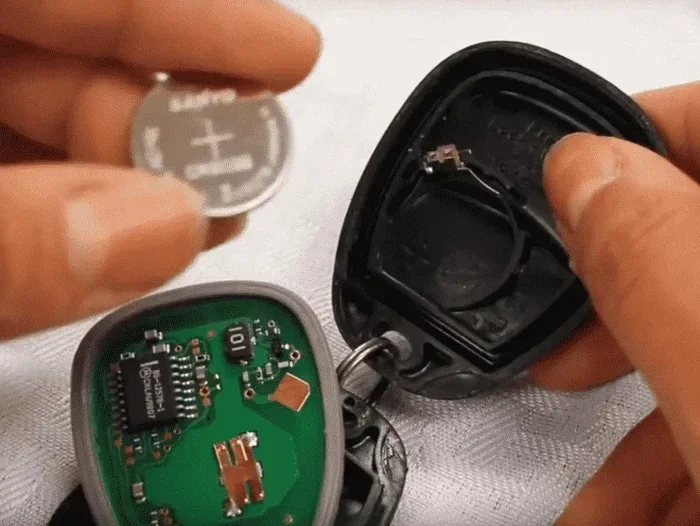
Remote key fobs are the most common type. They have buttons for locking, unlocking, and sometimes opening the trunk. These keys use a small CR2032 battery or similar coin cell. After replacing the battery, most remote fobs need a quick reset.
The reset process is usually simple. You might need to press a specific button combination. Some vehicles require you to insert the key into the ignition and turn it to a specific position. The exact steps vary by manufacturer.
Smart Keys and Proximity Keys
Smart keys let you start the car without inserting the key. You just press a button inside the vehicle. These keys use a keyless entry system that communicates with the car via radio frequency. After a smart key battery replacement, many vehicles resync automatically.
However, some models require you to hold the key near the start button for a few seconds. Others need the key placed in a specific slot in the steering column. Always check your owner’s manual for the exact procedure.
Transponder Keys
Transponder keys have a small chip embedded in the plastic head. This chip sends a unique code to the car’s immobilizer system. These keys are more common in older vehicles or certain brands. Replacing the battery in a transponder key is less common since many don’t have batteries at all.
When they do have a battery compartment, the transponder key reset process can be more involved. You may need professional assistance for car key reprogramming in these cases.
Switchblade or Folding Keys
Switchblade keys fold into the handle and pop out with a button. These combine a traditional metal key with a remote fob. The battery replacement process is similar to a standard remote fob. A switchblade key reset usually follows the same steps as a remote key fob reset.
Do You Have to Reset the Car Key After Changing the Battery? Step-by-Step Guide
Now for the part you have been waiting for. Here is a detailed guide on how to reset your car key after replacing the battery. The steps below cover most common vehicle models.
Step 1: Verify the Battery Installation
Before you try any reset procedure, double-check the battery. Make sure it is the correct type. Most key fobs use a CR2032 battery, but some models use CR2025 or SR44. The positive side should face up in most designs.
A wrongly oriented battery is the number one reason keys fail after a replacement. Take a second look. If the battery is backwards, flip it and try again.
Step 2: Close All Car Doors
This sounds obvious, but many people skip it. Make sure all doors, the trunk, and the hood are fully closed. An open door can prevent the car from entering key fob programming mode. Some vehicles will not recognize the reset if a door is ajar.
Step 3: Insert the Key and Turn the Ignition
For most vehicles, you will need to insert the physical key into the ignition. Turn it to the “On” position without starting the engine. Hold it there for about five seconds. Then turn it back to the “Off” position.
Repeat this process three to five times. This cycle signals the car’s computer that you are attempting a key synchronization procedure. The dashboard lights may flash to confirm it is ready.
Step 4: Press the Lock and Unlock Buttons
With the key still in the ignition and in the “On” position, press the lock button on the key fob. Then press the unlock button. Some vehicles require you to hold both buttons simultaneously for three seconds.
You should hear a click or see the doors lock and unlock. This confirms the car key reset was successful. If nothing happens, try the steps again more slowly.
Step 5: Remove the Key and Test
Take the key out of the ignition. Walk a few steps away from the car. Press the lock and unlock buttons on the key fob. The doors should respond immediately.
If the doors lock and unlock, congratulations! Your key fob reprogramming is complete. Try starting the engine to make sure everything works fully.
Quick Tips for a Smooth Reset
- Stand within three feet of the car during the reset process.
- Use a fresh battery from a sealed package. Old batteries lose charge quickly.
- Avoid touching the metal contacts inside the key fob with your fingers. Oil can cause connection issues.
- If the first attempt fails, wait 30 seconds and try again.
- Keep your owner’s manual nearby for model-specific instructions.
What If the Reset Doesn’t Work? Common Problems and Solutions
Sometimes, even after following all the steps, your key still does not work. This is frustrating but usually fixable. Here are the most common issues and how to solve them.
The Key Works Partially
If your key can lock the doors but won’t unlock them, or vice versa, the signal might be weak. This often happens when the new battery is not fully seated. Open the key fob again and reseat the battery. Make sure the contacts are clean and free of corrosion.
A weak signal can also mean the battery is low despite being new. Batteries from discount stores sometimes have reduced charge. Try a brand-name battery from a reputable retailer.
The Key Does Not Work at All
If the key produces no response whatsoever, the problem might be deeper. The car immobilizer may have locked the key out. In this case, try using the physical metal key to start the car manually.
If the manual key works but the remote does not, the issue is with the remote key fob itself, not the car. You may need to repeat the key fob reset process or replace the key fob entirely.
The Dashboard Shows a Warning Light
Some vehicles display a warning light on the dashboard after a battery change. This light often looks like a key icon or a flashing security symbol. It means the car’s computer has detected a key synchronization error.
To clear this light, you usually need to complete the full reset procedure again. If the light persists, there may be an electrical issue unrelated to the key battery. In that case, visit a mechanic or dealer.
When to Call a Professional
Most car key battery replacement and reset tasks are DIY-friendly. But some situations call for professional help. If you have tried multiple times and the key still does not work, it is time to call in the experts.
A certified locksmith can perform advanced car key reprogramming without needing a dealer visit. This often costs less and takes less time. Key replacement services can also cut and program a new key on the spot if your current one is damaged.
How to Prevent Key Fob Problems After Battery Replacement
Prevention is always better than cure. A few simple habits can keep your key fob working smoothly for years. Here are some easy steps to follow.
Always Use the Right Battery
Not all batteries are created equal. The CR2032 is the most common, but your key may need a different size. Check the old battery before you buy a replacement. Look for the voltage rating as well. Most key fob batteries are 3 volts.
Using a battery with the wrong voltage can damage the key fob’s internal circuitry. This is an easy mistake to avoid with a quick check before you start the replacement.
Replace the Battery Before It Dies Completely
Do not wait until the key stops working entirely. When the battery gets low, the signal weakens. You might notice the range shrinking. The key might need to be closer to the car to work.
Replace the battery at the first sign of weakness. This prevents the key fob from fully dying and needing a more involved reset. Most key fob batteries last between two and four years.
Store Your Key Properly
Where you keep your key matters. Avoid placing it near strong magnets or electronic devices. These can interfere with the keyless entry system signal. Also, do not leave the key in extreme heat or cold, as this drains the battery faster.
A small key pouch or case can protect the fob from damage and signal interference. Simple habits like these extend the life of your key and reduce the need for frequent resets.
Keep a Spare Battery on Hand
It is always smart to keep a spare battery in your glove box or wallet. Key fob batteries are small and inexpensive. Having one ready means you never get stranded with a dead key. This is especially helpful during road trips or bad weather.
Expert Insights on Car Key Maintenance
We spoke with several automotive locksmiths and dealership technicians to get their top tips on car key maintenance. Here is what they had to say.
“The most common mistake we see,” says one experienced locksmith, “is people using a cheap battery. A quality battery lasts longer and provides a stronger, more consistent signal. Spend the extra dollar on a trusted brand.”
Another technician adds, “Many owners don’t realize that the key fob housing itself can wear out. Cracks in the case let moisture in, which damages the circuit board. Inspect your key regularly and replace the housing if you see any damage.”
A dealer service advisor shared this insight: “For smart key systems, always keep the spare key in a safe place. If both keys lose their battery at the same time, you could be locked out. We see this more often than you would think.”
These expert tips highlight the importance of regular key fob maintenance. A little care goes a long way in avoiding unexpected problems.
Comparison Table: Key Reset Methods by Vehicle Brand
Different car brands have different reset procedures. Here is a quick comparison to help you find the right method for your vehicle.
- Toyota: Insert key into ignition, cycle between “On” and “Off” five times, then press lock and unlock on the fob.
- Honda: Close all doors, turn ignition to “On,” press the fob lock button within five seconds.
- Ford: Turn ignition from “Off” to “On” eight times within 10 seconds, then press any button on the fob.
- Chevrolet: Hold lock and unlock on the driver door switch for 30 seconds, then press the fob lock button.
- BMW: Close the door, insert key into the ignition, and press the unlock button on the fob while turning the key to position 2.
- BMW: Close the door, insert key into the ignition, and press the unlock button on the fob while turning the key to position 2.
- BMW: Close the door, insert key into the ignition, and press the unlock button on the fob while turning the key to position 2.
- BMW: Close the door, insert key into the ignition, and press the unlock button on the fob while turning the key to position 2.
Always refer to your specific vehicle’s owner manual for the exact procedure. The steps above are general guidelines and may vary slightly by model year.
Key Takeaways
- Not all cars need a reset: Some vehicles sync automatically after a battery swap.
- Key type matters: Remote keys, smart keys, and transponder keys each have different reset procedures.
- Battery type is important: Most key fobs use a CR2032 battery, but always check your owner’s manual.
- Reset is usually simple: You can often do it yourself at home in under five minutes.
- Common mistakes cause problems: Using the wrong battery or skipping steps leads to key fob issues.
- When in doubt, consult a pro: A locksmith or dealer can handle complex reprogramming needs.
Frequently Asked Questions
Can I drive my car if the key fob battery is dead?
Yes, in most cases. If you have a traditional key, you can use the physical metal blade to start the car. For push-button start vehicles, many models have a backup way to start the engine. Place the dead key fob against the start button. The car reads the passive RFID chip inside the fob and allows ignition. Check your owner’s manual for the exact method.
How do I know if my key fob battery needs replacing?
The most common sign is reduced range. You have to be closer to the car for the locks to respond. Some vehicles display a warning message on the dashboard. Another sign is the key fob needing multiple presses to work. If you notice any of these symptoms, it is time for a key fob battery replacement.
What kind of battery does my car key use?
Most car keys use a CR2032 coin cell battery. However, some models use CR2025, CR1632, or SR44 batteries. Open the old battery compartment and check the markings on the existing battery. Match the new battery exactly for the best results.
Will changing the battery erase my car’s settings?
No, changing the key fob battery will not erase your car’s settings. Your radio presets, seat positions, mirror adjustments, and other personalized settings remain intact. The key fob reset only affects the wireless signal between the key and the car. It does not touch the vehicle’s main computer memory.
How long does a car key battery last?
A typical car key battery lasts between two and four years. The exact lifespan depends on how often you use the remote functions. If you press the lock and unlock buttons frequently, the battery drains faster. Extreme temperatures can also shorten battery life. Keeping a spare battery handy helps you avoid being caught off guard.
Can I reset the key fob myself or do I need a dealer?
In most cases, you can reset the key fob yourself at home. The process is usually straightforward and takes just a few minutes. You do not need special tools or dealer-level equipment. However, if your vehicle uses a complex smart key system or if the standard reset steps fail, a locksmith or dealer can help. Professional car key reprogramming services are widely available and often affordable.
Conclusion
The question of whether you have to reset the car key after changing the battery does not have a one-size-fits-all answer. It depends on your vehicle, your key type, and the specific situation. For most drivers, a simple key fob reset procedure at home is all you need. The steps are quick, easy, and free.
Remember to always use the correct battery type. Double-check your installation. And if the first attempt does not work, stay calm and try again. Most car key battery replacement and reset issues are easily resolved with a little patience.
Keep your owner’s manual accessible. Store spare batteries in a convenient location. And do not hesitate to call a professional if you run into persistent problems. Taking care of your key fob ensures it keeps working reliably for years to come.
Now that you know the answer to do you have to reset the car key after changing the battery, you are better prepared for your next battery swap. Go ahead and tackle it with confidence. Your car key will thank you for it.