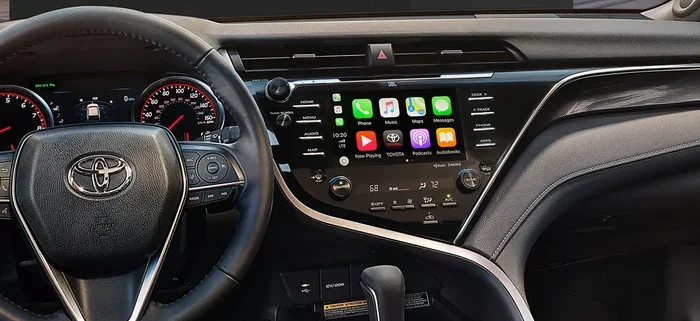
Does the Toyota Camry Have Apple CarPlay and Wireless
The Toyota Camry does offer Apple CarPlay, but availability depends on your model year and trim level. Newer Camry models from 2021 onward come standard with wireless Apple CarPlay on higher trims, while older years may require a wired USB connection. This guide covers everything you need to know about Toyota Camry Apple CarPlay compatibility, setup, and troubleshooting.
So you just bought a Toyota Camry, or maybe you are thinking about it. Either way, one question is probably on your mind right now: does the Toyota Camry have Apple CarPlay? It is a fair question. In today’s world, staying connected while driving is not just a luxury. It is practically a necessity. Whether you need navigation, hands-free calling, or your favorite music streaming, Apple CarPlay makes it all possible right from your car’s screen.
The good news is that the Toyota Camry has supported Apple CarPlay for several model years now. But here is the catch. Not every Camry trim or year is created equal. Some come with wireless Apple CarPlay built right in. Others need a simple USB cable. And a few older models might not have it at all. In this guide, we will walk through everything you need to know. We will cover which years have it, how to set it up, what to do when things go wrong, and much more. By the end, you will be a Toyota Camry Apple CarPlay expert.
Key Takeaways
- Apple CarPlay is available on most Toyota Camry model years from 2019 onward, with wireless support on newer trims.
- Wired and wireless options exist, and the type you get depends on your specific trim and year.
- Setting up Apple CarPlay is simple — just plug in a USB cable or connect wirelessly through the infotainment system.
- Common issues like freezing or disconnecting can usually be fixed with a quick reset or software update.
- The Toyota Camry is known for reliability, making it a great choice for those who want smartphone integration in a dependable sedan.
- Not all Camry trims include Apple CarPlay, so always check your specific model before purchasing.
- Keeping your infotainment system updated ensures the best Apple CarPlay experience.
📑 Table of Contents
- What Is Apple CarPlay and Why Does It Matter?
- Which Toyota Camry Model Years Support Apple CarPlay?
- Wired vs Wireless Apple CarPlay in the Toyota Camry
- How to Set Up Apple CarPlay on Your Toyota Camry
- Common Apple CarPlay Issues and How to Fix Them
- Does Apple CarPlay Work With Android Too?
- Does the Toyota Camry’s Infotainment System Affect Other Features?
- Final Verdict: Is Apple CarPlay Worth It in the Toyota Camry?
What Is Apple CarPlay and Why Does It Matter?
Before we dive into the Camry specifics, let us quickly cover what Apple CarPlay actually is. Apple CarPlay is a feature that mirrors your iPhone’s interface onto your car’s infotainment screen. Once connected, you can access your phone’s core functions without taking your hands off the wheel or your eyes off the road.
What Can You Do With Apple CarPlay?
The list of what you can do is pretty impressive. Here are some of the key things Apple CarPlay lets you access:
- Maps and Navigation: Use Apple Maps or third-party apps like Google Maps or Waze.
- Phone Calls: Make and receive calls hands-free through your car’s speakers and microphone.
- Messaging: Send and receive texts using Siri voice commands.
- Music: Stream music from Apple Music, Spotify, Pandora, and other apps.
- Podcasts and Audiobooks: Access your favorite audio content directly through the car’s display.
For many drivers, smartphone integration like this is a game changer. It keeps your phone safely stowed while still giving you full access to the apps you use every day. And when you think about how much time we spend in our cars, having a seamless connection between your phone and your vehicle really does make a difference.
Which Toyota Camry Model Years Support Apple CarPlay?
This is where things get a little more specific. The Toyota Camry has been around for decades, and Apple CarPlay support has evolved over the years. Here is a breakdown by model year.
Toyota Camry 2019 and Earlier
If you are looking at a used Camry from 2019 or earlier, Apple CarPlay availability depends heavily on the trim level and the infotainment system. The 2019 Camry was one of the first years to offer Apple CarPlay, but it was typically limited to higher trims like the XSE and XLE. Lower trims like the base L or SE might not have included it. Also, these early versions usually required a wired USB connection rather than wireless.
Toyota Camry 2020 and 2021
The 2020 and 2021 Toyota Camry models expanded Apple CarPlay availability across more trims. These years brought improved infotainment screens and better overall integration. However, wireless Apple CarPlay was still mostly reserved for the higher-end trims. If you were looking for the convenience of going cable-free, you needed to step up to a more premium trim level.
Toyota Camry 2022, 2023, and 2024
The newer Toyota Camry model years really stepped up the game. Starting with the 2022 refresh, Apple CarPlay became more widely available across trims. The 2023 and 2024 Toyota Camry models offer wireless Apple CarPlay on most mid-to-upper trims. This means you can connect your iPhone without fumbling with a cable every time you get in the car. It is a small convenience, but once you have it, you do not want to go back.
Quick Reference: Apple CarPlay by Year
- 2019: Available on select trims (XSE, XLE). Wired only.
- 2020: Expanded trim availability. Still mostly wired.
- 2021: More trims included. Wireless available on select models.
- 2022: Wireless support broadened across trims.
- 2023 and 2024: Wireless Apple CarPlay standard on most trims.
If you are shopping for a used Camry and Apple CarPlay is a must-have, always double-check the trim level and infotainment package. A quick look at the window sticker or the vehicle’s features list will tell you everything you need to know.
Wired vs Wireless Apple CarPlay in the Toyota Camry
One of the biggest decisions you will encounter is whether to go with a Camry that has wired or wireless Apple CarPlay. Both options get the job done, but they offer very different experiences.
Wired Apple CarPlay
Wired Apple CarPlay uses a USB cable to connect your iPhone to the Camry’s infotainment system. It has been the standard for years, and it works reliably. Here are the pros and cons:
- Pros: Consistent connection, no signal issues, works on all Camry years that support CarPlay.
- Cons: You need to plug in a cable every time, cables can wear out or get tangled, and it limits where you can place your phone in the car.
Wireless Apple CarPlay
Wireless Apple CarPlay connects your iPhone to the Camry’s system over Bluetooth and Wi-Fi. No cable needed. You just pair your phone, and it connects automatically when you get in the car. Here is what you need to know:
- Pros: Ultimate convenience, no cables to manage, automatic connection, and a cleaner dashboard look.
- Cons: Only available on newer Camry trims, can occasionally experience minor connectivity hiccups, and uses slightly more battery on your phone.
In our experience, wireless Apple CarPlay is the way to go if your Camry supports it. The convenience factor is hard to beat. You get in the car, and your phone is already connected. Maps are loading, your playlist is ready, and you are on your way without ever touching a cable. If you are deciding between two Camry trims and one offers wireless while the other does not, the wireless option is well worth the upgrade.
How to Set Up Apple CarPlay on Your Toyota Camry
Setting up Apple CarPlay on your Toyota Camry is straightforward, regardless of whether you have a wired or wireless connection. Here is a step-by-step walkthrough.
For Wired Apple CarPlay
- Start your Toyota Camry and make sure the infotainment system is on.
- Locate the USB port in the center console or glove box.
- Plug one end of a compatible USB cable into your iPhone.
- Plug the other end into the car’s USB port.
- Your iPhone should prompt you to trust the car. Tap Trust.
- The Apple CarPlay interface will appear on your Camry’s screen.
For Wireless Apple CarPlay
- Start your Toyota Camry and ensure Bluetooth is enabled on your iPhone.
- On the Camry’s infotainment screen, go to Settings and select Bluetooth or Smartphone Connection.
- Select your iPhone from the list of available devices.
- Follow the on-screen prompts to complete pairing.
- Once paired, Apple CarPlay should connect automatically every time you start the car.
Quick Tip: If wireless Apple CarPlay does not connect automatically, try restarting both your phone and the car’s infotainment system. Sometimes a fresh start is all it takes to get things running smoothly again. Also, make sure your iPhone is running the latest version of iOS, as updates often improve CarPlay performance.
Common Apple CarPlay Issues and How to Fix Them
Even though Apple CarPlay is generally reliable, you may run into occasional hiccups. Here are the most common problems Camry owners face and how to solve them.
Apple CarPlay Not Working
If Apple CarPlay suddenly stops working, do not panic. Start with the basics. Disconnect and reconnect your cable (for wired setups) or toggle Bluetooth off and on (for wireless). If that does not work, try restarting your iPhone and the car’s infotainment system. Often, a simple restart clears up the issue.
Apple CarPlay Freezing or Lagging
A slow or freezing CarPlay interface can be frustrating. This usually happens when your phone’s storage is nearly full or when too many apps are running in the background. Close unused apps and make sure you have plenty of storage space on your iPhone. If the problem persists, check for a software update for your Camry’s infotainment system. Toyota occasionally releases updates that improve smartphone integration performance.
Wireless Connection Keeps Dropping
If your wireless Apple CarPlay connection keeps dropping, the issue is usually related to Bluetooth interference. Make sure no other devices are competing for the same connection. You can also try forgetting the device on both your phone and the car, then pairing fresh. If you have been using a wired connection and want to switch to wireless, deleting the old pairing and starting fresh often solves the problem.
Expert Insight: One thing many Camry owners do not realize is that certain aftermarket accessories or phone cases can interfere with wireless CarPlay signals. If you have a thick or metal-heavy phone case, try removing it to see if the connection improves. It is a small thing, but it can make a big difference.
Does Apple CarPlay Work With Android Too?
This is a question that comes up more often than you might think. The short answer is no. Apple CarPlay is designed exclusively for iPhones. If you have an Android phone, you will want to look into Android Auto instead. The Toyota Camry supports both Apple CarPlay and Android Auto on most models that have a touchscreen infotainment system. So no matter what type of phone you use, you should have options for smartphone integration in your Camry.
It is worth noting that having both Apple CarPlay and Android Auto support is one of the reasons the Toyota Camry remains a popular choice among sedan buyers. The Toyota Camry has long been praised for its reliability and value, and the addition of modern tech features like smartphone integration only strengthens its appeal. If you want to learn more about how reliable the Camry really is, check out our guide on Are Toyota Camry Reliable for a deep dive into long-term ownership.
Does the Toyota Camry’s Infotainment System Affect Other Features?
You might wonder if having Apple CarPlay impacts other aspects of your Camry. The short answer is no. The infotainment system operates independently from your car’s core systems like engine management, safety features, and climate control. However, there are a few things worth knowing.
For instance, using Apple CarPlay while driving does draw a small amount of power from your car’s electrical system. This is negligible and should not affect your fuel economy in any meaningful way. If you are curious about how different driving modes impact your Camry’s efficiency, our article on how much mileage does eco mode save provides great insights on maximizing your fuel economy.
Another consideration is maintenance. Just like any other electronic system in your car, the infotainment screen and its connections benefit from regular care. Keeping your Toyota Camry on schedule with oil changes and other routine services helps ensure everything continues to work smoothly. For a quick reminder on oil change intervals, take a look at our guide on does your car say when you need an oil change.
One more thing to keep in mind: the cabin air filter plays a role in your overall driving experience, even if it does not directly interact with Apple CarPlay. A clean cabin air filter ensures good airflow and helps your car’s sensors operate correctly. If you want to understand how this affects your vehicle, our piece on does a cabin air filter affect gas mileage covers the topic in detail.
Final Verdict: Is Apple CarPlay Worth It in the Toyota Camry?
The short answer is absolutely yes. Apple CarPlay transforms the Toyota Camry from a great sedan into an even better one. It adds convenience, safety, and entertainment all in one seamless package. Whether you opt for the wired or wireless version depends on your model year and trim, but both options deliver a solid experience.
The Toyota Camry has always been about delivering value and reliability. Adding Apple CarPlay to the mix simply raises the bar. You get a car that not only drives beautifully but also keeps you connected, informed, and entertained on every trip. From daily commutes to long road trips, having your favorite apps right at your fingertips makes the driving experience more enjoyable and safer.
If you are in the market for a Toyota Camry and smartphone integration is important to you, prioritize models from 2021 onward for the best wireless Apple CarPlay experience. Check the trim level carefully, confirm the features list, and you will be all set. The Toyota Camry continues to be one of the best sedans on the market, and with Apple CarPlay, it is ready for the modern driver.
Remember, technology in cars is always evolving. Toyota has been quick to adapt, and the Camry continues to lead the way in blending traditional reliability with modern connectivity. Whether you are a long-time Camry fan or a first-time buyer, Apple CarPlay is a feature that will genuinely enhance your daily driving experience.
Frequently Asked Questions
Does every Toyota Camry come with Apple CarPlay?
No, not every Toyota Camry comes with Apple CarPlay. Availability depends on your model year and trim level. Generally, Camry models from 2019 onward offer Apple CarPlay, but lower trims on older years may not include it. Always check the specific features list for your trim before purchasing.
Can I get wireless Apple CarPlay on a used Toyota Camry?
Yes, you can find wireless Apple CarPlay on used Toyota Camry models, but it is most common on 2022 and newer trims. If you are shopping for a used Camry, look for the XSE or XLE trims from 2021 onward for the best chance of getting wireless connectivity.
Why does my Toyota Camry’s Apple CarPlay keep disconnecting?
Frequent disconnections are usually caused by software glitches, Bluetooth interference, or outdated iOS or infotainment software. Try restarting both your phone and the car’s system, updating your software, or forgetting and re-pairing the connection to resolve the issue.
Is Apple CarPlay safe to use while driving?
Yes, Apple CarPlay is designed to be safe while driving. It uses Siri voice commands, large buttons, and a simplified interface to minimize distractions. You can make calls, send messages, and get directions without taking your hands off the wheel or your eyes off the road.
Does Apple CarPlay work when the car is turned off?
No, Apple CarPlay requires the car’s infotainment system to be active, which means the car needs to be in accessory mode or running. When the car is completely off, the infotainment screen will not display Apple CarPlay.
Can I use Apple CarPlay and Android Auto at the same time in my Toyota Camry?
No, you cannot use both Apple CarPlay and Android Auto simultaneously. The system switches between the two based on which phone is connected. If you connect an iPhone, you get Apple CarPlay. If you connect an Android phone, you get Android Auto.
=== CONCLUSION ===
The Toyota Camry and Apple CarPlay are a winning combination. From the 2019 model year onward, Toyota has made smartphone integration a standard feature on most Camry trims, with wireless support becoming the norm on newer models. Whether you prefer the simplicity of a wired connection or the convenience of going cable-free, the Camry delivers.
Setting up Apple CarPlay is quick and easy, and the system works reliably for navigation, calls, messaging, and music. When issues do arise, they are usually easy to fix with a simple restart or software update. And with the Camry’s reputation for durability and value, you can enjoy all of these features for years to come.
If Apple CarPlay is important to you in your next car, the Toyota Camry should be at the top of your list. It offers the perfect blend of reliability, comfort, and modern technology. Just make sure to confirm the trim level and model year to get the version of Apple CarPlay that fits your needs. Happy driving.