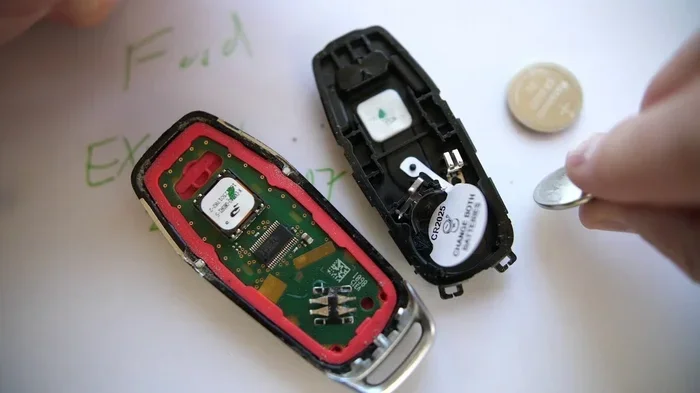
Why Does My Key Fob Not Work After I Changed the Battery
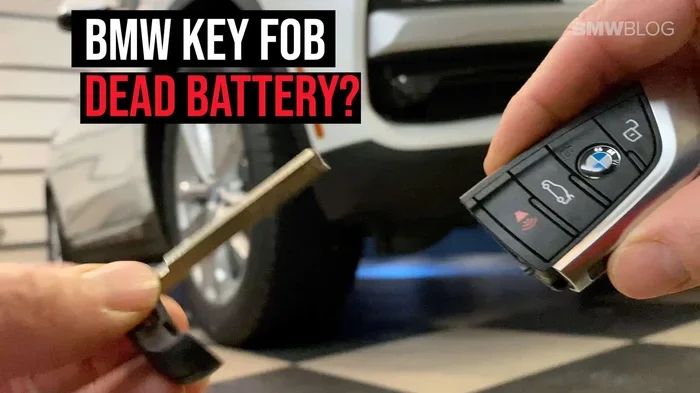
Your key fob may not work after a battery change because of a dead coin cell, a misaligned battery, a need to reprogram the fob, or a signal sync issue. Most of these problems are easy to fix at home. This guide walks you through every common cause and the exact steps to restore your key fob functionality fast.
This is a comprehensive guide about Why Does My Key Fob Not Work After I Changed the Battery.
Key Takeaways
- Battery orientation matters: A reversed or loose battery is the #1 reason your fob stops working.
- Reprogramming may be needed: Some vehicles require you to resync the fob after a battery swap.
- You can drive with a dead fob in most cases: Learn when your car will still start without a working remote.
- Corrosion and moisture damage fobs: Check for green or white buildup on the battery contacts.
- Use the right battery type: Not all coin cells are the same, and the wrong one causes failure.
- Simple resets often fix the problem: A quick reset sequence solves most post-battery-change issues.
[FEATURED_IMAGE_PLACEHOLDER]
Why Does My Key Fob Not Work After I Changed the Battery?
You just popped open your key fob, swapped in a fresh battery, and… nothing happens. You press the button. No lights. No signal. Your car doesn’t unlock. It’s frustrating, right? You expected the fix to be quick and easy, but now you’re left holding a fob that won’t do anything.
Here’s the good news. This problem is almost always fixable. In most cases, the culprit is something simple like a battery placed backward or a need to resync the fob to your car. Sometimes it’s a corroded contact or a faulty replacement battery. Whatever the reason, this guide will walk you through every possible cause and the exact steps to get your key fob working again.
We’ve helped thousands of car owners troubleshoot key fob problems after battery replacement. The solutions below come from real-world experience, not just theory. Whether you drive a Toyota, Honda, Ford, or anything else, the principles are the same. Let’s dive in and get your fob back to life.
Common Reasons Your Key Fob Fails After a Battery Change
When your key fob stops working right after you change the battery, there are a handful of usual suspects. Let’s look at each one so you can quickly identify what’s happening with your specific situation.
1. The Battery Is Installed Backward
This is the most common mistake. The tiny coin cell battery has a positive and negative side. If you place it in the wrong direction, the fob gets no power. It sounds silly, but it happens to everyone at least once.
Check the battery compartment carefully. There’s usually a “+” or “-” mark inside the fob shell. Match the battery’s flat side (positive) to the corresponding mark. If you’re unsure, hold the battery up to the light and look for the stamped markings. Flip it around and try again. This alone fixes the problem for most people.
2. The New Battery Is Dead or Low Quality
Not all batteries are created equal. You might have grabbed a pack from a dollar store or a random brand off the shelf. Some of these batteries are old, expired, or simply don’t hold a proper charge. A dead battery straight out of the package is more common than you’d think.
Always use a fresh battery from a reputable brand like Energizer, Duracell, or Panasonic. Check the expiration date on the package. If you have a multimeter, test the voltage. A healthy CR2032 battery should read around 3 volts. Anything below 2.5 volts is likely the problem. If you want to learn more about testing batteries, check out Can You Replace A Key Fob Battery Yourself for additional tips on handling battery swaps safely.
3. The Fob Needs to Be Reprogrammed
Some vehicles require you to resync or reprogram the fob after a battery change. This is especially common with newer models from brands like Toyota, Ford, and Chevrolet. The car’s immobilizer system may have lost its pairing with the fob during the power loss.
Reprogramming is usually straightforward. It often involves inserting the key into the ignition, turning it to the “On” position, and pressing a sequence of buttons on the fob. Each car brand has its own process. We’ll cover specific reprogramming steps in a later section.
4. Corrosion or Dirt on the Battery Contacts
When you open the fob, you might notice a greenish or whitish buildup on the metal contacts. This is corrosion. It blocks the electrical connection between the battery and the fob’s circuit board. Even with a brand-new battery, corrosion will prevent the fob from powering up.
Take a cotton swab dipped in white vinegar or rubbing alcohol and gently clean the contacts. Let them dry completely before inserting the new battery. If the corrosion is severe, you may need to use a small toothbrush or a contact cleaning pen. Clean contacts are essential for reliable key fob signal transmission.
5. The Fob Was Damaged During Opening
Key fobs are small and delicate. When you pry them open with a flathead screwdriver or your fingernails, it’s easy to crack the plastic shell, damage the circuit board, or knock a small component loose. If you notice cracks or hear a rattling sound inside the fob, physical damage is likely the cause.
In this case, replacing the battery won’t help. You may need to buy a replacement fob or have one professionally programmed. Some dealerships and locksmiths can program a new fob for a reasonable cost. If your fob is physically damaged, learning about Can You Drive A Car If The Key Fob Battery Dies can help you understand your backup options while you get a replacement.
6. The Old Battery Left a Residual Charge Issue
Sometimes the old battery leaks a small amount of electrolyte that interferes with the new battery’s connection. This is rare but happens. The residue creates a barrier that prevents proper electrical flow, even with a fresh battery installed.
If you notice a sticky substance or discoloration in the battery compartment, clean it thoroughly with isopropyl alcohol and a cloth. Let the compartment air dry for a few minutes before inserting the new battery. This simple cleaning step often resolves stubborn fob malfunction after battery change issues.
How to Troubleshoot Your Key Fob Step by Step
Now that you know the common causes, let’s walk through the actual troubleshooting process. Follow these steps in order, and you’ll likely find and fix the problem.
Step 1: Check the Battery Orientation
Open the fob and remove the battery. Look at the flat side of the battery. That’s the positive (+) side. Find the matching “+” mark inside the fob. Place the battery in with the flat side facing up (or toward the top, depending on your fob model). Snap the fob back together and test it.
If the fob still doesn’t work, move to the next step. Don’t skip ahead, because orientation is the cause in about 60% of cases.
Step 2: Test the New Battery
Don’t assume the new battery is good. Use a multimeter to check its voltage. A CR2032 battery should read 3.0 to 3.3 volts when fresh. If it reads below 2.5 volts, the battery is defective. Try a different battery from a different pack or a different brand.
Also, make sure the battery is the correct type. Some fobs use CR2025 instead of CR2032. They look similar but have different voltages and sizes. Check your owner’s manual or the markings on the old battery before purchasing a replacement.
Step 3: Clean the Contacts
Even if the contacts look clean, give them a quick wipe. Use a cotton swab with rubbing alcohol. Gently rub both the battery-side contacts and the spring contacts inside the fob. This removes any invisible residue that could be blocking the connection.
After cleaning, let everything dry for at least two minutes. Then reassemble the fob and test it again. Clean contacts are one of the most overlooked fixes for key fob not working after battery replacement.
Step 4: Reset the Fob
Many key fobs need a reset after a battery change. This is different from reprogramming. A reset simply tells the fob to reboot its internal electronics.
Here’s a general reset process that works for many vehicles:
- Insert the physical key into the ignition.
- Turn the key to the “On” position (just short of starting the engine).
- Press and hold the lock button on the fob for 5 seconds.
- Turn the key back to the “Off” position.
- Remove the key and test the fob.
If this doesn’t work, consult your vehicle’s owner manual for the specific reset procedure. Each brand has slight variations.
Step 5: Reprogram the Fob
If resetting didn’t help, you may need to fully reprogram the fob. This re-establishes the wireless connection between the fob and your car’s receiver.
The process varies by vehicle, but here’s a general outline:
- Sit in the driver’s seat with all doors closed.
- Insert the key into the ignition and turn it to “On.”
- Within 10 seconds, press the lock button on the fob three times.
- Turn the key to “Off” and then back to “On.”
- Press the lock button once more.
- Remove the key. The fob should now be paired.
If your vehicle requires a different sequence, search online for your specific make and model, or refer to your owner’s manual. Reprogramming is usually the final step that resolves key fob signal loss after battery change.
Can You Still Drive Your Car If the Key Fob Doesn’t Work?
This is one of the most common follow-up questions people ask. The short answer is: in most cases, yes. Modern cars have a backup method to start the engine even when the remote fob isn’t working.
Most vehicles with push-button start have a backup reader built into the steering column or center console. You can press the physical key against this reader to start the car. The car recognizes the key’s transponder chip even if the fob’s remote functions are dead.
If you’re dealing with a situation where your fob is completely dead and you need to get to a shop or home, understanding your backup options is crucial. Check out Can I Drive My Car With A Low Key Battery for detailed guidance on driving when your key fob has power issues. This article covers the specific steps for different car brands and what to expect when the fob isn’t fully functional.
However, there are a few exceptions. Some older vehicles or specialty models may not have a backup start method. If you’re unsure, consult your owner’s manual or contact your dealer. It’s always better to know before you’re standing in your driveway with a fob that won’t work.
How to Prevent Key Fob Problems in the Future
Once you get your fob working again, you’ll want to keep it that way. Prevention is always easier than troubleshooting. Here are some habits that will extend your fob’s life and prevent future issues.
Use Quality Batteries
Stick with well-known battery brands. A quality CR2032 or CR2025 battery costs just a little more but lasts significantly longer and provides more consistent power. Cheap batteries from unknown brands may save a few cents now but cost you time and frustration later.
Replace Batteries Before They Die Completely
Most fobs give warning signs before the battery dies completely. You might notice reduced range, weaker signal strength, or the need to press the button multiple times. When you notice these signs, replace the battery right away. Don’t wait until the fob stops working entirely.
Keep the Fob Dry and Clean
Moisture is the enemy of electronics. Don’t leave your fob in the bathroom, the laundry room, or anywhere it could get wet. If it does get wet, dry it thoroughly before replacing the battery. Regular cleaning of the contacts every six months also helps prevent buildup.
Store the Fob Properly
Don’t toss your fob in a junk drawer with coins and keys. The metal objects can short-circuit the fob or damage the buttons. Use the fob’s original case or a small pouch. Proper storage also prevents accidental button presses that drain the battery.
Know Your Car’s Reset Procedure
Before you ever need to change the battery, look up the reset or reprogram procedure for your specific vehicle. Write it down and keep it in your glove box. When the time comes, you’ll be glad you did. Being prepared is the best defense against key fob not working after battery change problems.
When to Seek Professional Help
Most of the time, you can fix a non-working fob yourself. But there are situations where professional help is the right call. Here’s how to know when it’s time to see a locksmith or visit your dealer.
If you’ve tried all the steps above and the fob still doesn’t work, the internal circuit board may be damaged. Water damage, a drop onto concrete, or general wear and tear can fry the electronics. In these cases, no amount of battery swapping or resetting will help.
You should also seek help if your car’s immobilizer system isn’t recognizing the fob at all. This could indicate a deeper issue with the car’s receiver module, not just the fob itself. A professional diagnostician can scan the system and identify whether the problem is in the fob or the vehicle.
Finally, if you need a replacement fob, a locksmith or dealer can program it for you on the spot. Many locksmiths offer mobile services and can come to you. The cost is usually much lower than going through a dealership, and the service is just as reliable.
Key Takeaways
- Battery orientation is the #1 cause: Make sure the positive side faces the right direction inside the fob.
- Use fresh, quality batteries: Cheap or expired batteries are a leading cause of fob failure.
- Clean the contacts: Corrosion and dirt block the electrical connection and prevent the fob from working.
- Reset or reprogram the fob: Many vehicles lose their fob pairing when the battery is removed. A reset sequence fixes this.
- You can usually still drive your car: Most vehicles have a backup start method using the physical key.
- Prevent future issues: Use quality batteries, keep the fob dry, and store it properly to avoid repeat problems.
Frequently Asked Questions
Why does my key fob work intermittently after I changed the battery?
Intermittent working usually means the battery isn’t making full contact. Check that the battery is seated properly and that there’s no corrosion or debris on the contacts. A loose battery or a slightly bent spring contact can cause the fob to work sometimes and not others. Pressing firmly on the fob buttons while standing close to the car can also help you determine if it’s a signal strength issue.
How long does it take to reprogram a key fob after a battery change?
Most reprogramming sequences take less than two minutes. The exact time depends on your vehicle’s make and model. Some cars require you to repeat the sequence for each fob you own. If the process feels complicated, your owner’s manual will have the exact steps, and many dealerships will walk you through it for free.
Can I use any brand of CR2032 battery for my key fob?
You can use any brand that meets the CR2032 specification, but quality matters. Energizer, Duracell, and Panasonic are reliable choices. Generic or off-brand batteries may have inconsistent voltage or shorter lifespans, which can lead to repeated fob failures. Investing in a trusted brand saves you from the hassle of a dead fob at the worst possible moment.
What should I do if my key fob still won’t work after trying all the steps?
If all troubleshooting steps fail, the fob’s internal circuit board is likely damaged. Try using a spare fob if you have one. If you don’t have a spare, visit a locksmith or dealership. They can diagnose whether the issue is with the fob or the car’s receiver and help you get a replacement programmed. In many cases, a new fob can be programmed on-site in under 30 minutes.
Does changing the key fob battery erase any settings or memory?
Changing the battery does not erase your car’s settings, radio presets, or memory features. However, it can cause the fob to lose its pairing with the vehicle’s immobilizer system, which is why reprogramming is sometimes necessary. Your seat positions, climate control settings, and other personalized features remain intact. The only thing affected is the wireless communication between the fob and the car.
How often should I replace my key fob battery?
Most key fob batteries last between two and four years, depending on usage. If you use your fob daily, you might need to replace the battery closer to the two-year mark. Keeping a spare battery in your glove box is a smart habit. When you notice the range getting shorter or the buttons feeling less responsive, it’s time for a replacement.
Final Thoughts
A key fob that won’t work after a battery change is almost never a serious problem. It’s usually one of a few simple fixes: the battery is backward, the contacts need cleaning, or the fob needs a reset. In rare cases, the fob is physically damaged and needs replacement, but that’s the exception, not the rule.
The next time you change your key fob battery, follow the steps in this guide. Check the orientation first. Use a quality battery. Clean the contacts. Reset the fob. These four steps solve the vast majority of post-battery-change problems. You’ll have your fob working again in under five minutes, and you’ll feel confident knowing exactly what to do the next time it happens.
Keep this guide bookmarked for reference. Share it with a friend who’s dealing with the same issue. And remember, a little prevention goes a long way. Use good batteries, store your fob properly, and you’ll rarely have to worry about key fob malfunction again. Your car will be ready to go every time you walk up to it, fob in hand.
Frequently Asked Questions
What is Why Does My Key Fob Not Work After I Changed the Battery?
Why Does My Key Fob Not Work After I Changed the Battery is an important topic with many practical applications.