Where Is Maintenance Mode and How to Locate It
Maintenance mode is a dashboard alert or vehicle setting that reminds you about upcoming service. It is usually found on your dashboard display, instrument cluster, or through your car’s infotainment system. Knowing where to locate it helps you stay on top of oil changes, tire rotations, and other critical services.
This is a comprehensive guide about Where Is Maintenance Mode?.
Key Takeaways
- Maintenance mode location varies by vehicle brand: Some cars show it on the dashboard cluster, while others display it on the infotainment screen.
- It is not the same as the check engine light: Maintenance mode is a service reminder, not an emergency warning.
- You can usually reset it yourself: Most vehicles allow you to reset the maintenance light through a simple button sequence.
- Ignoring maintenance mode can lead to bigger problems: Skipping service alerts may cause engine damage or reduce your car’s lifespan.
- Hybrid and electric vehicles have unique maintenance modes: These cars often use different service intervals and warning systems.
- Consult your owner’s manual: Every car brand places maintenance mode indicators in slightly different locations.
[FEATURED_IMAGE_PLACEHOLDER]
Where Is Maintenance Mode and How to Find It
Your car talks to you. It uses lights, symbols, and messages on the dashboard to tell you what it needs. One of the most important signals it sends is the maintenance mode alert. But here is the thing — many drivers do not know exactly where to find it or what it means. This guide will walk you through everything you need to know about locating your vehicle’s maintenance mode, understanding what it means, and taking the right action.
Whether you drive a Toyota, a Honda, a Ford, or a luxury European brand, your car has some form of maintenance reminder built into its system. The maintenance mode is designed to keep track of your service intervals. It tells you when it is time for an oil change, a tire rotation, a brake inspection, or other routine work. Think of it as your car’s personal assistant. It does not want to bother you unnecessarily, but it also does not want you to forget something important.
The challenge is that every car manufacturer places this feature in a different spot. Some put it right on the instrument cluster behind the steering wheel. Others hide it deep inside the infotainment menu system. A few vehicles even use a combination of both. This is exactly why so many drivers get confused. They see a little light or message and think, “Where is maintenance mode? What does this even mean?”
The good news is that once you learn where to look, it becomes second nature. You will be able to spot the maintenance alert in seconds. More importantly, you will understand what your car is asking you to do. In this article, we will cover every major location where maintenance mode can appear. We will also share tips on how to reset it, what common mistakes to avoid, and how to keep your vehicle running smoothly between services.
Maintenance mode is one of those features that seems small but plays a huge role in long-term car health. Ignoring it might seem harmless at first, but over time, skipped services add up. Engine wear increases. Fuel efficiency drops. Repair costs go through the roof. So let us get into it. Here is everything you need to know about finding and understanding your car’s maintenance mode.
What Does Maintenance Mode Mean?
Before we dive into locations, let us make sure we understand what maintenance mode actually is. In simple terms, it is a service reminder system. Your car tracks mileage, driving conditions, and time intervals. When it reaches a preset threshold, it triggers an alert. This alert is the maintenance mode indicator.
It is important to understand that maintenance mode is not the same as a check engine light. A check engine light usually signals a problem or malfunction. Maintenance mode is more like a calendar reminder. It says, “Hey, you are due for service.” It does not necessarily mean something is broken right now.
Most vehicles use a maintenance interval based on mileage. The standard interval is every 5,000 to 7,500 miles for conventional cars. Some newer models use an oil life monitoring system that adjusts the interval based on your driving habits. If you drive in stop-and-go traffic or extreme temperatures, the system may shorten the interval.
Common Symbols and Messages for Maintenance Mode
Different cars use different symbols to indicate maintenance mode. Here are some of the most common ones you might see:
- Wrench icon: This is one of the most widely used maintenance symbols. It appears on the dashboard or instrument cluster.
- SERVICE REQUIRED text: Many vehicles display this exact phrase when maintenance mode is active.
- MAINTENANCE REQUIRED light: Common in Toyota and Lexus vehicles. It is a small orange or yellow light.
- Oil can symbol: This often appears alongside the maintenance reminder to indicate an oil change is due.
- Percentage-based indicator: Some modern cars show a percentage (like “Oil Life: 15%”) on the digital display.
Each of these signals points to the same thing. Your vehicle is due for routine maintenance. The maintenance mode has been activated, and it is time to schedule a service appointment or perform the needed work yourself.
Where Is Maintenance Mode Located on Different Vehicles
This is the big question. The location of maintenance mode depends entirely on your car’s make, model, and year. Let us break it down by the most common locations you will find it.
On the Dashboard Instrument Cluster
The most traditional location for maintenance mode is the instrument cluster. This is the panel directly behind your steering wheel that houses your speedometer, fuel gauge, and temperature gauge. On most older and many newer vehicles, the maintenance light sits right among these gauges.
For Toyota owners, the maintenance required light is a small orange symbol that looks like a wrench or the word “MAINTENANCE.” It usually appears on the lower left side of the instrument cluster. When you turn the key to the “ON” position (without starting the engine), this light may illuminate briefly as part of a bulb check. If it stays on, that means maintenance mode is active.
For Honda vehicles, the maintenance light is similar. It typically shows a small wrench icon on the dashboard. The Honda maintenance mode is tied to the oil life monitoring system. When the system determines that the oil life is depleted, the light comes on.
If you are not sure where your instrument cluster is, just look straight ahead at the panel behind the steering wheel. The maintenance light is usually one of the smaller icons in that area. It is not as large or as prominent as the check engine light, which is why many people miss it.
On the Infotainment Display Screen
Modern vehicles increasingly rely on digital screens for all kinds of alerts. If you drive a newer car, your maintenance mode might appear on the infotainment display rather than the traditional instrument cluster. This is common in vehicles from brands like BMW, Mercedes-Benz, Audi, and many newer model years from American manufacturers.
To find maintenance mode on the infotainment screen, you typically need to navigate through the vehicle settings menu. The exact path varies, but here is a general idea of what to look for:
- Press the “Menu” or “Settings” button on the infotainment screen.
- Look for a section called “Vehicle,” “Car Status,” or “Service.”
- Within that section, you should see a “Maintenance” or “Service” option.
- The screen will display your current service status and any upcoming maintenance needs.
Some vehicles also show maintenance mode alerts as a pop-up notification on the screen. You might see a message like “Service Due in 500 Miles” or “Maintenance Mode Active.” These are easy to dismiss, but you should not ignore them. They are your car’s way of telling you it needs attention.
Through the Combination Trip Meter
Many vehicles use the trip meter or odometer display to show maintenance mode information. This is especially common in Japanese brands like Toyota, Honda, and Nissan. The maintenance reminder countdown often appears on the trip meter screen when you cycle through the display using the steering wheel buttons.
To access this, try the following steps:
- Press the trip meter reset button or the steering wheel arrow buttons.
- Cycle through the display options until you see the maintenance or service screen.
- The screen will show your current oil life percentage or the next service due date.
This is a very useful feature because it gives you a precise countdown. You will know exactly how many miles or what percentage of oil life remains before the maintenance mode triggers a full alert.
On the Driver Information Center (DIC)
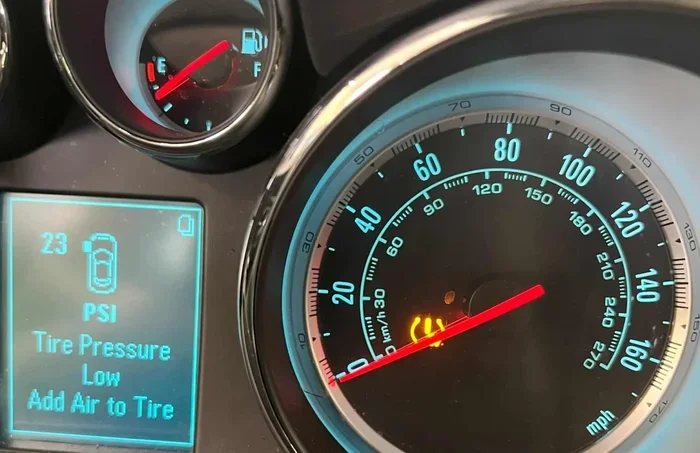
General Motors vehicles, including Chevrolet, GMC, and Cadillac models, often use a Driver Information Center (DIC) display. This is a small screen located behind the steering wheel or integrated into the instrument cluster. The DIC shows a variety of vehicle information, including fuel economy, tire pressure, and maintenance reminders.
To find maintenance mode on a GM vehicle, you can usually press the information button on the steering wheel to scroll through the DIC menus. Look for a “Service” or “Maintenance” option. The DIC will display the current service status and any pending maintenance tasks.
How to Reset Maintenance Mode After Service
Once you have found the maintenance mode alert and completed your service, the next step is resetting it. This is an important part of the process. If you do not reset the maintenance mode, the light or message will stay on even after the service is done. That can be confusing and annoying.
Resetting Maintenance Mode on Toyota Vehicles
Toyota has a straightforward process for resetting the maintenance required light. Here is how to do it:
- Turn the ignition to the “ON” position (do not start the engine).
- Press the trip meter reset button until the maintenance light appears on the display.
- Hold the trip meter reset button for about 10 seconds.
- The light should turn off, and the maintenance mode will be reset.
- Turn the ignition off and then back on to confirm the reset.
If this does not work, you can also try holding the button while turning the ignition to the “ON” position. Some Toyota models from 2013 onward have a slightly different procedure that involves the steering wheel controls and the instrument display. Check your owner’s manual for the exact steps.
Resetting Maintenance Mode on Honda Vehicles
Honda vehicles use a similar process. The maintenance mode reset on most Honda models involves these steps:
- Turn the ignition to the “ON” position.
- Press and hold the trip meter reset button.
- Continue holding the button until the maintenance light blinks.
- Release the button, then press and hold it again for about 10 seconds.
- The light should turn off, confirming the reset.
Resetting Maintenance Mode on Other Brands
For other vehicle brands, the process can vary. European luxury cars like BMW and Mercedes often require you to use the infotainment system to reset the maintenance mode. You go into the vehicle settings, find the service menu, and select “Reset Service Interval.” Some models require a professional scan tool to reset the maintenance mode, especially if the service was performed by a third-party shop.
If you are unsure about the reset process for your specific vehicle, the owner’s manual is your best friend. It will have step-by-step instructions tailored to your exact model. You can also search for your specific make and model online for video tutorials that walk you through the process.
Common Mistakes People Make with Maintenance Mode
Even though maintenance mode is a simple system, people make mistakes with it all the time. Here are some of the most common ones to avoid:
Ignoring the Maintenance Light
This is the biggest mistake. Some drivers see the maintenance light and simply ignore it. They assume it is not important because the car still runs fine. But here is the truth — maintenance mode exists for a reason. It tracks your service intervals for a purpose. Skipping oil changes, for example, can lead to engine buildup and reduced performance. If you are unsure whether it is safe to drive with the maintenance light on, you can read more about it here.
Confusing Maintenance Mode with the Check Engine Light
These are two completely different alerts. The check engine light usually indicates a serious problem that needs immediate attention. Maintenance mode is a routine service reminder. However, some drivers panic when they see any warning light and others ignore all lights completely. Understanding the difference helps you respond appropriately.
Forgetting to Reset After Service
If you get your car serviced at a shop and they do not reset the maintenance mode, the light will stay on. This can be confusing and may cause you to think the service was not completed. Always confirm that the maintenance mode has been reset after any service appointment.
Not Checking the Oil Level Regularly
Maintenance mode is tied to your service schedule, but it does not replace regular oil checks. You should still check your oil level at least once a month. If you are wondering how to tell if your car is low on oil, this guide has everything you need to know.
Assuming Maintenance Costs Are the Same for All Vehicles
Not all cars cost the same to maintain. Hybrid vehicles, for example, often have different maintenance requirements and costs. If you drive a hybrid, you might be wondering whether maintenance costs are higher. The answer is not always straightforward, and you can find more details here.
Why Staying on Top of Maintenance Mode Matters
Now that you know where to find maintenance mode and how to reset it, let us talk about why this matters so much. Staying on top of your vehicle’s maintenance schedule is one of the best things you can do as a car owner.
First, regular maintenance keeps your car safe. A well-maintained vehicle is less likely to break down on the road. Brakes, tires, and steering components all depend on timely service to function properly. When you respond to the maintenance mode alert, you are investing in your safety and the safety of your passengers.
Second, maintenance saves you money in the long run. It might seem like an unnecessary expense to get an oil change or a tire rotation when the car appears to be running fine. But preventive maintenance catches small problems before they become big, expensive ones. A simple oil change costs far less than a rebuilt engine.
Third, staying current with maintenance helps preserve your vehicle’s value. If you ever decide to sell or trade in your car, a documented maintenance history is a huge selling point. Buyers and dealers are willing to pay more for a vehicle that has been well cared for. Ignoring the maintenance mode alerts can hurt your resale value significantly.
Finally, regular service keeps your car running at peak performance. You will notice better fuel economy, smoother acceleration, and a more comfortable ride. All of these benefits come from simply paying attention to what your car is telling you through the maintenance mode system.
Quick Tips for Managing Maintenance Mode
Here are some quick tips to help you stay on top of your vehicle’s maintenance mode:
- Know your vehicle’s service interval: Check your owner’s manual for the recommended mileage between services.
- Set a phone reminder: Do not rely solely on the maintenance light. Set a reminder in your phone a few hundred miles before the service is due.
- Keep a service log: Write down every service you get, including the date, mileage, and type of service. This helps you track your car’s health over time.
- Don’t delay oil changes: Oil is the lifeblood of your engine. Changing it on schedule is the single most important maintenance task.
- Check for recalls and bulletins: Some vehicles have known maintenance issues that the manufacturer has addressed through recalls or service bulletins.
- Use quality parts and fluids: Cheap parts may save money upfront but can lead to more frequent repairs and higher long-term costs.
These simple habits will help you stay ahead of the maintenance mode alert and keep your vehicle in excellent condition year after year.
Expert Insights on Maintenance Mode Systems
Automotive experts agree that the maintenance mode system is one of the most underappreciated features in modern vehicles. Many drivers do not even realize it exists until the light has been on for weeks or months. By that point, they may have already missed a critical service window.
According to certified mechanics, the most common reason for premature engine wear is not driving too fast or hitting potholes. It is simply failing to change the oil and other fluids on schedule. The maintenance mode alert is designed to prevent exactly this problem. When you see it, take it seriously.
Experts also recommend understanding the difference between “hard” and “soft” maintenance reminders. A hard reminder is based strictly on mileage or time. A soft reminder uses algorithms to adjust the service interval based on your driving conditions. Both are important, but they work differently. Knowing which type your vehicle uses helps you plan your service schedule more effectively.
Conclusion
So where is maintenance mode? The answer is that it can be in several places depending on your vehicle. It might be on the instrument cluster, the infotainment screen, the trip meter display, or the driver information center. Regardless of where it appears, the message is the same. Your car needs service, and it is asking you to take care of it.
Learning to find and understand your car’s maintenance mode is one of the simplest things you can do as a vehicle owner. It takes just a few minutes to locate the indicator and learn how to reset it. But the payoff is enormous. You will stay on top of your service schedule, avoid costly repairs, and keep your car running smoothly for years to come.
Next time you see that wrench icon or the “SERVICE REQUIRED” message, do not ignore it. Pull up your owner’s manual, find the maintenance mode, and take action. Your car will thank you for it.
Frequently Asked Questions
What does maintenance mode mean on a car?
Maintenance mode is a service reminder system built into your vehicle. It alerts you when your car is due for routine maintenance such as an oil change, tire rotation, or brake inspection based on mileage or driving conditions.
Can I drive with the maintenance light on?
Yes, you can generally drive with the maintenance light on. It is a service reminder, not an emergency warning. However, you should schedule service soon to avoid potential engine damage or performance issues from neglected maintenance.
How do I reset the maintenance mode after an oil change?
The reset process varies by vehicle brand. For most Toyota and Honda models, you turn the ignition to “ON,” press and hold the trip meter reset button, and wait for the light to blink and turn off. Consult your owner’s manual for the exact steps for your specific model.
What is the difference between maintenance mode and the check engine light?
Maintenance mode is a routine service reminder that tells you it is time for scheduled maintenance. The check engine light indicates a potential problem or malfunction that needs diagnosis. They serve very different purposes and should be treated differently.
Why did my maintenance mode come on even though I just had service done?
This usually happens when the maintenance mode was not reset after the service was completed. Ask your service provider to reset it. If the light persists, it may indicate that the service interval has already been reached again or there is a system glitch.
Does maintenance mode go away on its own?
No, maintenance mode typically does not go away on its own. It will remain active until you either complete the required service and reset the system, or the underlying service need is addressed. Ignoring it will not make it disappear.