How to Turn Off Daytime Running Lights on Hyundai Palisade
Turning off daytime running lights on a Hyundai Palisade is straightforward once you know where to look. Whether you use the steering wheel controls, the infotainment system, or the driver settings menu, we walk you through every method. This guide covers all Palisade trims and includes important tips to keep your vehicle safe and compliant.
If you own a Hyundai Palisade, you have probably noticed the bright lights that stay on even during the day. These are called daytime running lights, or DRL for short. They are designed to make your vehicle more visible to other drivers. But sometimes, you just want them off. Maybe they bother you. Maybe you live in an area where they are not needed. Or maybe you are worried about battery drain.
Whatever your reason, this guide will show you exactly how to turn off daytime running lights on Hyundai Palisade models. We will cover every method available. We will also answer common questions and share tips to keep your vehicle running smoothly. Let us dive right in.
Key Takeaways
- Multiple Methods: You can disable DRL using steering wheel buttons, the infotainment screen, or the driver settings menu depending on your trim.
- Battery Awareness: Leaving lights on auto can drain your battery over time, so understand the trade-offs before turning DRL off.
- Safety First: Daytime running lights improve visibility. Consider the road conditions in your area before disabling them.
- Trim Differences: Higher trims may offer more customization options for your lighting preferences.
- No Permanent Damage: Turning off DRL will not harm your Hyundai Palisade or its electrical system.
- Reversible: You can always re-enable DRL later through the same steps.
📑 Table of Contents
- What Are Daytime Running Lights on the Hyundai Palisade?
- Methods to Turn Off Daytime Running Lights on Hyundai Palisade
- Can You Turn Off DRL on All Hyundai Palisade Trims?
- What Happens When You Turn Off Daytime Running Lights?
- Common Issues When Disabling DRL on Hyundai Palisade
- Should You Turn Off Daytime Running Lights?
- Related Maintenance Tips for Hyundai Palisade Lighting
- Conclusion
What Are Daytime Running Lights on the Hyundai Palisade?
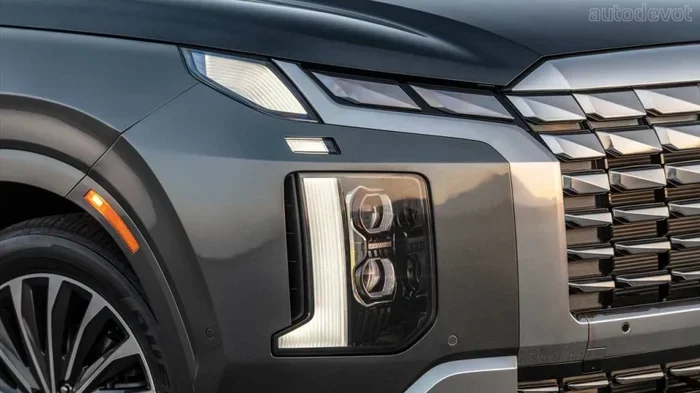
Daytime running lights are automatic lights that turn on when your engine starts. They are not the same as your headlights. DRLs are dimmer and designed only for daytime visibility. Most Hyundai Palisade trims come with them enabled by default. They help other drivers see your vehicle during daylight hours.
The Palisade is a popular three-row SUV known for its comfort and features. The vehicle lighting system includes DRLs, headlights, fog lights, and taillights. Each of these can be controlled separately depending on your trim level and settings. Understanding how the system works is the first step to customizing it to your needs.
Why Do Hyundai Palisade Models Have DRLs Enabled by Default?
Most modern vehicles, including the Palisade, come with DRLs turned on from the factory. This is because many countries require them for safety. In the United States, they are not legally required, but most manufacturers still include them. The idea is simple: a visible vehicle is a safer vehicle. The auto headlights system on the Palisade works alongside DRLs to adjust lighting based on surrounding conditions.
Methods to Turn Off Daytime Running Lights on Hyundai Palisade
There are several ways to disable DRL on your Palisade. The method you use depends on your trim level and the year of your vehicle. Below, we cover each method in detail.
Method 1: Using the Steering Wheel Controls
Many Hyundai Palisade trims allow you to control lighting settings directly from the steering wheel. Look for the lighting button on the left side of the steering column. Press and hold this button for a few seconds. A menu should appear on your instrument cluster display.
From this menu, navigate to the vehicle lighting section. Look for the DRL option. Toggle it off. This is the quickest method and works on most 2020 through 2024 Palisade models. If your steering wheel does not have a dedicated lighting button, try Method 2 below.
Method 2: Through the Infotainment System
The Hyundai Palisade features a large touchscreen infotainment system. You can access lighting settings through this screen. Here is how:
- Start your Palisade and press the Settings button on the home screen.
- Scroll to the Vehicle Settings section.
- Look for the Lighting or Display Lighting option.
- Select Daytime Running Lights.
- Toggle the switch to Off.
This method works on most trims and gives you access to additional lighting preferences. You may also be able to adjust the brightness of your dashboard lights and instrument panel from this same menu.
Method 3: Through the Driver Settings Menu
Some Palisade trims, especially the Limited and Calligraphy editions, offer a more detailed driver settings menu. To access it:
- Go to the home screen on your infotainment display.
- Tap the Driver Settings icon.
- Look for the Lighting Preferences section.
- Find the Daytime Running Lights toggle.
- Switch it off.
On certain trims, you may also find options to set your lights to auto mode. This allows the light sensor on your vehicle to decide when to turn the headlights on and off. The auto mode can be a great middle ground if you do not want DRLs but still want automatic lighting when it gets dark.
Can You Turn Off DRL on All Hyundai Palisade Trims?
Not all Palisade trims offer the same level of customization. The base SE trim may have limited options for disabling DRL. Higher trims like the SEL, Limited, and Calligraphy typically offer more control through the infotainment system. If you are unsure about your specific trim, check your owner manual or consult your local Hyundai dealership.
Here is a quick comparison of what you can expect across trims:
- SE Trim: Basic lighting controls. DRL may only be adjustable through the steering wheel buttons.
- SEL Trim: Expanded infotainment options. DRL can usually be toggled off through the settings menu.
- Limited Trim: Full driver settings access. More granular control over all lighting features.
- Calligraphy Trim: The most options available. Includes premium lighting customization features.
What Happens When You Turn Off Daytime Running Lights?
Disabling DRL on your Hyundai Palisade has a few effects you should be aware of. First, your vehicle will no longer have lights on during the day. This means other drivers may have a harder time seeing you in low-light daylight conditions, such as early morning or late afternoon.
Second, turning off DRL does not turn off your headlights completely. Your headlights will only activate when the light sensor detects low ambient light or when you manually turn them on. Third, some drivers report that the dashboard lights may also dim or change behavior when DRL is disabled. This is normal and not a cause for concern.
Will Turning Off DRL Drain Your Battery?
One common concern is whether disabling DRL affects battery health. The good news is that turning off DRL actually reduces electrical load on your battery. However, if you manually leave your headlights on when the engine is off, that can drain your battery. If you have ever experienced a dead battery, you know how frustrating it can be. The auto headlights system helps prevent this by turning lights off automatically when the engine is shut down.
If you want to learn more about how car lights affect battery life, you can check our article on do car lights on auto drain the battery for a deeper dive into this topic.
Common Issues When Disabling DRL on Hyundai Palisade
While turning off DRL is generally simple, some owners run into issues. Here are the most common problems and how to fix them.
DRL Won Turn Off After Following the Steps
If you followed the steps above but your DRLs are still on, try restarting your vehicle first. Sometimes the settings do not fully apply until you cycle the ignition. If the problem persists, check that your software is up to date. Hyundai occasionally releases infotainment updates that can affect settings menus.
Warning Lights Appear After Disabling DRL
Some Palisade owners report seeing a warning light on the dashboard after turning off DRL. This is usually related to the vehicle detecting a change in the lighting system. In most cases, this warning is harmless and will go away after a few drive cycles. If the light stays on, you may need to manually clear your car codes to reset the system. You can find guidance on how to do this in our article on how do I manually clear my car codes.
DRL Turns Back On After a Battery Disconnect
If you have your battery replaced or disconnected for any reason, the DRL settings may reset to default. This means they will turn back on. You will need to repeat the steps above to disable them again. Keep this in mind if you ever need service work done on your electrical system.
Should You Turn Off Daytime Running Lights?
This is a personal decision that depends on your driving habits and environment. Here are some factors to consider:
- Where You Drive: If you drive in areas with lots of daylight, turning off DRLs may not make much difference. But if you drive in shaded forests or tunnels frequently, keeping them on can improve safety.
- Your Vehicle Visibility: DRLs make your Palisade more noticeable to other drivers. In rain, fog, or overcast conditions, this extra visibility matters.
- Battery Health: If you are concerned about battery drain, disabling DRLs actually helps. However, the difference is small on modern vehicles.
- Legal Considerations: In some regions, DRLs are required by law. Check your local regulations before turning them off.
Expert Insight: The Balance Between Visibility and Comfort
Many drivers who disable DRLs do so because the lights create glare or distraction inside the cabin. The Palisade has a large windshield and spacious interior, which can sometimes amplify the effect of DRL glare. If this is your concern, consider adjusting the brightness of your dashboard lights instead of completely disabling DRLs. This gives you the best of both worlds: visibility outside and comfort inside.
Related Maintenance Tips for Hyundai Palisade Lighting
Your Palisade lighting system requires occasional maintenance to stay in top shape. Here are some tips to keep everything working properly.
- Check Your Bulbs Regularly: Replace any burned-out DRL or headlight bulbs promptly. Driving with only one working light can reduce visibility and may result in a ticket.
- Keep Lenses Clean: Dirty headlight lenses can reduce light output significantly. A quick wipe with a microfiber cloth can make a big difference.
- Monitor the Light Sensor: The auto headlights system relies on a sensor, usually located near the rearview mirror. Keep this area clean and unobstructed.
- Watch for Warning Lights: If you see any unusual warning lights on your dashboard, address them quickly. Ignoring them can lead to bigger problems down the road.
- Visit a Hyundai Dealership for Complex Issues: If you cannot resolve a lighting issue on your own, a certified Hyundai dealership can help. They have access to specialized diagnostic tools and genuine Hyundai parts.
For more information about vehicle warning lights, check out our guide on can a check engine light go off by itself. Understanding how warning lights work can save you time and money.
Conclusion
Turning off daytime running lights on your Hyundai Palisade is a simple process that anyone can do. Whether you use the steering wheel controls, the infotainment screen, or the driver settings menu, you have options. Just remember that DRLs serve an important safety purpose. Consider your driving conditions and personal preferences before making the change.
If you run into any issues while disabling DRL, do not hesitate to consult your owner manual or reach out to a Hyundai dealership. The Palisade is a well-engineered vehicle, and its lighting system is designed to be flexible and user-friendly. With the steps in this guide, you will have full control over your vehicle lighting in no time.
Take a moment to explore your Palisade settings. Try the different methods described above. Find what works best for you and your driving style. A comfortable, customized driving experience starts with understanding your vehicle. And now you have the knowledge to make the most of your Hyundai Palisade lighting system.
Frequently Asked Questions
Can I turn off daytime running lights on any Hyundai Palisade trim?
Most trims allow you to disable DRL, but the method may vary. Higher trims like Limited and Calligraphy offer more options through the infotainment system. The base SE trim may only support steering wheel controls. Check your owner manual for trim-specific instructions.
Will turning off DRL affect my Hyundai Palisade warranty?
No, disabling daytime running lights will not void your warranty. DRL is a standard feature that can be toggled on or off without affecting any vehicle systems. However, if you experience electrical issues after making changes, it is always best to consult a dealership.
Do I need special tools to turn off DRL on my Palisade?
No special tools are needed. You can disable DRL using the steering wheel buttons or the infotainment touchscreen. Everything is built into the vehicle settings and requires no additional equipment or modifications.
Can I set my Palisade lights to turn on automatically instead of disabling DRL?
Yes. The auto headlights feature on the Palisade allows your vehicle to detect ambient light and turn the headlights on or off automatically. This is a great alternative if you want convenience without keeping DRLs active all the time.
Why do my daytime running lights stay on even after I turn them off?
This can happen if your vehicle needs a restart after changing the setting. Try turning your Palisade off and back on again. If the issue persists, check for software updates or consult your Hyundai dealership for diagnostic assistance.
Is it legal to drive without daytime running lights in the United States?
In most U.S. states, daytime running lights are not legally required. However, some states and regions may have specific regulations. Always check your local laws before disabling safety features like DRLs on your vehicle.