How to Start a Hyundai Tucson When Your Key Fob Is Dead
When your Hyundai Tucson key fob dies, you still have several reliable ways to start your vehicle. This guide walks you through the hidden key blade method, the emergency start procedure, and tips for replacing the key fob battery. You will also learn how to prevent this problem from happening again and when to seek professional help.
There is nothing more frustrating than standing by your Hyundai Tucson ready to head out and realizing your key fob is dead. The screen is blank, the buttons do nothing, and your car just sits there refusing to start. Whether you left the fob in a pocket that went through the wash or the battery simply wore out, a dead key fob does not mean you are stuck forever.
This guide covers every practical method you can use to start a Hyundai Tucson when your key fob battery is dead. From the hidden mechanical key blade to the emergency start procedure, we will walk you through each step in plain language. You will also learn how to replace the battery, reset the fob, and avoid this headache in the future.
By the end of this article, you will feel confident handling a dead key fob situation like a pro. No more panic. No more calling a tow truck for a simple battery issue. Let us get you back on the road.
Key Takeaways
- Use the hidden key blade: Every Hyundai Tucson key fob has a backup mechanical key hidden inside that can unlock the driver’s door.
- Place the fob near the start button: A dead key fob can still start the Tucson if you hold it directly against the push start button.
- Replace the CR2032 battery: Most Hyundai key fobs use a common CR2032 battery that is easy and cheap to swap out at home.
- Reset the key fob after battery change: You may need to reprogram the fob after replacing the battery to restore full functionality.
- Keep a spare battery handy: Storing a spare CR2032 battery in your glove box can save you from getting stranded again.
- Know when to call a pro: If none of the emergency methods work, contact a Hyundai dealership or certified locksmith for assistance.
📑 Table of Contents
- Why Does a Hyundai Tucson Key Fob Stop Working?
- How to Start a Hyundai Tucson with a Dead Key Fob
- Can You Drive a Hyundai Tucson with a Dead Key Fob?
- How to Prevent Key Fob Battery Problems
- When to Seek Professional Help
- Quick Tips for Common Tucson Key Fob Issues
- Common Mistakes People Make with Dead Key Fobs
- How to Replace the Key Fob Battery Step by Step
- Expert Insight: Why Hyundai Built This Backup System
- Final Thoughts
Why Does a Hyundai Tucson Key Fob Stop Working?
Understanding why your Hyundai Tucson key fob stopped working helps you prevent it from happening again. Most of the time, the cause is simple and easy to fix.
Battery Depletion
The most common reason is a worn-out battery. Key fobs use small coin-cell batteries, usually a CR2032, that last between two and four years. If you notice the range shrinking or the buttons becoming sluggish, the battery is likely dying soon.
Water or Moisture Damage
Accidents happen. Dropping your fob in a puddle or putting it through a laundry cycle can cause internal corrosion. Water damage can short out the circuit board and kill the fob completely, even after the battery is replaced.
Signal Interference
Sometimes the problem is not the fob at all. Nearby electronics, metal structures, or even other key fobs operating on similar frequencies can cause interference. This makes it seem like your fob is dead when it is really just losing its signal temporarily.
Wear and Tear
Key fobs get handled every single day. Buttons wear out, the casing cracks, and internal connections loosen over time. If your fob is more than five years old and showing signs of physical damage, the entire unit may need replacement.
How to Start a Hyundai Tucson with a Dead Key Fob
Good news. Hyundai designed the Tucson with backup methods for exactly this situation. You do not need a working key fob to drive the vehicle. Here are the reliable methods that actually work.
Method 1: Use the Hidden Key Blade
Every Hyundai Tucson key fob contains a hidden mechanical key blade inside the plastic shell. This is your ultimate backup. You can use it to physically unlock the driver’s door and start the car manually.
To find the hidden key, look at the side of the fob. There is a small button or slider that releases the metal blade. Press it and slide the key out. Use this key to unlock the door, then place the fob (even dead) on the start button or in the designated emergency slot.
If you are wondering whether you can start an ignition without a traditional key at all, check out this guide on Can You Start an Ignition Without a Key for more insights.
Method 2: Hold the Fob Against the Start Button
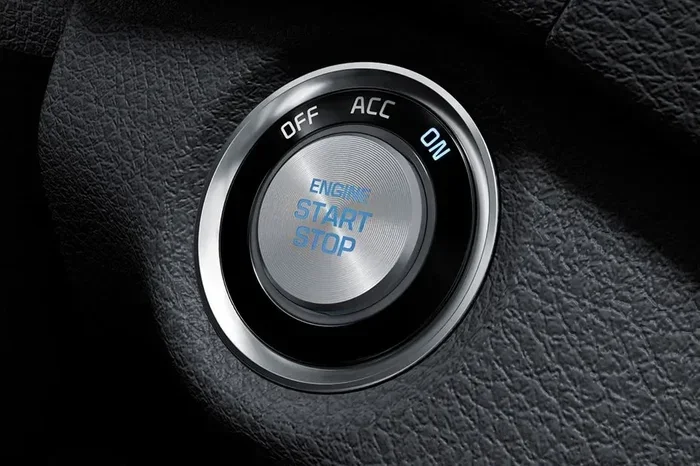
Modern Hyundais including the Tucson have a push button start system that can read the fob even when the battery is dead. The trick is proximity. You need to place the dead fob directly against the start button.
Follow these steps:
- Sit in the driver’s seat and make sure the fob is in your hand or pocket.
- Press the brake pedal firmly with your foot.
- Place the dead key fob directly against the push start button.
- Press the start button as you normally would.
- The system should detect the fob’s internal chip and start the engine.
This works because the Tucson’s antenna around the start button can pick up the fob’s identification signal even without a working battery. It is a clever safety feature that many Tucson owners do not know about.
Method 3: Place the Fob on the Dashboard
Some Tucson models allow you to place the dead fob on a specific spot on the dashboard near the steering column. Try placing it flat on the lower part of the dashboard to the right of the steering wheel. Then press the start button while holding the brake.
If this does not work on your model, try different locations around the center console and cup holder area. The antenna placement varies slightly between model years.
Method 4: Replace the Key Fob Battery
The most permanent fix is to replace the battery inside the key fob. This is a quick and inexpensive job you can do at home in minutes.
You will need a CR2032 battery, which costs about two to three dollars at any grocery store or pharmacy. Here is how to do it:
- Flip the fob over and locate the small groove along the seam.
- Use a flathead screwdriver or the hidden key blade to pry open the fob shell.
- Remove the old battery and note which side faces up.
- Insert the new CR2032 battery with the positive side facing up.
- Snap the fob shell back together until it clicks.
After replacing the battery, test the fob by standing near the Tucson and pressing the start button. If the fob does not work right away, you may need to reset the key fob. For detailed instructions on this process, see our article on Do You Have to Reset the Car Key After Changing the Battery.
Can You Drive a Hyundai Tucson with a Dead Key Fob?
Once you have started the Tucson with a dead fob, you can absolutely drive the vehicle. The engine runs normally regardless of the fob’s battery status once the car is already running. However, there are a few things to keep in mind.
First, you will not be able to turn off the engine by pressing the start button again unless the fob is detected. If the fob battery is completely dead and you cannot place it near the button, the engine may stay running. This is a safety feature, not a malfunction.
Second, when you turn off the engine and try to restart, you will need the fob again. If the battery is still dead, use the hidden key blade or the dashboard placement method to restart the vehicle.
If you are concerned about driving without a functioning key fob in general, you can read more about Can You Drive a Car If the Key Fob Battery Dies for a deeper look at this topic.
How to Prevent Key Fob Battery Problems
Prevention is always better than dealing with a dead fob on the side of the road. Here are simple habits that keep your Hyundai Tucson key fob working reliably.
Replace the Battery Before It Dies
Do not wait until the fob stops working. If you notice the range decreasing or the buttons feeling weak, swap the battery immediately. Setting a calendar reminder every two years helps you stay ahead of the problem.
Keep the Fob Away from Moisture
Store your fob in a dry place. Avoid leaving it in the bathroom, near the kitchen sink, or in a coat pocket that might get wet. A small waterproof fob pouch can add extra protection.
Replace the Fob When It Shows Physical Damage
If the buttons are sticking, the casing is cracked, or the fob feels loose inside, it is time for a replacement. A damaged fob can cause intermittent problems that are hard to diagnose.
Keep a Spare Battery in the Car
Toss a spare CR2032 battery in your glove box. It takes up no space and can save you from a stressful situation when you are far from home.
When to Seek Professional Help
Most dead key fob situations are easy to handle on your own. But there are times when you should call in an expert.
If you have tried the hidden key blade, the emergency start procedure, and battery replacement, and the Tucson still will not start, there may be a deeper issue. The problem could be a faulty antenna module, a damaged start button, or a malfunction in the vehicle’s immobilizer system.
In these cases, visit your nearest Hyundai dealership or a certified automotive locksmith. They have the diagnostic tools and expertise to identify and fix complex issues. Do not attempt to open the fob and repair internal circuitry yourself unless you have experience with electronics. You risk causing more damage.
Also, if you need a completely new key fob programmed to your Tucson, a dealership can handle that for you. They will match the fob to your specific vehicle and ensure everything works seamlessly.
Quick Tips for Common Tucson Key Fob Issues
- Quick Tip 1: If the fob works intermittently, the battery is usually the culprit. Replace it before it dies completely.
- Quick Tip 2: Always carry the hidden key blade separately when traveling. You never know when you might need it.
- Quick Tip 3: Clean the fob buttons with a soft cloth and a small amount of rubbing alcohol to keep them responsive.
- Quick Tip 4: If your Tucson is in cold weather and the fob stops working, the battery may just be temporarily weakened. Warm the fob in your hands for a few minutes before trying again.
- Quick Tip 5: After replacing the battery, reprogram the fob if the Tucson does not recognize it immediately. Refer to your owner’s manual for the specific reset procedure for your model year.
Common Mistakes People Make with Dead Key Fobs
Avoid these common pitfalls that make a dead key fob situation worse.
- Assuming the car is completely dead: Many people think a dead fob means the car will not start at all. This is not true. The Tucson has built-in backup methods that work every time.
- Using the wrong battery: Not all key fobs use CR2032 batteries. Check your owner’s manual or look at the old battery before purchasing a replacement.
- Forcing the fob open: If the fob shell does not come apart easily, do not use excessive force. Look for the release mechanism or use the hidden key blade slot.
- Ignoring the problem: A weak fob battery gets worse over time. Address it early before you are stranded somewhere.
- Not resetting the fob after battery replacement: Simply putting in a new battery does not always restore full function. A reset may be required.
How to Replace the Key Fob Battery Step by Step
Let us walk through the battery replacement process one more time with extra detail. This is the single most important skill every Tucson owner should know.
What you need:
- One CR2032 battery (available at most stores for under five dollars)
- A small flathead screwdriver or the hidden key blade from the fob
- A clean, dry workspace
Steps:
- Locate the small release button on the side of the fob. It is usually near the top.
- Press the button and slide the metal key blade out of the fob.
- Use the key blade or screwdriver to gently pry open the fob shell along the seam.
- Carefully lift out the old battery. Note which side faces up (positive side up is standard).
- Insert the new CR2032 battery with the positive side facing up.
- Snap the two halves of the fob back together. Press firmly until you hear a click.
- Slide the key blade back into the fob until it locks into place.
- Test the fob by standing within a few feet of the Tucson and pressing the start button.
That is it. You just saved yourself a trip to the dealership and a potentially expensive service call. This simple maintenance task can extend the life of your fob by years.
Expert Insight: Why Hyundai Built This Backup System
Hyundai engineers designed the Tucson’s push start system with redundancy in mind. They know that key fob batteries die, and they do not want drivers stranded. The hidden key blade, the emergency start procedure, and the dashboard antenna placement all work together to ensure you can always get into and start your vehicle.
This is a great example of thoughtful automotive design. Even as cars become more digital and electronic, manufacturers still include mechanical backups for reliability. Understanding these features makes you a smarter, more prepared car owner.
If you have ever wondered whether the key fob needs reprogramming after any kind of battery replacement or reset, check out our detailed guide on Does the Key Fob Need to Be Reprogrammed After Replacing for expert insights on this topic.
Final Thoughts
A dead key fob on a Hyundai Tucson is a minor inconvenience, not a major crisis. You now know multiple ways to start the vehicle, how to replace the battery, and how to prevent the problem from happening again. The hidden key blade, the emergency start procedure, and the simple CR2032 battery swap give you everything you need to handle this situation with confidence.
Keep a spare battery in your glove box, pay attention to warning signs like reduced range, and do not ignore a fob that is starting to feel weak. These small habits save time, money, and stress in the long run.
Next time your Hyundai Tucson key fob dies, do not panic. You have the knowledge and the tools to handle it. Get back in the driver’s seat and keep moving forward.
Frequently Asked Questions
Can I start my Hyundai Tucson if the key fob battery is completely dead?
Yes. You can start the Tucson by placing the dead fob directly against the push start button while pressing the brake pedal. The vehicle’s antenna can still read the fob’s chip even without a working battery. You can also use the hidden mechanical key blade to unlock the door and start the car manually.
What type of battery does a Hyundai Tucson key fob use?
Most Hyundai Tucson key fobs use a CR2032 coin-cell battery. This is a common battery available at grocery stores, pharmacies, and auto parts shops for just a few dollars. Always check your owner’s manual to confirm the correct battery type for your specific model year.
How do I know if my Tucson key fob battery needs replacing?
Signs of a dying key fob battery include reduced range, weak or unresponsive buttons, and the need to press the button multiple times from close range. If you notice any of these symptoms, replace the battery right away before the fob stops working completely.
Do I need to reprogram my Hyundai Tucson key fob after replacing the battery?
In most cases, simply replacing the battery is enough and no reprogramming is needed. However, if the fob does not work after a battery swap, you may need to reset it. Check your owner’s manual for the specific reset procedure for your Tucson model year.
Can I drive my Hyundai Tucson if the key fob battery dies while I am on the road?
Yes. Once the Tucson engine is running, it will continue running even if the key fob battery dies. You can drive normally and turn off the engine when you reach your destination. Just be aware that you will need the fob or the hidden key blade to restart the vehicle.
How much does it cost to replace a Hyundai Tucson key fob battery?
A CR2032 battery costs between two and five dollars. The entire replacement process takes about five minutes and requires no special tools. If you visit a dealership or locksmith for the replacement, you may pay a service fee, but the battery itself is very inexpensive.