How to Change the Battery in a Nissan Sentra Key Fob
Changing the battery in your Nissan Sentra key fob is a simple DIY job you can finish in under five minutes. You only need a CR2032 coin cell battery and a small flathead screwdriver. This guide walks you through every step, from opening the fob to resetting it after the swap.
Your Nissan Sentra key fob is one of those small things you probably never think about until it stops working. Maybe you’re standing in the driveway, pressing the unlock button, and nothing happens. Or you’re walking away from the car and the doors just won’t lock. Before you call a dealer or spend money on a replacement fob, here is the good news: changing the battery in a Nissan Sentra key fob is incredibly easy. You do not need any special tools, and you do not need to be a mechanic. In this guide, we walk you through the entire process from start to finish.
Whether you own a 2013 Sentra or the latest 2024 model, the key fob battery replacement process is basically the same. We will show you exactly what battery you need, how to open the fob safely, and what to do after you pop in the new one. We also cover common mistakes to avoid and tips to make your Nissan key fob last longer between battery changes. By the end of this article, you will feel confident handling this quick fix on your own.
If you have ever wondered whether you can replace a key fob battery yourself, the answer is a definite yes. Let us get into it.
Key Takeaways
- Easy DIY Fix: You can replace the battery yourself without visiting a dealer or locksmith.
- CR2032 Battery: The Nissan Sentra key fob uses a standard CR2032 coin cell battery, which is widely available.
- Quick Process: The entire battery swap takes less than five minutes.
- Reset Is Important: You may need to reset the key fob after replacing the battery to restore full functionality.
- Know the Warning Signs: Weak signal, intermittent remote start, and unresponsive buttons are early signs of a dying battery.
- Prevent Future Issues: Simple habits can extend your key fob battery life significantly.
📑 Table of Contents
- What You Need Before You Start
- Step-by-Step Guide to Changing the Battery
- Common Signs Your Nissan Sentra Key Fob Battery Is Dying
- How to Reset Your Nissan Sentra Key Fob After Battery Replacement
- Tips to Make Your Key Fob Battery Last Longer
- When to Replace the Entire Key Fob Instead
- Frequently Asked Questions
- Final Thoughts
What You Need Before You Start
Before you dive in, gather a few simple items. You do not need to run to the dealership. Everything you need is likely already in your home or desk drawer.
Battery Type
The Nissan Sentra key fob uses a CR2032 battery. This is a standard 3-volt coin cell battery. You can find it at almost any grocery store, pharmacy, or auto parts shop. Brands like Energizer, Duracell, and Panasonic all make reliable CR2032 batteries. They typically cost between $3 and $5.
Tools You Will Need
- A small flathead screwdriver or a thin plastic pry tool
- The new CR2032 battery
- A clean, flat surface to work on
- A soft cloth to place the fob on while you work
That is it. No fancy equipment. No trips to the mechanic. You are ready to go once you have those two things.
Step-by-Step Guide to Changing the Battery
Now let us get into the actual process. Follow these steps carefully, and you will have a working key fob in just a few minutes.
Step 1: Locate the Battery Compartment
Turn your Nissan Sentra key fob over so you are looking at the back. You will notice a small seam running along the edge of the fob. This is where the two halves of the fob shell meet. On most Sentra models, there is a tiny slot near the bottom of the fob where you can insert your flathead screwdriver.
Step 2: Open the Fob Carefully
Slide the flathead screwdriver into the slot and gently pry the two halves apart. Go slowly. The fob shell is held together by a small plastic clip. If you force it too hard, you risk cracking the shell. Use a gentle wiggling motion. The top half should pop right off.
If your Sentra fob does not have a visible slot, look closely at the edge near the key ring attachment. Some models have the opening right there. A plastic pry tool works even better than a screwdriver because it will not scratch the fob surface.
Step 3: Remove the Old Battery
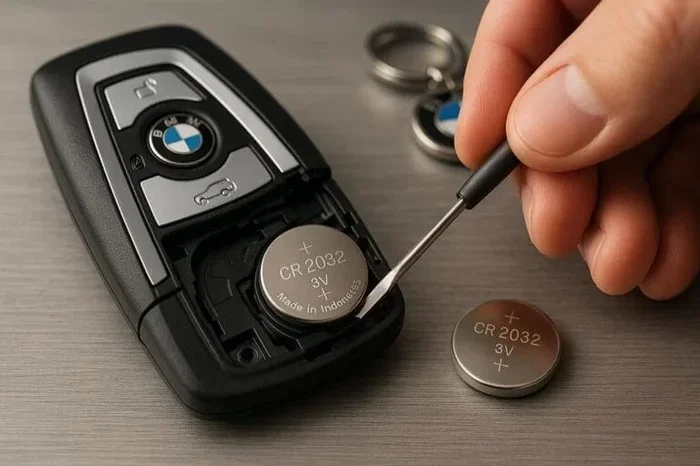
Once the fob is open, you will see the old battery sitting in a small circular compartment. Take note of which side is facing up. The positive side (the one with the + symbol and the text “CR2032”) should be facing up. Use the tip of your screwdriver or a small pair of tweezers to gently lift the battery out.
Do not throw the old battery in the regular trash. Batteries contain chemicals that can harm the environment. Take it to a recycling center or drop it off at a store that accepts battery recycling.
Step 4: Insert the New Battery
Take your new CR2032 battery and place it in the compartment with the positive side facing up, just like the old one was positioned. Push it down gently until it clicks into place. Make sure it sits flat and snug. A loose battery can cause intermittent issues with your key fob.
Step 5: Snap the Fob Back Together
Line up the two halves of the fob and press them together firmly. You should hear a small click when the plastic clip locks into place. Give it a gentle tug to make sure it is secure. If the halves do not sit flush, the clip may not be seated properly.
Step 6: Test Your Key Fob
Now for the satisfying part. Stand near your Nissan Sentra and press the unlock button. Do the doors respond? Try the lock button too. Test the remote start if your model has it. If everything works, you are done. Congratulations, you just saved yourself a trip to the dealer.
If the fob does not work right away, do not panic. Sometimes the fob needs a moment to reconnect. Try standing closer to the car and pressing the button again. If it still does not work, check that the battery is seated correctly and the positive side is facing up.
Common Signs Your Nissan Sentra Key Fob Battery Is Dying
You do not always get a warning light when your key fob battery is low. However, there are several telltale signs that it is time for a replacement. Catching these early can save you from being locked out of your car.
Reduced Range
One of the first things you will notice is that your Nissan Sentra remote key does not work from as far away as it used to. Maybe you could unlock the car from 30 feet away before, but now you have to be standing right next to it. This is a classic sign of a weakening battery.
Intermittent Function
If your key fob works sometimes but not others, the battery is likely on its way out. You might press the unlock button once and it works, but the second press does nothing. This inconsistent behavior happens because the battery voltage is fluctuating.
Delayed Response
A healthy key fob responds instantly when you press a button. If you notice a delay between pressing the button and the car responding, the battery may be low. This is especially noticeable with the remote start function.
Warning Light on the Dashboard
Some Nissan Sentra models display a warning message on the dashboard when the key fob battery is low. If you see a message about the smart key or key fob battery, do not ignore it. Replace the battery as soon as possible.
Key Fob Not Working at All
If the fob stops working completely, the battery is almost certainly dead. But before you replace it, try holding the fob directly against the car’s door handle. Most Sentra models have a backup system that lets you unlock the car using the fob as a physical key. This is a lifesaver when you are stranded.
How to Reset Your Nissan Sentra Key Fob After Battery Replacement
Replacing the battery is only half the job. In many cases, you need to reset the key fob after the battery swap to restore full functionality. The good news is that this is also a straightforward process.
For most Nissan Sentra models, the reset process involves putting the car into a specific mode and then re-synchronizing the fob. Here is the general process:
- Sit in the car and close all doors.
- Turn the ignition to the ON position without starting the engine. You can do this by pressing the start button without pressing the brake pedal.
- Press and hold the lock button on the key fob for about five seconds.
- Turn the ignition back to OFF.
- Repeat the process two more times (ON, hold lock, OFF).
- Turn the ignition off and step out of the car.
- Press the lock button on the fob outside the car. You should hear the doors lock.
If this does not work for your specific model, consult your owner’s manual. The reset process can vary slightly between different model years. You can also find model-specific instructions in your Sentra’s manual or by searching online for your exact year.
For more details on what to do after changing your car key battery, check out our article on whether you have to reset the car key after changing the battery.
It is worth noting that if your key fob stops working entirely and the battery is fresh, the issue might not be the battery at all. There could be a deeper key fob troubleshooting issue at play, such as a damaged circuit board or a problem with the car’s immobilizer system.
Tips to Make Your Key Fob Battery Last Longer
Nobody wants to replace their key fob battery every few months. Here are some simple habits that can extend the life of your Nissan Sentra smart key battery significantly.
Avoid Extreme Temperatures
Do not leave your key fob in the car on a hot summer day or in freezing temperatures. Extreme heat and cold both drain batteries faster. Keep your fob in a coat pocket or a bag when you are not using it.
Do Not Press Buttons Unnecessarily
Every time you press a button, a small amount of battery power is used. Try to be deliberate with your key fob usage. Instead of standing next to the car and pressing unlock repeatedly, press it once and wait for the response.
Keep the Fob Away from Other Electronics
Other electronic devices can sometimes interfere with the key fob signal and cause it to use more power trying to communicate with the car. Keep your fob separate from your phone, tablet, and other wireless devices when possible.
Use the Right Battery
Always use a quality CR2032 battery from a reputable brand. Cheap off-brand batteries may not last as long and could leak, potentially damaging the fob internals.
Replace Before It Dies Completely
Do not wait until the fob stops working entirely. Replace the battery at the first sign of weakness. This prevents you from getting stranded and also protects the fob’s internal components from potential damage caused by a fully depleted battery.
When to Replace the Entire Key Fob Instead
Sometimes a new battery is not enough. If you have replaced the battery and the key fob still does not work, there may be a bigger problem. Here are some situations where a full Nissan key replacement makes more sense than a simple battery swap.
If the fob has been dropped or damaged physically, the internal circuitry could be compromised. Water damage is another common culprit. If your fob has been exposed to moisture and the battery compartment shows signs of corrosion, a new battery will not fix the problem.
You should also consider replacing the fob if your Sentra is several years old and the fob is showing general wear. Cracked shells, sticky buttons, and faded buttons are all signs that the fob is reaching the end of its lifespan.
In some cases, you may need to program a new key fob for your Nissan Sentra. This is a more involved process that typically requires a visit to the dealer or a qualified locksmith. If you are wondering whether you can still drive without a working fob, our article on driving without a key fob covers general scenarios that apply across different vehicle brands.
The cost of a replacement fob varies, but for a Nissan Sentra, you can expect to pay between $50 and $200 for a new fob, depending on the model year and whether you buy it from the dealer or an aftermarket supplier. Programming costs at the dealer can add another $50 to $100.
Frequently Asked Questions
What battery does a Nissan Sentra key fob use?
The Nissan Sentra key fob uses a CR2032 battery. This is a standard 3-volt coin cell battery that is easy to find at any grocery store, pharmacy, or auto parts shop. It is one of the most common battery types used in car key fobs, so you should not have trouble sourcing one.
How long does a Nissan Sentra key fob battery last?
On average, a key fob battery lasts between two and four years. However, this can vary depending on how often you use the fob, the distance between the fob and the car, and the weather conditions you expose the fob to. If you use remote start frequently, the battery may drain faster.
Can I drive my Nissan Sentra if the key fob battery dies?
Yes, you can still drive your Sentra even if the key fob battery is completely dead. Most Nissan Sentra models have a backup system that allows you to unlock the door by placing the dead fob directly against the door handle. You can also start the car by pressing the fob against the start button. This is a built-in safety feature designed for exactly this situation.
How do I know if my Sentra key fob battery is low?
The most common signs are reduced range, intermittent operation, delayed response, and a dashboard warning light. If you notice you have to be closer to the car for the fob to work, it is probably time for a new battery. Replacing the battery early can prevent you from getting caught off guard with a completely dead fob.
Do I need to reprogram the key fob after changing the battery?
In most cases, no. Simply replacing the battery should restore full function. However, some Nissan Sentra models may require a quick reset procedure after a battery change. This usually involves cycling the ignition and pressing buttons on the fob in a specific sequence. Check your owner’s manual for model-specific instructions.
How much does it cost to change a Nissan Sentra key fob battery?
The battery itself costs between $3 and $5. If you do it yourself, there is no labor cost at all. If you take it to a dealer or locksmith, you might pay $20 to $50 for the service. Given how simple the process is, we strongly recommend doing it yourself. It takes less than five minutes and saves you money.
Final Thoughts
Changing the battery in your Nissan Sentra key fob is one of the easiest and most satisfying DIY car maintenance tasks you can do. It takes less than five minutes, costs just a few dollars, and requires no special skills or tools. You do not need to wait for a dealer appointment or spend money on a locksmith.
Keep a spare CR2032 battery in your glove box or junk drawer so you are always prepared. Pay attention to the warning signs of a dying battery, and replace it early before you find yourself locked out of your car. And remember, if the fob still does not work after a fresh battery, the issue may be something more serious that requires professional attention.
With this guide, you have everything you need to handle the job confidently. Share it with a friend who might be struggling with their key fob, and save yourself a trip to the dealer next time your Sentra remote stops working.