Do 2012 Honda Civics Have Bluetooth Wireless Audio
The 2012 Honda Civic does offer Bluetooth wireless audio, but only on certain trim levels. The EX and higher trims come standard with Bluetooth for hands-free calling and music streaming, while the base LX and Si models may lack this feature. If your 2012 Honda Civic does not have Bluetooth built in, you can easily add it with an adapter or aftermarket stereo.
Do 2012 Honda Civics have Bluetooth? This is one of the most common questions buyers and owners ask when shopping for a used Honda Civic or trying to figure out their current ride. The answer is not a simple yes or no. It depends on the trim level, the options package, and whether the car was sold with factory-installed technology. Let me walk you through everything you need to know about Bluetooth on the 2012 Honda Civic.
The 2012 Honda Civic is a popular compact car that has earned a loyal fan base over the years. Known for its fuel efficiency, sporty handling, and affordability, the Civic remains one of the best-selling sedans in America. But when it comes to Bluetooth connectivity, not every trim level is created equal. Understanding which features come standard and which are optional can save you a lot of frustration.
If you are looking to buy a used 2012 Honda Civic or already own one, knowing your Bluetooth options is essential. Bluetooth wireless audio lets you stream music from your phone through your car speakers, make hands-free calls, and use voice commands while driving. These features make your daily commute more enjoyable and keep you safer on the road. In this article, I will break down everything about Bluetooth on the 2012 Honda Civic, including which trims have it, how to pair devices, and how to add Bluetooth if your car does not have it.
Key Takeaways
- Bluetooth availability depends on trim level: The 2012 Honda Civic EX and above typically include Bluetooth, while base models may not.
- Two types of Bluetooth exist: Hands-free calling and wireless audio streaming are separate features on some trim levels.
- You can add Bluetooth to any 2012 Honda Civic: Bluetooth adapters and aftermarket stereos are affordable and easy to install.
- Pairing is simple: The process takes just a few minutes and works with most smartphones.
- The 2012 Honda Civic is still a solid car: Even without Bluetooth, this model remains reliable and fun to drive.
📑 Table of Contents
- Which 2012 Honda Civic Trims Have Bluetooth?
- Understanding Bluetooth Types in the 2012 Honda Civic
- How to Pair Your Phone with a 2012 Honda Civic Bluetooth
- How to Check If Your 2012 Honda Civic Has Bluetooth
- Adding Bluetooth to a 2012 Honda Civic Without It
- Is the 2012 Honda Civic Still a Good Car Today?
- Common Bluetooth Problems and How to Fix Them
- Final Thoughts on Bluetooth in the 2012 Honda Civic
Which 2012 Honda Civic Trims Have Bluetooth?
The 2012 Honda Civic came in several trim levels, and Bluetooth availability varied between them. Honda did not make Bluetooth standard across all trims, so knowing which one your car has matters a lot. Let me break down the trim levels for you.
The Base LX Trim
The 2012 Honda Civic LX was the entry-level trim. It came with a standard AM/FM stereo and a CD player. However, the base LX did not include Bluetooth as a standard feature. You could add it through an optional package, but most LX models left the factory without wireless connectivity. If you own a 2012 Civic LX, there is a good chance you do not have Bluetooth built in.
The EX Trim and Above
The 2012 Honda Civic EX marked the point where Bluetooth became more common. The EX trim typically included Bluetooth hands-free calling as a standard feature. Some EX models also offered wireless audio streaming, but this depended on the specific package and options chosen at the time of purchase. The EX-L trim, which added leather seating and a few extra comfort features, usually included full Bluetooth capabilities as well.
The Si Trim
The 2012 Honda Civic Si was the sport-tuned version of the Civic. It came with a more powerful engine and sporty styling. The Si trim generally included a more advanced audio system, and Bluetooth was often available. However, the specific features could vary, so it is always a good idea to check the exact specifications of the car you are looking at.
The Touring Trim
The top-of-the-line Touring trim in 2012 came with the most features. This trim almost always included Bluetooth wireless audio, hands-free calling, and a more sophisticated infotainment system. If you have a 2012 Civic Touring, you should have no trouble connecting your phone wirelessly.
Understanding Bluetooth Types in the 2012 Honda Civic
Not all Bluetooth is the same, and this is something many car owners do not realize at first. When people ask, “Do 2012 Honda Civics have Bluetooth?” they might be thinking of different features that fall under the Bluetooth umbrella. Let me explain the two main types.
Hands-Free Calling
Bluetooth hands-free calling is the most basic form of Bluetooth in a car. It lets you make and receive phone calls through your car’s audio system without touching your phone. Your voice comes through the car speakers, and the microphone picks up your voice through a built-in or phone-mounted mic. This feature is incredibly convenient and also helps you stay legal in states that ban handheld phone use while driving. The 2012 Honda Civic EX and above typically include this feature.
Wireless Audio Streaming
Bluetooth wireless audio streaming is the feature most people think of when they hear “Bluetooth.” It lets you play music, podcasts, and audiobooks from your phone through your car speakers. This is different from hands-free calling because it uses a different Bluetooth profile (A2DP instead of HFP). Not all 2012 Honda Civics came with wireless audio streaming, even if they had hands-free calling. This distinction matters a lot if your main goal is to stream music wirelessly.
Comparing the Two Bluetooth Types
| Feature | Hands-Free Calling | Wireless Audio Streaming |
|---|---|---|
| Available on LX trim | Rarely (optional) | No |
| Available on EX trim | Yes (standard) | Sometimes |
| Available on EX-L trim | Yes (standard) | Usually yes |
| Available on Si trim | Yes | Usually yes |
| Available on Touring trim | Yes | Yes (standard) |
| Requires phone pairing | Yes | Yes |
| Works with all phones | Most phones | Most smartphones |
As you can see, the type of Bluetooth you get depends heavily on your trim level. If wireless audio streaming is important to you, make sure the specific car you are looking at has it. You can check by looking for the Bluetooth symbol on the stereo screen or by checking the car’s settings menu.
How to Pair Your Phone with a 2012 Honda Civic Bluetooth
If your 2012 Honda Civic has Bluetooth, pairing your phone is a straightforward process. Whether you have an iPhone or an Android device, the steps are similar. Let me walk you through the general process.
First, make sure Bluetooth is turned on in your phone settings. Then, start your car and press the phone or Bluetooth button on the stereo unit. Your car should enter pairing mode and display a message asking you to select a device. On your phone, go to the Bluetooth settings and look for your car in the list of available devices. Tap on it, and you may need to enter a PIN. The default PIN for most Honda Civics is 0000 or 1234.
Once paired, your phone should automatically connect whenever you start the car. This makes the process seamless over time. If you want to learn more about the pairing process for specific phone models, check out our guide on how to pair your iPhone to your car for detailed steps.
For those who also want to sync their phone with a new car setup, our article on how to sync your iPhone to a new car covers additional tips and troubleshooting steps that apply to the 2012 Civic as well.
Quick Pairing Tips
- Turn off other Bluetooth devices nearby that might interfere with the pairing process.
- Make sure your phone is fully charged before starting the pairing process.
- Delete old pairings from both your phone and car if you are having trouble connecting.
- Restart both devices if the initial pairing attempt fails.
- Check for software updates on your phone, as older software can sometimes cause connection issues.
How to Check If Your 2012 Honda Civic Has Bluetooth
If you are not sure whether your specific 2012 Honda Civic has Bluetooth, there are a few easy ways to find out. You do not need to be a mechanic or a tech expert to check. Here are the simplest methods.
Check the Stereo Screen
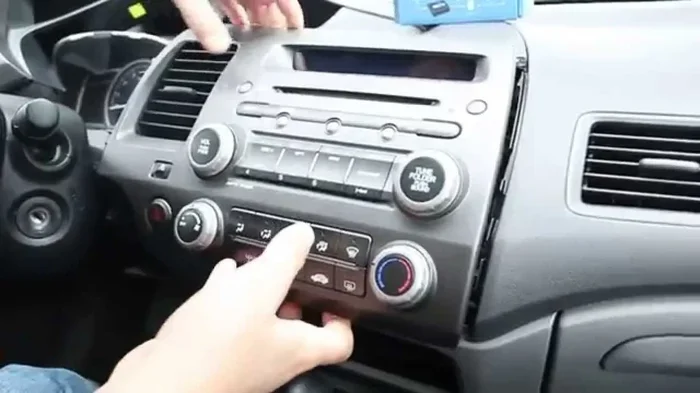
Look at your car’s infotainment screen. If your Civic has Bluetooth, you should see a Bluetooth icon or a phone menu option in the audio settings. Press the phone or setup button on the stereo unit and look for a Bluetooth or Phone menu. If you see options like “Add Device,” “Pair Phone,” or “Bluetooth Settings,” your car has Bluetooth capability.
Look for the Bluetooth Button
Check the steering wheel or the stereo face for a dedicated Bluetooth button. Many 2012 Honda Civics with Bluetooth have a phone icon button on the steering wheel controls. Pressing it should bring up the phone menu on the stereo screen.
Check the Owner’s Manual
Your owner’s manual is one of the best resources for figuring out what features your car has. Look up the audio system section and search for Bluetooth. The manual will tell you exactly what connectivity options came with your trim level.
Look at the VIN
If you have the vehicle identification number, you can look up the exact factory options for that specific car. Honda’s website and various VIN decoder tools let you enter the VIN and see the full list of features and options. This is the most accurate way to confirm Bluetooth availability.
Adding Bluetooth to a 2012 Honda Civic Without It
Here is the good news. Even if your 2012 Honda Civic does not have Bluetooth from the factory, you are not stuck without wireless connectivity. There are several affordable and effective ways to add Bluetooth to your car. Let me share the best options.
Bluetooth FM Transmitter
A Bluetooth FM transmitter is the cheapest and easiest way to add wireless audio to your car. These small devices plug into your cigarette lighter or USB port and broadcast audio over an FM frequency that your car stereo can pick up. You pair your phone with the transmitter just like you would with a factory Bluetooth system. The sound quality is decent, and these devices usually cost between $15 and $40.
One thing to keep in mind is that FM transmitters can sometimes pick up interference from other radio stations. Choose a frequency that is clear in your area for the best results.
Bluetooth Adapter for the Aux Port
If your 2012 Honda Civic has an auxiliary input jack (the 3.5mm headphone-style port), you can use a Bluetooth adapter that plugs directly into it. These adapters are small and unobtrusive. They connect to your phone via Bluetooth and then send the audio signal through the aux cable to your car stereo. The sound quality is usually better than an FM transmitter because it uses a direct audio connection.
Aftermarket Stereo Replacement
If you want a more permanent and premium solution, consider replacing your factory stereo with an aftermarket unit. Modern stereos from brands like Pioneer, Kenwood, and Alpine come with built-in Bluetooth, USB ports, and even Apple CarPlay or Android Auto compatibility. This is the most expensive option, but it also gives you the best sound quality and the most features. An aftermarket stereo installation typically costs between $150 and $400 including the unit and labor.
Bluetooth Car Kit
A dedicated Bluetooth car kit is another option. These kits usually include a microphone and a small receiver that you mount in your car. They connect to your stereo through the auxiliary input or FM transmitter and provide both hands-free calling and audio streaming. These kits are a clean-looking option that keeps your dashboard uncluttered.
Quick Comparison of Bluetooth Add-On Options
| Option | Price Range | Sound Quality | Installation Difficulty | Features |
|---|---|---|---|---|
| FM Transmitter | $15 – $40 | Good | Very Easy | Audio streaming only |
| Aux Bluetooth Adapter | $20 – $50 | Very Good | Easy | Audio streaming only |
| Aftermarket Stereo | $150 – $400 | Excellent | Moderate | Audio, calls, USB, apps |
| Bluetooth Car Kit | $30 – $80 | Good | Easy to Moderate | Audio streaming and calls |
No matter which option you choose, adding Bluetooth to a 2012 Honda Civic is very doable. Most of these solutions take less than 15 minutes to set up, and you do not need any special tools or technical skills. If you are interested in learning more about car audio upgrades, our article on how to upgrade your vehicle covers a wide range of improvements you can make to your car.
Is the 2012 Honda Civic Still a Good Car Today?
Even though the 2012 model is now over a decade old, the Honda Civic remains a strong choice for used car buyers. Honda Civics are known for their longevity, reliability, and low maintenance costs. Many 2012 Civics are still on the road today with well over 150,000 miles on the odometer. If you are considering buying a used 2012 Civic, you are looking at a car that should serve you well for years to come.
The 2012 Honda Civic is also a good car in various weather conditions. Whether you live in a rainy climate or deal with occasional snow, the Civic handles well and stays predictable on the road. For more information on how the Civic performs in winter weather, check out our article on are Honda Civics good in the snow.
One thing to keep in mind is that the 2012 Civic does not have all the modern tech features that newer cars offer. No touch screen, no backup camera (standard on all 2012 Civics), and limited connectivity options. But for a car that was built to be practical and affordable, these limitations are easy to work around. And as I have shown in this article, adding Bluetooth is a quick and affordable fix that brings your 2012 Civic up to speed with modern convenience.
When it comes to overall reliability, the 2012 Honda Civic is one of the better choices in the used car market. Honda has a strong reputation for building cars that last, and the Civic is no exception. For a deeper look at Honda Civic reliability, you can read our article on are Honda Civics reliable for a comprehensive breakdown of what owners can expect.
Common Bluetooth Problems and How to Fix Them
Even with a factory Bluetooth system, you may run into issues from time to time. Bluetooth technology has improved over the years, but it is not perfect. Here are some common problems and their solutions.
Phone Will Not Pair
If your phone will not connect to your 2012 Honda Civic’s Bluetooth, try these steps. First, make sure Bluetooth is turned on in your phone settings. Then, delete the car from your phone’s Bluetooth memory and try pairing again. Sometimes simply restarting both devices solves the problem. If you still have issues, check that your car is in pairing mode by pressing the Bluetooth button on the stereo.
Audio Cuts Out or Crackles
If your Bluetooth audio keeps cutting out or sounds crackly, the most common cause is distance or interference. Stay within about 10 feet of the car’s antenna for the best connection. Also, make sure nothing else is connected to your car’s audio system that might interfere. If the problem persists, try unpairing and re-pairing your devices.
Phone Connects But No Audio
If your phone connects to Bluetooth but you cannot hear any audio, check your car’s audio settings. Make sure the audio source is set to Bluetooth and not the radio or CD player. Also check your phone’s volume and the car’s volume separately. Sometimes the phone mutes its audio output when connected to a car Bluetooth system, and you need to turn the media volume back up on your phone.
Bluetooth Keeps Disconnecting
A Bluetooth connection that keeps dropping can be frustrating. This usually happens when another device tries to connect or when the phone moves out of range. Make sure only one device is paired and connected at a time. If you have multiple phones in the car, the system may get confused. Turn off Bluetooth on any other devices in the vehicle to keep a stable connection.
Final Thoughts on Bluetooth in the 2012 Honda Civic
So, do 2012 Honda Civics have Bluetooth? The answer is yes, but with conditions. The EX trim and above usually come with Bluetooth hands-free calling, and many also offer wireless audio streaming. The base LX trim typically does not include Bluetooth, but you can easily add it with an affordable adapter or transmitter.
The 2012 Honda Civic is a versatile and reliable car that can be upgraded to meet your connectivity needs. Whether you go with a simple FM transmitter or invest in a full aftermarket stereo, adding Bluetooth is one of the best upgrades you can make. It transforms your daily driving experience and lets you enjoy your favorite music, podcasts, and hands-free calls without wires.
If you are shopping for a used 2012 Honda Civic, make sure to confirm the Bluetooth features before you buy. Check the trim level, look for the Bluetooth menu in the stereo, and test the connection with your phone. A little homework upfront can save you a lot of hassle later.
Bluetooth technology has come a long way, and even a 2012 Honda Civic can benefit from it. With the right setup, your Civic can feel almost as connected as a brand-new car. Enjoy the wireless freedom, and happy driving.
Frequently Asked Questions
Do all 2012 Honda Civics have Bluetooth?
No, not all 2012 Honda Civics come with Bluetooth. The feature is typically standard on the EX trim and above, but the base LX trim usually does not include Bluetooth. You can check your specific car by looking for a Bluetooth or Phone menu in the stereo settings.
Can I add Bluetooth to a 2012 Honda Civic that does not have it?
Yes, absolutely. You can add Bluetooth using an FM transmitter, a Bluetooth aux adapter, or by replacing the factory stereo with an aftermarket unit. Each option is affordable and easy to install, with most setups taking less than 15 minutes.
What is the difference between Bluetooth hands-free calling and wireless audio streaming?
Hands-free calling lets you make and receive phone calls through your car speakers using Bluetooth. Wireless audio streaming lets you play music, podcasts, and audiobooks from your phone through the car’s audio system. These are two separate Bluetooth profiles, and not all 2012 Honda Civics have both.
How do I know if my 2012 Honda Civic has wireless audio streaming?
Check your stereo settings for a Bluetooth or Phone menu. If you see an option for media audio or A2DP, your car supports wireless audio streaming. You can also look for the Bluetooth icon on the stereo screen when connected.
What is the best Bluetooth adapter for a 2012 Honda Civic?
The best adapter depends on your budget and needs. A Bluetooth FM transmitter is the cheapest and easiest option. For better sound quality, a Bluetooth aux adapter that plugs into the 3.5mm jack is a great choice. If you want a full upgrade, consider an aftermarket stereo with built-in Bluetooth and USB connectivity.
Is Bluetooth in a 2012 Honda Civic safe to use while driving?
Yes, Bluetooth hands-free calling is designed to be safer than holding your phone while driving. It keeps your hands on the wheel and your eyes on the road. However, it is still important to stay focused and limit distractions while operating any vehicle.