How to Reset the Maintenance Light on a 2011 Toyota Matrix
Resetting the maintenance light on a 2011 Toyota Matrix is a quick DIY task you can do at home. The process involves using your trip meter or turn signal stalk to clear the service reminder. This guide walks you through every step with clear instructions and helpful tips.
That little yellow or orange light on your dashboard just popped up, and now it’s staring at you every time you drive. If you own a 2011 Toyota Matrix, you have probably seen the maintenance light come on more than once. It can be annoying, confusing, and sometimes a little scary.
Here is the good news. Resetting the maintenance light on a 2011 Toyota Matrix is one of the easiest things you can do yourself. You do not need expensive tools, and you definitely do not need to visit a mechanic or dealership for this. In about five minutes, you can clear that light and get back to driving with peace of mind.
This guide covers everything you need to know. From understanding why the light came on in the first place, to the exact step-by-step reset process, to what to do if the light keeps coming back. Let us get started.
Key Takeaways
- Easy DIY Process: You can reset the maintenance light on your 2011 Toyota Matrix without visiting a mechanic or dealership.
- Two Methods Available: Use either the trip meter reset button or the turn signal stalk, depending on your preference.
- Drives Safe After Reset: The maintenance light is a service reminder, not a serious warning that stops your car from running.
- Regular Maintenance Matters: Resetting the light is just the beginning. Following the Toyota maintenance schedule keeps your Matrix running strong.
- Common Mistakes Happen: Avoid holding buttons too long or skipping the ignition steps to prevent reset issues.
- Light Won’t Turn Off? There are troubleshooting steps you can try before seeking professional help.
📑 Table of Contents
- Understanding the Maintenance Light on Your 2011 Toyota Matrix
- Tools You Will Need Before Starting
- Step-by-Step Guide to Reset the Maintenance Light on a 2011 Toyota Matrix
- Common Mistakes When Resetting the Maintenance Light
- When the Maintenance Light Won’t Turn Off
- Maintaining Your 2011 Toyota Matrix Beyond the Reset
- Final Thoughts
Understanding the Maintenance Light on Your 2011 Toyota Matrix
Before we jump into the reset process, let us talk about what this light actually means. Many drivers see the maintenance light and think something is seriously wrong with their car. That is almost never the case.
What Triggers the Maintenance Light?
The maintenance light on a 2011 Toyota Matrix is a service interval reminder. Toyota programmed it to come on after a certain number of miles. For most Matrix models, this happens around every 5,000 miles. It is essentially your car saying, “Hey, it is time for an oil change or routine checkup.”
The light is not the same as the check engine light. The check engine light signals a problem with your engine or emissions system. The maintenance light is purely a reminder. It tracks your service interval based on mileage and lets you know when it is time for scheduled maintenance.
Common reasons the light triggers include:
- Reaching the 5,000-mile service milestone
- Completing an oil change without resetting the counter
- Battery replacement that reset the trip meter
- Ignoring the light for too many miles
Can You Drive With the Maintenance Light On?
Yes, you absolutely can. The maintenance light does not affect how your car drives or performs. You can drive with the maintenance required light on in a Toyota without any risk to your engine or safety. That said, you should not ignore it forever. The light is reminding you that your car is due for routine service like an oil change, tire rotation, or fluid check.
If you are planning a long road trip and the light is on, do not worry. Your 2011 Toyota Matrix will run just fine. Just make sure you schedule service soon after your trip.
Tools You Will Need Before Starting
One of the best things about resetting the maintenance light on a 2011 Toyota Matrix is that you need almost nothing. Here is a quick list:
- Your 2011 Toyota Matrix with the key or push-start button
- A flat surface to park on
- Your owner’s manual (optional but helpful)
- A few minutes of your time
That is it. No special equipment. No mechanic tools. No computer scanner. The reset process is built right into the car’s dashboard system. This is one of the simplest maintenance tasks you will ever do.
If you have misplaced your owner’s manual, do not stress. The steps below cover both common methods for resetting the light. You can also check the Toyota owner’s manual online for free through the Toyota website.
Step-by-Step Guide to Reset the Maintenance Light on a 2011 Toyota Matrix
Now for the part you have been waiting for. Here are the two proven methods to reset the maintenance light. Follow them carefully and you will have that light off in no time.
Method 1: Using the Trip Meter Reset Button
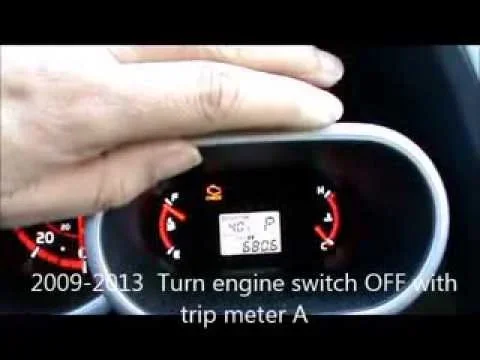
This is the most common method for the 2011 Toyota Matrix. The trip meter button is usually located on the dashboard cluster, near the speedometer or odometer. Some models place it on the left side of the steering column.
Follow these steps carefully:
- Turn the ignition to the “ON” position. Do not start the engine. Just press the start button once or turn the key to the “ON” setting. The dashboard lights will come on.
- Locate the trip meter reset button. It is usually labeled “TRIP” or “RESET.” Press and hold this button.
- You will see the maintenance light start to flash. Keep holding the button. The flashing means the system is entering reset mode.
- Hold the button for about 10 seconds. The maintenance light should turn off and stay off.
- Release the button and turn the ignition off. Then turn it back on to check if the light is gone.
If the light stays off after you turn the key back on, congratulations. You successfully reset the maintenance light on your 2011 Toyota Matrix.
Method 2: Using the Turn Signal Stalk
Some 2011 Toyota Matrix models use the turn signal stalk for the reset process. This method works similarly but uses a different button location.
Here is how to do it:
- Turn the ignition to the “ON” position without starting the engine.
- Move the turn signal stalk into the neutral center position.
- Look for a small reset button on the stalk or nearby on the dashboard.
- Press and hold the reset button until the maintenance light begins to flash.
- Continue holding for 10 to 15 seconds until the light turns off.
- Release the button and cycle the ignition off and back on to confirm the reset.
Both methods work well. If one does not seem to work for your specific Matrix, try the other. Some owners report that Method 1 works more consistently, but your experience may vary depending on your exact trim level and configuration.
Quick Tip: If the maintenance light is flashing instead of staying solid, that usually means the system is already in reset mode. Just hold the button and wait for it to stop flashing.
Common Mistakes When Resetting the Maintenance Light
Even though this is a simple process, mistakes happen. Here are the most common ones and how to avoid them.
- Starting the engine during the reset. Keep the ignition in “ON” only. Starting the engine can interrupt the reset process and make the light come back on.
- Releasing the button too early. You need to hold the button for a full 10 to 15 seconds. Letting go after just a few seconds will not work.
- Pressing the wrong button. Make sure you are pressing the trip reset or stalk reset button, not the odometer button or any other dashboard control.
- Turning the ignition off too soon. After the light goes off, turn the ignition off first, then back on to verify. Rushing this step can undo your progress.
- Ignoring the light after reset. If you reset the light but do not actually perform the scheduled maintenance, you are just hiding a reminder. The light will come back once you hit the next mileage interval.
Avoiding these mistakes will save you frustration and make the reset process smooth the first time.
When the Maintenance Light Won’t Turn Off
Sometimes, despite your best efforts, the maintenance light on a 2011 Toyota Matrix just will not go away. This can be frustrating, but it is usually fixable. Here is what to do when the standard reset methods do not work.
Could It Be a Deeper Issue?
In rare cases, a persistent maintenance light might indicate something beyond a simple service reminder. The light could be connected to an underlying issue that needs attention. For example, if you recently had work done on your car and the light appeared afterward, the service technician may not have cleared the code properly.
Here are a few things to check:
- Make sure you have reached the correct mileage for the service interval
- Check if the maintenance light stays on after a battery disconnect or replacement
- Verify that no other dashboard warning lights are also illuminated
- Confirm that your oil level is adequate and the oil change was completed
If none of these apply and the light keeps returning after reset, it may be time to visit a Toyota dealership or qualified mechanic. They have diagnostic tools that can read the specific code behind the light and address any underlying issues.
Remember, the maintenance light is different from the check engine light. If your check engine light is on, that is a separate issue. You can drive my Toyota Camry with the check engine light on for short distances, but the same does not apply to all warning lights. Always pay attention to what each dashboard symbol means.
Maintaining Your 2011 Toyota Matrix Beyond the Reset
Resetting the maintenance light is just one piece of the puzzle. Keeping your 2011 Toyota Matrix in great shape requires ongoing care and attention. Here are some tips to go beyond the reset and keep your car running strong for years to come.
Follow the Toyota Maintenance Schedule
Toyota provides a detailed maintenance schedule for every model year. For the 2011 Matrix, this includes regular oil changes every 5,000 miles, tire rotations, brake inspections, and fluid checks. Following this schedule is the best way to prevent unexpected breakdowns and keep your car running smoothly.
Keep Records of Your Service
Every time you get your Matrix serviced, write down the date, mileage, and what was done. This log helps you track your car’s health and makes it easier to reset the maintenance light at the right time. It also adds value if you ever decide to sell the car.
Do You Reset After Every Oil Change?
Yes. After every oil change, you should reset the maintenance light so the counter starts fresh. This ensures the light comes on at the right time for your next service. Skipping the reset means the light may come on too early or too late, and you might miss your actual service window.
Final Thoughts
Resetting the maintenance light on a 2011 Toyota Matrix is a simple, satisfying DIY task. You do not need to spend money at a dealership or wait for a mechanic appointment. With just a few button presses, you can clear that dashboard reminder and keep driving confidently.
The key is to follow the steps carefully, avoid the common mistakes, and remember that the maintenance light is just a friendly reminder. It is not a warning sign of a broken car. It is your Toyota telling you it is time for some routine TLC.
Keep up with your maintenance schedule, reset the light after each service, and your 2011 Toyota Matrix will reward you with reliable performance for many miles to come. Happy driving!
Frequently Asked Questions
How do I reset the maintenance light on a 2011 Toyota Matrix?
Turn the ignition to the “ON” position without starting the engine. Locate the trip meter reset button on the dashboard or the reset button on the turn signal stalk. Press and hold the button for 10 to 15 seconds until the maintenance light stops flashing and turns off. Then turn the ignition off and back on to confirm the reset.
Can I drive my 2011 Toyota Matrix with the maintenance light on?
Yes, you can safely drive with the maintenance light on. The light is simply a service interval reminder and does not affect your car’s performance or safety. However, you should schedule your next oil change or routine service as soon as possible to keep your Matrix in good shape.
Why does the maintenance light keep coming back after I reset it?
The maintenance light is tied to your mileage counter. It will return once you reach the next service interval, typically around 5,000 miles. If the light keeps coming back immediately after resetting, you may not have held the button long enough during the reset process, or there could be an underlying issue that needs professional diagnosis.
Do I need any special tools to reset the maintenance light?
No special tools are needed at all. The reset process is built into the 2011 Toyota Matrix dashboard system. You only need your ignition key or push-start button and access to the trip meter or turn signal stalk reset button. It takes just a few minutes to complete.
Is the maintenance light the same as the check engine light?
No, they are completely different. The maintenance light is a service reminder that comes on at scheduled mileage intervals. The check engine light signals an actual problem with your engine or emissions system. If your check engine light is on, that requires a different response and possibly a diagnostic scan.
What should I do if the maintenance light will not turn off?
First, try both reset methods described in this guide. If the light still will not turn off, check that you are following the steps correctly and holding the button long enough. If the problem persists, visit a Toyota dealership or qualified mechanic who can run a diagnostic check and address any underlying issues causing the light to stay on.