Does Toyota Come With HomeLink Everything You Need To Know
Does Toyota come with HomeLink? Many new Toyota models include a factory-installed HomeLink garage door opener, but availability varies by trim and year. This guide covers which Toyotas have HomeLink, how to check for it, programming steps, and compatibility with your garage door system. You’ll also learn quick tips and common mistakes to avoid.
Does Toyota come with HomeLink? This is one of the most common questions new car buyers ask. The answer is not a simple yes or no. Many Toyota models offer HomeLink as a standard feature on higher trims or as an optional add-on. Some older models and base trims do not include it at all. In this guide, we will walk you through everything you need to know about Toyota HomeLink. You will learn which Toyotas have it, how to check if your car has it, and how to program it. We will also cover compatibility with your existing garage door opener and share practical tips to avoid common problems.
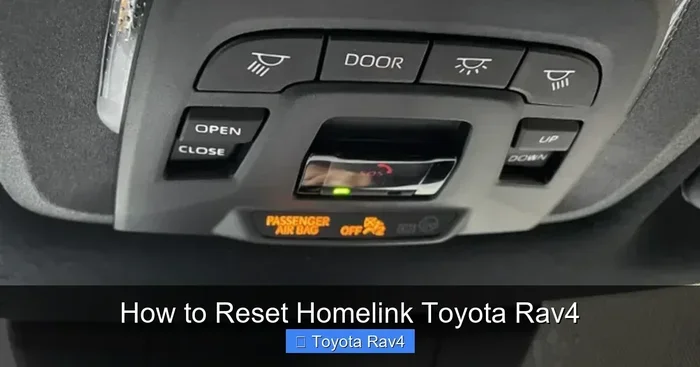
HomeLink is a convenient wireless system that replaces the need for a separate garage door remote. It is built directly into your Toyota, usually near the rearview mirror or on the overhead console. When you press the button, it sends a signal to your garage door opener. This means you never have to fumble for a handheld remote again. The system is designed to work with most garage door operators, but there are a few exceptions. Understanding how Toyota HomeLink works will save you time and frustration.
Key Takeaways
- HomeLink is not standard on every Toyota: It depends on the model, trim level, and model year.
- You can check your car two ways: Look for the HomeLink buttons on the overhead console or mirror, or verify via the VIN.
- Programming is simple: Follow a three-step process that takes about two minutes once you know the steps.
- Compatibility matters: Older garage door openers may need a universal receiver or an aftermarket HomeLink adapter.
- Security is built in: HomeLink uses rolling codes, so it is safer than fixed-code remotes.
- Dealers can help: If you are unsure, a Toyota dealer can confirm features and assist with programming.
📑 Table of Contents
- What Is HomeLink and Why Does It Matter?
- Does Every Toyota Come With HomeLink?
- How to Check If Your Toyota Has HomeLink
- Garage Door Opener Compatibility
- Programming Your Toyota HomeLink
- HomeLink Maintenance and Troubleshooting
- Is HomeLink Secure?
- Frequently Asked Questions About Toyota HomeLink
- Final Thoughts on Toyota HomeLink
What Is HomeLink and Why Does It Matter?
How HomeLink Works
HomeLink is a small radio transmitter integrated into your Toyota. It operates on the same frequency as your garage door opener, typically 300 MHz or 390 MHz. When you press a HomeLink button, it sends a coded signal to the garage door motor. Modern HomeLink systems use a rolling code technology, which changes the signal every time you press the button. This makes it much more secure than older fixed-code remotes. The system is hardwired into the vehicle’s electrical system, so it does not rely on batteries.
Benefits of Having HomeLink in Your Toyota
- Convenience: Open your garage door without taking your eyes off the road.
- Clean look: No bulky aftermarket remote hanging from your rearview mirror.
- Vehicle-specific integration: HomeLink is designed to work seamlessly with your Toyota’s electronics.
- Multiple buttons: Most Toyotas have three HomeLink buttons, so you can program garage doors, gates, or lights.
- Resale value: A factory-installed HomeLink system is a desirable feature for many used car buyers.
Does Every Toyota Come With HomeLink?
The short answer is no. Not every Toyota model or trim includes HomeLink. Whether your car has it depends on the model, the trim level, and the model year. Toyota uses HomeLink as a premium convenience feature, so it is more common on higher-end trims and certain models. Let us break this down by model and trim.
Toyota Models That Include HomeLink
Many popular Toyota models offer HomeLink, often as part of a convenience package. Here are some of the most common models that include HomeLink:
- Toyota RAV4: Available on XLE and XSE trims, and standard on the Limited and Platinum trims.
- Toyota Camry: Included on XSE and XLE trims, and standard on the TRD and Hybrid trims.
- Toyota Highlander: Standard on XLE and above; available on the base L trim as part of an optional package.
- Toyota 4Runner: Available on SR5 and higher trims.
- Toyota Tundra: Included on XLE and higher trims.
- Toyota Sienna: Standard on XLE and above.
Trims and Packages That Offer HomeLink
Even if your model does not list HomeLink as standard, it may be available through an optional package. For example, the Toyota Convenience Package on the Corolla often includes HomeLink. The Toyota Premium Audio Package on the Tacoma may also bundle it. Always check the window sticker or the trim specification sheet when buying a used Toyota. If you are unsure about a specific vehicle, you can look up the VIN on Toyota’s website or ask the dealer. You can also refer to this guide on how to know if your car has Homelink for more details.
| Toyota Model | Trims with HomeLink | Standard or Optional |
|---|---|---|
| RAV4 | XLE, XSE, Limited, Platinum | Optional on base, standard on higher trims |
| Camry | XSE, XLE, TRD, Hybrid | Optional on base, standard on higher trims |
| Highlander | XLE, SE, Limited, Platinum | Optional on L, standard on XLE+ |
| 4Runner | SR5, TRD, Limited | Optional on base, standard on higher trims |
| Tundra | XLE, XLT, Limited, Platinum | Optional on base, standard on higher trims |
| Sienna | XLE, SE, XSE, Limited | Standard on XLE and above |
How to Check If Your Toyota Has HomeLink
If you already own a Toyota, you can quickly check whether it has HomeLink. There are two simple methods: a visual inspection and a VIN lookup. You do not need any special tools.
Looking for the HomeLink Button
Open your Toyota and look at the overhead console, just above the windshield. You are searching for a cluster of three small buttons, usually labeled 1, 2, and 3. They are often black or gray and sit near the rearview mirror. If you see these buttons, your Toyota has HomeLink. If your Toyota uses a mirror-mounted HomeLink system, the buttons will be embedded in the rearview mirror itself. This is common on newer models like the 2020 Toyota Camry and 2021 Toyota RAV4. If you do not see any buttons, your vehicle likely does not have factory HomeLink.
Using the Vehicle Identification Number (VIN)
Another reliable method is to use your VIN. You can enter the VIN on Toyota’s official website or use a free VIN decoder. The vehicle specifications will list HomeLink as a feature if it was installed at the factory. You can also call your local Toyota dealer with your VIN and ask them to confirm. If you are buying a used Toyota, always ask the seller to show you the HomeLink buttons before purchasing.
Garage Door Opener Compatibility
HomeLink is designed to work with the vast majority of garage door openers. However, compatibility depends on the type of opener you have. Understanding the difference between fixed code and rolling code systems is essential.
Fixed Code vs. Rolling Code Systems
Fixed code systems use the same code every time you press the button. These are older openers, typically found in garages built before 1995. HomeLink can usually learn a fixed code by holding the HomeLink button and the opener button simultaneously. Rolling code systems generate a new code each time, which is the standard for modern openers. HomeLink supports rolling code through a synchronization process. If your opener is very old, it may not be compatible with HomeLink without an additional receiver.
What If Your Opener Isn’t Compatible?
If your garage door opener is not compatible with HomeLink, you have a few options. You can install a universal HomeLink-compatible receiver that plugs into your opener. Another option is to use an aftermarket universal remote that mimics HomeLink signals. Before buying any adapter, check your opener’s model number. You can learn more about compatibility by visiting this guide on how to know if your garage door opener is compatible with Homelink. This will save you time and money.
Programming Your Toyota HomeLink
Programming HomeLink is straightforward and takes less than five minutes. You will need your garage door opener remote and your Toyota. Follow these steps carefully.
Step-by-Step Programming Guide
- Turn on your Toyota. Insert the key or press the start button. Make sure the vehicle is in park.
- Locate the HomeLink buttons. Find the three buttons on the overhead console or mirror.
- Press and hold the desired HomeLink button. Hold it until the indicator light turns on. This usually takes about 20 seconds.
- Bring your garage door opener remote close to the HomeLink system. Press and hold the remote button simultaneously with the HomeLink button.
- Release both buttons when the HomeLink indicator light starts blinking. This means the system is learning the code.
- Press the programmed HomeLink button. Your garage door should open or close. If it does not, repeat the process.
Quick Tip: If you are programming a second or third HomeLink button, repeat the same process for each button. You can program up to three different devices, such as a garage door, a gate, or a home light.
Common Programming Issues and Fixes
- Indicator light does not blink: Make sure your Toyota is fully powered. Check the fuse for the HomeLink system if necessary.
- Garage door does not respond: Ensure your garage door opener remote has fresh batteries. Move the remote closer to the HomeLink system during programming.
- HomeLink button works intermittently: This can happen if the garage door opener is too far away during the learning process. Reposition the remote closer to the mirror.
- Rolling code not syncing: Some openers require you to press the “learn” button on the motor unit first. Check your opener’s manual.
HomeLink Maintenance and Troubleshooting
HomeLink is a durable system, but it can occasionally need attention. Regular maintenance is minimal. Here are the most common questions drivers ask.
Does HomeLink Need Maintenance?
HomeLink does not require routine maintenance. The system is solid-state and has no moving parts. However, if the buttons become sticky or unresponsive, you can clean them with a soft, dry cloth. Avoid using harsh chemicals. If the HomeLink indicator light fails to illuminate, the issue may be a blown fuse or a wiring problem. In that case, a visit to a Toyota dealer or a qualified mechanic is recommended.
When to Seek Professional Help
If you have tried reprogramming and the HomeLink still does not work, it is time to seek help. A Toyota dealer can run a full diagnostic on the HomeLink module. They can also check whether the wiring harness is intact. Sometimes, a HomeLink unit needs to be replaced entirely, but this is rare. Remember that unlike the ignition lock that secures the steering wheel, HomeLink is a convenience feature and does not affect vehicle security. It is safe to drive even if HomeLink stops working.
Is HomeLink Secure?
Security is a top concern for any wireless system. HomeLink uses rolling code technology, which means the signal changes every time you use it. This prevents unauthorized access. Older fixed-code remotes can be vulnerable to code grabbers, but HomeLink is much safer. If you are still concerned, you can always keep your garage door opener remote in a safe place and use HomeLink for daily convenience. The system is designed to work alongside your existing garage door security features.
Frequently Asked Questions About Toyota HomeLink
Here are answers to some of the most common questions we hear about Toyota HomeLink.
- Can I install HomeLink myself? Yes, programming HomeLink is a DIY task that takes just a few minutes. No special tools are needed.
- Does HomeLink work with all garage door brands? HomeLink works with most major brands, including Chamberlain, LiftMaster, Craftsman, and Genie. If you have an older or specialty opener, you may need an adapter.
- Is HomeLink the same as a universal remote? HomeLink is integrated into the vehicle, while a universal remote is a separate device. HomeLink is more convenient and looks cleaner.
- Can I use HomeLink for anything other than garage doors? Yes, you can program HomeLink to control gates, lighting, and other compatible devices.
- Does HomeLink drain the car battery? No, HomeLink draws very little power and will not drain your battery.
- What should I do if I buy a used Toyota without HomeLink? You can have an aftermarket HomeLink system installed by a dealer or an auto electrician. It is a straightforward upgrade.
Final Thoughts on Toyota HomeLink
So, does Toyota come with HomeLink? For many drivers, the answer is yes. HomeLink is a valuable convenience feature that adds ease and comfort to your daily routine. Whether you have a Toyota RAV4, Camry, Highlander, or another model, there is a good chance it includes HomeLink, especially on higher trims. If your Toyota does not have it, you can always add an aftermarket system or check compatibility with your garage door opener. Programming is simple, and the system is built to last. Now that you know everything about Toyota HomeLink, you can make an informed decision the next time you are in the market for a new or used Toyota. Enjoy the convenience of a garage door that opens with the touch of a button.