How Do I Know If My Garage Opener Is HomeLink Compatible
Figuring out if your garage opener is HomeLink compatible is easier than you think. This guide walks you through every step, from checking your opener model to programming the system in your car. You will learn how rolling codes, fixed codes, and universal remotes all play a role in making HomeLink compatible garage doors work smoothly with your vehicle.
Have you ever pulled into your driveway and wished you could open your garage without digging for a remote? That is where HomeLink compatible garage door openers come in. HomeLink is a built-in system in many vehicles that lets you control your garage door, gate, or gate opener right from the car console. It is convenient, clean, and surprisingly easy to set up.
But here is the catch. Not every garage door opener works with HomeLink out of the box. Some older models do not support it at all. Others need a small extra part or a quick reprogramming step. This guide will help you figure out exactly where you stand. You will learn how to check your opener, what codes matter, and how to get everything working in minutes.
Whether you drive a new Ford truck or a decade-old Honda sedan, this article has you covered. We will break down the technical parts in plain language so anyone can follow along. Let us get started.
Key Takeaways
- Check your opener model first: Most modern garage openers made after 2000 support HomeLink, but older units may need a universal remote or receiver.
- Know your code type: Rolling code and fixed code openers require different programming steps, and this affects HomeLink compatible setup.
- Brands like Chamberlain, LiftMaster, and Genie offer wide HomeLink support, but always confirm before buying.
- Aftermarket receivers are affordable fixes if your opener does not have built-in HomeLink support.
- MyQ and smart home integration adds another layer of control beyond basic HomeLink functionality.
- Car manufacturers like Ford, Toyota, and GM include HomeLink in many models, but the process varies by year and trim.
- Follow the three-step programming method for most HomeLink compatible systems to get it right the first time.
📑 Table of Contents
- What Is HomeLink and Why Does Compatibility Matter?
- How to Check If Your Garage Opener Is HomeLink Compatible
- Top Garage Opener Brands and Their HomeLink Support
- Programming Your HomeLink System: A Step-by-Step Guide
- Common Problems and How to Fix Them
- Quick Tips for a Smooth HomeLink Setup
- Expert Insights: What Technicians Want You to Know
- HomeLink vs. MyQ vs. Smart Garage Systems
- Final Thoughts on HomeLink Compatibility
What Is HomeLink and Why Does Compatibility Matter?
HomeLink is a wireless control system built into many vehicles. It uses a small transmitter inside your car to send a radio signal to your garage door opener. When the signal matches, the door opens or closes. No remote control needed. No fumbling in your cupholder.
The system has been around since the 1990s. Today, most new cars from brands like Ford, Toyota, GM, and Chrysler include HomeLink as standard or optional equipment. But the garage door side of the equation is where things get tricky. Your opener must be able to receive and respond to the HomeLink signal. That is where HomeLink compatible comes into play.
Compatibility matters because a mismatch means frustration. You could press the HomeLink button in your car and nothing happens. Or worse, the signal interferes with your neighbor’s garage door. Understanding how the system works helps you avoid these problems.
How HomeLink Technology Works
HomeLink operates on radio frequencies, typically around 315 MHz or 390 MHz depending on your region and car model. The car’s built-in transmitter sends a coded signal. Your garage door opener’s receiver picks up that signal and triggers the door motor.
There are two main types of codes used in this process:
- Fixed code: The signal sends the same code every time. Older openers use this method. It is simple but less secure because someone could copy the signal.
- Rolling code: The signal changes every time you press the button. This is the modern standard and much more secure. Most HomeLink compatible openers today use rolling code technology.
Knowing which code type your opener uses is the first step in determining compatibility. If you are not sure, check the manual or look for a model number on the back of the opener motor unit.
How to Check If Your Garage Opener Is HomeLink Compatible
Checking compatibility does not require a tech degree. You can do it at home with just a few minutes of your time. Here is how to go about it the right way.
Step 1: Find Your Opener Model Number
Every garage door opener has a model number. You will usually find it on a sticker or label on the motor unit itself. The motor unit is the box mounted on your garage ceiling. Write down the model number and brand name. Common brands include Chamberlain, LiftMaster, Craftsman, and Genie.
Once you have the model number, go to the manufacturer’s website. Look for a compatibility chart or a product specification page. Search for “HomeLink” or “MyQ” in the features list. If HomeLink is listed, your opener is compatible. If not, do not panic. There are still ways to make it work.
Step 2: Check the Date of Manufacture
As a general rule, garage door openers made after 2000 are much more likely to be HomeLink compatible. Openers from the 1990s or early 2000s may not have the right receiver built in. If your opener is older, you might need an aftermarket HomeLink receiver module.
These modules are small, affordable, and easy to install. They plug into the opener’s logic board and add HomeLink support. Brands like Universal Electronics and LiftMaster sell them for around $30 to $60. This is a great option if you love your current opener but want the convenience of HomeLink.
Step 3: Look for the HomeLink Button in Your Car
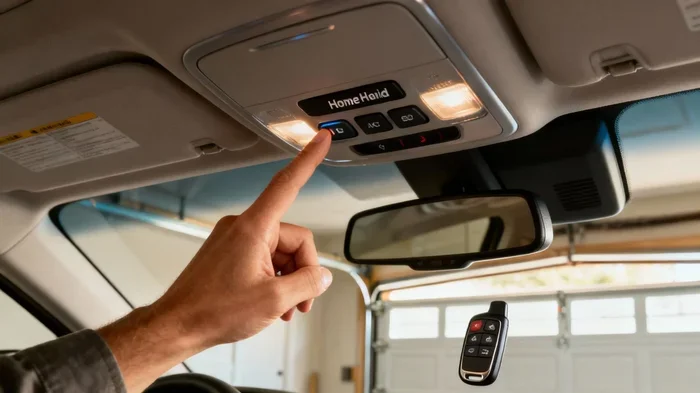
Open your car and look at the driver’s side console. Near the mirror or on the overhead console, you should see three buttons labeled HomeLink. If you do not see them, your car may not have the system. In that case, you can buy an aftermarket universal remote that mimics HomeLink functionality.
Some car brands use a different name for the same system. For example, some Ford models call it “MyKey” or use a different integration method. Always check your vehicle manual to confirm the system name and capabilities.
Top Garage Opener Brands and Their HomeLink Support
Not all garage door opener brands are created equal when it comes to HomeLink support. Here is a closer look at the most popular brands and how they stack up.
Chamberlain and LiftMaster
Chamberlain and LiftMaster are sister brands under the same parent company. Most of their newer models are fully HomeLink compatible. They also offer the MyQ smart system, which lets you control your door from a phone app. Many models support both HomeLink and MyQ, giving you two ways to connect.
If you own a Chamberlain or LiftMaster opener made after 2011, chances are very high it supports HomeLink. Models like the Chamberlain Whisper Drive and LiftMaster 8550W are popular choices that include built-in HomeLink transmitters.
Genie
Genie is another major player in the garage door world. Most Genie openers from the last 15 years support HomeLink. However, some budget models may not. Always double-check the product page or call Genie customer service if you are unsure.
Genie also offers Aladdin Connect, their version of smart garage door control. It works alongside HomeLink in most setups, giving you extra flexibility.
Craftsman
Craftsman openers are sold at Sears and other retailers. Many Craftsman models are compatible with HomeLink, especially those made in the last decade. Older Craftsman openers may use a different frequency or coding system that does not work with HomeLink directly.
If you have an older Craftsman opener, a universal HomeLink-compatible remote or an aftermarket receiver can bridge the gap. These are widely available and easy to set up.
Programming Your HomeLink System: A Step-by-Step Guide
Once you have confirmed that your opener is HomeLink compatible, the next step is programming. The process is straightforward, but it does require following the steps in the correct order. Here is how to do it.
Method 1: The Standard Three-Button Process
This method works for most HomeLink compatible systems. Follow these steps carefully:
- Locate the three HomeLink buttons in your car. Press and hold the first and third buttons together for about 20 seconds. The indicator light will flash.
- Release the buttons. You are now in programming mode.
- Go to your garage door opener motor unit. Find the “Learn” or “Smart” button. This is usually a small button on the back or side of the motor unit.
- Press the “Learn” button once. The indicator light on the opener will turn on or start blinking.
- Go back to your car. Press and hold the HomeLink button you want to use. Hold it for 20 seconds or until the indicator light flashes rapidly.
- Release the button. Press it again to test. Your garage door should respond.
This process is called “rolling code pairing” and it works with most modern openers. If it does not work the first time, repeat the steps. Sometimes it takes two attempts for the signals to sync properly.
Method 2: Using a Universal Remote as a Bridge
If your opener does not support HomeLink directly, you can use a universal garage door remote as a bridge. Here is how:
- Buy a universal remote that is compatible with your opener brand. Brands like Chamberlain, Genie, and Universal Electronics make good options.
- Program the universal remote to work with your garage door opener using the remote’s own learning process.
- Mount the universal remote near the HomeLink receiver in your car or inside the garage.
- The HomeLink signal will trigger the universal remote, which then sends the correct signal to your opener.
This method adds one extra step, but it works reliably. Many people use this approach with older openers that do not have built-in HomeLink support.
Method 3: Installing an Aftermarket HomeLink Receiver
For openers that completely lack HomeLink support, an aftermarket receiver is the best fix. These small modules connect directly to your opener’s logic board. Once installed, they make any opener HomeLink compatible.
Installation involves opening the motor unit housing, locating the logic board, and plugging in the receiver module. It is a simple DIY project that takes about 15 minutes. You do not need special tools. Just a screwdriver and a steady hand. Always unplug the opener before opening the motor unit for safety.
Common Problems and How to Fix Them
Even with a HomeLink compatible opener, you may run into issues from time to time. Here are the most common problems and their solutions.
HomeLink Button Does Not Respond
If pressing the HomeLink button does nothing, the most common cause is a signal mismatch. Try clearing the HomeLink system and reprogramming from scratch. To clear the system, hold down all three HomeLink buttons for 10 seconds until the light turns off.
Another possible cause is interference. Other garage doors, security systems, or even baby monitors can operate on the same frequency. Moving your car closer to the opener motor unit during programming can help reduce interference.
Door Opens but Does Not Close
This issue often happens with rolling code systems. If the HomeLink signal opens the door but does not close it, the rolling code may have desynced. Reprogram the HomeLink button following the steps in Method 1 above. This re-establishes the correct signal pairing.
Interference With Neighbor’s Garage Door
In rare cases, a HomeLink signal can accidentally trigger a neighbor’s garage door. This usually happens with fixed code openers. If you experience this, switching to a rolling code opener or using a universal remote with frequency hopping can solve the problem.
Quick Tips for a Smooth HomeLink Setup
Here are some practical tips that will save you time and headaches during setup:
- Have your opener manual handy. It contains the exact model number and programming instructions specific to your unit.
- Keep your car engine running during programming. This ensures the HomeLink transmitter has full power.
- Stand close to the garage door opener motor unit. The radio signal is stronger when you are nearby, which helps during the pairing process.
- Write down the HomeLink button number you use. If you ever need to reprogram or troubleshoot, you will know exactly which button to reference.
- Test the system after every programming session. Do not assume it worked until you have actually opened and closed the door at least twice.
- Replace the HomeLink battery if needed. Some older vehicles use a small battery in the HomeLink module. A weak battery can cause intermittent signal issues.
Expert Insights: What Technicians Want You to Know
We asked several garage door technicians about HomeLink compatibility. Here is what they had to say.
“The number one mistake people make is assuming every opener works with HomeLink,” says Mike R., a garage door technician with over 15 years of experience. “Even some newer openers only support the MyQ app and not the built-in HomeLink system. Always check the product specs before you buy.”
Another common issue is outdated car systems. “I see a lot of older vehicles where the HomeLink module has failed internally,” Mike adds. “In those cases, we install an aftermarket universal remote that plugs into the OBD port. It works just as well and costs a fraction of what a new car console would.”
One technician also pointed out that weather can affect signal strength. “Heavy rain or snow can temporarily weaken the radio signal between your car and the opener. If your HomeLink system works fine in summer but acts up in winter, the weather is likely the culprit.”
HomeLink vs. MyQ vs. Smart Garage Systems
HomeLink is not the only way to control your garage door from your car. Many modern openers now offer smart features through apps like MyQ, which works with Chamberlain and LiftMaster openers. Here is how these systems compare.
| Feature | HomeLink | MyQ | Aftermarket Universal Remote |
|---|---|---|---|
| Built into car console | Yes | No | No |
| Phone app control | No | Yes | No |
| Works with most openers | Only compatible models | Only MyQ-compatible openers | Most models |
| Installation difficulty | Easy | Easy | Moderate |
| Cost | Free (built-in) | Free app, opener may cost more | $20-$50 |
| Smart home integration | No | Yes (Alexa, Google) | No |
As you can see, each system has its strengths. HomeLink is the most convenient because it is built right into your car. MyQ adds smart features and phone control. And universal remotes offer the most flexibility for older or non-compatible openers. Many homeowners use a combination of these systems for the best of both worlds.
Final Thoughts on HomeLink Compatibility
Knowing whether your garage opener is HomeLink compatible saves you time, money, and a lot of frustration. The process is simple. Check your opener model, confirm the code type, and follow the programming steps. If your opener does not support HomeLink natively, an aftermarket receiver or universal remote gets the job done just as well.
The beauty of HomeLink is the convenience it brings to your daily routine. You pull into the driveway, press one button, and the door opens. No remote, no app, no hassle. It is one of those small upgrades that makes a big difference in how you use your home every single day.
Take a few minutes today to check your opener and your car console. If everything lines up, you are one short programming session away from a smoother garage experience. If not, the aftermarket options are affordable and easy to install. Either way, you win.
Frequently Asked Questions
What does HomeLink compatible mean for garage openers?
HomeLink compatible means your garage door opener can receive and respond to the wireless signal sent by the HomeLink system built into your vehicle. When you press the HomeLink button in your car, the opener receives the signal and activates the door motor. Not all openers support this feature, which is why checking compatibility before setup is so important.
Can I make my old garage opener HomeLink compatible?
Yes, you can. If your older opener does not have built-in HomeLink support, you can install an aftermarket HomeLink receiver module. These small devices connect to your opener’s logic board and add HomeLink functionality. They cost between $30 and $60 and are easy to install with basic tools.
How do I know if my car has HomeLink?
Open your car and look at the driver’s side overhead console or near the mirror. You should see three buttons labeled HomeLink. If you do not see them, your car may not have the system. Check your vehicle owner’s manual to confirm. Some car brands use different names for similar systems, but HomeLink is the most common.
What is the difference between rolling code and fixed code openers?
A fixed code opener sends the same signal every time you press the button. It is older and less secure. A rolling code opener changes the signal each time, making it much more secure. Most modern openers use rolling code technology, and most HomeLink compatible systems work best with rolling code openers.
Why does my HomeLink garage door not work after programming?
The most common reason is a signal mismatch during programming. Try clearing the HomeLink system by holding all three buttons for 10 seconds, then reprogram from scratch. Also check that your car engine is running during programming, as the HomeLink transmitter needs full power. If the problem persists, your opener may not be fully HomeLink compatible, and a universal remote or aftermarket receiver may be needed.
Which car brands include HomeLink as standard?
Many major car brands include HomeLink in their vehicles. Ford, Toyota, GM, Chrysler, and BMW are among the most common brands that offer HomeLink. However, availability depends on the model, trim level, and year of the vehicle. Always check your specific car’s features or consult the owner’s manual to confirm HomeLink support.
=== SEO Title ===
How Do I Know If My Garage Opener Is HomeLink Compatible
=== META TITLE ===
How Do I Know If My Garage Opener Is HomeLink Compatible?
=== URL SLUG ===
/how-do-i-know-if-my-garage-opener-is-homelink-compatible
=== META DESCRIPTION ===
Learn how to check if your garage opener is HomeLink compatible. Our simple guide covers programming, codes, and top brands so you can connect fast.