How Do You Turn Off The BSM On A Toyota Camry Today
Turning off the BSM (Blind Spot Monitor) on a Toyota Camry is straightforward once you know the right steps. Whether you find the BSM alerts annoying or are dealing with a faulty sensor, this guide covers everything you need. We walk you through the exact process for different Camry model years and share helpful tips along the way.
Have you ever been driving your Toyota Camry and thought, “I wish I could just turn off this blind spot monitor”? You are not alone. The BSM, or Blind Spot Monitor, is a helpful safety feature, but it can also feel annoying when the alerts keep going off. Maybe you are merging lanes on a busy highway and the system beeps every few seconds. Or perhaps the BSM light on your dashboard is flickering for no clear reason. Whatever the reason, knowing how to manage this system gives you more control over your driving experience.
In this guide, we will show you exactly how to turn off the BSM on a Toyota Camry. We will cover the step-by-step process for different model years. We will also explain what the BSM does, why you might want to disable it, and what to do if the system is acting up. By the end, you will feel confident handling the BSM on your Camry. Let us get into it.
Key Takeaways
- Easy Access: The BSM can usually be turned off through the steering wheel controls or the settings menu on your Camry.
- Model Year Matters: The process varies slightly depending on your Toyota Camry model year, especially between older and newer versions.
- Safety First: Disabling the BSM removes an important safety feature, so always consider the risks before turning it off.
- Common Issues: A flickering BSM light or false alerts often signal a sensor problem, not a need to disable the system entirely.
- Reset Is Simple: If you turn the BSM back on later, the process is just as easy as turning it off.
- Related Features: The BSM often works alongside other Toyota safety systems like lane departure alert and automatic high beams.
📑 Table of Contents
What Is the BSM System on a Toyota Camry?
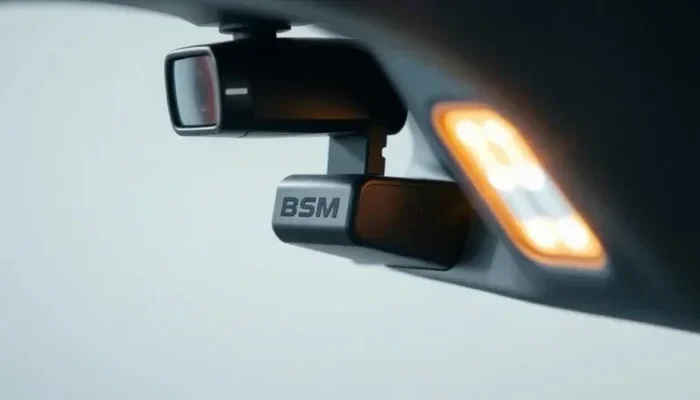
The Blind Spot Monitor is a driver assistance feature designed to keep you safe on the road. It uses sensors mounted on the rear bumper or side mirrors to detect vehicles in your blind spots. When a car is detected in an area you cannot see, the system gives you a warning. This warning usually shows up as a light on the side mirror or a beep sound.
Most Toyota Camry models from the mid-2010s onward come with the BSM as part of the safety package. The system works alongside other features like lane departure alert and rear cross-traffic alert. Together, these tools help you make safer lane changes and parking maneuvers. But not everyone loves having these alerts active all the time.
Understanding what the BSM does is the first step to managing it properly. The system is smart, but it is not perfect. Sometimes the sensors get dirty. Other times, the system might give false alerts. Knowing how the BSM works helps you decide when to keep it on and when to turn it off.
How the BSM Sensors Work
The sensors on your Camry use radar or ultrasonic technology. They scan the areas to the left and right of your vehicle, just outside your line of sight. When a vehicle enters that zone, the system activates a warning. The warning typically appears as a green or orange light on the corresponding side mirror. If the system detects a potential collision risk, it may also emit an audible alert.
These sensors are built into the rear bumper or integrated into the side mirrors, depending on your Camry model year. Keeping the sensors clean is important for accurate performance. Mud, snow, or debris can block the sensors and cause the BSM to malfunction or give false readings.
Why Would You Want to Turn Off the BSM?
There are several reasons why a driver might want to disable the Blind Spot Monitor on a Toyota Camry. Some reasons are practical, while others are more about personal preference. Let us look at the most common ones.
Annoying False Alerts: The BSM sensors can sometimes trigger false warnings. This happens when the sensors detect objects that are not actual vehicles, like guardrails, signs, or even heavy rain. If you are constantly getting beeps when there is no real danger, it can be distracting and frustrating.
Sensor Malfunction: A faulty BSM sensor can cause the warning light to stay on even when the system is not detecting anything. A broken sensor may also drain your battery or trigger unrelated warning lights on the dashboard. In these cases, turning off the BSM temporarily can prevent unnecessary stress while you arrange for repairs.
Frequent Driving in Tight Areas: If you drive a lot in crowded parking lots or narrow streets, the BSM might go off too often. Some drivers find this annoying, especially when they are confident in their ability to check their blind spots manually.
Aftermarket Accessories: Sometimes, drivers add aftermarket tow mirrors or bike racks that interfere with the BSM sensors. The added width or metal can trigger constant alerts. Turning off the BSM in these situations makes sense until you remove the accessory.
No matter the reason, it is important to understand that disabling the BSM removes a layer of safety. Always weigh the pros and cons before turning the system off. And if you are dealing with a persistent issue, it might be better to fix the root cause rather than just turning the system off.
How to Turn Off the BSM on a Toyota Camry
Now let us get to the main part. The process for turning off the BSM depends on your Toyota Camry model year and trim level. Newer models with touchscreen displays have a different process than older models with physical buttons. We will cover both.
Method 1: Using the Steering Wheel Controls
On most Toyota Camry models, you can turn off the BSM directly from the steering wheel. This is the quickest method and works on most 2015 and newer Camry models. Here is what to do:
- Start your Toyota Camry and make sure it is in Park.
- Look at the steering wheel controls on the left side.
- Find the SCS (Smart Key System) or settings button. It usually looks like a small gear icon.
- Press the button to open the vehicle settings menu on the instrument cluster display.
- Use the arrow buttons to scroll to the Blind Spot Monitor or BSM setting.
- Select the option to turn the BSM Off.
- Confirm your choice when prompted.
Once you turn off the BSM, the indicator light on the dashboard and side mirrors should go dark. You will no longer receive blind spot warnings when merging or changing lanes.
Method 2: Using the Touchscreen Display
If your Toyota Camry has a touchscreen infotainment system, you can also turn off the BSM through the display menu. This method works well on 2018 and newer Camry models. Here are the steps:
- Start your Camry and access the home screen on the touchscreen.
- Navigate to the Settings menu. This is usually represented by a gear icon.
- Look for the Vehicle Settings or Car Settings option.
- Scroll down to find the Blind Spot Monitor or BSM setting.
- Toggle the switch to turn the BSM Off.
- Exit the settings menu. The change takes effect immediately.
Some Camry models also let you adjust the sensitivity of the BSM rather than turning it off completely. If you find the alerts too sensitive, try reducing the sensitivity level first. This way, you still get warnings for actual threats but avoid the false alerts.
Method 3: Using the Vehicle Settings App
On certain Toyota Camry trims, especially the XSE and XLE versions, there is a dedicated Vehicle Settings app. This app gives you quick access to various vehicle features, including the BSM. Simply open the app from the home screen, find the safety settings, and toggle the BSM off. It is that simple.
If you are having trouble finding the right menu, consult your owner’s manual. Every Camry model year has a slightly different layout. The manual will have a section specifically about the Blind Spot Monitor and how to manage its settings.
Common BSM Problems and How to Fix Them
Sometimes the BSM on a Toyota Camry does not work properly. Before you decide to turn it off permanently, it helps to understand common issues and their solutions. Many BSM problems are easy to fix without a trip to the mechanic.
BSM Light Stays On Constantly
If the BSM warning light on your dashboard stays on even when the system is not detecting anything, it usually means there is a sensor issue. The most common causes are dirty sensors, a loose connection, or a faulty sensor module. Start by cleaning the sensors on your rear bumper and side mirrors. Use a soft cloth and gentle cleaner. If cleaning does not help, the sensor may need to be replaced.
You can also try resetting the BSM system. Turn off your Camry, wait for 30 seconds, and then restart it. This simple reset often clears minor glitches. If the light still stays on, it is a good idea to have a professional check the system. You can also check if there are any Toyota Camry recalls related to the BSM system that might apply to your model year.
BSM Gives False Alerts
False alerts happen when the BSM sensors detect something that is not actually a vehicle. This can be caused by dirty sensors, aftermarket accessories, or even weather conditions. Heavy rain, snow, or fog can interfere with the radar sensors and trigger false warnings.
To fix false alerts, start by cleaning the sensors thoroughly. Remove any dirt, ice, or debris from the rear bumper and side mirrors. If you have recently installed aftermarket tow mirrors, a bike rack, or a trailer hitch, these might be interfering with the sensors. Removing them temporarily can help you confirm if they are the cause.
Another common cause of false alerts is driving near large structures like overpasses or tunnel walls. The sensors can sometimes mistake these structures for vehicles. If this happens frequently, you might want to reduce the BSM sensitivity instead of turning it off completely.
BSM System Not Working at All
If the BSM system does not work at all, the issue could be more serious. A blown fuse, a wiring problem, or a failed control module could be the cause. Start by checking the fuse box under the hood. Look for the fuse labeled “BSM” or “Blind Spot Monitor.” If the fuse is blown, replace it with a new one of the same amperage.
If replacing the fuse does not fix the problem, you will need to take your Camry to a Toyota dealer or a qualified mechanic. They can run a diagnostic scan to identify the exact issue. In some cases, the BSM control module may need to be replaced. This can be costly, so it is worth checking if your vehicle is still under warranty before proceeding.
BSM vs Other Toyota Safety Features
The Blind Spot Monitor is just one of several safety features available on the Toyota Camry. Understanding how it compares to other systems can help you make better decisions about which features to keep on and which to turn off.
For example, the BSM works closely with the Lane Departure Alert (LDA) system. The LDA warns you if your vehicle starts to drift out of its lane without using a turn signal. Together, the BSM and LDA provide a comprehensive safety net for lane changes and highway driving. However, some drivers find the combination of both systems overwhelming and prefer to turn one or both off.
The BSM also works with the Rear Cross-Traffic Alert (RCTA) system. The RCTA warns you of approaching vehicles when you are backing out of a parking space. This feature is especially useful in crowded parking lots. If you find the RCTA too sensitive, you can often turn it off using the same menu where you manage the BSM settings.
Another related feature is the Automatic High Beams system. While not directly connected to the BSM, many drivers manage their safety settings as a group. If you are adjusting your Toyota Camry safety features, it is worth reviewing all the options together to find the right balance between safety and convenience.
Should You Keep the BSM Enabled?
This is the big question. The Blind Spot Monitor is a safety feature designed to prevent accidents. According to studies, blind spot-related crashes account for a significant number of lane-change collisions every year. Keeping the BSM enabled can reduce your risk of being involved in such an accident.
That said, there are situations where turning off the BSM makes sense. If you are driving in an area where the sensors are constantly triggering false alerts, it might be safer to turn the system off temporarily. A false alert can startle you and cause you to make a sudden, unsafe maneuver. In those cases, disabling the BSM and relying on your own mirror checks might actually be the safer choice.
The key is to use your judgment. If the BSM is working properly and giving accurate alerts, keep it on. If it is malfunctioning or causing more problems than it solves, turn it off and get it fixed. And if you ever need to turn it back on, the process is the same as turning it off, just in reverse.
Remember, the BSM is an aid, not a replacement for safe driving habits. Always check your mirrors and turn your head before changing lanes. The BSM is there to supplement your awareness, not to take the place of it. For more tips on managing your Toyota Camry’s features, check out our guide on how to turn off automatic high beams on your Camry.
Quick Tips for Managing the BSM on Your Toyota Camry
- Clean your sensors regularly: A quick wipe-down of the rear bumper and side mirrors every few weeks keeps the BSM sensors working accurately.
- Check your owner’s manual: The manual has specific instructions for your Camry model year. It is the most reliable source for BSM information.
- Reset before assuming the worst: A simple system reset often fixes minor BSM glitches. Turn off the car, wait 30 seconds, and restart.
- Keep aftermarket accessories in mind: Tow mirrors, bike racks, and trailer hitches can interfere with BSM sensors. Be aware of this when installing new accessories.
- Visit a Toyota dealer for persistent issues: If the BSM light stays on or the system fails completely, a Toyota dealer can run diagnostics and provide professional solutions.
- Consider reducing sensitivity first: Before turning the BSM off completely, try lowering the sensitivity. This gives you fewer false alerts while keeping the system active.
Conclusion
Knowing how to turn off the BSM on a Toyota Camry gives you more control over your driving experience. Whether you are dealing with false alerts, a malfunctioning sensor, or just personal preference, the steps we covered in this guide should help you get the job done. The process is simple once you know where to look, and it works across most Camry model years.
Always remember that the BSM is a valuable safety feature. Turning it off removes an extra layer of protection, so use this knowledge wisely. Keep the system on when it is working properly, and turn it off only when necessary. If you run into persistent issues, do not hesitate to consult a professional. Your safety on the road always comes first.
For more helpful tips on managing your Toyota Camry, explore our other articles on driving with the check engine light on and Toyota Camry recalls. Stay safe and happy driving!
Frequently Asked Questions
Can I turn off the BSM on any Toyota Camry model year?
Most Toyota Camry models from 2015 onward have a BSM that can be turned off through the steering wheel controls or touchscreen menu. Older models may not have this feature. Check your owner’s manual for specific instructions for your model year.
Will turning off the BSM affect other safety features on my Camry?
No, turning off the BSM only disables the blind spot monitoring system. Other safety features like lane departure alert, rear cross-traffic alert, and automatic high beams will continue to work normally. Each system operates independently.
Why does my BSM light keep flashing even when the system is off?
A flashing BSM light after turning the system off usually indicates a sensor malfunction or a wiring issue. Clean the sensors first and try resetting the system. If the light persists, have a mechanic run a diagnostic scan to identify the problem.
Is it legal to drive with the BSM turned off?
Yes, it is legal to drive with the BSM turned off in most places. The BSM is a convenience and safety feature, not a legal requirement. However, disabling it does remove an extra layer of protection, so drive carefully and check your blind spots manually.
How do I turn the BSM back on after turning it off?
To turn the BSM back on, follow the same steps you used to turn it off. Go to the vehicle settings menu or steering wheel controls, find the BSM setting, and toggle it back to On. The system will reactivate immediately and the indicator light will return.
Can a dirty sensor cause the BSM to turn off by itself?
A dirty sensor usually causes false alerts or a constantly lit BSM light, but it does not typically turn the system off completely. If the BSM stops working, the issue is more likely a faulty sensor, a blown fuse, or a wiring problem. Cleaning the sensors is always a good first step in troubleshooting.