How Do You Reset the Oil Light on a 2013 Toyota Easily
Resetting the oil light on a 2013 Toyota is a simple process you can do at home in under five minutes. Whether you drive a Toyota Camry, Corolla, or another model, this guide walks you through the exact steps. We also cover common mistakes, maintenance light tips, and when to see a Toyota service center.
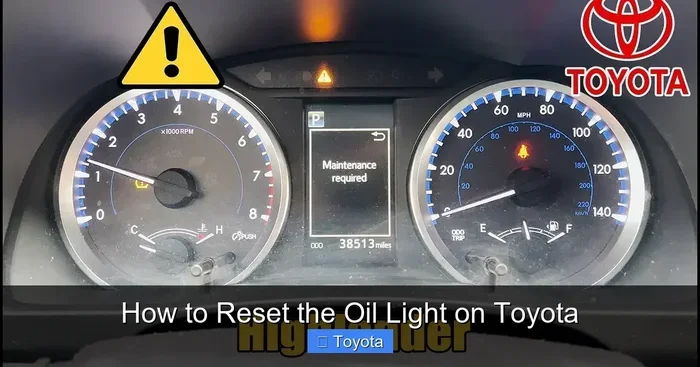
That little yellow or red oil can icon on your dashboard can really get under your skin. You just got your oil change done, but the oil light on your 2013 Toyota just will not go away. It is annoying, right? You are not alone. Thousands of Toyota owners face this exact problem every month.
The good news is that resetting the oil change light on a 2013 Toyota is incredibly easy. You do not need a mechanic. You do not need fancy tools. In most cases, you can handle it yourself right from your driver seat. This guide gives you every step you need, no matter which 2013 Toyota model you drive.
We will walk you through the full process, explain why the light comes on in the first place, and share tips to keep your Toyota dashboard warning system working properly. Let us get into it.
Key Takeaways
- Quick Reset: You can turn off the oil change reminder in minutes using your dashboard controls.
- No Tools Needed: The process requires no special equipment or mechanic visits.
- Model-Specific Steps: Different 2013 Toyota models may have slight variations in the reset process.
- Safety First: Always check your oil level before resetting the light to avoid engine damage.
- Maintenance Schedule: Regular oil changes keep your Toyota running smoothly and prevent future warning lights.
- Persistent Light: If the light stays on after resetting, it may signal a deeper issue that needs professional attention.
📑 Table of Contents
- Why Does the Oil Light Come On in a 2013 Toyota?
- How to Reset the Oil Light on a 2013 Toyota
- Which 2013 Toyota Models Does This Apply To?
- Common Mistakes When Resetting the Oil Light
- When Should You See a Toyota Service Center?
- Tips to Keep Your 2013 Toyota Running Smoothly
- How to Tell If Your Oil Needs Changing Soon
- Final Thoughts
Why Does the Oil Light Come On in a 2013 Toyota?
Before you learn how to reset the light, it helps to understand why it turns on in the first place. The oil change light is part of your Toyota’s oil life system. This smart system tracks your driving habits and engine conditions. It estimates when your oil is due for a change.
Here are the most common reasons the light activates:
- Scheduled Oil Change: Your Toyota tracks mileage and time since the last service. When you hit the set interval, the light pops up.
- Oil Quality Sensor Alert: Modern Toyotas use sensors to monitor oil condition. Dirty or degraded oil triggers the reminder.
- Low Oil Level: If your oil drops below the safe level, a different warning light may appear. This is more urgent.
- Oil Pressure Issue: Low oil pressure is serious. The Toyota dashboard warning system will alert you immediately.
- After Service: Sometimes the light does not reset automatically after an oil filter change or oil top-up.
Understanding the root cause helps you decide whether a simple reset is enough or if you need a closer look at your engine.
How to Reset the Oil Light on a 2013 Toyota
The reset process varies slightly depending on your model. Below, we cover the most common methods for 2013 Toyota vehicles. Pick the one that matches your car.
Method 1: Using the Trip Meter (Most Common)
This method works for most 2013 Toyota models including the Toyota Camry, Corolla, and RAV4. Here is what to do:
- Turn the ignition to the “ON” position. Do not start the engine. Just press the start button once or turn the key to “ON.”
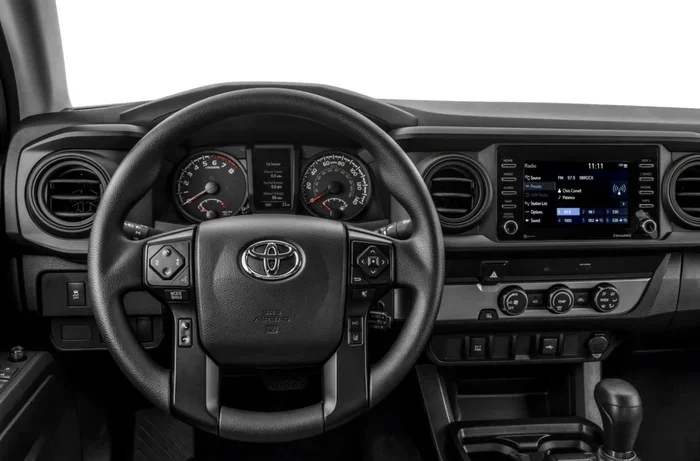
- Locate the trip meter reset button on your dashboard. It is usually near the speedometer or on the steering wheel controls.
- Press and hold the trip meter button. Keep holding it.
- While holding the button, turn the ignition to the “OFF” position, then back to “ON.”
- Continue holding the button for about 10 to 15 seconds.
- The maintenance light should start flashing.
- Release the button. The light is now reset.
Turn your engine off and then back on to confirm the light is gone. This is the most widely used method across Toyota models.
Method 2: Using the Steering Wheel Controls
Some 2013 Toyota models use steering wheel buttons for dashboard settings. If your car has arrow buttons on the steering column, try this:
- Press the menu or settings button on the steering wheel.
- Scroll through the options until you see “Maintenance” or “Reset.”
- Select the oil change reminder option.
- Hold the OK or reset button for several seconds.
- The display should confirm the reset is complete.
Method 3: Using the Multi-Function Display
Higher-end 2013 Toyota trims come with a multi-function display screen. If your car has one, follow these steps:
- Press the “Menu” or “Setup” button on the display.
- Navigate to the “Vehicle Info” or “Maintenance” section.
- Find the “Reset Maintenance” option.
- Select it and confirm the reset.
- The oil reminder should disappear from the screen.
Which 2013 Toyota Models Does This Apply To?
The reset process is very similar across the 2013 Toyota lineup. Here is a quick comparison of how the process works for popular models:
- Toyota Camry 2013: Use the trip meter method. The dashboard buttons are located on the left side of the steering column.
- Toyota Corolla 2013: Same trip meter process. Very straightforward and quick.
- Toyota RAV4 2013: Trip meter reset works perfectly. Some models also support steering wheel button reset.
- Toyota Tacoma 2013: Use the trip meter method. The button is usually near the instrument cluster.
- Toyota Highlander 2013: Multi-function display method works well for this larger SUV.
If you are unsure which method fits your specific model, check your Toyota owner manual. It has a dedicated section on dashboard reset procedures. The manual is also a great resource if you need help with other Toyota dashboard warning lights.
Common Mistakes When Resetting the Oil Light
Even though the reset process is simple, people still make mistakes. Here are the most common ones and how to avoid them:
Mistake 1: Resetting Without Changing the Oil
This is the biggest mistake people make. The oil change light is a reminder for a reason. If you reset it without actually changing the oil, you are just hiding the problem. Your engine still needs fresh oil. Skipping an oil change interval can lead to serious engine damage over time.
Mistake 2: Not Holding the Button Long Enough
Some owners release the trip meter button too early. The system needs a few seconds to register the reset command. Hold the button steadily for at least 10 seconds. If the light does not flash, try again and hold it a bit longer.
Mistake 3: Ignoring Other Warning Lights
The oil light is not the only warning you should pay attention to. If your check engine light is also on, the oil reset will not fix that issue. A persistent Toyota dashboard warning could signal a deeper mechanical problem. Always investigate multiple lights together.
Mistake 4: Forgetting to Check the Oil Level
Before you reset anything, pop the hood and check your oil level with the dipstick. If the oil is low, the light may come back on within days. A reset will not fix a low oil problem. Top off the oil first, then reset the reminder.
When Should You See a Toyota Service Center?
Most of the time, resetting the oil change light is a DIY job. But there are situations where professional help is the right call.
- The Light Keeps Coming Back: If the maintenance light returns shortly after you reset it, something is wrong. You may have an oil leak or a faulty oil pressure sensor.
- The Oil Pressure Warning Light Is Red: A red oil can icon is different from a yellow maintenance reminder. A red light means your oil pressure is dangerously low. Stop driving and get your car inspected immediately.
- You Are Unsure About the Process: If the steps above do not match your dashboard, a Toyota service center can walk you through it. They will also check your oil condition during the visit.
- You Need an Oil Change Anyway: If it has been a while since your last service, now is a great time to visit a professional. They will change the oil, replace the filter, and handle the reset for you.
Regular visits to a Toyota service center keep your car in top shape. They use genuine Toyota parts and follow the manufacturer’s recommended maintenance schedule. This is especially important for maintaining your warranty and ensuring long engine life.
Tips to Keep Your 2013 Toyota Running Smoothly
Resetting the oil light is just one piece of the puzzle. Here are some extra tips to keep your 2013 Toyota in excellent shape:
- Follow the Maintenance Schedule: Stick to the oil change intervals in your Toyota owner manual. Most 2013 Toyotas need an oil change every 5,000 to 7,500 miles.
- Use Quality Oil: Synthetic oil lasts longer and protects your engine better. Check what grade your Toyota recommends.
- Check Oil Monthly: Get in the habit of checking your oil level once a month. It takes just two minutes and prevents problems before they start.
- Watch for Other Dashboard Warnings: Your Toyota dashboard warning system is designed to protect you. Pay attention to every light, not just the oil indicator.
- Keep a Service Log: Record every oil change and service visit. This helps you track your service interval and makes resale easier.
- Do Not Ignore the maintenance light: If your maintenance light stays on after a reset, there may be an underlying issue that needs attention.
Taking care of small things like oil changes and light resets adds up. Your engine will thank you with years of reliable performance.
How to Tell If Your Oil Needs Changing Soon
The oil change light is the most obvious sign, but there are other clues your 2013 Toyota gives you. Watch for these warning signs between services:
- Dark or Dirty Oil: Fresh oil is amber in color. If your dipstick shows dark brown or black oil, it is time for a change.
- Burning Smell: A burnt odor from the engine bay can indicate old or overheating oil.
- Reduced Fuel Efficiency: Dirty oil makes your engine work harder. You may notice fewer miles per gallon.
- Engine Noise: Old oil loses its lubricating power. You might hear louder engine sounds, especially at startup.
- Oil Change After drive cycle: If you have recently completed a long drive cycle, the oil life system may recalibrate and the light could return.
Catching these signs early saves you from costly repairs. It also keeps your Toyota running the way it should.
Final Thoughts
Resetting the oil light on a 2013 Toyota is a quick, easy, and free task. You do not need to visit a mechanic or spend a dime. Whether you use the trip meter method, steering wheel controls, or the multi-function display, the process takes less than five minutes. Just remember to change your oil first, check your levels, and follow the reset steps carefully.
Your 2013 Toyota is a reliable machine. Keeping up with oil changes and maintenance reminders is one of the best things you can do for it. The oil change light is there to help you stay on track. Treat it as a friendly reminder, not an annoyance.
Now that you know how to handle the reset yourself, you can save time and money the next time that little oil can icon shows up. Drive safe, keep your oil fresh, and enjoy the ride.
Frequently Asked Questions
Can I drive my 2013 Toyota with the oil light on?
It depends on the type of light. A yellow maintenance reminder is usually safe to drive with for a short distance. However, a red oil pressure warning is serious and requires immediate attention. Check your oil level and top it off if needed before driving.
How often should I reset the oil light on my 2013 Toyota?
You should only reset the light after each oil change. Resetting it without changing the oil will just clear the reminder and leave your engine unprotected. Follow the recommended oil change interval for your specific Toyota model.
Will resetting the oil light affect my Toyota warranty?
No, resetting the light does not affect your warranty. However, failing to perform regular oil changes as per the maintenance schedule could void certain warranty coverage. Always keep records of your oil changes and services.
What if the oil light comes back after I reset it?
If the light returns shortly after resetting, your oil level may be low or there could be a sensor issue. Check your oil level first. If the problem persists, visit a Toyota service center for a professional diagnosis.
Do I need special tools to reset the oil light on a 2013 Toyota?
No special tools are needed at all. You only need access to your dashboard controls, which are built into every 2013 Toyota model. The trip meter reset method requires nothing more than a button press.
How is the oil light different from the check engine light on a 2013 Toyota?
The oil light specifically relates to oil change reminders or oil pressure issues. The check engine light covers a broader range of engine and emissions problems. If both lights are on, address the oil issue first, then investigate the check engine light. You can also refer to our guide on driving with the check engine light on for more details.