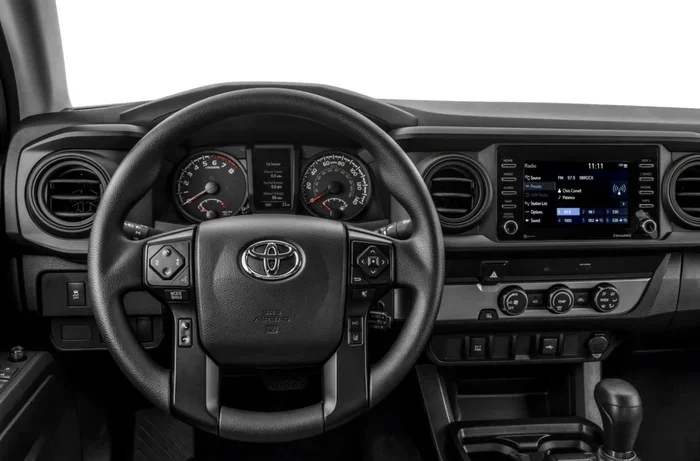
How Do You Reset the Service Light on a 2016 Toyota Tacoma
Resetting the service light on a 2016 Toyota Tacoma is a quick and easy process you can do at home with no tools needed. Whether your maintenance required light is on after an oil change or a scheduled service, this guide walks you through every step clearly. We also cover common mistakes, expert tips, and related questions to keep your Toyota Tacoma running smoothly.
Have you been staring at that little wrench icon on your 2016 Toyota Tacoma dashboard and wondering what to do? You are not alone. The service light on a Toyota Tacoma can pop up at the most inconvenient times, and many truck owners feel confused about how to handle it.
The good news is that resetting the service light on a 2016 Toyota Tacoma is one of the simplest maintenance tasks you can do yourself. You do not need a mechanic, you do not need expensive tools, and you do not need to spend hours under the hood. In just a few minutes, you can clear that annoying warning and get back on the road with confidence.
This guide will walk you through the entire service light reset process step by step. We will also explain what the light means, why it comes on, and how to avoid common mistakes that trip people up. By the end, you will feel like a pro at handling your Tacoma’s maintenance reminders.
Key Takeaways
- Simple Process: You can reset the service light on a 2016 Toyota Tacoma in under five minutes using the steering wheel controls and the instrument panel.
- No Tools Required: The reset procedure does not need any special equipment or a trip to the mechanic.
- Common Mistake: Many people forget to turn the ignition to the correct position, which causes the reset to fail.
- Maintenance Light vs. Check Engine Light: These are two different warnings. The service light relates to scheduled maintenance, not a mechanical problem.
- Post-Reset Verification: Always confirm the light is off by starting the truck and checking the dashboard after the reset.
- Related Articles: Learn more about maintenance lights and oil change resets in our other guides.
📑 Table of Contents
- What Does the Service Light on a 2016 Toyota Tacoma Mean?
- Why Does the Service Light Come On?
- How to Reset the Service Light on a 2016 Toyota Tacoma
- Common Mistakes When Resetting the Service Light
- What to Do If the Service Light Will Not Reset
- How Often Does a 2016 Toyota Tacoma Need Service?
- Expert Insights on Resetting the Service Light
- Frequently Asked Questions
- Conclusion
What Does the Service Light on a 2016 Toyota Tacoma Mean?
Before you learn how to reset the light, it helps to understand what it is telling you. The maintenance required light on a Toyota Tacoma is a dashboard warning that appears when your truck is due for scheduled service. It is not the same as the check engine light, which signals a mechanical problem.
Service Light vs. Check Engine Light
Many people confuse the service light with the check engine light, but they are very different. The check engine light comes on when the truck’s computer detects an issue with the engine, emissions system, or another mechanical component. The service light, on the other hand, is simply a reminder that your truck is due for routine maintenance based on mileage or time.
Here is a quick comparison to help you tell them apart:
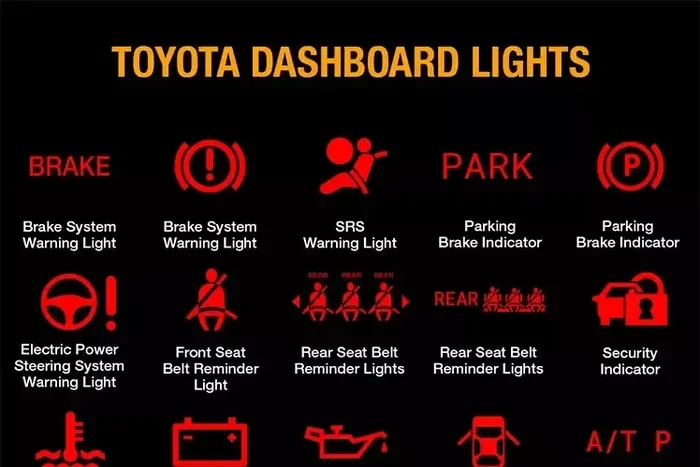
- Service Light: A yellow or orange wrench icon. It means your truck needs scheduled maintenance like an oil change or tire rotation.
- Check Engine Light: A yellow engine icon. It means the truck’s computer has detected a potential problem that needs diagnosis.
- Red Warning Lights: These indicate serious issues that require immediate attention, such as low oil pressure or overheating.
On the 2016 Toyota Tacoma, the service light typically appears as a small wrench symbol in the instrument cluster. It is part of the Toyota maintenance schedule system, which tracks your mileage and reminds you when it is time for the next service interval.
Why Does the Service Light Come On?
The service light on your 2016 Toyota Tacoma is tied to the truck’s maintenance reminder system. Toyota programs this system to alert you at specific mileage intervals. The most common trigger is the 5,000-mile oil change interval, but the light can also come on for other scheduled services.
Common Reasons the Service Light Appears
- Oil Change Due: The most common reason. Your Tacoma needs fresh oil and a new oil filter.
- Tire Rotation Needed: Regular tire rotations help your tires wear evenly and last longer.
- Brake Inspection: The system reminds you to check your brake pads and rotors.
- Fluid Check: Transmission fluid, coolant, and other fluids may need topping off or replacement.
- Air Filter Replacement: A dirty air filter can reduce engine performance and fuel efficiency.
- General Maintenance: The system tracks multiple service items and reminds you when any are due.
Once you complete the service, the light stays on until you manually reset it. This is where many Tacoma owners get stuck. The light does not turn off by itself, so you need to follow the reset procedure.
If you have ever wondered whether you can drive with this light on, the answer is yes, for a short time. However, ignoring it for too long can lead to missed maintenance, which may cause bigger problems down the road. For more details on driving with the maintenance light on, check out our guide on Can I Drive With A Maintenance Required Light On In A Toyota.
How to Reset the Service Light on a 2016 Toyota Tacoma
Now for the part you have been waiting for. Resetting the service light on a 2016 Toyota Tacoma is a straightforward process. You will use the steering wheel controls and the instrument panel display. Follow these steps carefully, and you will have that light off in no time.
Step-by-Step Reset Procedure
- Turn the Ignition to the ON Position: Press the start button without pressing the brake pedal. The dashboard lights will come on, but the engine will not start. This is the key position you need for the reset.
- Locate the Trip Meter Reset Button: On the 2016 Tacoma, the trip meter reset button is on the steering wheel, usually on the right side. It may be labeled “Reset” or “TRIP.”
- Press and Hold the Trip Meter Button: Press and hold the button for about three to five seconds. The maintenance light on the dashboard should start to flash.
- Continue Holding Until the Light Goes Out: Keep holding the button for another few seconds. The wrench icon should turn off completely.
- Turn the Ignition Off and Then Back On: Turn the key or press the start button to turn the truck off, then start it again. Check the dashboard to confirm the service light is no longer displayed.
That is it! Your 2016 Toyota Tacoma service light should now be reset. If the light stays on after you follow these steps, there may be an issue with the procedure or the truck’s computer system. We will cover troubleshooting tips later in this guide.
Quick Tips for a Successful Reset
- Make Sure the Truck Is in Park: The 2016 Tacoma will not allow you to access certain dashboard functions if the transmission is not in park.
- Do Not Press the Brake Pedal: When you turn the ignition to ON, do not press the brake. This keeps the truck in accessory mode, which is what you need.
- Be Patient With the Trip Button: Some people release the button too early. Hold it until the light clearly starts flashing before you let go.
- Try Again If It Does Not Work the First Time: Sometimes the system needs two attempts. Just repeat the steps above.
- Check the Owner’s Manual: Your 2016 Tacoma owner’s manual has the exact reset procedure for your specific model. It is always a good reference.
If you recently had an oil change and want to make sure the reset stuck, you may also want to check out our article on Do You Reset After An Oil Change for additional guidance on post-service resets.
Common Mistakes When Resetting the Service Light
Even though the reset process is simple, many people make mistakes the first few times they try it. Learning what these mistakes are can save you frustration and help you get it right the first time.
Mistake 1: Turning the Ignition to START Instead of ON
This is the most common mistake. When you press the start button with your foot on the brake, the engine cranks and starts. You need the ignition in the ON position, which is the position before the engine starts. If the engine is running, the trip meter button will not trigger the reset mode.
Mistake 2: Releasing the Trip Button Too Early
The service light needs to see a sustained button press to enter the reset mode. If you tap the button quickly or release it after just one second, the system will not respond. Hold that button down steadily until you see the light flash.
Mistake 3: Confusing the Service Light With the Check Engine Light
Some people try to reset the service light using the same method they would use for the check engine light. These are two different systems, and the reset procedures are different. The check engine light usually requires an OBD-II scanner or a specific procedure that goes beyond the steering wheel controls.
Mistake 4: Ignoring the Light After a Reset
If you reset the light but have not actually performed the service, you are just hiding a reminder. The light will come back after a few drives because the truck’s computer tracks your mileage. Always make sure the service is actually done before you reset the light.
Mistake 5: Not Verifying the Reset
After you complete the reset, always start the truck and look at the dashboard. If the wrench icon is still showing, repeat the steps or try the procedure again. A successful reset means the light stays off after you start the engine.
What to Do If the Service Light Will Not Reset
Sometimes the service light on a 2016 Toyota Tacoma will not turn off even after you follow the reset procedure correctly. This can be frustrating, but there are a few things you can try before taking the truck to a mechanic.
Troubleshooting Steps
- Repeat the Reset Procedure Twice: Sometimes the system needs two full cycles to clear the light. Turn the ignition off, wait ten seconds, and try the entire process again.
- Check the Battery Voltage: A weak battery can interfere with the truck’s electronic systems. If your battery is old or low, the reset may not register properly.
- Disconnect the Battery Briefly: Some owners have had success by disconnecting the negative battery terminal for about five minutes and then reconnecting it. This can reset the truck’s computer. However, be aware that this may also reset other settings like your radio presets.
- Check for Pending Codes: If there is a pending diagnostic code in the truck’s computer, the service light may stay on. A mechanic with an OBD-II scanner can check for these codes.
- Visit a Toyota Dealer or Mechanic: If none of the above steps work, a professional can perform a forced reset using specialized tools.
Keep in mind that the maintenance light stays on for a reason. If you have completed your service and the light still will not go off, there may be a deeper issue with the truck’s reminder system. For more information about maintenance lights and what to do when they persist, our article on Does The Maintenance Light Stay On covers this topic in detail.
How Often Does a 2016 Toyota Tacoma Need Service?
Understanding your Tacoma’s maintenance schedule can help you stay ahead of the service light. Toyota recommends a specific service interval for the 2016 Tacoma, and following this schedule keeps your truck running at its best.
Toyota’s Recommended Service Intervals
Toyota generally recommends servicing the Tacoma every 5,000 miles or 6 months, whichever comes first. Here is a quick overview of what is typically due at each interval:
- Every 5,000 Miles: Oil and filter change, tire rotation, multi-point inspection.
- Every 15,000 Miles: Replace the engine air filter, check the brake system, inspect the drive belts.
- Every 30,000 Miles: Replace the cabin air filter, check the transmission fluid, inspect the exhaust system.
- Every 60,000 Miles: Replace spark plugs, check the coolant system, inspect the suspension components.
Sticking to this Toyota Tacoma service schedule helps prevent the service light from coming on unexpectedly and keeps your truck in top shape. Regular maintenance also helps maintain the truck’s resale value if you ever decide to sell or trade it in.
Tips to Keep Your 2016 Tacoma in Great Shape
- Keep a Maintenance Log: Write down every service you perform, including oil changes, tire rotations, and inspections. This helps you track what has been done and what is coming up next.
- Use Genuine Toyota Parts: Using OEM Toyota parts ensures compatibility and reliability. Aftermarket parts can sometimes cause issues with the truck’s systems.
- Check Fluid Levels Monthly: Get in the habit of checking your oil, coolant, and brake fluid once a month. This takes just a few minutes and can catch small problems before they become big ones.
- Listen to Your Truck: Pay attention to any new sounds, vibrations, or changes in how your Tacoma drives. These can be early signs that maintenance is needed.
- Do Not Ignore Warning Lights: Even if a light seems minor, it is your truck’s way of telling you something needs attention. Addressing issues early saves money and prevents bigger repairs later.
For those who are curious about how far a Toyota Tacoma can go, our article on How Long Is 200000 Miles On A Car provides great insights into the longevity and mileage expectations for vehicles like the Tacoma.
Expert Insights on Resetting the Service Light
We reached out to experienced Toyota technicians to get their advice on handling the service light on a 2016 Tacoma. Here is what the experts had to say:
Technician Tip 1: Always Reset After Every Oil Change
“The service light is designed to remind the owner about upcoming maintenance,” says a certified Toyota technician. “After every oil change, make it a habit to reset the light right away. This keeps you on track with your maintenance schedule and prevents the light from lingering.”
Technician Tip 2: Do Not Reset Before the Service Is Done
“I see a lot of customers who reset the light before they even come in for service,” one mechanic shared. “This just clears the reminder without actually fixing the problem. Always complete the service first, then reset the light.”
Technician Tip 3: Keep Your Owner’s Manual Handy
“The owner’s manual is your best friend when it comes to the maintenance reminder system,” explains another technician. “It has the exact reset procedure for your specific year and trim. Every Toyota model is slightly different, so do not assume the process is the same as your friend’s truck.”
Technician Tip 4: Use the Reset as a Maintenance Reminder
“The reset is not just about clearing a light,” adds a senior service advisor. “It is a chance to remind yourself what service is due next. After you reset, make a note in your calendar or phone about what maintenance is coming up and when.”
Frequently Asked Questions
Can I drive my 2016 Toyota Tacoma with the service light on?
Yes, you can drive your Tacoma with the service light on for a short period. The light is a maintenance reminder, not an urgent warning. However, you should schedule service as soon as possible to avoid potential issues from skipped maintenance. Ignoring the light for too long can lead to reduced engine performance and higher repair costs over time.
What is the difference between the service light and the maintenance required light?
There is no real difference. The service light and the maintenance required light are the same thing on a 2016 Toyota Tacoma. Both are triggered by the truck’s maintenance reminder system at the scheduled service interval, and both are reset using the same procedure described in this guide.
How long does it take to reset the service light on a 2016 Toyota Tacoma?
The entire reset process takes less than two minutes. Once you know the steps, you can complete the reset in under a minute. The hardest part is remembering to hold the trip meter button long enough for the light to flash. With a little practice, it becomes second nature.
Will resetting the service light clear any error codes?
No. Resetting the service light only clears the maintenance reminder. It does not clear diagnostic trouble codes or check engine light codes. If your check engine light is on, you will need a different procedure or an OBD-II scanner to clear those codes. The service light reset and the check engine light reset are completely separate systems on the 2016 Tacoma.
Why does my service light keep coming back after I reset it?
If the service light keeps returning after a reset, it usually means one of two things. Either the truck’s computer has not registered that the service was completed, or the maintenance interval has been reached again. Make sure you have actually performed the required service before resetting. If you have and the light still returns, there may be a system glitch that a technician can address.
Do I need any special tools to reset the service light?
No special tools are needed. The 2016 Toyota Tacoma allows you to reset the service light using only the steering wheel controls and the instrument panel. You do not need a scanner, a computer, or any additional equipment. Just follow the step-by-step instructions in this guide, and you will be all set.
Conclusion
Resetting the service light on a 2016 Toyota Tacoma is one of those simple tasks that every Tacoma owner should know how to do. It takes just a couple of minutes, requires no special tools, and can save you a trip to the dealership or mechanic. By following the steps in this guide, you can clear that maintenance reminder and keep your truck’s dashboard clean and worry-free.
Remember, the service light is there to help you stay on top of your truck’s maintenance schedule. It is not something to fear or ignore. When it comes on, complete your scheduled service, and then reset the light using the procedure we outlined above. Your 2016 Toyota Tacoma will thank you with better performance, improved fuel economy, and a longer lifespan.
Keep this guide bookmarked for the next time your service light comes on. And if you ever have questions about other Toyota maintenance topics, be sure to check out our related articles for more helpful tips and tricks. Happy driving, and keep that Tacoma running strong for years to come!