How Do I Turn Off Automatic High Beams On My Vehicle
Turning off automatic high beams is simple once you know where to look. Whether you drive a Toyota, Honda, Ford, or another brand, the process usually takes just a few seconds. Most vehicles let you disable auto high beams through a dashboard setting, a steering column switch, or the infotainment system. Knowing how to control your headlights keeps you safe and comfortable during night driving.
Driving at night can be a mixed bag. The roads are quiet, the stars are out, and everything feels peaceful. But then a car comes toward you with its high beams blazing. That sudden glare can blind you for a few scary seconds. It is a moment nobody enjoys.
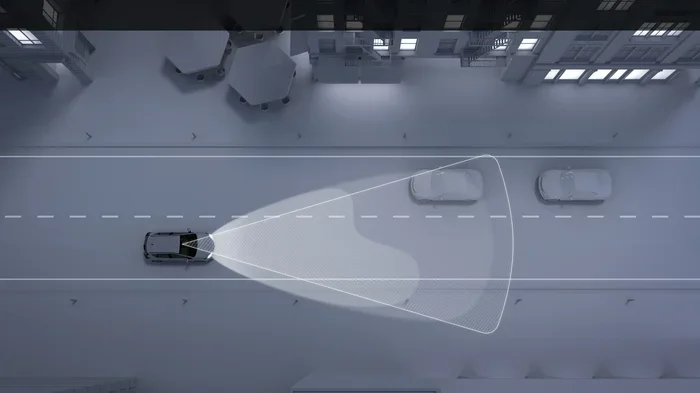
Modern vehicles have a feature called automatic high beams to solve this problem. The system uses a sensor to detect oncoming traffic and vehicles ahead. It then switches between high beams and low beams automatically. This keeps you visible without blinding other drivers.
But here is the thing. Not everyone likes this feature. Some drivers find it distracting. Others just prefer full manual control over their headlights. Maybe the sensor triggers too often, or the constant switching annoys you. Whatever the reason, knowing how to turn off automatic high beams gives you back that control.
In this guide, we will walk you through every method. We will cover steering column switches, dashboard menus, infotainment settings, and more. By the end, you will know exactly how to handle your specific vehicle. Let us get into it.
Key Takeaways
- Check the steering column stalk: Most cars have a manual override switch right near your turn signal lever.
- Use the dashboard settings menu: Many newer vehicles let you toggle auto high beams through the instrument cluster or touchscreen.
- Look for a dedicated button: Some models include a standalone auto high beam button on the dashboard or console.
- Consult your owner’s manual: Every vehicle is different, and the manual has the exact steps for your specific model.
- Auto high beams help with glare: The feature automatically dims when it detects oncoming traffic or vehicles ahead.
- You can re-enable anytime: Turning it off is not permanent — you can switch it back on whenever you want.
📑 Table of Contents
- Understanding How Automatic High Beams Work
- How to Turn Off Automatic High Beams Using the Steering Column
- Turning Off Auto High Beams Through the Dashboard Menu
- Common Vehicle-Specific Methods
- Why You Might Want to Turn Off Automatic High Beams
- Quick Tips for Managing Your Headlights
- Common Mistakes People Make With Auto High Beams
- Expert Insight: When to Keep Auto High Beams On
- Conclusion
Understanding How Automatic High Beams Work
Before you learn how to turn the feature off, it helps to understand what it does. Automatic high beams go by several names depending on the car maker. You might hear them called auto high beam control, adaptive driving beams, or high beam assist. They all serve the same basic purpose.
The Light Sensor Behind the System
Most automatic high beam systems use a camera or sensor mounted near the rearview mirror. This sensor looks ahead at the road. It detects the light from oncoming vehicles and the taillights of cars in front of you. When it sees those lights, it dims your headlights to low beam. When the road is clear, it switches back to high beam.
This is a great safety feature. It means you always have the best visibility without needing to flip a switch manually. The system works especially well on dark highways and rural roads where streetlights are scarce.
However, the sensor is not perfect. Sometimes it reacts to streetlights or reflections. Other times it might not switch back to high beam quickly enough. These small frustrations lead many drivers to ask how to disable the system entirely.
How to Turn Off Automatic High Beams Using the Steering Column
The most common way to disable auto high beams is right on the steering column. This is the area just behind the steering wheel where your turn signal lever sits. On most vehicles, you will find a small switch or button there.
Step-by-Step for Steering Column Controls
Follow these simple steps to turn off the feature:
- Start your vehicle and sit in the driver seat.
- Look at the steering column on the left side, near the turn signal lever.
- Find a small switch or button labeled “Auto” or with a headlight icon.
- Push or flip the switch to the “Off” position.
- Check your dashboard for a confirmation light.
On many Toyota and Honda models, this is a sliding switch on the left side of the steering column. You push it left or right to toggle between auto and manual mode. When it is off, your headlights stay on low beam until you manually switch them to high beam using the lever.
Ford vehicles often have a similar setup. The switch may be a small rotating dial or a push button. Chevrolet and GMC trucks sometimes place the control near the gear shifter instead. Always look around the steering area first because that is where most manufacturers put it.
What the Dashboard Indicator Looks Like
Once you turn off auto high beams, your dashboard should show a change. Look for a headlight icon on the instrument cluster. When the system is active, the icon usually glows blue or green. When you turn it off, the icon may change color or disappear entirely.
If you are unsure whether you succeeded, check the headlight control on the lever. You should now be able to manually switch between low beam and high beam. The auto function will no longer control this for you.
Turning Off Auto High Beams Through the Dashboard Menu
Newer vehicles, especially those from 2018 and later, often have digital settings menus. These menus let you customize almost every feature in your car. The automatic high beam system is usually one of them.
Using the Instrument Cluster Buttons
Many cars let you access headlight settings through the steering wheel buttons or the dash controls:
- Press the menu button on the steering wheel or dashboard.
- Navigate to the Vehicle Settings or Lighting section.
- Look for Auto High Beam or Headlight Control.
- Toggle it off using the up or down arrows.
- Confirm the change and exit the menu.
BMW, Mercedes-Benz, and Audi vehicles are famous for their detailed digital menus. On these cars, you may need to scroll through a few submenus. Start by pressing the button on the left side of the steering wheel. Look for a headlight or vehicle settings icon. From there, the path is usually straightforward.
Using the Touchscreen Infotainment System
Vehicles with large touchscreens like the Ford SYNC system or Tesla touchscreen make this process even easier:
- Tap the Settings icon on your home screen.
- Select Vehicle or Lighting Settings.
- Find the Headlight or Beam Control option.
- Toggle Automatic High Beams to Off.
On Ford F-150 models, for example, you go to Settings, then Vehicle Settings, then Lighting. On a Tesla, you tap Controls, then Lights, and then toggle the Auto High Beams setting. Each brand has its own layout, but the general path is similar across the board.
Common Vehicle-Specific Methods
Every car maker handles this a little differently. Here is a quick guide for some of the most popular brands on the road today.
Toyota and Lexus
Toyota and Lexus vehicles typically use the steering column switch method. On most Toyota models, you will find a small lever or switch near the headlight lever. Push it to the off position to disable the auto high beam system. The instrument cluster will show a confirmation light when the change takes effect.
Honda and Acura
Honda vehicles usually have a turn signal lever control. You pull the lever toward you and push it left or right depending on the model. Some Honda models also allow you to adjust this through the steering wheel-mounted menu buttons on the left side of the wheel.
Ford and Lincoln
Ford vehicles offer multiple ways to access this setting. You can use the steering column switch or the touchscreen infotainment system. On newer Ford models with the SYNC 3 or SYNC 4 system, the touchscreen method is the most intuitive. Simply go to Settings, then Vehicle, then Lighting Controls.
Chevrolet and GMC
Chevrolet and GMC trucks and SUVs often place the auto high beam control near the gear selector or on the steering column. Some models also let you adjust this through the MyLink infotainment system. Look for the Lighting or Driver Assistance section in the settings menu.
General Tips for All Vehicles
No matter what brand you drive, these tips apply to nearly all vehicles:
- Always start the engine before adjusting headlight settings.
- Put the vehicle in Park before making changes.
- Check the owner’s manual if you cannot find the control.
- Look for a headlight icon on the dashboard to confirm the change.
Why You Might Want to Turn Off Automatic High Beams
It is worth asking why someone would want to disable a safety feature. The truth is, automatic high beams are not perfect for every driving situation. Here are some common reasons drivers choose to turn them off.
Too Many False Triggers
The light sensor on your vehicle can sometimes react to things that are not actual traffic. Streetlights, reflective signs, and even bright storefronts can trigger the system to dim your headlights. This constant switching can become annoying, especially on long night drives through well-lit city streets.
Manual Control Preference
Some experienced drivers simply prefer to control their own headlights. They know when they need high beams and when they do not. They do not want a computer making that decision for them. Turning off the auto system gives them full, direct control every time.
Sensor Malfunctions
Like any electronic system, the auto high beam sensor can malfunction. Dirt, snow, or ice on the sensor window can cause it to behave erratically. In these cases, turning off the feature entirely is the safest choice until you can clean or repair the sensor.
Driving in Specific Conditions
In some situations, you might want the system off temporarily. For example, when driving through fog, high beams can actually reduce visibility by reflecting light back at you. In heavy rain or snow, the same principle applies. Turning off auto high beams lets you stay on low beam consistently in these conditions.
Quick Tips for Managing Your Headlights
Here are some practical tips to keep in mind when managing your vehicle’s headlight system:
- Clean your sensor window regularly. The small camera or sensor near your rearview mirror can collect dust. A quick wipe during your car wash keeps it working properly.
- Know your dashboard icons. Spend five minutes learning what each light on your dash means. This helps you quickly identify when the auto high beam system is active or off.
- Use the manual override when needed. Even with auto high beams turned off, you can always manually switch to high beam by pulling the headlight lever toward you.
- Keep your owner’s manual handy. It is the best resource for vehicle-specific instructions. Most manuals have a section dedicated to lighting controls.
- Re-enable the feature when conditions improve. If you turned it off for a specific reason, remember to turn it back on when those conditions pass. Auto high beams are a valuable safety tool.
Common Mistakes People Make With Auto High Beams
Even though this system is straightforward, drivers still make mistakes. Here are a few to avoid:
- Confusing the auto switch with the headlight switch. These are two different controls. The headlight switch turns your lights on or off. The auto switch controls whether the system manages high beams for you.
- Ignoring a dirty sensor. If your auto high beams are acting weird, check the sensor first. A simple cleaning might solve the problem before you even need to disable the system.
- Forgetting to turn the feature back on. After you turn off auto high beams for a specific situation, it is easy to forget to switch it back on. Make it a habit to check before driving at night on unfamiliar roads.
- Assuming all vehicles work the same way. Every car is different. What works on a Honda may not work on a Ford. Always verify the method for your specific vehicle.
Expert Insight: When to Keep Auto High Beams On
While this guide focuses on turning off the feature, it is worth noting that automatic high beams offer real benefits. According to the Insurance Institute for Highway Safety, proper headlight use significantly reduces nighttime accident risk. The auto high beam system ensures you always have optimal visibility without relying on the driver to make the switch.
For drivers who rarely encounter oncoming traffic — such as those who drive rural roads or empty highways — keeping the feature on is often the better choice. The system handles the switching seamlessly, and you get the best of both worlds: full visibility when you need it and automatic dimming when others are around.
The key is knowing how to control the system. Whether you keep it on or turn it off, understanding your vehicle’s lighting options makes you a safer, more confident driver.
Conclusion
Learning how to turn off automatic high beams on your vehicle is a simple but valuable skill. Whether you use the steering column switch, the dashboard menu, or the infotainment touchscreen, the process is quick and easy once you know where to look. Every vehicle is different, so always refer to your owner’s manual if you get stuck.
The good news is that turning it off is not permanent. You can always re-enable the feature whenever you want. This flexibility means you get the best of both worlds — manual control when you need it and automatic assistance when you do not.
Take a few minutes today to locate the controls on your specific vehicle. Practice the steps a couple of times so you feel confident doing it in the dark. Safe night driving starts with knowing your vehicle inside and out. Now you have the knowledge to handle your headlights exactly the way you want.
Frequently Asked Questions
Can I turn off automatic high beams on any vehicle?
Most vehicles manufactured after 2010 include an automatic high beam system with a disable option. However, the method varies by brand and model. Older vehicles may not have this feature at all. Check your owner’s manual or consult your dealership if you are unsure whether your car supports this function.
Is it safe to drive with automatic high beams turned off?
Yes, it is perfectly safe. Turning off auto high beams simply means you will control your headlights manually. You can still switch between low beam and high beam whenever you need to. The key is to be mindful of oncoming traffic and switch to low beam yourself when other drivers approach.
Where is the auto high beam sensor located?
The sensor is typically located near the rearview mirror, behind the windshield. It looks like a small camera or module mounted at the top of the windshield. Keeping this sensor clean ensures the system works properly when the feature is turned on.
Will turning off auto high beams affect my regular headlights?
No, turning off the auto high beam feature does not affect your regular low beam headlights. Your low beams will continue to work normally. You simply take over the responsibility of switching to high beam manually when needed.
How do I know if my automatic high beams are currently on or off?
Look at your dashboard instrument cluster. When the auto high beam system is active, you will usually see a headlight icon with a blue or green glow. When the system is off, the icon may change color or disappear. Your owner’s manual will show you exactly what the indicator looks like for your vehicle.
Can a dirty sensor cause the auto high beam system to malfunction?
Yes, absolutely. Dirt, snow, ice, or even bugs on the sensor window can cause the system to behave incorrectly. It might fail to dim when oncoming traffic approaches, or it might dim too often on clear roads. A simple cleaning with a soft cloth can often resolve these issues quickly.