How to Open a Key Fob Case Quickly Without Breaking It
Learning how to open a key fob case is easier than most people think. With the right tools and a steady hand, you can safely pry open your key fob, replace the battery, or fix a broken button in just minutes. This guide walks you through every step so you never have to visit a dealer or pay for costly key fob repair.
There is nothing more frustrating than standing by your car, pressing the buttons on your key fob, and realizing nothing happens. Maybe the remote stopped working. Maybe the lock buttons feel sticky. Or maybe you simply need to swap out a dead battery. Whatever the reason, knowing how to open a key fob case is a skill that saves time, money, and a lot of headaches.
Most people assume they need a dealer or a locksmith to handle their key fob disassembly. But the truth is, opening a key fob is straightforward once you know what you are doing. This guide shows you exactly how to open a key fob case quickly without breaking it. You will learn the right tools, the step-by-step process, common mistakes to avoid, and expert tips that make the whole job feel easy.
Whether you have a simple key fob keychain or a more advanced transponder key with a built-in remote, this article covers it all. We will walk through every detail so you feel confident handling the job yourself. Let us get started.
Key Takeaways
- You need just a few simple tools: a small flathead screwdriver, a pry tool, and a coin cell battery.
- Never force the case apart: gentle pressure and patience prevent damage to the key fob shell and circuit board.
- Know your key fob type: different models have different clips and screws, so identify yours before starting.
- Keep a clean workspace: a soft cloth and good lighting make the whole process smoother and safer.
- Replace the battery the right way: match the coin cell battery type and note the positive side orientation.
- Seek help when needed: if the key fob is damaged or the transponder key is involved, a professional can save you time and money.
📑 Table of Contents
Why You Might Need to Open a Key Fob Case
Key fobs are small but mighty devices. They let you lock, unlock, and even start your car with the push of a button. But like any electronic device, they wear out over time. Understanding why you might need to open yours helps you act faster when problems arise.
Signs Your Key Fob Needs Attention
Your key fob usually gives you warning signs before it completely fails. Watch for these common signals:
- The remote stops working: you have to press the button multiple times or stand right next to the car for it to respond.
- Buttons feel sticky or unresponsive: grime, moisture, or worn contacts can cause the buttons to stick or lose their snap.
- The key fob not working consistently: intermittent function often points to a dying battery or a loose connection inside the key fob housing.
- You need to replace the key fob battery: most coin cell batteries last one to two years, and replacement is the most common reason people open their fobs.
- The key fob fell in water or took a hit: moisture damage or a cracked key fob shell may require opening the case for inspection or key fob repair.
Understanding the Key Fob Housing
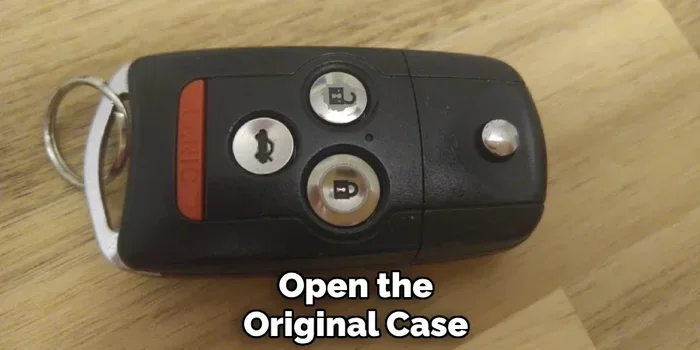
A typical key fob has two halves that snap or screw together. Inside, you will find the key fob circuit board, the buttons, a small spring mechanism, and the battery. The key fob shell protects all of these delicate parts. When you learn how to open a key fob case, you gain access to every component. This means you can replace batteries, clean contacts, fix stuck buttons, and even troubleshoot key fob troubleshooting issues on your own.
Tools You Will Need to Open a Key Fob Case
Before you start, gather everything you need. Having the right tools makes the process smooth and prevents accidental damage. Here is what you will want on hand.
Essential Tools
- Small flathead screwdriver: a thin, flat screwdriver works great for gently prying open most key fob cases.
- Plastic pry tool or spudger: this is the safest option. It prevents scratches and does not conduct electricity, which protects the key fob circuit board.
- Small Phillips head screwdriver: some key fob models use tiny screws instead of clips. Check yours before you start.
- Soft cloth or microfiber towel: this keeps the workspace clean and prevents scratches on the key fob shell.
- Good lighting: a bright lamp or a flashlight helps you see the small clips and screws clearly.
Helpful Extras
These items are not strictly necessary, but they make the job much easier:
- Tweezers: helpful for handling small springs or screws that might fall out.
- A replacement coin cell battery: CR2025 or CR2032 are the most common types, but check your owner’s manual to be sure.
- Isopropyl alcohol and a cotton swab: useful for cleaning dirty contacts inside the key fob housing.
- A small tray or magnetic mat: keeps tiny screws and parts from rolling away while you work.
Comparison: Pry Tools vs. Flathead Screwdrivers
| Feature | Plastic Pry Tool | Flathead Screwdriver |
|---|---|---|
| Safe for the key fob shell | Yes | Risk of scratches |
| Cost | Very low | Already in most homes |
| Ease of use | Very easy | Requires a light touch |
| Conducts electricity | No | Yes (risk to circuit board) |
| Best for | All key fob types | Firm clips only |
For most people, a plastic pry tool is the best choice. It is cheap, safe, and works on virtually every key fob disassembly job. If you do not have one, a flathead screwdriver can work too, but you need to be very gentle.
Step-by-Step Guide to Open a Key Fob Case
Now that you have your tools ready, let us walk through the actual process. Follow these steps carefully, and you will open your key fob without any trouble.
Step 1: Prepare Your Workspace
Find a clean, flat surface with good lighting. Lay down your soft cloth. Place your tray or magnetic mat nearby to catch any small parts. Remove the key fob keychain and any other attachments from the fob. If your key fob has a built-in key, set it aside safely.
Take a moment to examine the key fob remote closely. Look for any visible seams, screws, or clips along the edges. Every model is slightly different, so identifying the opening points before you start is a smart move.
Step 2: Remove the Keychain Clip
Most key fobs have a small metal clip or ring where the keychain attaches. This clip often hides the main seam of the case. Use your finger or a small flathead screwdriver to gently push the clip aside or pop it out. Some clips slide back; others need to be pressed down.
Quick Tip: If the clip is tight, do not force it. Try wiggling it gently from side to side until it releases. Forcing it is one of the most common causes of key fob damage during opening.
Step 3: Locate and Release the Clips
Once the clip is removed, look for the seam where the two halves of the key fob housing meet. Insert your plastic pry tool or flathead screwdriver into the seam. Start at one corner and work your way around.
Move slowly and gently. You will feel small clicks as the clips release. These clicks are normal and expected. If you meet resistance, stop and reposition your tool. Never use excessive force. The goal is to let the clips do the work, not to overpower them.
Expert Insight: Heating the edges of the key fob shell slightly with a hair dryer on a low setting can help loosen tight clips. This is especially useful for older key fobs that have been exposed to heat and cold over the years.
Step 4: Separate the Two Halves
Once all the clips are released, carefully separate the two halves of the case. Lift the top half straight up. Do not pull at an angle, as this can bend or break internal components.
Inside, you will see the key fob circuit board, the buttons, a small metal spring, and the battery. The key fob buttons are usually held in place by the top half of the shell. Handle everything gently and avoid touching the circuit board with your bare fingers, as oils from your skin can cause corrosion over time.
Step 5: Access the Internal Components
Now you have full access to the inside of your key fob. This is where you can:
- Replace the coin cell battery: note which side faces up, remove the old battery, insert the new one, and make sure it clicks into place.
- Clean the contacts: use a cotton swab dipped in isopropyl alcohol to gently clean the button contacts and circuit board connections.
- Check the spring mechanism: if a button feels loose or weak, the small spring may have popped out. Use tweezers to reposition it carefully.
- Inspect for damage: look for cracks in the key fob shell, corrosion on the circuit board, or worn-out buttons.
If your key fob not working issue was caused by a dead battery, replacing it will likely solve the problem right away. If the issue persists after a battery swap, you may need to look deeper at the circuit board or button contacts for signs of wear or corrosion.
Step 6: Reassemble the Key Fob
Once you have completed your key fob battery replacement or repair, it is time to put everything back together. Place the circuit board and buttons back into the bottom half of the shell. Make sure the spring is seated correctly and the battery is oriented the right way. Then press the top half down firmly until all the clips snap into place.
Quick Tip: Before you fully close the case, test the buttons to make sure everything is working. This saves you from having to reopen the fob if something is off.
Reattach the key fob keychain and clip. Test the remote from a distance to confirm it is working properly. If your key fob remote responds immediately and smoothly, you are all set.
Common Mistakes to Avoid When Opening a Key Fob Case
Even with the best intentions, mistakes happen. Here are the most common errors people make when they try to open a key fob case, and how to avoid them.
Using the Wrong Tools
Using a kitchen knife, a butter knife, or any sharp metal tool is a recipe for disaster. These tools can scratch the key fob shell, puncture the key fob circuit board, or even short out the electronics. Always use a plastic pry tool or a thin, flat screwdriver specifically designed for electronics.
Forcing the Case Apart
This is the number one mistake. If the case does not open easily, you are probably missing a clip or starting at the wrong seam. Stop, re-examine the fob, and find the correct opening point. Forcing the case apart can crack the key fob housing, break internal clips, and damage the key fob buttons or circuit board.
Losing Small Parts
Key fobs contain tiny springs, screws, and clips. If you lose one, the fob may not work properly even after reassembly. Always work on a tray or magnetic mat, and keep a close eye on small parts as you remove them.
Ignoring the Battery Orientation
When you replace key fob battery, the positive and negative sides matter. Putting the battery in backwards will not damage the fob, but it will not work either. Take a photo of the battery orientation before you remove the old one, so you have a reference when inserting the new one.
Skipping the Cleaning Step
Dirt and grime build up inside key fobs over time, especially around the button contacts. Skipping a simple cleaning with isopropyl alcohol can leave you with sticky or unresponsive buttons even after a fresh battery. A quick clean takes seconds and often solves mysterious key fob troubleshooting issues.
Quick Tips for Key Fob Care and Maintenance
Once you know how to open a key fob case, you can keep your fob in great shape with minimal effort. Here are some practical tips that extend the life of your key fob remote and keep it working reliably.
Replace the Battery Before It Dies Completely
Do not wait until the remote stops working entirely. If you notice the range getting shorter or buttons feeling sluggish, swap in a fresh coin cell battery. This prevents the frustration of being stranded with a dead fob. Most key fob battery replacement jobs take less than five minutes once you know how to open the case.
Keep Your Key Fob Dry
Moisture is one of the biggest enemies of a key fob. Even if your fob is labeled as key fob waterproof, prolonged exposure to water or humidity can still cause damage. If your fob gets wet, open the case as soon as possible and let it dry completely before reassembling.
Store It Safely
Avoid leaving your key fob in direct sunlight, inside a hot car, or near strong magnetic fields. Extreme heat and cold can damage the battery, warp the key fob shell, and weaken the circuit board. A pocket, a bag, or a dedicated key dish works perfectly.
Clean the Buttons Regularly
A quick wipe-down with a damp cloth removes surface grime. For deeper cleaning, open the case and use a cotton swab with isopropyl alcohol on the button contacts. This keeps the key fob buttons responsive and prevents the stickiness that builds up over months of daily use.
When to Seek Professional Help for Your Key Fob
Opening a key fob and replacing a battery solves most common problems. But there are situations where professional help is the smarter choice. Knowing when to call in an expert saves you time, prevents further damage, and protects your transponder key programming.
If your key fob has been physically damaged beyond a cracked shell, a professional can assess whether the key fob circuit board needs replacement. Similarly, if your car’s immobilizer system is not recognizing the fob, the issue may involve the transponder chip inside the key. This type of key fob repair requires specialized equipment and expertise that goes beyond simple disassembly.
Also, if you have tried opening the case and the fob still does not work, the problem could be with the car’s receiver module rather than the fob itself. A locksmith or dealer can diagnose this quickly and accurately. There is no shame in seeking help when the situation calls for it.
Expert Insight: Many locksmiths now offer mobile key fob programming and replacement services. They come to you, handle the key fob disassembly and repair on the spot, and get you back on the road in no time. This is a great option if you are not comfortable opening the case yourself or if the fob has complex internal damage.
Conclusion
Knowing how to open a key fob case quickly without breaking it is one of the most useful car care skills you can develop. It saves you money, gives you independence, and takes only a few minutes once you get the hang of it. From gathering the right tools to carefully separating the two halves of the key fob housing, every step is manageable when you take it slow and stay patient.
Remember to use a plastic pry tool, never force the case, and keep track of every small part. Replace your coin cell battery when needed, clean the contacts regularly, and store your fob in a safe place. With these habits, your key fob remote will stay in excellent working condition for years to come.
Whether you are dealing with a dead battery, sticky buttons, or a fob that simply stopped working, you now have the knowledge and confidence to handle it yourself. Open that case, fix the problem, and get back to enjoying the convenience of a working key fob in no time.
Frequently Asked Questions
Can I open a key fob case without any special tools?
Yes, you can open most key fob cases with just a small flathead screwdriver and a bit of patience. A plastic pry tool makes the job easier and safer, but it is not strictly required. The most important thing is to go slowly and avoid using sharp or metal tools that could damage the key fob shell or circuit board.
What type of battery do most key fobs use?
The vast majority of key fobs use a CR2025 or CR2032 coin cell battery. These are inexpensive and widely available at drugstores, hardware stores, and online. Check your owner’s manual or look at the old battery before purchasing a replacement to confirm the exact type your key fob battery replacement requires.
Will opening my key fob void the warranty?
This depends on the manufacturer and the age of your fob. Some newer key fobs come with a warranty that may be voided if you open the case yourself. If your fob is still under warranty, it is best to contact the dealer or manufacturer first. For older fobs or out-of-warranty units, opening the case is perfectly fine and often the most practical solution.
How do I know if my key fob needs a new battery or something else?
If the remote range has gotten shorter or the buttons feel weak, a new battery is usually the fix. However, if replacing the battery does not solve the problem, the issue may be with the key fob circuit board, the buttons, or the internal contacts. In that case, opening the case and inspecting the components can help you identify the real cause of the key fob not working issue.
Is it safe to use a hairdryer to loosen tight key fob clips?
Yes, using a hairdryer on a low or medium setting for a few seconds can gently warm the key fob shell and soften the plastic clips. This makes the case easier to open without excessive force. Just be careful not to apply too much heat or hold the dryer too close, as extreme heat can damage the internal components of the key fob housing.
Can a damaged key fob be repaired instead of replaced?
In many cases, yes. Common issues like dead batteries, loose springs, dirty contacts, and cracked shells can all be repaired with basic tools and a little time. However, if the key fob circuit board is severely damaged or the transponder chip is malfunctioning, replacement may be the more cost-effective option. A locksmith can help you decide which route makes the most sense for your specific situation.