Learn How to Pair Phone to Car Bluetooth in Minutes
Learning how to pair phone to car Bluetooth is easier than most people think. This guide walks you through every step, from turning on Bluetooth to fixing common connection problems. You will also discover tips to keep your wireless connection strong and reliable on every drive.
There is something incredibly satisfying about tapping your phone and hearing your favorite song come through your car speakers. Or answering a call without ever touching your device while driving. Learning how to pair phone to car Bluetooth opens up a world of convenience and safety on the road.
Maybe you just bought a new car. Or perhaps your old phone finally gave out and you need to reconnect everything. Either way, Bluetooth pairing does not have to be confusing. This guide breaks it down into simple, easy-to-follow steps that work for almost any phone and car combination.
By the time you finish reading, you will know exactly how to get your devices connected, troubleshoot common issues, and enjoy all the features that wireless car connectivity has to offer. Let us get started.
Key Takeaways
- Pairing is quick: Most phones connect to car Bluetooth in under two minutes once you know the steps.
- Check compatibility first: Make sure your phone and car system support Bluetooth before you start.
- Restart both devices: This simple fix solves the majority of Bluetooth pairing issues.
- Keep your software updated: Outdated phone or car firmware often causes connection problems.
- Use a Bluetooth adapter if needed: Older cars without built-in Bluetooth can still get wireless connectivity.
- Explore hands-free features: Bluetooth lets you make calls, stream music, and use voice commands safely.
📑 Table of Contents
- Why You Should Pair Your Phone to Car Bluetooth
- How to Pair Phone to Car Bluetooth: Step-by-Step
- Common Bluetooth Pairing Problems and How to Fix Them
- Tips for Better Bluetooth Performance in Your Car
- Bluetooth Features You Should Know About
- When to Use a Bluetooth Adapter Instead
- Quick Tips for a Smooth Bluetooth Experience
- Common Mistakes People Make When Pairing Bluetooth
- Expert Insights on Car Bluetooth Technology
- Final Thoughts
Why You Should Pair Your Phone to Car Bluetooth
Some people still rely on auxiliary cables or FM transmitters. And that is fine. But Bluetooth connectivity has become the standard for a reason. It is wireless, it is convenient, and it makes your driving experience much better.
Here are some of the biggest benefits of setting up wireless connection between your phone and car:
- Hands-free calling: You keep your hands on the wheel and your eyes on the road. This is one of the most important hands-free driving features available today.
- Music streaming: Stream your favorite playlists, podcasts, and audiobooks directly through your car audio system without any wires.
- Voice commands: Many car Bluetooth systems let you control your phone using voice prompts. You can make calls, send texts, and change songs without lifting a finger.
- Seamless integration: Modern car infotainment systems sync your phone’s contacts, messages, and apps for a smooth experience.
- No more cables: Once paired, your phone connects automatically every time you get in the car. No fumbling with cords or adapters.
The safety benefits alone are worth it. Studies show that hands-free calling significantly reduces distracted driving. And let us be honest, streaming music through your car speakers sounds way better than tinny phone speakers. Bluetooth wireless sync is one of the simplest upgrades you can make to any vehicle.
How to Pair Phone to Car Bluetooth: Step-by-Step
The process is nearly identical whether you use an iPhone or an Android device. The steps below cover the general device pairing process. Small differences may exist depending on your phone model and car brand.
Step 1: Prepare Your Car
Start by getting your car ready for Bluetooth settings access. Most modern vehicles have a car infotainment system with a Bluetooth menu. Here is what to do:
- Turn on your car’s ignition. You do not need to start the engine, but the system needs power.
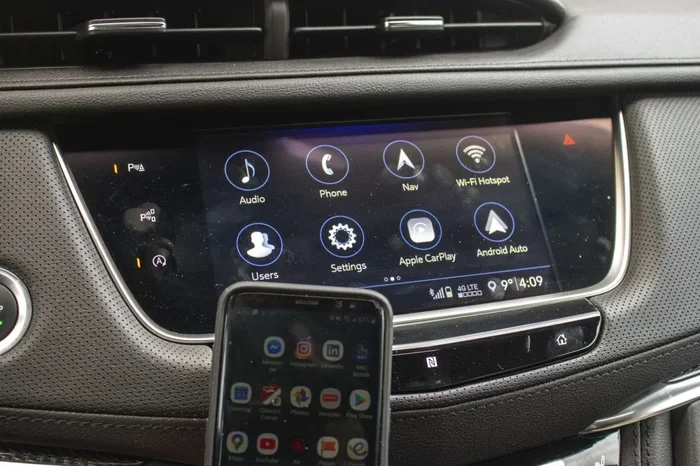
- Navigate to the Settings or Phone menu on your car’s display screen.
- Look for a Bluetooth option and tap it.
- Select the option to make your car discoverable or visible to other devices.
Some cars display a pairing code on the screen. Make a note of this number. You will need it shortly. This is part of the standard passkey pairing process that keeps your connection secure.
Step 2: Turn on Bluetooth on Your Phone
Now it is time to work on your phone side of the phone connection. Follow these steps:
- Open your phone’s Settings app.
- Tap on Bluetooth or Connections (the exact name depends on your phone).
- Toggle Bluetooth to the On position.
- Make sure your phone is set to be discoverable by other devices.
Your phone will now start scanning for nearby Bluetooth devices. Within a few seconds, your car’s name should appear on the list. This is the moment when wireless connection begins to happen.
Step 3: Select Your Car and Complete Pairing
Here is where everything comes together:
- Tap on your car’s name from the list of available devices on your phone.
- If your car showed a pairing code earlier, enter that code on your phone now.
- Wait a few seconds while both devices authenticate the connection.
- You should see a confirmation message on both your phone and car screen.
That is it. You have successfully paired phone to car Bluetooth. Your phone should now connect automatically every time you get in the car and Bluetooth is turned on.
Step 4: Test Your Connection
Before you hit the road, test everything out:
- Play a song on your phone and check if it streams through your car speakers.
- Make a test call to a friend or family member to confirm hands-free calling works.
- Try using voice commands if your car supports them.
- Check that your phone’s contact list syncs with your car’s system.
Testing takes about 30 seconds and saves you a lot of frustration later. If anything does not work, do not worry. We will cover troubleshooting in the next section.
Common Bluetooth Pairing Problems and How to Fix Them
Bluetooth troubleshooting is something almost everyone deals with at some point. Even after you learn how to pair phone to car Bluetooth, you may run into hiccups. Here are the most common issues and their solutions.
Problem 1: Your Phone Does Not Find the Car
This is the most frequent complaint people have. If your phone does not detect your car’s Bluetooth signal, try these fixes:
- Restart Bluetooth on both your phone and car.
- Turn off Bluetooth on your phone completely, wait 10 seconds, and turn it back on.
- Check the car’s Bluetooth range. Most systems work within 30 feet. Move your phone closer to the car’s dashboard.
- Delete old pairings from both devices and start fresh.
- Make sure your car is discoverable. Some systems turn off discoverability after a few minutes.
Problem 2: Paired but No Audio
Sometimes the devices connect but you cannot hear any sound. This usually happens because the audio profile is not set correctly:
- Go to your phone’s Bluetooth settings and look for the car connection.
- Tap the settings icon next to your car’s name.
- Make sure both Phone Audio and Media Audio are enabled.
- Check your car’s volume and make sure it is not muted.
Problem 3: Connection Keeps Dropping
An unstable Bluetooth connection can be incredibly annoying. If your phone keeps disconnecting from the car, here is what to do:
- Update your phone’s software. Outdated software is a leading cause of Bluetooth connectivity issues.
- Check for car firmware updates. Many manufacturers release updates that improve wireless sync performance.
- Remove other paired devices that are not in use. Too many active connections can cause interference.
- Avoid placing your phone in the glove box or far from the dashboard. Bluetooth range matters.
Problem 4: Pairing Code Not Working
If you are using passkey pairing and the code does not work, try this:
- Delete the existing pairing from both devices.
- Restart both your phone and car’s infotainment system.
- Try pairing again with a fresh code.
- If the problem persists, consult your car’s user manual or contact the manufacturer.
Most Bluetooth troubleshooting issues resolve with a simple restart or by clearing old pairings. Patience goes a long way here.
Tips for Better Bluetooth Performance in Your Car
Once you have successfully paired phone to car Bluetooth, you want to keep that connection strong and reliable. Here are some expert tips that make a real difference.
Keep Your Software Updated
Both your phone and car benefit from regular software updates. These updates often include fixes for Bluetooth connectivity bugs and improvements to wireless connection stability. Check for updates at least once a month.
Limit the Number of Paired Devices
Most car systems can store multiple paired devices. But having too many connections can slow things down and cause interference. Keep only the devices you actually use regularly. Delete old pairings you no longer need.
Position Your Phone Wisely
Bluetooth range is typically around 30 feet. Place your phone in a cradle or on the dashboard near the car’s antenna. Avoid putting it in a bag, glove box, or under a seat. Better placement means a stronger and more stable connection.
Use a Bluetooth Adapter for Older Cars
If your car does not have built-in Bluetooth, do not worry. A car Bluetooth adapter is an affordable solution. These small devices plug into your car’s audio system and add wireless connectivity to any vehicle. They are easy to install and work with virtually any phone.
Enable Multipoint Connection If Available
Some advanced car infotainment systems support multipoint connection. This feature allows your phone to connect to two Bluetooth devices at the same time. For example, you can stay connected to your car while also using wireless headphones. Check your car or phone settings to see if this feature is available.
Bluetooth Features You Should Know About
Pairing your phone is just the beginning. Modern smartphone integration offers features that go far beyond simple audio streaming. Here are some capabilities you should explore.
Hands-Free Calling
This is the #1 reason people learn how to pair phone to car Bluetooth. With hands-free calling, you can answer calls through your car’s steering wheel controls or voice commands. Your voice comes through the car speakers, and the microphone picks up your voice without you touching your phone.
This feature is not just about convenience. It is about safety. The National Highway Traffic Safety Administration strongly recommends hands-free driving to reduce distractions. A wireless connection makes this effortless.
Music and Media Streaming
Once connected, you can stream music from apps like Spotify, Apple Music, and YouTube directly through your car speakers. You control playback from your phone or from the car’s infotainment screen. Some systems even display song information and album art on the dashboard display.
If you use audio streaming regularly, make sure your media audio setting is enabled in your Bluetooth connection options. Without it, you will only get call audio and not music.
Voice Commands and Assistants
Most modern phones work with voice assistants like Siri, Google Assistant, or Alexa. When paired via Bluetooth connectivity, you can activate these assistants through your car’s system. You can ask for directions, send texts, set reminders, and more all without touching your phone.
This is one of the most powerful features of wireless car connectivity. It keeps your attention where it belongs: on the road.
Contact and Message Syncing
Many car infotainment systems can sync your phone’s contacts and recent messages. This means you can see who is calling even before you pick up the phone. Some systems let you read incoming text messages aloud through the car speakers.
Keep in mind that this feature depends on your phone and car model. Not all systems support full message syncing, but most handle basic contact access well.
When to Use a Bluetooth Adapter Instead
Not every car has built-in Bluetooth settings. If you drive an older model or a budget vehicle, you might not have native wireless connection capabilities. That is where a car Bluetooth adapter comes in handy.
These adapters are small, affordable devices that bridge the gap between your phone and your car’s audio system. Here is what you need to know:
- Types of adapters: Some plug into the cigarette lighter, others connect via AUX or FM transmitter. Choose one that matches your car’s available inputs.
- Setup is simple: Most adapters require no installation. Plug them in, pair your phone, and you are good to go.
- Cost: Quality Bluetooth adapters range from $15 to $50. You do not need to spend a lot to get reliable wireless sync.
- Limitations: Adapters may not support all features like voice commands or contact syncing. They primarily provide audio streaming and hands-free calling.
A Bluetooth adapter is a great solution if you are not ready to upgrade your car but still want the benefits of Bluetooth connectivity. It is one of the best budget-friendly car accessories available today.
Quick Tips for a Smooth Bluetooth Experience
Here are some quick tips to keep your Bluetooth connection running smoothly every time you drive:
- Restart both devices once a month to clear temporary connection glitches.
- Delete old pairings from both your phone and car at least twice a year.
- Keep your phone charged. A low battery can weaken Bluetooth range and cause disconnections.
- Turn off Bluetooth on devices you are not actively using. This reduces interference and improves connection quality.
- Use a phone mount to keep your device near the car’s antenna for the strongest signal.
- Avoid placing your phone near other wireless devices that might cause interference, such as USB hubs or dash cams.
These small habits make a big difference over time. Your wireless connection will be faster, more stable, and more reliable every single drive.
Common Mistakes People Make When Pairing Bluetooth
Even after you learn how to pair phone to car Bluetooth, certain mistakes can cause frustration. Here are the ones to avoid:
- Not checking compatibility: Some older phones do not support the latest Bluetooth version. Check before you try to pair.
- Skipping the restart: A simple restart of both devices solves more problems than any other troubleshooting step.
- Ignoring software updates: Outdated phone or car firmware is a hidden cause of many connection issues.
- Leaving Bluetooth on in crowded areas: In places with many Bluetooth devices, your connection may become unstable. Turn it off in crowded areas if you are not using it.
- Forgetting to enable media audio: Many people connect their phone but wonder why music does not play. Always check that media audio is enabled.
- Not clearing old pairings: Leftover pairings from previous devices can interfere with new connections. Clean them out regularly.
Avoiding these mistakes will save you time and frustration. Most Bluetooth pairing issues are easily preventable with a little awareness.
Expert Insights on Car Bluetooth Technology
Bluetooth technology has come a long way since it first appeared in cars. The latest Bluetooth version standards offer faster data transfer, better range, and lower power consumption. Here is what you should know about the current state of wireless car connectivity.
Most modern cars support Bluetooth 4.0 or newer, which provides excellent range and stability. Bluetooth 5.0, found in newer phones and premium vehicles, offers even better performance with a range of up to 800 feet in ideal conditions.
Experts also recommend checking your car’s Bluetooth settings periodically. Manufacturers occasionally change how their systems handle pairing, and a quick review of the manual can reveal features you did not know existed.
One thing industry professionals stress is the importance of Bluetooth security. Only pair devices you trust. Delete pairings for devices you no longer use. This keeps your wireless connection safe from unauthorized access.
The bottom line is that car Bluetooth technology continues to improve every year. Taking a few minutes to learn your system’s capabilities pays off in a much better driving experience.
Final Thoughts
Learning how to pair phone to car Bluetooth is one of the simplest yet most valuable skills for any driver. It takes only a few minutes, and the benefits last for every single drive you take. From safer hands-free calling to seamless music streaming, Bluetooth connectivity transforms your car into a smarter, more connected space.
Remember the steps: prepare your car, turn on Bluetooth on your phone, select your car, and complete the pairing. If you run into issues, restart both devices and check your Bluetooth settings. Keep your software updated and your devices positioned well for the best experience.
Whether your car has built-in wireless connection or you use a Bluetooth adapter, the result is the same: a safer, more enjoyable drive. Take a few minutes today to pair your phone. You will wonder how you ever drove without it.
Now that you know the process, go ahead and connect your devices. Your next drive will feel smoother, safer, and more connected than ever before.
Frequently Asked Questions
How long does it take to pair phone to car Bluetooth?
Most Bluetooth pairing processes take less than two minutes once both devices are ready. The first connection may take a little longer as the systems authenticate each other. After that, your phone will connect automatically every time you get in the car.
Why won’t my phone connect to my car Bluetooth?
The most common reasons include Bluetooth being turned off on one or both devices, the car not being set to discoverable mode, or old pairings interfering with a new connection. Try restarting Bluetooth on both devices and deleting old pairings to fix the issue.
Can I pair multiple phones to my car Bluetooth?
Yes, most car infotainment systems can store multiple paired devices. However, only one phone can stream audio at a time. When you get in the car, the system typically connects to the last phone that was paired automatically.
Do I need an internet connection for car Bluetooth?
No, Bluetooth connectivity does not require an internet connection. It uses a short-range wireless signal to connect your phone to your car. However, some features like streaming online music or getting live traffic updates will need data or Wi-Fi.
Is Bluetooth safe to use while driving?
Yes, hands-free calling via Bluetooth is considered safe and is legal in most places. It allows you to make and receive calls without taking your hands off the wheel or eyes off the road. Always use voice commands or steering wheel controls for the safest experience.
What should I do if my Bluetooth connection keeps dropping?
First, restart both your phone and car’s Bluetooth system. If the problem continues, check for software updates on both devices, reduce the number of active paired devices, and make sure your phone is within Bluetooth range of the car’s antenna.
=== CONCLUSION ===
Learning how to pair phone to car Bluetooth is a quick and rewarding process that enhances every drive. With hands-free calling, music streaming, and voice commands at your fingertips, wireless car connectivity makes your vehicle safer and more enjoyable. Follow the steps in this guide, keep your devices updated, and enjoy a seamless Bluetooth connection every time you turn the key. The road ahead just got a lot more connected.