How to Fix VTM-4 Light on Acura MDX 2005 – Quick Guide
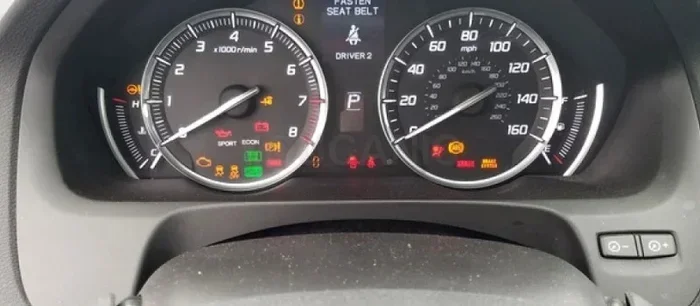
The VTM-4 light on a 2005 Acura MDX signals a problem with the all-wheel drive system. Common causes include a faulty VTM-4 switch, low fluid level, or a wheel speed sensor issue. You can often fix this yourself with an OBD-II scanner, some basic tools, and about 30 minutes of your time. This guide walks you through every step to diagnose and resolve the VTM-4 warning light on your Acura MDX.
That little warning light on your dashboard can send anyone into a panic. If you own a 2005 Acura MDX and the VTM-4 light just popped on, take a breath. This is a common issue, and in most cases, it is something you can fix without visiting a mechanic. The VTM-4 system is Acura’s all-wheel drive technology, and when that light comes on, it means something in the system needs attention.
In this guide, we will walk you through everything you need to know. From understanding what the VTM-4 system does, to finding the root cause, to actually fixing the problem. We will keep things simple and practical. You do not need to be a master mechanic to handle this. By the end of this article, you will know exactly what to do and how to do it safely.
The VTM-4 warning light is your car telling you something is off with the Acura MDX AWD system. Think of it as a helpful nudge rather than a full-blown emergency. That said, addressing it early can save you from bigger problems down the road. Let us dive in and get your MDX back to running smoothly.
Key Takeaways
- The VTM-4 light is a warning about your Acura MDX all-wheel drive system and should not be ignored.
- Common causes include a bad VTM-4 switch, low transfer case fluid, or faulty wheel speed sensors.
- You can diagnose the issue yourself using an OBD-II scanner and a few simple checks.
- Most VTM-4 repairs are affordable and can be done at home with basic tools.
- Ignoring the light can lead to expensive drivetrain damage over time.
- Resetting the light after repair is simple but requires clearing the fault codes properly.
📑 Table of Contents
- What Does the VTM-4 Light Mean on a 2005 Acura MDX?
- Common Causes of the VTM-4 Light on Acura MDX 2005
- Tools and Materials You Will Need
- Step-by-Step Guide to Fixing the VTM-4 Light
- When to See a Professional Mechanic
- Preventing Future VTM-4 Light Issues
- How the VTM-4 Light Compares to Other Warning Lights
- Cost Breakdown for VTM-4 Repairs
- Final Thoughts on Fixing the VTM-4 Light
What Does the VTM-4 Light Mean on a 2005 Acura MDX?
The VTM-4 stands for Variable Torque Management 4-wheel drive. It is Honda’s clever all-wheel drive system found in Acura vehicles. On your 2005 MDX, this system sends power to the rear wheels when needed for better traction. The light on the dashboard is a dashboard warning that tells you something in this system is not working correctly.
How the VTM-4 System Works
Here is a simple way to think about it. Under normal driving, your 2005 Acura MDX mostly runs in two-wheel drive mode. This saves fuel. When the system detects slipping or loss of traction, it automatically engages the rear wheels. A VTM-4 actuator on the rear differential handles this engagement. It uses hydraulic pressure to lock the rear differential, sending power where it is needed most.
The VTM-4 switch on the center console lets you manually activate this system. You might use it in snow, mud, or loose gravel. When the light stays on or flashes, it means the system has detected a fault and may not be functioning properly.
Why You Should Not Ignore the VTM-4 Light
Some drivers see the light and just keep going. That is a mistake. While your MDX might still drive in two-wheel drive mode, you lose the safety and stability benefits of all-wheel drive. More importantly, the underlying issue could worsen. A small problem like a low fluid level can turn into a costly rear differential repair if left unchecked.
Also, if you live in an area with harsh winters or frequent rain, driving without a working AWD system can be unsafe. The VTM-4 light is there to protect you and your vehicle. Treat it with respect and address it promptly.
Common Causes of the VTM-4 Light on Acura MDX 2005
Several things can trigger the VTM-4 warning light. Understanding these causes helps you narrow down the problem before you start digging into repairs. Here are the most common culprits.
Faulty VTM-4 Switch
The VTM-4 switch is the button on your center console that lets you turn the all-wheel drive system on and off. Over time, this switch can wear out or develop electrical issues. When it fails, it sends wrong signals to the car’s computer, and the light comes on. This is one of the most frequent causes on the 2005 MDX.
A bad switch does not mean your AWD system is broken. It just means the signal telling the system to engage is not working right. Replacing the switch is usually a quick and inexpensive fix.
Low Transfer Case Fluid
The VTM-4 system relies on hydraulic fluid to operate the actuator. If your transfer case fluid level drops too low, the system cannot build the pressure it needs. This triggers the warning light. Low fluid can happen from normal seepage over time or from a small leak in a line or seal.
Check your fluid level regularly. If it is low, top it off with the correct Honda/Acura ATF-Z1 fluid. If you notice the fluid keeps dropping, look for leaks around the transfer case and rear differential lines.
Wheel Speed Sensor Failure
Your MDX uses wheel speed sensors to monitor how fast each wheel is turning. When one sensor fails or gets dirty, the AWD system cannot properly detect traction loss. The car’s computer then triggers the VTM-4 light as a safety measure. This is especially common after driving through deep water or mud that contaminates the sensors.
Wiring or Electrical Issues
Sometimes the problem is not a part at all but a wiring issue. Corroded connectors, frayed wires, or a blown fuse can all cause the VTM-4 light to illuminate. The 2005 MDX is getting up there in age, so electrical gremlins are not uncommon. A full car diagnostic can help you pinpoint whether the issue is electrical.
VTM-4 Actuator Failure
The actuator is the component that physically engages the rear differential. If it fails, the system cannot lock, and the light comes on. Actuator failure is less common than a bad switch or low fluid, but it does happen. This repair is more involved and typically costs more than the other fixes on this list.
Tools and Materials You Will Need
Before you start, gather everything you need. Having the right tools makes the job faster and easier. You do not need anything fancy for most VTM-4 repairs.
- OBD-II scanner – to read and clear fault codes
- Basic socket set and wrenches
- Jack and jack stands or ramps
- ATF-Z1 transmission fluid for topping off
- Clean rags and gloves
- Multimeter for electrical testing
- Replacement VTM-4 switch if needed (around $20-$40)
An OBD-II scanner is the single most important tool for this job. It lets you read the specific fault code stored in your car’s computer. That code tells you exactly what is wrong, so you do not have to guess. You can pick up a basic scanner for under $30, or many auto parts stores will read the codes for free.
Step-by-Step Guide to Fixing the VTM-4 Light
Now for the part you have been waiting for. Let us get into the actual repair process. Follow these steps carefully, and you will have that light off in no time.
Step 1: Read the Fault Codes
Plug your OBD-II scanner into the diagnostic port under your dashboard. Turn the ignition to the “on” position without starting the engine. Read any stored codes and write them down. The codes will tell you whether the issue is with the switch, the actuator, a sensor, or something else.
Common codes related to the VTM-4 system include codes starting with C for chassis-related faults. If you see a code pointing to the VTM-4 switch, you already know where to focus your attention.
Step 2: Check the VTM-4 Switch
Locate the VTM-4 switch on the center console near the shifter. Unplug the electrical connector behind it. Use your multimeter to test for continuity. If there is no continuity when you press the button, the switch is bad and needs replacement.
Replacing the switch is straightforward. Pull out the old switch, plug in the new one, and reconnect the electrical connector. This simple fix resolves the VTM-4 light in many cases. It costs very little and takes just a few minutes.
Step 3: Check and Top Off Fluid Levels
Locate the transfer case dipstick (on models that have one) or the fill plug on the transfer case. Check the fluid level. If it is low, add ATF-Z1 fluid until it reaches the proper level. Look for any signs of leaks around the lines and seals while you are at it.
Clean up any spilled fluid and reset the system. Sometimes simply topping off the fluid clears the light entirely.
Step 4: Inspect and Clean Wheel Speed Sensors
Check each wheel speed sensor for damage or contamination. Clean them with a cloth and ensure they are properly seated. If a sensor is damaged, replace it. This is usually a straightforward job that involves removing a bolt and pulling the sensor out.
Step 5: Clear the Codes and Test Drive
Once you have made your repair, use the OBD-II scanner to clear the fault codes. Start the engine and take a short test drive. Pay attention to whether the VTM-4 light stays off. If it does, you have successfully fixed the issue.
If the light comes back on, you may need to dig deeper. The problem could be more complex than a simple switch or fluid issue. At that point, it might be worth visiting a mechanic for a professional diagnosis.
When to See a Professional Mechanic
Not every VTM-4 issue can be solved at home, and that is okay. Here are signs that you should take your 2005 Acura MDX to a professional.
- The light comes back immediately after you clear it
- You hear grinding or whining noises from the rear differential
- The AWD system feels sluggish or unresponsive
- You notice fluid leaks underneath the vehicle
- Multiple warning lights are on along with the VTM-4 light
These symptoms could indicate a serious problem with the rear differential or the transfer case. Attempting to repair these components without experience can lead to further damage. A qualified mechanic has the tools and expertise to handle complex drivetrain repairs safely.
Also, if you have tried the steps above and the light persists, do not keep driving with it on indefinitely. A persistent VTM-4 light means the system is not functioning correctly, and you could be compromising your vehicle’s safety and performance.
Preventing Future VTM-4 Light Issues
The best way to deal with the VTM-4 light is to prevent it from coming back. Regular maintenance goes a long way in keeping your all-wheel drive system healthy and reliable.
- Check transfer case fluid regularly – change it according to your maintenance schedule
- Keep sensors clean – especially after driving through mud or water
- Use the VTM-4 switch properly – do not leave it locked on dry pavement for extended periods
- Address warning lights promptly – do not let them sit for weeks or months
- Follow the service schedule in your Acura MDX owner’s manual
Think of it this way. Your AWD system works hard for you every day, especially in tough driving conditions. A little regular attention keeps it running strong. Just like checking your tire pressure or oil level, checking on the VTM-4 system should be part of your routine car care.
If you ever notice the light flickering or coming on intermittently, do not wait for it to become a constant problem. Intermittent warnings often signal early-stage issues that are easy and cheap to fix. Catching them early saves you time, money, and headaches.
How the VTM-4 Light Compares to Other Warning Lights
It helps to understand how the VTM-4 light relates to other warnings on your dashboard. While it is not the same as a check engine light, it shares some similarities. Both lights indicate that your car’s computer has detected a fault. However, the VTM-4 light is specific to the all-wheel drive system, while the check engine light covers engine and emissions systems.
Some drivers confuse the VTM-4 light with the maintenance required light. The maintenance light simply reminds you that service is due. The VTM-4 light is an active warning that something needs attention now. If you are unsure which light you are seeing, consult your owner’s manual or a trusted mechanic.
Also worth noting: if you see a check engine light along with the VTM-4 light, the issues could be related. A faulty sensor or electrical problem can trigger multiple lights at once. In these cases, a thorough diagnostic scan is your best first step.
Cost Breakdown for VTM-4 Repairs
Wondering what you might spend to fix this issue? Here is a rough breakdown of common VTM-4 repairs for the 2005 Acura MDX. Prices can vary based on your location and whether you do the work yourself.
- VTM-4 switch replacement: $20-$40 for the part, plus about 30 minutes of your time
- Fluid top-off: $15-$25 for a quart of ATF-Z1 fluid
- Wheel speed sensor replacement: $50-$150 per sensor including parts and labor
- VTM-4 actuator replacement: $300-$600 depending on whether you do it yourself or hire a mechanic
- Full diagnostic at a shop: $50-$100 if you do not own a scanner
As you can see, most VTM-4 repairs are quite affordable. The switch replacement and fluid top-off are jobs you can easily handle yourself. Even the sensor replacement is within reach for a handy DIYer. The actuator is the most expensive repair, but it is also the least common cause of the VTM-4 light.
Compare these costs to what a dealership or independent shop would charge for the same work. You could easily save hundreds of dollars by tackling the repair yourself. Just make sure you follow the steps carefully and do not rush through the process.
Final Thoughts on Fixing the VTM-4 Light
The VTM-4 light on your 2005 Acura MDX is a common issue with straightforward solutions. Whether it is a simple switch replacement, a fluid top-off, or a sensor cleaning, most fixes are quick and affordable. The key is to act when the light first appears and not let it linger.
Use an OBD-II scanner to read the fault codes. Work through the common causes systematically. And do not hesitate to call a professional if the problem feels beyond your comfort level. Your MDX’s all-wheel drive system is a valuable feature that keeps you safe on the road. Taking care of the VTM-4 light is a small investment that pays off in reliability and peace of mind.
Now that you know how to handle this issue, you are better equipped than most drivers. Share this guide with fellow Acura MDX owners who might be dealing with the same problem. A little knowledge goes a long way toward keeping your car running its best for years to come.
Remember, that warning light is your car talking to you. Listen to it, respond quickly, and you will keep your 2005 Acura MDX in excellent shape. Safe driving!
Frequently Asked Questions
Can I still drive my Acura MDX with the VTM-4 light on?
Yes, you can drive short distances with the VTM-4 light on. Your MDX will default to two-wheel drive mode. However, you will lose the benefits of the all-wheel drive system, which can affect traction and stability. It is best to address the issue as soon as possible to avoid potential drivetrain damage.
How much does it cost to fix the VTM-4 light on a 2005 Acura MDX?
The cost depends on the root cause. A VTM-4 switch replacement costs around $20-$40 for the part. A fluid top-off is even cheaper. More complex repairs like an actuator replacement can run $300-$600. Many of these fixes are simple enough to do yourself, saving you significant labor costs.
What does VTM-4 stand for on the Acura MDX?
VTM-4 stands for Variable Torque Management 4-wheel drive. It is Acura’s all-wheel drive system that automatically sends power to the rear wheels when traction is needed. The system uses a hydraulic actuator on the rear differential to engage and disengage as conditions change.
Will the VTM-4 light reset itself after I fix the problem?
In most cases, you will need to manually clear the fault codes using an OBD-II scanner. The light does not always reset on its own, even after the repair is complete. Once you clear the codes and take a test drive, the light should stay off if the repair was successful.
Can a low battery cause the VTM-4 light to come on?
Yes, in some cases. A weak or dying battery can cause electrical issues that trigger warning lights, including the VTM-4 light. If you have recently had battery problems or your MDX has been sitting for a long time, a low battery could be the culprit. Try charging or replacing the battery and see if the light clears.
How often should I check my VTM-4 system fluid?
It is a good practice to check your transfer case fluid every 10,000 to 15,000 miles or during each oil change. Regular fluid checks help you catch low levels early before they cause the VTM-4 light to come on. Fresh fluid also keeps the entire AWD system running smoothly and extends its lifespan.
=== INTERNAL LINKS ===
If you are dealing with warning lights on your vehicle, you might also want to check out how to handle a check engine light on your Camry for additional guidance.
After fixing the VTM-4 light, you may want to learn how to manually clear your car codes to make sure the warning light stays off.
For more on understanding your vehicle’s diagnostic system, see our guide on how long a full car diagnostic takes at your local shop.