How to Enter a Honda Civic Radio Code Without Stress
Entering a Honda Civic radio code is simple once you know the right steps. This guide walks you through finding your code, entering it correctly, and fixing common problems. You will learn how to unlock your car radio in minutes using basic tools and free methods.
There is nothing more frustrating than getting into your Honda Civic and seeing a radio screen that just says “Code” or “Err.” You turn the key, the engine starts, but your car audio system stays completely silent. This is the radio anti-theft system doing its job. It locks up when the battery loses power or gets disconnected. The good news is that unlocking your Honda Civic radio does not need to be a headache. In this guide, we walk you through every step to enter your radio code quickly and confidently.
Whether you just replaced your battery, had a jump start, or bought a used Honda Civic with a locked radio, this guide has you covered. We will show you where to find your code, how to input it correctly, and what to do if things do not go as planned. No expensive dealer trips needed. No confusing technical jargon. Just clear, simple steps that actually work.
The Honda Civic radio code is a security feature designed to protect your car stereo from theft. When the radio detects a power interruption, it locks itself and asks for a digital code before it will play again. This is standard across Honda vehicles. Understanding how this system works makes the whole process much less scary. Let us dive in and get your radio back up and running.
Key Takeaways
- Find your code easily: Check your owner’s manual, the radio serial number, or your original purchase paperwork to locate your Honda Civic radio code.
- Follow a simple process: The code entry method is straightforward and works across most Honda Civic model years.
- Avoid common mistakes: Using wrong codes or exceeding attempt limits can lock you out temporarily.
- Prevent future lockouts: Simple habits like keeping your manual handy save time and frustration.
- Professional help is available: Dealers and locksmiths can retrieve your code if DIY methods fail.
📑 Table of Contents
What Is a Honda Civic Radio Code and Why Does It Appear?
The radio security code is a four-digit number that Honda uses to protect the car audio system. When the radio unit loses power, it triggers the radio lockout feature. This means the radio will not turn on until you unlock car radio with the correct code. It is a simple anti-theft measure that has been used in Honda vehicles for decades.
The system works by storing the code in a memory chip inside the radio unit. When power returns after a disruption, the radio checks for the code. If no code is entered, it displays a lockout message. This keeps thieves from simply unplugging and removing your radio. It is a clever security feature, even if it feels annoying when you are the one on the outside looking in.
How the Anti-Theft System Works
Here is what happens behind the scenes. When the radio battery disconnect occurs, the radio enters a protected mode. The display shows “CODE” or “LOC” depending on your model year. The system gives you a limited number of attempts to enter the correct digital radio code. If you fail too many times, the radio may require a longer reset period or professional assistance. This is why it is so important to get the code right the first time.
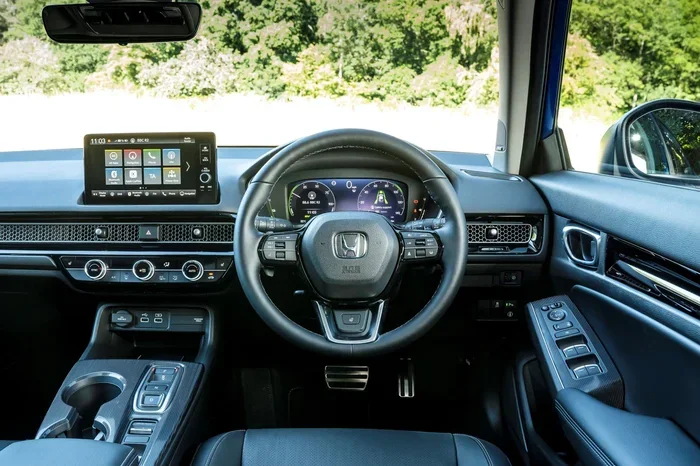
The code entry method uses the radio preset buttons on the face of the unit. Each button represents a number. You press buttons in a specific sequence to input your four-digit code. It sounds complicated, but once you see it, it is very simple. We will cover the exact steps below.
Where to Find Your Honda Civic Radio Code
Before you can enter the radio code, you need to find it. Honda provides several ways to retrieve this information. The method you use depends on what paperwork you have and your model year. Here are the most common ways to locate your Honda Civic radio code.
Check the Owner’s Manual
Your Honda Civic owner’s manual is the first place to look. Many Honda manuals include a small card or sticker inside the back cover with the radio code printed on it. The code is often listed alongside other important vehicle information like the radio serial number. If you still have your manual, this is the fastest way to find your code.
Look for the Radio Code Card
When you first bought your Honda Civic, the dealer likely gave you a small card with your radio code on it. Some people keep this in the glove box or with their vehicle paperwork. Check your glove compartment, center console, or any folder where you store car documents. If you find this card, you are all set.
Retrieve the Code Using the Serial Number
If you do not have the manual or the card, you can retrieve the code using the radio serial number. The serial number is printed on a label on the face or side of the radio unit. You will need to remove the radio from the dashboard to see it. Once you have the serial number, you can contact a Honda dealer or use an online Honda radio code retrieval service to get your code.
Some websites and apps allow you to input the serial number and generate your code instantly. Make sure you use a reputable source. Honda radio code retrieval tools are widely available and usually free or low-cost. This method works for most Honda Civic models from the 1990s through today.
Step-by-Step Guide to Entering the Honda Civic Radio Code
Now that you have your code, let us walk through the actual process of entering it. This is the part that trips up many people, so pay close attention. The steps are simple, but timing matters.
What You Need Before You Start
Before you begin, make sure you have the following ready:
- Your four-digit radio code written down or saved on your phone
- The radio unit turned on and displaying the “CODE” or “LOC” message
- A calm mindset — rushing leads to mistakes
- Your Honda Civic ignition in the “ON” or “ACC” position
Do not attempt this while driving. Pull over safely and make sure your vehicle is parked. Having your code written down is essential because you will need to input it from memory or reference it quickly.
The Entering Process
Follow these steps carefully to enter the Honda Civic radio code:
- Turn the ignition to the ON position. The radio should display “CODE” or “LOC.”
- Press and hold the AM/FM button. Hold it for about two seconds until the display starts blinking or shows a cursor.
- Use the preset buttons (1 through 6) to input each digit. Each preset button corresponds to a number. Press the button for the first digit of your code.
- Press the AM/FM button again to move to the next digit. The display will advance to the second position.
- Repeat this process for all four digits. Take your time and make sure each number is correct.
- Press and hold the AM/FM button to confirm. The radio should unlock and start playing normally.
If the code is correct, your Honda Civic radio will unlock immediately and you can enjoy your music again. If the code is wrong, the display will show an error message. Do not panic. You typically get a few attempts before the system locks you out temporarily.
Quick Tip: Some Honda Civic models use the Tune/Seek buttons instead of preset buttons. Check your specific model year to confirm which buttons to use. The process is the same, just different buttons.
Common Problems and How to Fix Them
Sometimes things do not go as smoothly as we would like. Here are the most common issues people face when trying to unlock car radio and how to solve them.
Radio Displays “Code” or “Err”
If your radio shows “CODE” or “Err” and will not accept your code, the first thing to check is whether you are using the correct code. Double-check the serial number you used to retrieve the code. A single wrong digit in the serial number will give you the wrong Honda Civic radio code. Go back and verify the serial number before trying again.
Another common cause is not holding the AM/FM button long enough. The system needs a clear signal that you are entering code mode. Hold the button until you see the display change before pressing your first digit.
You Have Used All Your Attempts
Every Honda radio has a limited number of code entry attempts. If you exceed this limit, the radio will lock you out for a set period, usually one hour. During this time, the radio will not accept any code at all. This is a built-in security measure to prevent brute-force attempts by thieves.
If this happens, do not keep trying. Wait for the lockout period to expire. In the meantime, double-check your code and make sure you have the right one. After the waiting period, try again with the correct code. This almost always works if your code is right.
The Radio Still Will Not Unlock After the Correct Code
In rare cases, the radio may not respond even after entering the correct code. This can happen if there is a deeper electrical issue or if the radio unit itself is faulty. If this occurs, try disconnecting the battery for 15 minutes and reconnecting it. This resets the system. If the problem persists, you may need professional radio troubleshooting.
Preventing Future Radio Lockouts
Nobody wants to deal with a locked radio twice. Here are some simple steps to prevent future radio lockout situations:
- Keep your owner’s manual in the glove box. This is the easiest way to store your radio code for future reference.
- Take a photo of your radio code card. If you find the original card, snap a photo and save it on your phone.
- Avoid unnecessary battery disconnections. Every time the battery is disconnected, the radio lockout can trigger again.
- Write down your code on a small piece of paper. Keep it in the glove box or center console. This is a low-tech but highly effective solution.
- Use a memory saver device during battery replacement. These small devices plug into your cigarette lighter and keep power flowing to the radio memory during a battery swap.
Taking these simple precautions can save you from the frustration of a locked radio in the future. A few minutes of preparation now can prevent hours of hassle later.
When to Seek Professional Help
Most of the time, entering the Honda Civic radio code is a straightforward DIY task. But there are situations where professional help makes sense. If you have tried everything and the radio still will not unlock, it is time to call in the experts.
A Honda dealer can look up your code using your vehicle identification number or the radio serial number. They have access to Honda’s internal database and can retrieve your code quickly. This is a reliable option if all other methods have failed. A mobile locksmith who specializes in car electronics is another good option. They often carry the tools and knowledge to retrieve and input radio codes on the spot.
Keep in mind that dealer services may come with a fee. However, it is usually much cheaper than replacing the entire radio unit. Before you spend money on a new radio, try these professional retrieval options first. You might be surprised at how affordable and quick the solution can be.
For more help with car diagnostics or troubleshooting, check out our guide on how long a full car diagnostic takes to understand what other systems might be causing issues. Also, if you are dealing with error codes on your Honda, our article on how to manually clear car codes can be very useful for related troubleshooting steps.
Final Thoughts
Dealing with a locked Honda Civic radio is never fun, but it is almost always a solvable problem. With the right code and a little patience, you can enter the radio code in just a few minutes. The key is knowing where to find the code and following the steps carefully. Do not rush, do not guess, and do not exceed the attempt limit.
Remember that the Honda Civic radio code is there to protect your investment. Once you unlock your radio, take a moment to write down the code and store it somewhere safe. This small habit will save you from future headaches. Your car audio system is an important part of your driving experience, and keeping it unlocked means you can enjoy your favorite music every time you hit the road.
Stay calm, follow the steps, and your Honda Civic radio will be playing again before you know it. Happy driving!
Frequently Asked Questions
What is a Honda Civic radio code?
A Honda Civic radio code is a four-digit security number that protects your car stereo from theft. When the radio loses power, it locks itself and requires this code to unlock again. The code is unique to your specific radio unit and can be found in your owner’s manual or retrieved using the radio serial number.
How do I find my Honda Civic radio code?
You can find your code in the owner’s manual, on the radio code card given at purchase, or by using the radio serial number. The serial number is printed on the radio unit itself. You can then contact a Honda dealer or use an online retrieval service to get your code. This is a free or low-cost process that usually takes just a few minutes.
Can I enter the wrong Honda Civic radio code too many times?
Yes, the radio has a limited number of entry attempts. If you exceed this limit, the system locks you out for a set period, usually about one hour. This is a security feature designed to prevent theft. Always make sure you have the correct code before attempting entry to avoid unnecessary lockouts.
Do I need to go to a dealer to enter my Honda Civic radio code?
No, you do not need to visit a dealer in most cases. The code entry process is simple and can be done yourself at home using the preset buttons on the radio. You only need professional help if you cannot find your code or if the radio does not respond to the correct code after multiple attempts.
What causes the Honda Civic radio to lock?
The radio locks when it detects a power interruption. This commonly happens after a battery replacement, jump start, or battery disconnect. The anti-theft system activates and requires the code to restore functionality. It is a standard security feature across all Honda vehicles.
Is there a way to prevent the radio from locking again?
Yes, you can prevent future lockouts by keeping your owner’s manual with the radio code in the glove box, taking a photo of the code card, and using a memory saver device during battery replacements. These simple steps ensure your radio stays unlocked and ready to play every time you start your car.
=== CONCLUSION ===
Entering a Honda Civic radio code does not have to be stressful. With the right information and a calm approach, you can unlock your radio in just a few minutes. Remember to find your code first, follow the steps carefully, and avoid exceeding the attempt limit. Taking a few minutes to store your code safely will save you from this frustration in the future. Now go enjoy your music and happy driving!