How to Reset the Brake Service Light on Your BMW Now
Resetting the brake service light on your BMW is a simple process you can do at home. This guide walks you through every step, from understanding why the light comes on to completing the reset on your iDrive system. You will learn the exact procedure for different BMW models, common mistakes to avoid, and when to see a professional.
That little red or yellow light on your BMW dashboard can feel alarming. One moment your car is running fine, and the next, a brake service warning stares back at you from the instrument cluster. It happens to every BMW owner at some point.
The good news is that resetting the brake service light is usually straightforward. You do not need a dealership visit or expensive tools. In this guide, I will show you exactly how to handle this yourself. We will cover why the light comes on, how to check your brakes, the step by step reset process, and when to call a pro.
Brake service light reset BMW is one of the most common maintenance tasks owners search for. Whether you drive an E46, F30, G20, or any other BMW model, the process is similar. Let us get into it.
Key Takeaways
- Brake service lights reset easily: Most BMW models let you clear the light through the iDrive menu in under five minutes.
- Check your brake pads first: The light usually means your pads need inspection or replacement before you reset anything.
- No special tools required: You only need your key and the steering wheel controls to complete the reset.
- Manual code clearing works too: If iDrive does not work, you can clear codes using an OBD scanner or manual method.
- Safety matters: Never ignore the brake warning light, as it protects you and your passengers on the road.
📑 Table of Contents
- Why Does the Brake Service Light Come On?
- How to Reset the Brake Service Light on a BMW
- What to Check Before Resetting the Light
- Common Mistakes When Resetting the Brake Service Light
- When Should You See a Professional?
- Preventive Maintenance Tips for BMW Brakes
- Understanding BMW Brake System Components
- Brake Service Light Reset by BMW Model
- Final Thoughts on Resetting Your BMW Brake Service Light
Why Does the Brake Service Light Come On?
Your BMW uses a network of sensors to monitor the health of your braking system. When something falls outside the expected range, the dashboard lights up to warn you. Understanding the triggers helps you respond correctly.
Worn Brake Pads
The most common reason is worn brake pads. BMW sensors detect when pad material gets thin. Once the pads reach a certain thickness, the system triggers the warning. This is a safety feature designed to protect you.
Low Brake Fluid Level
Brake fluid naturally decreases over time as pads wear down. However, a sudden drop can signal a leak. Low fluid compromises braking power, so the car warns you immediately.
Sensor Malfunction
Sometimes the sensor itself fails or gets dirty. A faulty sensor sends a false signal to the computer. In these cases, the light stays on even when your brakes are perfectly fine.
After Brake Pad Replacement
When you replace brake pads, the system does not automatically reset. The old wear data stays stored in the computer. You must manually clear it to turn off the light. This is where the reset process becomes essential.
How to Reset the Brake Service Light on a BMW
The reset process varies slightly depending on your BMW model year and the iDrive system version. Below, I cover the most common methods that work across the BMW lineup.
Method 1: Reset Through the iDrive System
This is the most popular method for newer BMW models with the iDrive infotainment system. Follow these steps carefully.
- Turn the ignition to the ON position without starting the engine. Press the start button without pressing the brake pedal.
- Press the Menu button on the steering wheel to access the main dashboard menu.
- Use the arrow buttons on the steering wheel to navigate to Vehicle Info or Vehicle Status.
- Select Vehicle Settings from the menu options.
- Look for Maintenance or Service in the settings list.
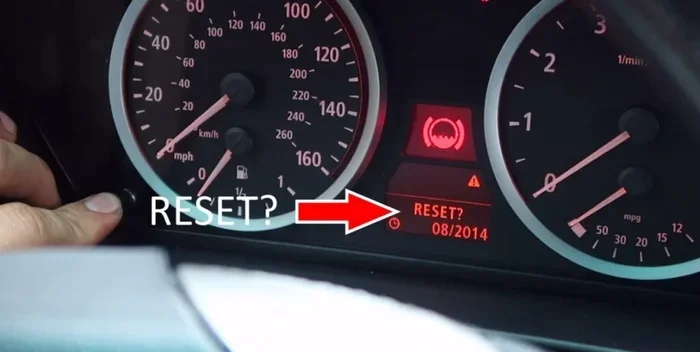
- Choose Reset Service Interval or Reset Maintenance Display.
- Confirm the reset when prompted. The screen should display a success message.
- Turn the ignition off and then back on to verify the light has cleared.
This method works on most BMW models from 2009 onward. The exact menu names may vary slightly depending on your iDrive version. If you cannot find the option, try searching for service reset in the settings menu.
Method 2: Reset Using the Steering Wheel Controls
For older BMW models without the full iDrive screen, the reset process uses the steering wheel stalk and dashboard buttons.
- Turn the ignition to the ON position.
- Press and hold the trip reset button on the steering wheel or dashboard.
- While holding the button, turn the ignition to the OFF position, then back to ON.
- Continue holding the button for about 10 seconds.
- The service light should start flashing, then turn off.
- Release the button once the light clears.
This method is simple and does not require navigating through menus. It works on models like the E46, E60, and E90 series.
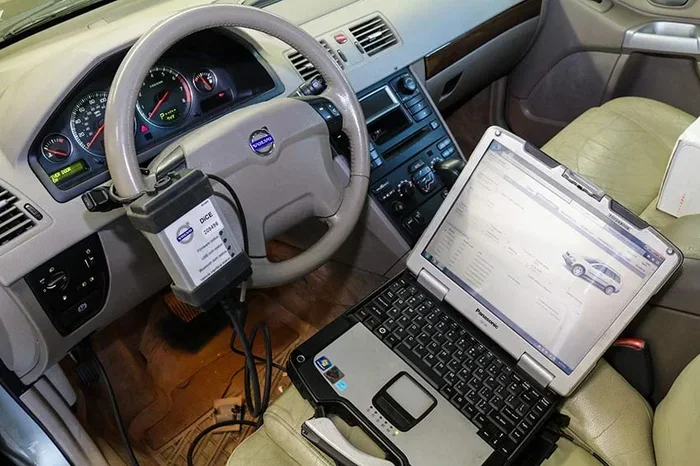
Method 3: Using an OBD2 Scanner
If the above methods do not work, an OBD2 scanner provides a reliable backup. You can also clear other diagnostic codes this way.
- Purchase or borrow an OBD2 scanner compatible with BMW vehicles.
- Plug the scanner into the OBD2 port, which is usually located under the steering column.
- Turn the ignition to ON and follow the scanner prompts.
- Select Read Fault Codes and identify any brake related codes.
- Choose Clear Codes to erase the stored data.
- Turn the ignition off and back on to confirm the light is gone.
Using a scanner gives you more control over the process. You can also check whether any real issues exist in the system. If you want to learn more about clearing codes yourself, check out our guide on how to manually clear your car codes.
What to Check Before Resetting the Light
Resetting the light without checking the actual brakes is a mistake many owners make. The warning exists for a reason. Before you clear anything, do these checks.
Inspect Your Brake Pads
Open the wheel spokes and look at the brake pad thickness. New pads are typically 10 to 12 millimeters thick. When they drop below 3 millimeters, replacement is urgent. You can also listen for a grinding or squealing sound when braking.
Check the Brake Fluid Reservoir
Locate the brake fluid reservoir under the hood, usually near the driver side firewall. The fluid level should sit between the minimum and maximum marks. If it is low, top it off with the correct BMW specified fluid, which is typically DOT 4.
Look for Visible Leaks
Check the ground under your car for any fluid puddles. Brake fluid feels slippery and has a slightly oily texture. If you spot a leak, do not reset the light. Take the car to a mechanic immediately.
Test the Brakes
Before driving anywhere after a reset, press the brake pedal a few times. The pedal should feel firm and responsive. If it feels spongy or goes to the floor, there is a serious problem that needs attention.
Common Mistakes When Resetting the Brake Service Light
Avoiding these mistakes saves time, money, and keeps you safe on the road.
Resetting Without Fixing the Problem
The biggest mistake is clearing the light without addressing the underlying issue. If your pads are worn to metal, resetting the light just hides the warning. You end up damaging rotors and compromising stopping power. Always fix the problem first.
Using the Wrong Brake Fluid
BMW vehicles require specific brake fluid grades. Using the wrong fluid can damage the ABS module and other expensive components. Always check your owner manual or the cap on the reservoir for the correct specification.
Skipping the Reset After Service
Many owners forget to reset the maintenance display after getting brake work done at a shop. The light stays on and confuses you about the actual status of your brakes. Make it a habit to reset after every service.
Ignoring the Light for Too Long
Some drivers see the brake service light and simply ignore it. Over time, they become desensitized to dashboard warnings. This is dangerous. If the light stays on for more than a few days, investigate the cause immediately.
Not Verifying the Reset
After completing the reset, always turn the ignition off and back on to confirm the light is gone. Sometimes the reset does not fully register. Verifying prevents confusion later.
If you want to learn more about warning lights and how they behave, read our article on can a check engine light turn off on its own. Understanding how dashboard lights work helps you respond better to every warning.
When Should You See a Professional?
Most brake service light resets are DIY friendly. However, certain situations call for expert help.
- The light returns immediately after resetting: This suggests an underlying problem that the reset cannot fix.
- You hear grinding or scraping noises: These sounds mean the pads are completely worn and may be damaging the rotors.
- The brake pedal feels soft or goes to the floor: This could indicate air in the brake lines or a serious leak.
- The ABS or traction control light also comes on: Multiple warning lights together point to a deeper system issue.
- You are unsure about any step: There is no shame in visiting a qualified BMW technician. Your safety matters most.
A professional BMW service center has specialized diagnostic tools that read detailed fault data. They can pinpoint issues that a basic reset cannot address. If you are near a dealership, getting a quick inspection is always a smart move.
Preventive Maintenance Tips for BMW Brakes
Keeping your BMW brakes in top shape reduces how often the service light comes on. Follow these simple tips.
- Inspect pads every 10,000 miles: Regular visual checks catch wear early before the sensor triggers the light.
- Check brake fluid every oil change: Fluid degrades over time and absorbs moisture. Replace it according to the service schedule.
- Drive smoothly: Aggressive braking wears pads faster. Smooth driving extends brake life significantly.
- Rotate tires regularly: Even tire wear reduces uneven braking stress on the system.
- Listen to your car: Unusual sounds, vibrations, or pulling to one side all signal brake problems early.
If you are also dealing with a maintenance required light and wondering whether you can still drive safely, check out our guide on can I drive with a maintenance required light on. While that article focuses on Toyota vehicles, the general advice about driving with service lights applies across all brands.
Understanding BMW Brake System Components
Knowing the parts of your BMW brake system helps you understand why the service light activates.
- Brake Pads: The friction material that presses against the rotors to slow the car. They wear down over time and need regular replacement.
- Brake Rotors: The metal discs that the pads clamp onto. They dissipate heat generated during braking.
- Brake Calipers: The hydraulic clamps that push the pads against the rotors when you press the pedal.
- Brake Lines and Hoses: The pathways that carry brake fluid from the master cylinder to each caliper.
- ABS Module: The anti-lock braking system controller that prevents wheel lockup during hard stops.
- Wear Sensors: Small electronic devices embedded in the pads that trigger the dashboard light when material gets low.
Each component plays a role in safe stopping. The brake service light acts as the early warning system for the entire network. Taking care of each part keeps the system reliable for years.
Brake Service Light Reset by BMW Model
Different BMW models have slight variations in the reset process. Here is a quick reference.
| BMW Model | Reset Method | Difficulty |
|---|---|---|
| F30 (3 Series, 2012+) | iDrive Menu > Vehicle Info > Service Reset | Easy |
| F10 (5 Series, 2010+) | iDrive Menu > Vehicle Status > Maintenance > Reset | Easy |
| E90 (3 Series, 2006-2011) | Steering Wheel Reset Button Method | Easy |
| E60 (5 Series, 2003-2010) | Steering Wheel Reset Button Method | Easy |
| E46 (3 Series, 1998-2006) | Trip Button Reset with Ignition | Moderate |
| G20 (3 Series, 2019+) | iDrive Menu > Vehicle Settings > Service Reset | Easy |
These steps cover the majority of BMW models on the road today. If your model is not listed, the iDrive method or the steering wheel method should still work.
Final Thoughts on Resetting Your BMW Brake Service Light
Resetting the brake service light on your BMW is one of the easiest maintenance tasks you can handle yourself. It takes just a few minutes and requires no special equipment. However, the reset is only effective when paired with actual brake inspection and repair.
Always check your pads, fluid, and overall brake health before clearing the warning. A reset is not a fix. It is a way to clear the notification after the problem is resolved. Treat it that way and your BMW will reward you with reliable stopping power for many miles to come.
If you ever feel unsure about any step, a certified BMW technician can walk you through the process or handle the service for you. There is no substitute for safety on the road.
For more tips on managing your BMW or any car maintenance topic, explore our full library of guides. Keeping your vehicle in great shape starts with understanding what each warning means and how to respond properly.
Frequently Asked Questions
Can I drive my BMW if the brake service light is on?
You can drive short distances if the brakes still feel normal. However, the light means the system has detected an issue. Get your brakes inspected as soon as possible to avoid safety risks or further damage to the braking system.
How much does it cost to reset the brake service light at a dealership?
Most dealerships charge between $50 and $150 for a service light reset. However, you can do it yourself for free using the iDrive system or steering wheel controls. The process takes less than five minutes.
Why does my brake service light keep coming back after I reset it?
The light returns because the underlying issue has not been resolved. Worn pads, low fluid, or a faulty sensor will trigger the warning again. Fix the root cause first, then reset the light.
Do I need special tools to reset the brake service light on a BMW?
No special tools are needed for most BMW models. You only need the steering wheel controls or the iDrive interface. An OBD2 scanner is optional but helpful if the standard reset methods do not work.
How often should I check my BMW brake pads?
Inspect your brake pads every 10,000 miles or during each oil change. Most BMW pads last between 30,000 and 70,000 miles depending on driving habits. Regular checks help you catch wear before the service light activates.
Can I reset the brake service light myself or do I need a mechanic?
You can absolutely reset the light yourself. The process is built into the BMW iDrive system and steering wheel controls. No mechanic is needed unless there is an underlying brake problem that requires professional diagnosis or repair.