How to Disable the Distance Alert on Your Volvo Truck
Disabling the distance alert on your Volvo truck is a straightforward process that can be done through the truck’s onboard settings menu. Whether you are dealing with frequent false alarms or simply prefer a different driving setup, this guide walks you through every step safely and clearly.
The distance alert on a Volvo truck is a safety feature designed to warn drivers when they are getting too close to the vehicle ahead. It uses radar and camera sensors to monitor the road and provide real-time warnings. For many truck drivers, this feature is a lifesaver on long hauls and heavy traffic. But there are times when drivers want to turn it off. Maybe the alerts are too frequent, or perhaps you are driving in conditions where the system is overly sensitive. Whatever the reason, knowing how to disable the distance alert on your Volvo truck is a useful skill every owner should have.
In this guide, we will walk you through the entire process step by step. We will also cover why you might want to turn it off, what the risks are, and how to do it safely. Whether you drive a Volvo FH, a Volvo FM, or another model in the Volvo truck lineup, this article has you covered. Let us dive in and get you the answers you need.
Key Takeaways
- Easy Access: The distance alert setting is built into the Volvo truck dashboard system and can be adjusted in just a few steps.
- Safety First: Disabling the alert may reduce driver assistance, so always consider the risks before turning it off.
- Reversible: You can re-enable the distance alert at any time through the same menu.
- Model Variations: Different Volvo truck models may have slightly different menus, but the general process is similar.
- Software Matters: Keeping your Volvo truck software updated ensures the alert system works correctly.
- Driver Preference: Some drivers disable the alert during specific driving conditions or routes.
📑 Table of Contents
- Understanding the Distance Alert System on Your Volvo Truck
- Reasons You Might Want to Disable the Distance Alert
- How to Disable the Distance Alert on Your Volvo Truck
- Important Safety Considerations Before Disabling the Alert
- Common Issues When Disabling the Distance Alert
- When Should You Re-Enable the Distance Alert?
- Tips for Managing Your Volvo Truck’s Alert Settings
- Conclusion
Understanding the Distance Alert System on Your Volvo Truck
The distance alert system is part of the broader driver assistance suite found in modern Volvo trucks. It works alongside features like adaptive cruise control and forward collision warning to keep you safe on the road. The system uses a combination of radar sensors and cameras mounted on the front of the truck to measure the distance between your vehicle and the one ahead. When that distance shrinks below a preset threshold, the system triggers an alert.
How the Distance Alert Works
The distance alert relies on the Volvo truck’s advanced sensor network. Here is a quick breakdown of how it functions:
- Radar Sensors: These detect the speed and distance of vehicles ahead of you.
- Camera Systems: These help identify lane markings and road conditions.
- Control Unit: The onboard computer processes data from the sensors and triggers alerts when needed.
- Visual and Audio Warnings: The system uses dashboard indicators and audible beeps to warn the driver.
The system is designed to be proactive. It does not just react when you are already too close. Instead, it gives you early warnings so you have time to adjust your speed or lane position. This is especially helpful during highway driving, where sudden stops can lead to serious accidents.
Why Volvo Trucks Have This Feature
Volvo has built its reputation on safety. The distance alert is one of many features that reflect this commitment. In commercial trucking, rear-end collisions are a leading cause of accidents. The distance alert helps reduce this risk by keeping drivers aware of their following distance at all times.
Many fleet managers also appreciate this feature because it promotes safer driving habits across their entire fleet. The system logs data that can be reviewed later, giving managers insight into driver behavior. This data can be used for training and improving overall fleet safety.
Reasons You Might Want to Disable the Distance Alert
There are several valid reasons a truck driver might want to turn off the distance alert. Understanding these reasons can help you decide whether disabling the feature is right for your situation.
False Alerts and Sensor Interference
One of the most common complaints about the distance alert is false triggering. In certain weather conditions like heavy rain, fog, or snow, the sensors can misinterpret road signs, guardrails, or other objects as vehicles. This leads to frequent beeping and dashboard warnings that are not actually needed. For drivers dealing with these false alerts daily, the annoyance can become a real distraction.
Driving in Specific Conditions
Some drivers prefer to manage their own following distance based on experience rather than relying on a computer system. For example, if you are driving on an empty highway with clear visibility, the distance alert might feel unnecessary. In these situations, turning off the alert can make for a more comfortable driving experience.
System Malfunctions
Occasionally, the distance alert system itself may malfunction. A faulty sensor or a software glitch can cause the alert to stay on constantly, even when there is no vehicle ahead. In these cases, disabling the alert temporarily may be necessary until you can get the system repaired. If you are dealing with persistent warning lights, you might also want to check whether a check engine light can turn off on its own, as similar sensor issues can cause related warning systems to behave unpredictably.
Customizing Your Truck’s Settings
Every driver has different preferences. Some people like all safety features turned up to maximum, while others prefer a more minimal setup. Disabling the distance alert is part of a broader trend of customizing the truck’s driver assistance settings to match individual driving styles.
How to Disable the Distance Alert on Your Volvo Truck
Now that you understand the system and the reasons for disabling it, let us get into the actual steps. The process is fairly simple, but it does vary slightly depending on your Volvo truck model and the year it was manufactured. We will cover the general process that applies to most models.
Step 1: Start the Truck and Access the Dashboard
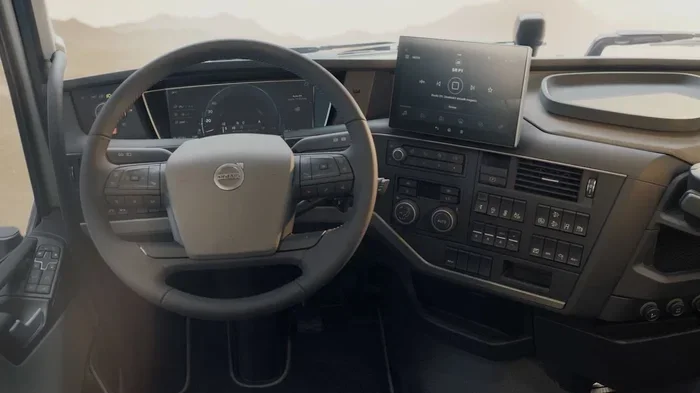
Turn on your Volvo truck and wait for the dashboard to fully load. You need the infotainment system to be active before you can access any settings. Make sure the truck is parked safely before you start adjusting any settings.
Step 2: Navigate to the Settings Menu
On the dashboard display, look for the “Settings” or “Setup” icon. This is usually represented by a gear icon on the home screen. Click on it to enter the main settings menu.
Step 3: Find the Driver Assistance or Safety Settings
Within the settings menu, scroll through the options until you find a section labeled “Driver Assistance,” “Safety Settings,” or “Driver Support.” This section houses all the features related to the distance alert, adaptive cruise control, and other safety systems.
Step 4: Locate the Distance Alert Setting
Inside the driver assistance menu, look for the “Distance Alert” option. It may also be listed as “Following Distance Alert” or simply “Distance Warning.” Click on it to open the configuration panel.
Step 5: Toggle the Alert Off
You will see an on/off switch or toggle for the distance alert. Move it to the “Off” position. Some models may ask you to confirm this change. If prompted, confirm that you want to disable the feature.
Step 6: Save and Exit
Once you have turned off the alert, make sure to save your changes. Exit the settings menu and resume driving. The distance alert should now be inactive. You can always go back and turn it on again following the same steps in reverse.
If you are having trouble finding the right menu, you can also refer to your Volvo truck owner’s manual for model-specific instructions. Some drivers also find it helpful to look up how to manually clear car codes if they are dealing with persistent warning messages after adjusting settings.
Important Safety Considerations Before Disabling the Alert
Before you turn off the distance alert, it is important to understand the safety implications. This is not a decision to take lightly, especially if you haul cargo or drive long distances regularly.
The Risk of Rear-End Collisions
The distance alert exists for a very good reason. It helps prevent rear-end collisions, which are among the most common and dangerous types of truck accidents. When you disable this feature, you lose an extra layer of protection. You become solely responsible for monitoring your following distance at all times.
Fatigue and Long-Distance Driving
Truck drivers often operate while fatigued, especially on long hauls. The distance alert acts as a backup when driver attention wanes. Without it, you need to be even more vigilant about maintaining a safe following distance. If you are planning a long trip, consider whether disabling the alert is worth the added mental load.
Insurance and Liability
In some cases, disabling safety features on your truck could affect your insurance coverage or liability in the event of an accident. It is worth checking with your insurance provider to understand any implications. Some fleet operators also have policies that require all safety features to remain active at all times.
Weather and Road Conditions
The distance alert is particularly useful in adverse weather conditions. Rain, fog, ice, and snow all reduce visibility and increase stopping distances. In these conditions, having the alert active could be the difference between a safe stop and a serious collision. Consider re-enabling the alert when driving in challenging weather.
Common Issues When Disabling the Distance Alert
Not every attempt to disable the distance alert goes smoothly. Here are some common issues drivers encounter and how to address them.
The Setting Does Not Save
Sometimes the dashboard will not save your changes. This can happen if there is a software glitch or if the truck’s battery voltage is low. Try restarting the truck and going through the steps again. If the problem persists, you may need a software update.
The Alert Keeps Coming Back
In some cases, the distance alert may re-enable itself after a truck restart or software update. This is a known behavior in certain Volvo truck models. If this happens, you may need to disable it again after each restart or check for available software updates.
Error Messages After Disabling
If you see error messages on the dashboard after turning off the distance alert, do not panic. These messages are usually related to the system recalibrating itself. They should clear up within a few minutes of driving. If they do not, it is a good idea to have the truck inspected by a qualified technician.
Impact on Other Driver Assistance Features
Disabling the distance alert may also affect other features that depend on the same sensors. For example, adaptive cruise control may behave differently or become less responsive. Before disabling the alert, check how it affects other systems on your truck.
When Should You Re-Enable the Distance Alert?
There is no rule that says you must keep the distance alert off permanently. In fact, most experts recommend re-enabling it as soon as the conditions that led to disabling it are no longer present. Here are some situations where you should definitely turn the alert back on.
Returning to Heavy Traffic
If you disabled the alert because of frequent false triggers in light traffic, turn it back on when you enter heavy traffic or congested highways. The risk of rear-end collisions increases significantly in these conditions.
Driving in Bad Weather
Rain, snow, fog, and ice all make driving more dangerous. Re-enable the distance alert whenever weather conditions deteriorate. The extra warning can give you the precious seconds you need to react safely.
After a System Repair
If you disabled the alert because of a sensor malfunction, make sure to turn it back on once the repair is complete. A repaired sensor means the alert is working correctly again and can provide reliable warnings.
When Hauling Heavy Loads
Heavy loads increase your truck’s stopping distance. The distance alert becomes even more important when you are carrying a full or heavy load. Always re-enable it before hauling heavy cargo.
Tips for Managing Your Volvo Truck’s Alert Settings
Managing your truck’s alert settings does not have to be complicated. Here are some practical tips to help you get the most out of your Volvo truck’s safety features.
- Review Your Manual: Every Volvo truck model has a unique set of features and menus. Spend a few minutes reading the relevant sections of your owner’s manual.
- Keep Software Updated: Volvo regularly releases software updates that improve sensor accuracy and alert performance. Make sure your truck is running the latest version.
- Test Your Settings: After making changes, test them in a safe environment before relying on them during a long drive.
- Document Your Preferences: If you have specific settings you like, write them down so you can quickly return to them after a service or software reset.
- Consult a Professional: If you are unsure about any settings or encounter persistent issues, consult a Volvo-certified technician.
Some drivers also explore whether they can transfer vehicle settings to a new owner when selling or trading in their truck. While this is specific to Tesla, the concept of managing and transferring vehicle preferences is relevant across all truck brands.
Conclusion
Disabling the distance alert on your Volvo truck is a simple process that can be done directly from the dashboard settings menu. However, it is a decision that comes with real safety implications. Always weigh the convenience of turning off the alert against the added protection it provides. For most drivers, keeping the alert enabled is the safer choice. But if you have a valid reason to disable it, now you know exactly how to do it. Remember to re-enable the feature when conditions demand it, and always keep your truck’s software up to date for the best performance.
Stay safe out there, and happy driving.
Frequently Asked Questions
Can I disable the distance alert on all Volvo truck models?
Yes, most modern Volvo truck models allow you to disable the distance alert through the dashboard settings menu. However, the exact steps may vary slightly depending on your specific model and year. Always refer to your owner’s manual for model-specific instructions.
Will disabling the distance alert affect my truck’s warranty?
Disabling the distance alert itself typically does not void your warranty. However, if a collision occurs and the disabled alert is found to be a contributing factor, your insurance or warranty claim could be affected. Check with your dealer or warranty provider for specific details.
Can I adjust the sensitivity of the distance alert instead of turning it off completely?
Yes, many Volvo truck models allow you to adjust the sensitivity or following distance threshold of the alert rather than disabling it entirely. This gives you more control without completely turning off the safety feature.
Do I need special tools to disable the distance alert?
No special tools are required. You can disable the distance alert directly through the truck’s infotainment system using the dashboard display. Everything is done through the on-screen menus.
Will the distance alert re-enable after a truck restart?
On most Volvo truck models, your settings will be saved even after a restart. However, some models may reset to default settings after a software update or battery disconnect. If this happens, you will need to disable the alert again.
Is it legal to disable the distance alert on a commercial truck?
Laws vary by jurisdiction and the type of commercial operation. Some fleet operators and commercial regulations require all safety features to remain active. Always check your local regulations and company policies before disabling any safety feature on a commercial vehicle.