How to Delete a Phone from Subaru Bluetooth for Good
Knowing how to delete a phone from Subaru Bluetooth is essential whether you are selling your car, switching devices, or just clearing out old connections. This guide walks you through every method, from the infotainment screen to a full Bluetooth reset, so you can manage your paired devices with confidence. We also cover common troubleshooting issues and best practices to keep your Subaru connection clean and secure.
There is something oddly satisfying about cleaning up your tech. You know that feeling when you finally declutter your phone, delete old apps, and organize your files? Deleting a phone from your Subaru Bluetooth gives you that same sense of freshness. Whether you are selling your vehicle, upgrading to a new phone, or just tired of seeing an old device hogging space in your connection list, this guide has you covered.
So, you want to learn how to delete a phone from Subaru Bluetooth. Great. This is one of those simple car maintenance tasks that many people overthink. The truth is, it only takes a few minutes once you know where to look. In this article, we will walk you through every method, troubleshoot the annoying hiccups, and share tips to keep your Bluetooth list lean and mean.
Let us be real for a second. Your Subaru’s Bluetooth system remembers more than you think. It stores paired devices, call history, contact syncing preferences, and sometimes even audio playback settings. When you do not clean that out, it can slow things down and create confusion, especially if multiple people use the same car. Learning to manage your Bluetooth pairing list properly is a small habit that pays off big time.
Key Takeaways
- Multiple Methods Available: You can delete a phone directly from the infotainment screen, use steering wheel controls, or perform a full Bluetooth reset depending on your Subaru model.
- Privacy Matters: Removing old phones protects your personal data, call logs, and contacts stored on your car’s Bluetooth memory.
- Troubleshooting Is Simple: Most issues like stubborn devices or persistent connections can be fixed with a quick reset or software update.
- Best Practices Save Time: Regularly managing your paired devices list keeps your Bluetooth fast and prevents connection conflicts.
- Works Across All Models: The process is similar for Subaru Forester, Outback, Legacy, and other models with minor menu variations.
- Re-Pairing Is Easy: After deletion, reconnecting a phone takes just a few minutes using standard pairing steps.
📑 Table of Contents
- Understanding How Subaru Bluetooth Works
- Why You Might Need to Delete a Phone from Subaru Bluetooth
- Step-by-Step Guide to Delete a Phone from Subaru Bluetooth
- Troubleshooting Common Issues
- Tips for Managing Multiple Bluetooth Devices
- Model-Specific Notes for Popular Subaru Vehicles
- Frequently Asked Questions About Subaru Bluetooth Deletion
- Final Thoughts on Managing Your Subaru Bluetooth
Understanding How Subaru Bluetooth Works
Before you start deleting anything, it helps to understand what is actually happening under the hood. Subaru Bluetooth systems are straightforward but clever. When you pair a phone, the car creates a stored profile for that device. This profile includes things like the phone name, connection preferences, and sometimes synced contacts.
How Bluetooth Pairing Works in Subaru
When you first connect your phone, the Subaru infotainment system searches for available devices. Once it finds yours, it exchanges security keys and creates a memory entry. From that point on, your phone connects automatically when you get in the car. This is called a paired device connection, and it is what makes hands-free calling and audio streaming so convenient.
The system can usually handle multiple paired phones at once. This is great for families or couples who share a vehicle. But over time, that list can grow cluttered with devices you no longer use. Each old connection takes up memory and can occasionally cause connection conflicts.
What Happens When You Pair a Phone
Here is what your Subaru stores when you pair a phone:
- Device Name: The label your phone broadcasts, like “John’s iPhone” or “Sarah’s Samsung.”
- Connection Type: Whether the phone is set for hands-free calling, audio streaming, or both.
- Contact Sync Status: Whether your phonebook has been synced to the car’s display.
- Call History: Recent calls may be stored locally on the infotainment system.
- Audio Preferences: Volume levels and audio source preferences for that device.
When you delete a phone from this list, you remove all of that stored data from the car’s memory. This is why it matters for privacy and performance. Old data does not just disappear on its own.
Why You Might Need to Delete a Phone from Subaru Bluetooth
There are several reasons you might want to remove a device from your Subaru’s Bluetooth memory. Some are obvious, and some might surprise you. Let us break them down.
Selling or Trading In Your Vehicle
This is the number one reason. If you are selling your Subaru or trading it in at a dealership, you absolutely need to remove all personal devices. Think about it. The next person who sits in that car could potentially access your call history, contacts, and even phone number. That is a serious privacy risk. Clearing your Bluetooth list is one of the most important steps in prepping your car for sale.
If you are planning to trade in your vehicle, you might also want to check out how to upgrade your vehicle and make sure all your personal data is wiped from every system, not just Bluetooth.
Switching to a New Phone
Upgrading to a new phone is another common reason. When you get a new device, it usually has a different name and Bluetooth ID than your old phone. If you do not remove the old one, you end up with a messy list of devices that nobody uses anymore. Plus, the old phone name might confuse the system or cause connection delays.
Privacy and Security Concerns
Even if you are not selling your car, privacy matters. Maybe a friend or family member used your Subaru and you do not want their phone lingering in your Bluetooth memory. Or perhaps you shared your car for a ride-share or carpool situation. Either way, removing old devices keeps your personal information safe and your connection list organized.
Performance and Connection Issues
Here is something not everyone knows. A cluttered Bluetooth device list can actually cause connection problems. The infotainment system has to search through all stored profiles when you get in the car. If there are too many old devices, this can slow down the connection process and sometimes cause the system to connect to the wrong phone by mistake.
Step-by-Step Guide to Delete a Phone from Subaru Bluetooth
Now for the part you have been waiting for. Here is exactly how to remove a phone from your Subaru’s Bluetooth system. The process varies slightly depending on your model year and infotainment system, but the general steps are the same across most Subarus.
Method 1: Using the Infotainment Screen
This is the most common and straightforward method. Here is what to do:
- Start your Subaru and make sure the infotainment screen is on. You do not need to start the engine fully. Accessory mode works fine.
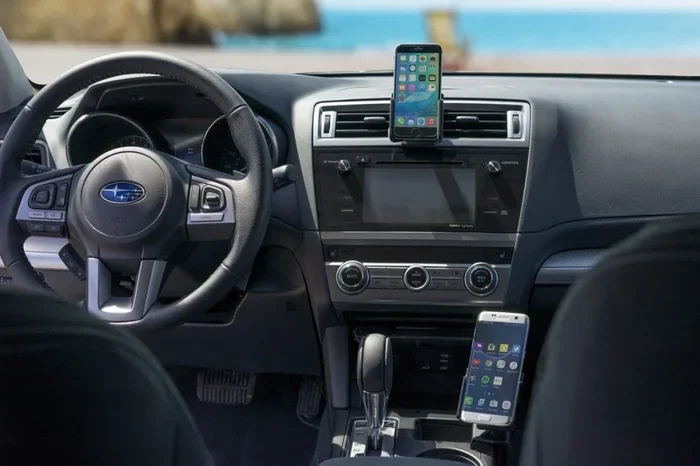
- Press the Phone button on the steering wheel or tap the Phone icon on the screen. This opens the phone menu.
- Navigate to the Bluetooth settings. Look for a menu option labeled “Bluetooth Settings,” “Device List,” or “Paired Devices.” The exact wording depends on your model year.
- Find the phone you want to delete. Scroll through the list of paired devices until you see the one you want to remove.
- Select the device. Tap on the phone name to open its details menu.
- Choose Delete or Remove. Look for an option that says “Delete,” “Remove Device,” or “Unpair.” Confirm your choice when prompted.
- Repeat for any other devices you want to remove.
That is it. The phone is now gone from your Subaru Bluetooth memory. If you are having trouble finding the right menu, try looking for a settings gear icon on the home screen. From there, Bluetooth settings are usually just a tap away.
Method 2: Using Steering Wheel Controls
If your hands are busy or you prefer not to touch the screen, you can use the steering wheel buttons to navigate the Bluetooth menu. The exact button layout varies by model, but most Subarus use a combination of the volume knob and arrow buttons.
Press the Phone button on the steering wheel to enter the phone menu. Use the arrow buttons to scroll to Bluetooth Settings or Device List. Highlight the device you want to remove and press the OK or Enter button. Then scroll to the Delete or Remove option and confirm. This method works well if you are driving and need to make a quick change.
Method 3: Resetting the Entire Bluetooth System
If you are having persistent issues or want a completely clean slate, you can reset the entire Bluetooth system. This removes all paired devices at once. Here is how:
- Go to the Bluetooth Settings menu using Method 1 above.
- Look for a “Reset Bluetooth” or “Factory Reset” option. This is usually buried in a settings submenu.
- Confirm the reset. The system will remove all paired devices and clear the Bluetooth memory.
- Restart the infotainment system by turning the ignition off and back on.
- Re-pair your current phone by going through the standard pairing process.
Be careful with this method. It wipes everything, so make sure you have your current phone ready to reconnect. If you are unsure, stick with Method 1 to remove devices one at a time.
Troubleshooting Common Issues
Sometimes things do not go as smoothly as we hope. Here are the most common problems people run into when trying to delete a phone from Subaru Bluetooth and how to fix them.
Phone Won’t Delete from the List
This is frustrating but more common than you might think. If the delete option is grayed out or the phone refuses to come off the list, try these steps:
- Restart the infotainment system. Turn the ignition off, wait 30 seconds, and turn it back on. This clears temporary glitches.
- Make sure the phone is not currently connected. You usually cannot delete a device while it is actively paired. Turn off Bluetooth on the phone first, then try again.
- Check for a software update. Older Subaru models sometimes have Bluetooth bugs that are fixed in firmware updates. Visit your dealer or check the Subaru website for updates.
- Try the factory reset method described above if individual deletion fails.
Bluetooth Still Connects After Deletion
If you deleted a phone but it still tries to connect when you get in the car, the infotainment system might be holding a residual memory. Here is what to do:
- Turn off Bluetooth on the old phone. This prevents it from broadcasting and trying to reconnect.
- Clear the Bluetooth cache on your phone. On most smartphones, you can go to Settings > Bluetooth > select the Subaru device > Forget Device. This clears the phone’s side of the memory too.
- Perform a full Bluetooth reset on the car. Use Method 3 from above to wipe everything and start fresh.
It is also worth noting that if you are trying to turn off voice assistant mode or manage other connected features, these steps will help clear any lingering connections that might interfere.
Voice Assistant Still Recognizes Old Phone
Some newer Subaru models have voice assistants that sync with your phone. If you delete a phone but the voice assistant still responds to the old device name, you may need to reset the voice assistant settings separately. Check your infotainment manual or visit a Subaru dealer for model-specific guidance.
Tips for Managing Multiple Bluetooth Devices
Deleting old phones is only half the battle. Keeping your Bluetooth list clean going forward is just as important. Here are some practical tips to stay organized.
How to Keep Your Bluetooth List Clean
Make it a habit to review your paired devices every few months. Here is a simple routine:
- Monthly Check: Once a month, go into your Bluetooth settings and review the device list. Remove anything you no longer use.
- After Selling or Sharing: Always delete a device immediately after someone else has used your car regularly.
- Before Upgrading Phones: Remove your old phone from the car’s Bluetooth before you switch to a new one. Then pair the new phone right away.
- Name Your Devices Clearly: When pairing, give each device a clear name so you can identify it easily later.
Best Practices for Subaru Bluetooth
Here are a few extra tips to keep your Subaru Bluetooth running smoothly:
- Limit the number of paired devices. Most Subaru systems work best with 3 to 5 paired phones. More than that can slow things down.
- Keep your phone’s Bluetooth software updated. Both your phone and your car benefit from the latest Bluetooth firmware.
- Restart your infotainment system occasionally. A simple restart once a month can clear minor glitches and keep things running fast.
- Turn off Bluetooth when not in use. If you are not actively using hands-free calling or audio streaming, turning off Bluetooth saves battery and reduces connection clutter.
If you are also managing other aspects of your car, such as fuel capacity or maintenance schedules, understanding your vehicle’s systems holistically helps you stay on top of everything. For more on fuel-related topics, check out how many gallons it takes to fill up a car or explore how many miles are considered too many for a used vehicle.
Model-Specific Notes for Popular Subaru Vehicles
While the general process works across most Subarus, there are a few model-specific nuances worth mentioning.
For Subaru Forester and Outback models, the infotainment interface is quite intuitive. The Bluetooth device list is usually accessible from the home screen under the “Phone” or “Settings” tab. Newer models from 2017 onward have a slightly different menu layout, but the deletion process remains the same.
If you own a Subaru Legacy or Impreza, the process is nearly identical. The only difference is that older models may not have a touchscreen, so you will rely entirely on the steering wheel controls and the dashboard display. In these cases, Method 2 is your best friend.
For Subaru models with the Starlink multimedia system, the process is slightly more streamlined. The system has a dedicated “Device Management” section where you can view, add, and remove paired devices with ease. If you are unsure which system your car has, check the owner’s manual or visit the Subaru website with your VIN number.
Some owners also ask about connecting additional devices like tablets or portable speakers to their Subaru Bluetooth. While this is possible, keep in mind that each additional device adds to the memory load. Regularly cleaning up your list ensures the system stays responsive and reliable.
Frequently Asked Questions About Subaru Bluetooth Deletion
Here are some common questions that come up when people are trying to manage their Subaru Bluetooth connections. These should help clear up any lingering confusion.
Can I delete a phone from Subaru Bluetooth without turning on the car?
No, you need at least accessory mode to access the infotainment system. This means turning the ignition to the “ON” position without starting the engine. The screen needs to be powered on for you to navigate the Bluetooth settings and delete a paired device.
Will deleting a phone from Subaru Bluetooth also delete contacts from my phone?
Absolutely not. Deleting a phone from the car’s Bluetooth memory only removes the stored connection profile from the infotainment system. Your contacts, call history, and personal data remain completely safe on your phone. The car does not store or delete any of your personal information.
How many phones can a Subaru Bluetooth system hold?
Most Subaru models can store between 5 and 10 paired devices, depending on the year and infotainment system. However, having too many devices connected can slow down the system. It is best to keep your active list to 3 to 5 devices for optimal performance.
What should I do if I bought a used Subaru with unknown paired phones?
If you bought a used Subaru and are unsure whose phones are still connected, it is a good idea to reset the entire Bluetooth system. Use Method 3 from the guide above to clear all paired devices. Then pair only your own phone. This ensures your privacy and gives you a clean connection list.
Can I delete a phone remotely if it is lost or stolen?
Unfortunately, no. You need physical access to the Subaru’s infotainment system to delete a paired Bluetooth device. If your phone is lost or stolen, the best course of action is to turn off Bluetooth on the phone remotely (if possible) and then delete it from the car once you have access. Some Subaru models with Starlink services may offer additional remote options through the mobile app.
How long does it take to delete a phone from Subaru Bluetooth?
The process takes less than two minutes per device when using the infotainment screen method. A full Bluetooth reset takes a bit longer, maybe 5 minutes including the restart time. Overall, it is a very quick task that does not require any special tools or technical knowledge.
Final Thoughts on Managing Your Subaru Bluetooth
Learning how to delete a phone from Subaru Bluetooth is one of those small skills that makes a big difference in your daily driving experience. It takes just a couple of minutes, it protects your privacy, and it keeps your car’s Bluetooth system running smoothly. Whether you are clearing out an old device before selling your car or simply tidying up your paired list, the steps in this guide will get the job done right.
The key is to stay proactive. Do not let old devices pile up in your Bluetooth memory. Make it a regular habit to review and clean your paired devices list. Your future self, whether you are trading in the car or just trying to connect your current phone without a hitch, will thank you for it.
Remember, managing your Subaru’s technology does not have to be complicated. With the right knowledge and a few simple steps, you can keep everything running like a well-oiled machine. So go ahead, delete that old phone from your Subaru Bluetooth, and enjoy a cleaner, faster, and more secure connection experience.