How Do I Reset My Maintenance Indicator Light Guide
Resetting your maintenance indicator light is a simple process that keeps your dashboard clear after every service. This guide provides step-by-step instructions for Toyota, Honda, Ford, and other popular brands. You’ll learn exactly how to turn off the service light and prevent it from coming back.
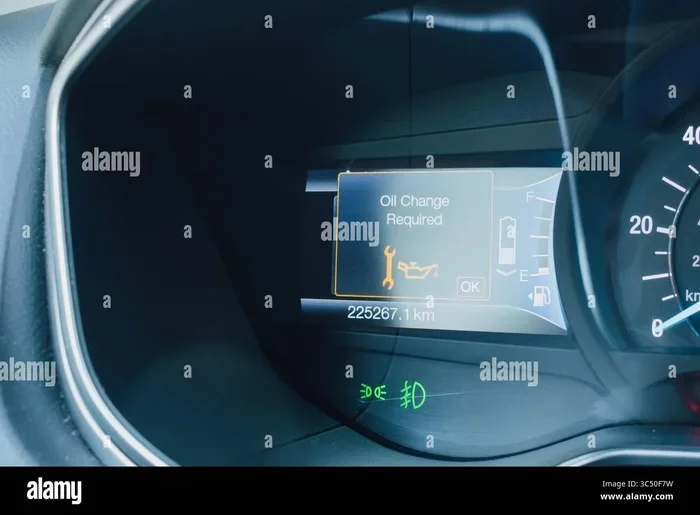
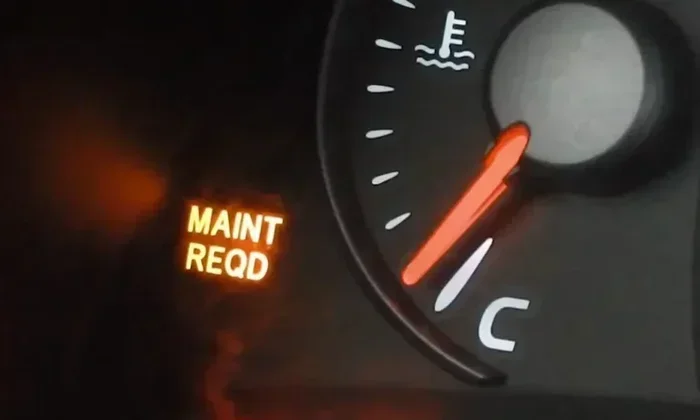
You’re driving to work, and suddenly that little wrench icon or the words MAINTENANCE REQUIRED light up your dashboard. It’s a common sight for any car owner, and it usually means it’s time for scheduled service. Resetting your maintenance indicator is the quick fix that clears the light and gets you back to a clean dashboard. But many people don’t know exactly how to do it, or they worry they’ll mess something up.
The maintenance indicator light is not the same as the check engine light. It’s a simple reminder based on your mileage or time since the last service. Once you’ve had your oil changed, tires rotated, or other routine work done, the light stays on until you manually reset it. This guide will walk you through the exact steps to reset the maintenance indicator light on virtually any car.
Whether you drive a Toyota, Honda, Ford, or Chevrolet, the basic idea is the same. You’ll use a combination of buttons on your dashboard or steering wheel to clear the message. I’ll show you the exact steps for the most popular brands, plus what to do if the light refuses to go away. By the end of this article, you’ll feel confident handling this simple maintenance task yourself.
Key Takeaways
- Reset your maintenance indicator light after every oil change or service to keep your dashboard clear and your service records accurate.
- The process varies by brand, but most cars use the trip odometer button or steering wheel controls to clear the reminder.
- Always turn the ignition to the ON position without starting the engine before beginning the reset sequence.
- If the light won’t turn off, there may be a stored diagnostic code that needs to be cleared with a scanner or button combination.
- Driving with the maintenance required light on is generally safe for short distances, but you should address it promptly to avoid missing service intervals.
- Regular maintenance resets help you track your service schedule and protect your vehicle warranty.
📑 Table of Contents
- What Does the Maintenance Indicator Light Mean?
- Why You Need to Reset the Maintenance Indicator After Service
- How to Reset Your Maintenance Indicator Light: Step-by-Step
- Reset Procedures for Popular Car Brands
- What to Do If the Maintenance Light Won’t Turn Off
- Keeping Your Maintenance Schedule on Track
What Does the Maintenance Indicator Light Mean?
The maintenance indicator light is your car’s friendly reminder that a service interval has been reached. It is not a warning of imminent failure like the check engine light. Instead, it tracks your mileage or time since the last oil change, tire rotation, or other scheduled maintenance. When the interval is reached, the light illuminates to prompt you to visit a service center or perform the work yourself.
How the Maintenance Reminder System Works
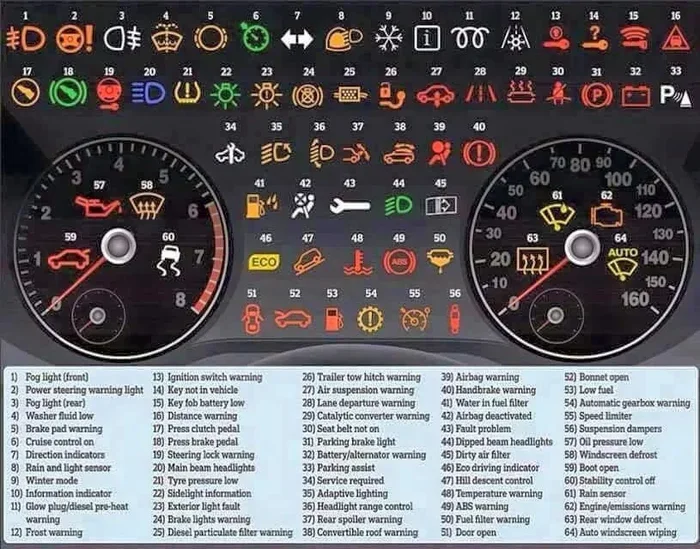
Most modern vehicles use an oil life monitoring system or a simple mileage counter. The car’s computer tracks the distance you drive and calculates when the next service is due. Some systems also consider driving conditions like frequent short trips, towing, or extreme temperatures, which can shorten the service interval. When the counter reaches zero, the maintenance indicator light turns on. The symbol often looks like a wrench, a small car with a wrench, or the text MAINT or SERVICE.
Quick Tip: If you’re unsure what the light means, check your owner’s manual. The symbol and reset procedure vary by manufacturer, and the manual will give you the exact details for your specific model.
Why You Need to Reset the Maintenance Indicator After Service
Once you’ve completed the scheduled service, the light will not turn off on its own. It will stay on indefinitely until you manually reset it. This can be annoying, especially if you’ve already taken care of the oil change or tire rotation. Leaving the light on can also clutter your dashboard and make it harder to spot a real warning in the future.
Resetting the light after service is important for a few reasons. First, it clears the visual reminder so your dashboard stays clean. Second, it updates the service history in your car’s computer, which can be helpful for resale value. Third, it ensures the light will come on again at the correct next interval, so you don’t miss future maintenance. For a detailed look at why resetting matters after an oil change, see our guide on reset after an oil change.
Common Mistake: Forgetting to reset the light after service is the most common error. The light stays on for weeks or months, and eventually you might ignore it altogether, which could cause you to miss a real service alert.
Expert Insight: Many modern cars store a complete service history in the onboard computer. Resetting the maintenance indicator updates this record. When you go to sell the car or claim a warranty, a clean service history can make a big difference.
How to Reset Your Maintenance Indicator Light: Step-by-Step
The general process for resetting the maintenance indicator is similar across most vehicles. While the exact button combination varies, the basic idea is the same: you need to put the car in a specific mode and hold a button to tell the computer that the service has been completed. Here is the most common sequence that works for many makes and models.
- Turn the ignition to the ON position. Do not start the engine. Just press the start button or turn the key to the accessory position where the dash lights come on.
- Locate the trip odometer button. This is usually a button on the instrument cluster or steering wheel labeled TRIP, RESET, or SET.
- Press and hold the button. Keep holding it while you move to the next step.
- Turn the ignition to OFF, then back to ON. While still holding the button, turn the key to the OFF position and then back to ON. Continue holding the button.
- Wait for the light to flash or the display to change. The maintenance light should start flashing, or the instrument display will show a reset message. This usually takes about 5 to 10 seconds.
- Release the button. Turn the ignition off and then on again to verify the light is gone.
Quick Tip: If your car has steering wheel controls, look for a button labeled SET or RESET near the turn signal lever or on the left side of the steering wheel. Some models use the up or down buttons on the steering wheel to navigate to a maintenance menu and then select reset.
Common Mistake: Starting the engine during the reset process will cancel the sequence. Always keep the key in the ON position without cranking the engine. If you accidentally start the car, just turn it off and begin the sequence again.
Expert Insight: On some European models like BMW or Mercedes, the reset procedure may require accessing a hidden menu in the instrument display. In those cases, you might need to press and hold a specific combination of buttons on the turn signal stalk. If you can’t find the right sequence, a professional scan tool or a visit to the dealer may be necessary.
Reset Procedures for Popular Car Brands
While the general method works for many cars, each manufacturer has its own preferred sequence. Here are the specific steps for the most popular brands.
How to Reset the Maintenance Light on a Toyota
For most Toyota models, the process is straightforward. Turn the ignition to ON without starting the engine. Locate the trip odometer reset button on the instrument cluster. Press and hold that button, then turn the ignition to OFF and back to ON. Keep holding the button for about 10 seconds. The maintenance light should flash and then turn off. Release the button and turn the ignition off and on again to confirm. On newer Toyotas with a steering wheel control, you may need to press and hold the trip button on the steering wheel or navigate to the maintenance menu using the arrow keys.
How to Reset the Maintenance Light on a Honda
Honda vehicles use a similar trip button method. Turn the ignition to ON. Find the trip odometer button on the left side of the instrument panel. Press and hold it. While holding the button, turn the ignition to OFF and then back to ON. Continue holding the button until the maintenance light flashes and goes out. Release the button and cycle the ignition once more to verify the reset. For Honda models with a steering wheel control, you can often hold the trip button on the steering wheel for the same effect.
How to Reset the Maintenance Light on a Ford
Ford vehicles often use the steering wheel controls for reset. Press the OK button on the steering wheel to access the information display. Use the arrow buttons to scroll to the Maintenance or Service menu. Select the Reset option and hold the OK button for a few seconds. The light should turn off. If your Ford uses a trip button on the instrument cluster, you can try the general sequence: turn ON, press and hold the trip button, cycle the key off and on, and release when the light flashes.
Quick Tip: For Ford models, if the steering wheel controls don’t work, try the trip button on the left side of the instrument panel. Sometimes the steering wheel buttons need to be unlocked or the display must be in a specific mode.
What to Do If the Maintenance Light Won’t Turn Off
Sometimes the maintenance indicator light stays on even after you follow the reset steps perfectly. This can be frustrating, but it usually points to a simple explanation. The light might be tied to a stored diagnostic code, or the service might not have been properly recorded in the car’s computer. In some cases, a faulty sensor or a loose gas cap can trigger the light.
If you suspect a stored code is keeping the light on, you can learn how to manually clear my car codes using an OBD-II scanner or a specific button combination. Many auto parts stores will read and clear codes for free. If the light is flashing rather than staying solid, it often indicates a more serious problem that needs immediate attention. In that case, you should avoid long drives and have the car towed if necessary.
If you’re wondering whether it’s safe to keep driving with the light on, check out our guide on can I drive with a maintenance required light on in a Toyota for more specific advice. In general, driving a short distance to a service center is fine, but ignoring a persistent light for weeks is not a good idea.
Common Mistake: Ignoring a flashing maintenance light or assuming it will go away on its own. A flashing light often signals an active problem that could worsen if not addressed quickly.
Expert Insight: A maintenance light that won’t reset after you’ve completed the service might mean the oil life system wasn’t properly zeroed. On some cars, you need to enter a special menu to manually adjust the oil life percentage back to 100% after an oil change. This is different from the simple reset and often requires holding a specific button combination while the ignition is on.
Keeping Your Maintenance Schedule on Track
Resetting the maintenance indicator is just one part of staying on top of your car’s health. The best way to avoid surprise lights is to follow a consistent maintenance schedule. Keep a logbook or use a smartphone app to record every oil change, tire rotation, and inspection. Set a reminder for every 5,000 miles or 6 months, whichever comes first. This proactive approach ensures the light only comes on when it’s supposed to, and you’ll never be caught off guard.
Many manufacturers offer maintenance programs like ToyotaCare or HondaCare that include scheduled services at no extra cost. These programs often send you reminders before the maintenance light even comes on. If you have a maintenance plan, make sure you’re taking advantage of it. Resetting the light after each covered service keeps your records clean and your warranty intact.
Quick Tip: After resetting the light, take a short test drive and then turn the ignition off and on again to confirm the light stays off. If it returns immediately, you may need to repeat the reset sequence or check for a stored code.
Common Mistake: Resetting the maintenance indicator without actually performing the required service. This clears the reminder but doesn’t fix the actual maintenance need. Always do the oil change, fluid top-off, or inspection first, then reset the light. Skipping the service and just resetting the light can lead to engine damage or voided warranties.
Resetting your maintenance indicator is a small but important part of car ownership. It takes just a few minutes and can save you from a cluttered dashboard and missed service intervals. With the steps outlined in this guide, you can handle the reset yourself for most vehicles. Remember to always perform the actual maintenance first, keep your owner’s manual handy, and don’t hesitate to consult a professional if the light won’t cooperate. A clean dashboard and a well-maintained car go hand in hand.
Frequently Asked Questions
How do I reset the maintenance light after an oil change?
The process is similar for most vehicles. Turn the ignition to ON, press and hold the trip odometer button, then cycle the key off and on while holding the button until the light flashes. If you’re unsure, check your owner’s manual or search for your specific model. The reset usually takes less than a minute.
Can I drive with the maintenance required light on?
In most cases, it’s safe to drive a short distance. The light is a reminder, not an immediate danger. However, you should schedule service soon. If the light is flashing, it may indicate a serious issue, and you should avoid long drives and have the car inspected.
What if the maintenance light stays on after I reset it?
This usually means there’s a stored diagnostic code or the service wasn’t properly recorded. You may need to use an OBD-II scanner to clear the code. If you’re not comfortable doing that, a mechanic can help. A persistent light after reset often points to a pending issue that needs attention.
Do I need any special tools to reset the maintenance indicator?
For most cars, no special tools are needed. You just use the buttons on your dashboard or steering wheel. However, some European vehicles might require a diagnostic scanner or a trip to the dealer. Always check your owner’s manual first to see if your model has a specific requirement.
How often should I reset the maintenance light?
You should reset it every time you complete a scheduled service, such as an oil change or tire rotation. This keeps your maintenance log accurate and ensures the light only comes on when it’s supposed to. Regular resets help you stay on track with your manufacturer’s recommended service intervals.
Is it safe to reset the maintenance light myself?
Yes, it’s completely safe and won’t harm your vehicle. The reset process simply clears the reminder. Just make sure you’ve actually done the required service before resetting, so you don’t skip important maintenance. Following the correct sequence for your car will ensure a successful reset every time.