Does the Alfa Romeo Giulia Have Apple CarPlay Built In
Yes, the Alfa Romeo Giulia does come with Apple CarPlay built in. This feature is available on most model years and trim levels, giving drivers a seamless way to connect their iPhones to the car’s infotainment system. Whether you want hands-free navigation, music streaming, or messaging, Apple CarPlay makes it easy and safe to stay connected on the road. The system works through both wired and wireless connections depending on your model and year. Below, we break down everything you need to know about Apple CarPlay compatibility in the Alfa Romeo Giulia.
If you are thinking about buying or already own an Alfa Romeo Giulia, one question likely popped into your head. Does the Alfa Romeo Giulia have Apple CarPlay? The short answer is yes. But like most things with cars, the full story has some details worth knowing. In this guide, we walk through everything you need to know about Apple CarPlay in the Alfa Romeo Giulia. We cover compatibility, setup, features, and a few tips to get the most out of the system.
Apple CarPlay has become a must-have feature for many drivers today. It lets you access your phone’s most useful apps right from your car’s screen. You can make calls, send messages, listen to music, and get directions without taking your eyes off the road. The Alfa Romeo Giulia, with its stylish Italian design and modern tech, is no exception. Let’s dive deep into how Apple CarPlay works in this popular sedan.
Key Takeaways
- Apple CarPlay is available: Most Alfa Romeo Giulia models come with Apple CarPlay as a standard or optional feature.
- Both wired and wireless options exist: Newer model years support wireless Apple CarPlay, while older ones may need a USB cable.
- Easy setup process: Connecting your iPhone takes just a few simple steps.
- Works alongside Android Auto: The Giulia offers both Apple CarPlay and Android Auto for broader phone compatibility.
- Model year matters: Features and connectivity options vary by model year and trim level.
- Siri integration adds convenience: You can use voice commands to control CarPlay functions hands-free.
📑 Table of Contents
- What Is Apple CarPlay and Why Does It Matter?
- Does the Alfa Romeo Giulia Have Apple CarPlay?
- How to Set Up Apple CarPlay in Your Alfa Romeo Giulia
- Features You Get with Apple CarPlay in the Giulia
- Quick Tips for Getting the Most Out of Apple CarPlay
- Common Mistakes and How to Avoid Them
- Alfa Romeo Giulia Apple CarPlay vs. Competitors
- Troubleshooting Apple CarPlay Issues in the Giulia
- Is Apple CarPlay Worth It in the Alfa Romeo Giulia?
- Final Thoughts
What Is Apple CarPlay and Why Does It Matter?
Apple CarPlay is a smart system that mirrors your iPhone onto your car’s infotainment display. Once connected, you can use your favorite apps through a simplified, driver-friendly interface. The system was designed by Apple to keep you safe and connected while driving.
So why does Apple CarPlay matter so much? First, it reduces distractions. Instead of holding your phone, you can use voice commands through Siri. Second, it gives you access to navigation apps like Apple Maps and Google Maps. Third, it supports music apps like Spotify, Apple Music, and Pandora. The list of supported apps keeps growing with every iOS update.
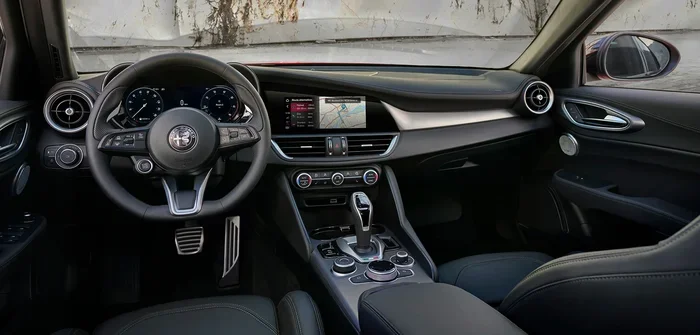
For the Alfa Romeo Giulia, Apple CarPlay brings a level of convenience that feels natural. The car’s built-in display becomes an extension of your iPhone. You get all the functionality you love about your phone, but in a safer, car-friendly way.
Does the Alfa Romeo Giulia Have Apple CarPlay?
The Alfa Romeo Giulia comes with Apple CarPlay as a standard or available feature, depending on the model year and trim level. Let’s break this down by different years and configurations.
Apple CarPlay by Model Year
The Alfa Romeo Giulia has been on the market since the 2017 model year. Here is how Apple CarPlay availability has evolved over the years:
- 2017-2019 Model Years: Apple CarPlay was available as part of the Uconnect infotainment system. It typically required the premium connectivity group or a specific tech package. The connection was wired, using a USB cable.
- 2020-2022 Model Years: Apple CarPlay became more widely available across trim levels. Wireless Apple CarPlay started appearing on higher trims, making the experience more convenient.
- 2023-2024 Model Years: The latest Giulia models come with Apple CarPlay as a standard feature on most trims. Wireless connectivity is now common across the lineup.
It is always a good idea to check the specific trim and model year before purchasing. Some base models may not include Apple CarPlay as standard, but it is often available as an add-on package.
Wired vs. Wireless Apple CarPlay in the Giulia
One of the biggest differences you will notice is whether the system uses a wired or wireless connection. Here is a quick comparison:
| Feature | Wired Apple CarPlay | Wireless Apple CarPlay |
|---|---|---|
| Connection Method | USB cable required | Bluetooth and Wi-Fi connection |
| Convenience | Requires plugging in your phone | Connects automatically when you get in |
| Charging | Phone charges while connected | Phone may need separate charging |
| Availability | Found on most model years | Available on newer trims and model years |
| Connection Stability | Very stable, no interference | Generally stable, occasional reconnection may be needed |
Wireless Apple CarPlay is a game-changer. You do not need to fumble with cables every time you get in the car. The Giulia’s system detects your iPhone and connects automatically. This seamless experience is one of the reasons Apple CarPlay has become so popular.
How to Set Up Apple CarPlay in Your Alfa Romeo Giulia
Setting up Apple CarPlay in your Giulia is straightforward. Whether you have a wired or wireless setup, the process is simple and user-friendly.
Setting Up Wired Apple CarPlay
Follow these steps to connect your iPhone using a USB cable:
- Plug your Lightning or USB-C cable into your iPhone.
- Connect the other end to the USB port in the Giulia’s center console.
- The infotainment screen should recognize your phone automatically.
- Tap the Apple CarPlay icon on the display.
- Follow any on-screen prompts to grant permissions.
- Your CarPlay interface is now active and ready to use.
Make sure you use a high-quality USB cable. Cheap or damaged cables can cause connection issues. If the system does not recognize your phone, try a different cable or USB port.
Setting Up Wireless Apple CarPlay
For wireless connection, the process is even simpler:
- Make sure Bluetooth and Wi-Fi are turned on your iPhone.
- Get into your Alfa Romeo Giulia and turn on the infotainment system.
- Your iPhone should appear on the car’s screen automatically.
- Tap on your phone’s name to pair the connection.
- Accept any permissions on both your phone and the car screen.
- Apple CarPlay is now connected without any cables.
Once paired, your Giulia will remember your iPhone. Future connections happen automatically when you sit in the driver’s seat. It is a seamless experience that feels like magic.
Features You Get with Apple CarPlay in the Giulia
Apple CarPlay brings a suite of useful features to the Alfa Romeo Giulia. Here are the highlights:
Navigation and Maps
With Apple CarPlay, you can use Apple Maps, Google Maps, Waze, and other navigation apps. The big screen on the Giulia’s dashboard makes directions easy to follow. You get real-time traffic updates, lane guidance, and estimated arrival times. Siri can also give you directions hands-free, which is great for safe driving.
Music and Podcasts
Apple CarPlay supports all your favorite audio apps. Apple Music, Spotify, Pandora, Audible, and many more work perfectly through the Giulia’s sound system. You can control playback, skip tracks, and adjust volume using the car’s steering wheel controls or the touchscreen.
Hands-Free Calling and Messaging
One of the safest features of Apple CarPlay is hands-free calling and messaging. Siri can read your messages aloud and let you respond using voice commands. You can make phone calls without ever touching your phone. This feature alone makes driving much safer and more convenient.
Siri Voice Control
Siri integration is a standout feature. You can say “Hey Siri” and ask her to do almost anything. Want to call someone? Ask Siri. Need directions to a restaurant? Siri handles it. Want to play a specific song? Just ask. Siri keeps your eyes on the road and your hands on the wheel.
Customization and App Support
Apple CarPlay lets you customize your home screen layout. You can pin your most-used apps for quick access. The system supports a wide range of apps, including messaging platforms, podcast apps, and third-party navigation tools. The Alfa Romeo Giulia’s infotainment system displays everything clearly and beautifully.
Quick Tips for Getting the Most Out of Apple CarPlay
Here are some practical tips to enhance your Apple CarPlay experience in the Alfa Romeo Giulia:
- Keep your iPhone updated: The latest iOS version ensures the best compatibility and performance with Apple CarPlay.
- Use a quality cable: If you use wired CarPlay, invest in a certified Lightning or USB-C cable to avoid connection problems.
- Clean your USB port: Dust and debris can interfere with wired connections. A quick clean can solve many issues.
- Enable “Auto-Connect”: In your iPhone settings, turn on Apple CarPlay auto-connect for a seamless experience every time you get in the car.
- Use Siri for safety: Rely on voice commands instead of tapping the screen while driving. It keeps you focused on the road.
- Restart both devices if needed: If CarPlay is not connecting, try restarting your iPhone and the car’s infotainment system.
Expert Insight
Automotive tech experts recommend pairing your iPhone while the car is parked. This ensures a stable initial connection. Once paired, wireless Apple CarPlay in the Alfa Romeo Giulia connects reliably every time you get behind the wheel. If you experience frequent disconnections, check for software updates on both your phone and the car’s system.
Common Mistakes and How to Avoid Them
Even though Apple CarPlay is easy to use, some common mistakes can cause frustration. Here are a few to watch out for:
Using a Low-Quality USB Cable
A cheap or worn-out cable is the number one cause of CarPlay connection issues. Always use an Apple-certified or high-quality USB cable. If your cable is frayed or old, replace it. A good cable ensures stable data transfer and charging.
Ignoring Software Updates
Both your iPhone and your car’s infotainment system need to stay updated. Apple releases iOS updates regularly that improve CarPlay performance. Similarly, Alfa Romeo may release firmware updates for the Uconnect system. Keeping both devices current prevents compatibility issues.
Not Granting Permissions
When you first connect Apple CarPlay, your iPhone will ask for permissions. Do not skip these. You need to grant access to contacts, messages, and location services for CarPlay to work properly. Without these permissions, some features will not function.
Overloading the Home Screen
Apple CarPlay lets you add many apps to your home screen. But adding too many can make the interface cluttered and hard to use. Keep your most-used apps visible and organize the rest in the app list. A clean setup makes navigation faster and safer.
Forgetting to Enable Wireless CarPlay
If your Giulia supports wireless Apple CarPlay, make sure it is enabled in the car’s settings. Some owners assume it is automatic but forget to activate the feature in the infotainment menu. Check under the settings or phone menu to confirm wireless CarPlay is turned on.
Key Takeaways
- Apple CarPlay is a standard feature on most Alfa Romeo Giulia models, especially newer ones.
- Both wired and wireless options are available, with wireless being the more convenient choice on recent model years.
- Setup takes only a few minutes, and the system remembers your iPhone for automatic future connections.
- Siri voice control keeps you safe by allowing hands-free operation of calls, messages, and navigation.
- Common issues like cable quality and software updates are easy fixes that keep CarPlay running smoothly.
- Check your specific model year and trim to confirm which CarPlay features are included.
Alfa Romeo Giulia Apple CarPlay vs. Competitors
How does Apple CarPlay in the Alfa Romeo Giulia compare to other luxury sedans? Let us look at a few competitors:
| Feature | Alfa Romeo Giulia | BMW 3 Series | Mercedes C-Class | Audi A4 |
|---|---|---|---|---|
| Apple CarPlay | Standard or available | Standard | Standard | Standard |
| Wireless CarPlay | Available on newer trims | Available | Available | Available |
| Android Auto | Yes | Yes | Yes | Yes |
| Siri Integration | Yes | Yes | Yes | Yes |
| Infotainment Brand | Uconnect | iDrive | MBUX | MMI |
| Ease of Use | Intuitive and simple | Slight learning curve | Intuitive | Slight learning curve |
The Alfa Romeo Giulia holds its own against the competition. Its Uconnect infotainment system is intuitive and responsive. Apple CarPlay integration is smooth, and the wireless option on newer models adds a premium feel. While some competitors have offered wireless CarPlay for longer, the Giulia has caught up quickly in recent model years.
Troubleshooting Apple CarPlay Issues in the Giulia
Even with a great system like Apple CarPlay, you may occasionally run into issues. Here are some common problems and their solutions:
CarPlay Does Not Connect
If Apple CarPlay does not connect, start with the basics. Try a different USB cable or a different USB port. Restart your iPhone and the car’s infotainment system. Make sure Bluetooth is turned on if you are using wireless CarPlay. Often, a simple restart solves the problem.
Screen Freezes or Laggs
A slow or frozen CarPlay screen can be annoying. This usually happens when the iPhone has too many apps open. Close unused apps and restart CarPlay. Also, make sure your iPhone has enough storage space. A full phone can slow down CarPlay performance.
Siri Does Not Respond
If Siri is not responding through CarPlay, check your Siri settings on your iPhone. Go to Settings, then Siri & Search, and make sure “Listen for Hey Siri” is enabled. Also, check that Siri is allowed when the car is locked. This setting is essential for hands-free use while driving.
Audio Cuts Out
If your audio cuts out during CarPlay use, check the audio source on the car’s display. Make sure it is set to Apple CarPlay as the audio input. Also, verify that your phone’s Bluetooth is connected if you are using wireless CarPlay. Sometimes toggling Bluetooth off and back on fixes the issue.
Quick Tips
- Always use an Apple-certified cable for wired connections.
- Restart both your iPhone and the car’s system if CarPlay acts up.
- Keep your iPhone’s software updated to the latest iOS version.
- Clear cache and unused apps from your iPhone for better performance.
- Check the car’s infotainment settings to ensure wireless CarPlay is enabled.
Is Apple CarPlay Worth It in the Alfa Romeo Giulia?
The short answer is absolutely. Apple CarPlay transforms the driving experience in the Alfa Romeo Giulia. It turns the car’s infotainment system into a powerful, familiar interface that you already know how to use. You do not need to learn a new system or navigate unfamiliar menus.
The convenience of hands-free calling, messaging, and navigation cannot be overstated. Safety is the biggest benefit. With Apple CarPlay, you keep your eyes on the road and your hands on the wheel. Siri handles the rest. Whether you are navigating city streets or cruising on the highway, Apple CarPlay makes the journey more enjoyable and less stressful.
The Alfa Romeo Giulia already offers a compelling package of performance, style, and luxury. Adding Apple CarPlay to the mix makes it even more appealing. It bridges the gap between your digital life and your driving experience seamlessly. For anyone who relies on their iPhone throughout the day, this feature is a game-changer.
If you are shopping for a used Giulia, make sure to confirm the Apple CarPlay availability for that specific model year and trim. Newer models offer the best experience, especially with wireless connectivity. But even older models with wired CarPlay provide excellent functionality and convenience.
Final Thoughts
The Alfa Romeo Giulia is a fantastic luxury sedan, and Apple CarPlay adds another layer of convenience and safety to the driving experience. The system is available across most model years and trim levels, with wireless options becoming standard in recent years. Setup is simple, the features are robust, and the integration with Siri makes everything hands-free and safe.
Whether you use Apple Maps for navigation, Apple Music for your playlist, or Siri to send messages, Apple CarPlay in the Giulia delivers a smooth and intuitive experience. It is one of those features that you use every single time you drive. Once you have it, you wonder how you ever managed without it.
If you are considering the Alfa Romeo Giulia, do not let questions about technology hold you back. The Apple CarPlay system is reliable, feature-rich, and easy to use. It fits perfectly with the Giulia’s blend of Italian style and modern technology. Drive with confidence knowing you stay connected, informed, and safe on every journey.
Frequently Asked Questions
Does every Alfa Romeo Giulia come with Apple CarPlay?
Most Alfa Romeo Giulia models come with Apple CarPlay, but availability depends on the model year and trim level. Newer model years typically include it as standard, while older models may have offered it as part of an optional package. Always check the specific trim and year before purchasing.
Can I use wireless Apple CarPlay in the Alfa Romeo Giulia?
Yes, wireless Apple CarPlay is available on newer model years and higher trims of the Alfa Romeo Giulia. The system connects automatically via Bluetooth and Wi-Fi, so you do not need to plug in a cable. If your model supports it, the setup is simple and seamless.
How do I connect my iPhone to Apple CarPlay in the Giulia?
For wired connection, plug your iPhone into the USB port in the center console. For wireless connection, make sure Bluetooth and Wi-Fi are on, and the car should detect your iPhone automatically. Follow the on-screen prompts to complete the pairing process.
Does Apple CarPlay work with Siri in the Alfa Romeo Giulia?
Yes, Apple CarPlay integrates fully with Siri in the Alfa Romeo Giulia. You can use voice commands to make calls, send messages, get directions, and play music. Activate Siri by saying “Hey Siri” or pressing the voice command button on the steering wheel.
What should I do if Apple CarPlay keeps disconnecting in my Giulia?
If Apple CarPlay disconnects frequently, try restarting your iPhone and the car’s infotainment system. Check that your cable is in good condition if you are using a wired connection. Also, make sure both your iPhone and the car’s system are updated to the latest software versions.
Is Apple CarPlay available on used Alfa Romeo Giulia models?
Apple CarPlay is available on many used Alfa Romeo Giulia models, especially those from 2018 onward. However, the features and connection type (wired vs. wireless) vary by model year and trim. Always confirm CarPlay availability when buying a used Giulia by checking the vehicle’s specifications.
=== CONCLUSION ===
Does the Alfa Romeo Giulia have Apple CarPlay built in? Yes, it does. The Alfa Romeo Giulia offers Apple CarPlay as a standard or available feature across most model years. Whether you prefer a wired or wireless connection, the system integrates smoothly with your iPhone and the car’s Uconnect infotainment display. From navigation and music to hands-free calling and Siri voice control, Apple CarPlay makes every drive safer and more connected.
With its intuitive setup, robust feature set, and seamless smartphone integration, Apple CarPlay is a standout feature in the Alfa Romeo Giulia. It complements the car’s luxurious interior and modern technology perfectly. If you are already a Giulia owner, make sure Apple CarPlay is enabled and updated on your system. If you are shopping for one, prioritize a model year and trim that includes this feature for the best experience.
Take advantage of the tips and troubleshooting advice in this guide to get the most out of Apple CarPlay in your Alfa Romeo Giulia. Stay connected, stay safe, and enjoy the drive. The Alfa Romeo Giulia, paired with Apple CarPlay, delivers a driving experience that is truly modern, convenient, and Italian in spirit.