Do I Need the Toyota App Heres What You Should Know
The Toyota App connects your phone to your vehicle, offering remote start, lock/unlock, and vehicle diagnostics. Whether you need it depends on how much you value convenience and smart features. This guide breaks down everything you should know before downloading the Toyota App.
Do you really need the Toyota App on your phone? It is a fair question. Plenty of drivers get through their day just fine without any car-related apps. But the Toyota App promises to make life easier. It lets you do things like start your engine from your couch or check your fuel level without walking up to the vehicle.
The Toyota App has grown a lot over the past few years. It now offers a wide range of features that go far beyond just locking your doors remotely. But with all those features comes a big question: is it actually worth your time and storage space? Let us break it all down so you can make a smart decision.
In this article, we will cover everything you need to know. We will look at the key features, who benefits most, and whether the app is right for your lifestyle. By the end, you will have a clear answer to the question: do I need the Toyota App?
Key Takeaways
- Remote Access: The Toyota App lets you start your engine, lock doors, and check fuel levels from your phone.
- Smart Connectivity: You can pair your iPhone or Android device easily for seamless integration.
- Not Essential: You can still drive and maintain your Toyota without the app, but it adds real convenience.
- Subscription Costs: Some features require a paid plan, so factor that into your decision.
- Compatibility Matters: Not all Toyota models support every app feature, so check your vehicle first.
- Alternatives Exist: Third-party apps and built-in systems may offer similar functionality.
📑 Table of Contents
- What Is the Toyota App?
- Who Benefits Most From the Toyota App?
- How Does the Toyota App Connect to Your Vehicle?
- What Are the Drawbacks of the Toyota App?
- Toyota App vs. Alternatives: Which Is Right for You?
- Common Mistakes Toyota App Users Make
- Quick Tips for Getting the Most Out of the Toyota App
- Final Verdict: Do You Need the Toyota App?
What Is the Toyota App?
The Toyota App is a mobile application designed to connect your smartphone with your Toyota vehicle. It works through a combination of Bluetooth, Wi-Fi, and cellular connectivity. Once paired, the app acts as a remote control for many of your car’s functions.
The app is available for both iPhone and Android devices. You can download it from the Apple App Store or Google Play Store. After installation, you create an account and link it to your vehicle using the VIN or a registration process.
The Toyota App goes by different names depending on the model and year. Some Toyota vehicles use myT technology, which is the brand’s connected services platform. Other models rely on the standard Toyota App. Either way, the core purpose remains the same: to give you more control over your vehicle from your phone.
Key Features of the Toyota App
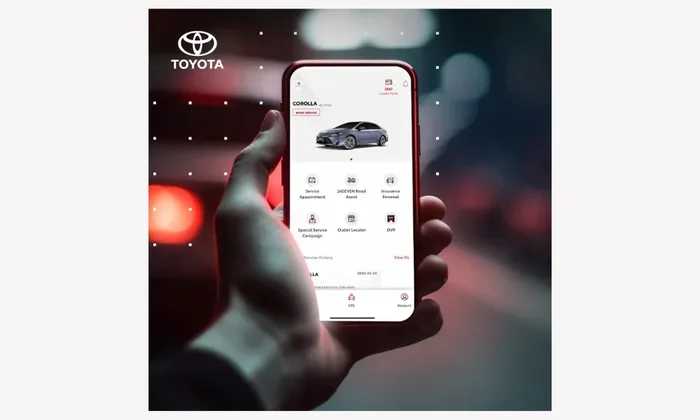
The Toyota App comes packed with useful features. Here is what you can typically do with it:
- Remote Start: Start your engine before you get in, especially useful in hot or cold weather.
- Lock and Unlock: Lock or unlock your doors remotely with a tap on your screen.
- Vehicle Location: Find your car in a crowded parking lot using GPS tracking.
- Fuel Level Check: See how much fuel you have left without walking to the tank.
- Trip Monitoring: View trip history, distance traveled, and driving habits.
- Maintenance Alerts: Receive notifications about service needs and oil changes.
- Smart Key Integration: Use your phone as a digital key for select models.
These features sound great on paper. But the real question is whether they are practical for your daily life. Let us dig deeper into who benefits most from the Toyota App.
Who Benefits Most From the Toyota App?
Not everyone needs every feature a car app offers. Some drivers will find the Toyota App incredibly useful. Others may barely touch it. Let us look at the types of drivers who get the most value from this app.
Busy Professionals
If you juggle a packed schedule, the Toyota App can save you precious minutes. Imagine pulling into your office parking lot and starting your car remotely. By the time you finish your morning coffee, the seats are warmed up and the defroster has cleared the windshield.
This is especially helpful in places with extreme weather. In freezing winters or scorching summers, remote start is a game changer. The app also lets you check your fuel level before heading out, so you can stop for gas at the right time.
Parents and Families
Families with multiple cars can benefit from the Toyota App too. Parents can monitor teen drivers through trip history and speed alerts. The lock and unlock feature also comes in handy when kids forget their keys or when you need to grant someone temporary access to the vehicle.
Some Toyota models also support smart key features through the app. This means you can use your phone to open and start the car, which is convenient when your hands are full with groceries or a baby.
Fleet Owners and Multiple Vehicle Users
If you manage more than one Toyota vehicle, the app can help you keep track of all of them. You can check fuel levels, maintenance schedules, and locations for each vehicle from a single dashboard. This is particularly useful for small business owners who rely on their fleet daily.
How Does the Toyota App Connect to Your Vehicle?
Setting up the Toyota App is generally straightforward. However, the process can vary depending on your vehicle model and year. Here is a general overview of how it works.
Step-by-Step Setup
- Download the Toyota App from your device’s app store.
- Create an account using your email address.
- Enter your vehicle information, including the VIN.
- Follow the on-screen prompts to pair your phone with the car.
- Test the connection by trying a basic feature like locking the doors.
For iPhone users, you may also want to sync your iPhone to your new car to ensure seamless Bluetooth connectivity. This step can make the Toyota App experience much smoother from day one.
Android users should make sure their phone supports the necessary Bluetooth versions. Most modern Android phones work without issues, but older models may struggle with certain features.
Pairing Your Phone for the Best Experience
Proper pairing is key to getting the most out of the Toyota App. Make sure your phone’s Bluetooth is turned on and that you are within range of the vehicle during setup. If you are having trouble connecting, try restarting both your phone and the car’s infotainment system.
For those who also want to connect their phone for calls and music, you might consider pairing your iPhone to your car through the standard Bluetooth settings first. This creates a solid foundation for the Toyota App to build on.
Voice Assistant Integration
The Toyota App works with voice assistants on your phone. You can use Siri or Google Assistant to trigger certain commands. For example, you can say “Hey Siri, lock my car” and the app will do it.
However, some users find that voice assistant features can interfere with the Toyota App’s performance. If you notice any issues, you might want to turn off voice assistant mode temporarily and see if the app runs more smoothly.
What Are the Drawbacks of the Toyota App?
No app is perfect, and the Toyota App is no exception. Before you decide to download it, it is important to understand the potential downsides.
Subscription Costs
Some of the best features in the Toyota App require a paid subscription. The basic app is free to download, but advanced features like remote start and vehicle tracking often come with a monthly or annual fee. These costs can add up over time.
Before committing, check what is included in the free tier and what requires payment. Some Toyota models come with a trial period, which gives you a chance to test the paid features before you pay anything.
Limited Compatibility
Not all Toyota models support every app feature. Older models may have limited functionality, and some features are only available on newer trims with the right tech package. If you have an older Toyota, the app might not offer as much value.
Before downloading, check your vehicle’s compatibility. You can usually find this information in your owner’s manual or by contacting your local dealership. Some owners also visit their Toyota dealership to confirm which connected services their vehicle supports.
Battery and Data Usage
The Toyota App runs in the background, which means it uses some battery life on your phone. It also requires a data connection to communicate with your vehicle. If you have limited data on your plan, this could be a concern.
That said, the battery drain is typically minimal. Most users do not notice a significant difference in phone battery life after installing the app.
Toyota App vs. Alternatives: Which Is Right for You?
There are alternatives to the Toyota App that you should consider. Some vehicles come with built-in connected services that work without a separate app. Third-party apps also offer remote start and vehicle tracking features.
Here is a quick comparison of the Toyota App versus some popular alternatives:
| Feature | Toyota App | Built-In Systems | Third-Party Apps |
|---|---|---|---|
| Remote Start | Yes | Yes (on select models) | Varies |
| Lock/Unlock | Yes | Yes | Limited |
| Vehicle Tracking | Yes | Yes | Yes |
| Subscription Required | Sometimes | Rarely | Sometimes |
| Brand Specific | Yes | No | No |
| Maintenance Alerts | Yes | Yes | Limited |
The Toyota App shines when it comes to brand-specific features. It is designed specifically for Toyota vehicles, which means better integration and reliability. Third-party apps may offer similar features, but they often lack the depth of Toyota-specific functionality.
On the other hand, built-in systems like Toyota’s own connected services do not require a separate app download. They work directly through the car’s infotainment system. This can be a simpler option for drivers who do not want to manage yet another app on their phone.
Common Mistakes Toyota App Users Make
Even if you decide the Toyota App is right for you, there are some common pitfalls to avoid:
- Skipping Software Updates: The app receives regular updates that improve performance and fix bugs. Always keep it updated.
- Ignoring Subscription Expiry: If you are on a trial, set a reminder before it expires so you do not lose access to key features.
- Not Reading the Manual: The owner’s manual explains which features are available for your specific model. Skipping it can lead to frustration.
- Using the App Instead of Physical Keys: Always keep a physical key as a backup. Technology can fail, and you do not want to be locked out.
Quick Tips for Getting the Most Out of the Toyota App
Here are some practical tips to help you get the best experience:
- Keep your phone’s Bluetooth and location services turned on for full functionality.
- Use the app’s vehicle health reports to stay on top of maintenance needs.
- Set up push notifications so you never miss an alert about your vehicle.
- Explore the app settings to customize which features you want quick access to.
- Share access with a trusted family member so they can also control the vehicle remotely.
Final Verdict: Do You Need the Toyota App?
The answer depends on your needs and lifestyle. If you value convenience and want to control your vehicle from your phone, the Toyota App is a great tool. It offers features that genuinely make daily life easier, especially in extreme weather or busy schedules.
However, if you rarely need remote access to your car and prefer a simpler setup, you can absolutely drive your Toyota without the app. It is not a requirement for operating or maintaining your vehicle.
For most Toyota owners, the app is a nice-to-have rather than a must-have. It adds a layer of convenience that becomes second nature once you start using it. If you are still on the fence, try the free version first and see if the features fit your routine.
The Toyota App continues to evolve with new features and improvements. As Toyota expands its connected services, the app will likely become even more valuable over time. So even if you do not need it today, it might be worth keeping an eye on it for future updates.
Ultimately, the decision is yours. Weigh the benefits against the costs and decide what makes sense for your driving life. The Toyota App is a solid tool that can make your Toyota ownership experience more convenient and connected.
Frequently Asked Questions
Is the Toyota App free to use?
The app itself is free to download, but some advanced features require a paid subscription. Basic features like vehicle location and maintenance alerts are typically available at no cost. Check your specific plan to see what is included.
Can I use the Toyota App on more than one phone?
Yes, you can link multiple phones to the same Toyota vehicle. This is useful for families who share a car. Each user can set up their own account and access the vehicle controls through the app.
Does the Toyota App work with all Toyota models?
Not all models support every feature. Newer Toyota models with the connected services package have the most functionality. Older models may have limited or no app support. Check your vehicle’s compatibility before relying on the app.
Can I remote start my Toyota without the app?
Some Toyota models come with a physical remote key fob that includes a remote start button. The app provides an additional way to remote start, but it is not the only method. Check your vehicle’s key features to see what options you have.
What should I do if the Toyota App is not connecting to my car?
First, make sure Bluetooth and location services are turned on. Try restarting both your phone and the car’s infotainment system. If the problem persists, uninstall and reinstall the app or contact Toyota customer support for assistance.
Will the Toyota App drain my car battery?
The app itself does not drain the car battery significantly. However, leaving features like vehicle tracking active for extended periods can have a minor impact. It is best to use the app’s features as needed rather than leaving them running constantly.