How Do I Activate Remote Start in the Toyota App Guide
Activating remote start through the Toyota App lets you start your engine from anywhere with just a few taps on your phone. This guide walks you through every step, from downloading the app to troubleshooting common issues. You will learn how to set up your account, pair your device, and enjoy the comfort of a pre-warmed or pre-cooled Toyota vehicle.
Key Takeaways
- Easy Setup: You can activate remote start in the Toyota App by following a few simple steps that take less than 10 minutes.
- Phone Pairing Is Key: Make sure your iPhone or Android is properly paired with your Toyota before attempting remote start activation.
- Subscription Matters: Some Toyota models require an active connected services subscription to use remote start features.
- Troubleshooting Is Simple: Most remote start issues can be fixed by checking your Wi-Fi connection, app settings, or vehicle compatibility.
- Smart Features Beyond Start: The Toyota App lets you control climate, lock doors, and locate your vehicle from your phone.
- Safety First: Always follow Toyota guidelines for safe remote start use, including running the engine only in well-ventilated areas.
📑 Table of Contents
What Is Toyota Remote Start and How Does It Work?
Toyota remote start is a feature that lets you start your car engine using your smartphone. Instead of walking out to a cold or hot vehicle, you can activate remote start in the Toyota App and let your engine run for a set amount of time. The system uses wireless signals to communicate between your phone and your vehicle.
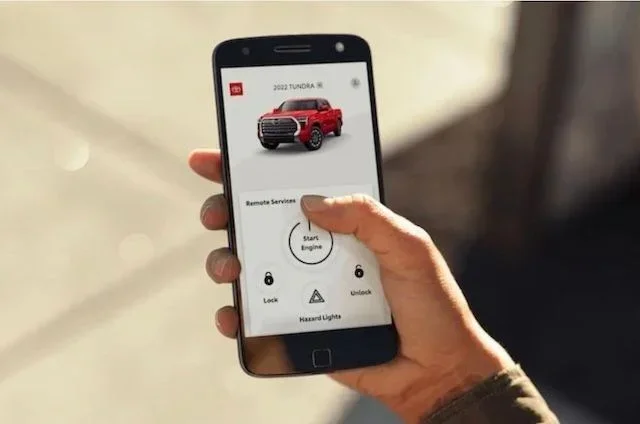
The process is simple. You open the app, log in, and tap the remote start button. Your Toyota engine turns on, and the climate control system begins warming or cooling the cabin. This is called vehicle preconditioning, and it is one of the most popular features among Toyota owners.
Not every Toyota model supports remote start. The feature depends on your vehicle’s built-in technology package. Models equipped with Toyota Entune or the newer Toyota connected services platform are most likely compatible. You can check your specific model by visiting your owner’s manual or the Toyota website.
Remote start also works with your Toyota Smart Key system. The key fob stays inside the vehicle while the engine runs remotely. This is a safety feature designed to prevent theft. The engine will shut off if someone tries to drive the car without the proper key present.
Why Do People Use Remote Start?
There are several great reasons to use remote start. In winter, you can warm up your seats and defrost the windshield before you step outside. In summer, you can cool down a hot cabin before getting in. Some people also use it to warm up their engine on cold mornings to improve oil flow and reduce engine wear.
Another benefit is convenience. If you are running late, you can start the car while finishing your coffee at home. The Toyota mobile app makes all of this possible with just a few taps on your screen.
How to Download and Set Up the Toyota App
Before you can activate remote start in the Toyota App, you need to download and set up the application on your phone. The Toyota App is available for both iPhone and Android devices. Follow these steps to get started.
Downloading the Toyota App
Open the App Store on your iPhone or the Google Play Store on your Android device. Search for “Toyota App” and look for the official Toyota application. Download and install it on your phone. The app is free to download, but some features may require a subscription.
Make sure your phone has a stable internet connection during setup. You will need Wi-Fi or mobile data to create your account and link your vehicle. If you are setting up a new phone, you may want to sync my iPhone to my new car first to make sure everything is connected properly.
Creating Your Toyota Account
Open the app and tap “Create Account.” You will need your Toyota vehicle identification number (VIN), which you can find on your dashboard or driver’s side door jamb. Enter your personal details, including your name, email address, and phone number.
Once your account is created, log in and follow the prompts to link your vehicle. The app will guide you through pairing your phone with your Toyota. This step is essential for smartphone connectivity and remote features to work correctly.
If you are having trouble pairing your device, check that your phone’s Bluetooth is turned on. You may also want to pair my iPhone to my car using the standard Bluetooth pairing process first. This ensures your phone is recognized by the vehicle before you try remote features.
Checking Your Subscription Status
Some Toyota remote start features require a paid subscription to Toyota connected services. Check your subscription status inside the app under “Vehicle Settings” or “Connected Services.” If your subscription has expired, you may need to renew it before remote start will work.
Toyota offers different tiers of connected services. Basic plans may include roadside assistance and navigation, while premium plans add remote start, remote lock, and climate control. Make sure you have the right plan for the features you want.
Step-by-Step Guide to Activate Remote Start
Now that your app is set up and your vehicle is linked, it is time to activate remote start in the Toyota App. Follow this step-by-step process carefully to make sure everything works.
Step 1: Open the Toyota App and Log In
Launch the Toyota App on your phone. Enter your username and password to log in. Make sure you are using the correct account that is linked to your Toyota vehicle. If you have multiple Toyotas, select the correct one from your vehicle list.
Step 2: Navigate to the Remote Start Section
Once you are logged in, look for the “Remote Start” or “Vehicle Controls” tab on the main screen. Tap on it to access the remote start function. The interface may vary slightly depending on your app version and Toyota model.
Step 3: Verify Your Vehicle is Ready
Before starting the engine remotely, make sure your vehicle is in park and all doors are closed. The app will usually display a status message if something is not ready. If your doors are unlocked or the vehicle is not in park, the remote start will not engage.
Also check that your key fob is inside the vehicle. The Toyota Smart Key system needs to detect the fob for the engine to start remotely. If the fob battery is low, replace it before trying again.
Step 4: Press the Remote Start Button
Tap the remote start button on the app screen. You will usually see a countdown timer showing how long the engine will run. The default setting is often 10 minutes, but you can adjust this in your vehicle settings.
After you press the button, wait a few seconds. You should hear the engine start. You can also check the app to confirm the engine is running. The app will show your vehicle’s status, including whether the climate control is active.
Step 5: Adjust Climate Settings (Optional)
One of the best features of Toyota remote start is the ability to set the cabin temperature before you get in. Use the app to adjust the climate control to your preferred temperature. This is especially useful on cold winter mornings or hot summer afternoons.
You can also set the fan speed and choose between heating or cooling modes. These settings are saved in the app for future use, making it even faster to start your engine remotely next time.
Troubleshooting Common Remote Start Problems
Even with a proper setup, you may run into issues when trying to activate remote start in the Toyota App. Here are the most common problems and how to fix them.
Remote Start Does Not Respond
If the app does not respond when you tap the remote start button, check your internet connection first. The app needs a stable Wi-Fi or cellular data connection to communicate with your vehicle. Try switching between Wi-Fi and mobile data to see if that fixes the issue.
Next, make sure your app is up to date. Open the App Store or Google Play Store and check for updates. Outdated app versions can cause connectivity problems. Restart the app and try again after updating.
Sometimes voice assistant features can interfere with app performance. If you have voice assistant mode enabled, try to turn off voice assistant mode and then retry the remote start process.
Engine Starts But Shuts Off Immediately
If your engine starts but shuts off right away, the most common cause is an open door or hood. Check that all doors, the trunk, and the hood are fully closed. The remote start system has safety sensors that shut off the engine if it detects an open entry point.
Another cause could be low fuel. Some Toyota models will not allow remote start if the fuel level is below a certain threshold. Fill up your tank and try again.
You should also check your remote start timer settings. If the timer is set too short, the engine may shut off before you reach the vehicle. Adjust the timer to at least 10 minutes for a comfortable warm-up or cool-down period.
App Shows “Vehicle Not Connected”
This error usually means your phone has lost its connection to the vehicle. Check that Bluetooth is enabled on your phone. You may also need to restart the Toyota App or restart your phone entirely.
If the problem persists, try unpairing and re-pairing your phone with the vehicle. Go to your phone’s Bluetooth settings, forget the Toyota connection, and pair it again. This often resolves persistent connectivity issues.
Tips to Get the Most From Toyota Remote Start
Once you know how to activate remote start in the Toyota App, you can get even more out of the feature with these practical tips.
Set a Remote Start Schedule
Many Toyota models allow you to schedule remote start for a specific time. This is perfect for weekday mornings when you want the car warmed up before your commute. Set the schedule in the app the night before, and wake up to a comfortable vehicle.
Use Remote Start with Climate Control
Combine remote start with the climate control system for maximum comfort. Set the temperature to your liking before you leave the house. By the time you walk to your car, the seats are warm and the windshield is clear of frost or fog.
Keep Your App Updated
Toyota regularly releases app updates that improve performance and add new features. Keep your app updated to ensure the best experience. Updates also fix bugs that could cause remote start problems.
Consider Upgrading Your Vehicle
If your current Toyota does not support remote start, you may want to consider upgrade my vehicle to a newer model with full connected services. Newer Toyota models come with enhanced remote features, including remote start, lock, and locate functions built right into the Toyota App.
Know Your Remote Start Limits
Toyota remote start has some built-in limits for safety. The engine typically runs for a maximum of 10 or 15 minutes before shutting off automatically. If you want a longer warm-up period, you can restart the remote start from the app. However, always make sure you are within a reasonable distance from your vehicle when using remote start.
Is Remote Start Worth It for Your Toyota?
After learning how to activate remote start in the Toyota App, you might wonder if it is worth the effort. For most Toyota owners, the answer is yes. Remote start adds a layer of comfort and convenience that becomes essential once you get used to it.
The ability to warm up or cool down your vehicle from anywhere is a game changer. It saves time, improves comfort, and can even help extend the life of your engine by allowing the oil to circulate before you drive. For people who live in areas with extreme temperatures, remote start is practically a necessity.
The Toyota App also offers several other features that work alongside remote start. You can lock and unlock your doors, honk the horn, locate your vehicle in a parking lot, and check your fuel level. These features work together to give you full control of your Toyota from your phone.
If you are still deciding whether to use remote start, consider how often you deal with extreme weather or tight schedules. If you find yourself rushing out the door on cold winter mornings or hot summer afternoons, remote start will quickly pay for itself in comfort and convenience.
The setup process is straightforward, and once you have it configured, using remote start becomes second nature. With the Toyota App on your phone, you always have control of your vehicle at your fingertips.
Frequently Asked Questions
Can I activate remote start without the Toyota App?
No, you need the Toyota App to activate remote start on most modern Toyota models. Some older vehicles may support remote start through a separate key fob button, but the app provides more control and features. Make sure to download the official Toyota App from your device’s app store.
Is remote start available on all Toyota models?
Not all Toyota models support remote start. The feature is typically available on models equipped with the Toyota Entune system or the newer Toyota connected services platform. Check your vehicle’s owner manual or contact your local Toyota dealer to confirm whether your specific model supports remote start.
How far can I be from my car when using remote start?
You can typically use remote start from several miles away, as long as you have a stable internet connection on your phone. The app communicates with your vehicle through Toyota’s cloud servers. However, always stay within a reasonable distance and never leave your vehicle running unattended in an enclosed space for safety reasons.
Does remote start work in extreme cold weather?
Yes, remote start works well in extreme cold weather and is actually one of the most popular use cases. The feature allows you to warm up the engine and cabin before you step outside. Make sure your vehicle is in a well-ventilated area and never use remote start in an enclosed garage.
Can I schedule remote start for a specific time?
Many newer Toyota models allow you to schedule remote start through the Toyota App. You can set a specific time for the engine to start, which is perfect for morning commutes. Check your vehicle settings in the app to see if scheduling is available for your model.
Is there a subscription fee for Toyota remote start?
Some Toyota models require an active subscription to Toyota connected services to use remote start. The subscription cost varies depending on the plan and your vehicle model. Basic plans may not include remote start, so check your subscription details in the app to confirm what features are included.