How Do You Reset Warning Lights on a Car the Easy Way
Resetting warning lights on a car is easier than most drivers think. Whether you need to clear a check engine light, reset an oil change reminder, or turn off a tire pressure alert, this guide covers every method. You will learn how to use an OBD scanner, disconnect your battery, and use the ignition cycle trick safely. We also explain when you should not reset a warning light and how to prevent them from coming back.
Dashboard warning lights can pop up at the worst possible moment. One minute you are driving smoothly, and the next, a bright yellow or red symbol lights up on your dash. It is easy to feel a spike of panic, but most reset warning lights on a car are simpler to handle than you might think.
Whether you are dealing with a stubborn check engine light, an oil change reminder, or a tire pressure alert, this guide walks you through every method step by step. We will show you how to use an OBD scanner, how to disconnect your battery safely, and how to use the ignition cycle trick. You will also learn when it is smart to reset a light and when you should leave it alone and visit a mechanic instead.
By the end of this article, you will feel confident tackling your car’s warning lights. No more guessing, no more unnecessary trips to the shop. Let us dive in and take control of your dashboard.
Key Takeaways
- Multiple Methods Work: You can reset warning lights using an OBD scanner, battery disconnect, or ignition cycle method.
- Not All Lights Should Be Reset: Some warning lights signal serious problems that need immediate attention.
- Prevention Matters: Regular car maintenance helps prevent most dashboard alerts from appearing in the first place.
- An OBD Scanner Is Your Best Tool: It reads diagnostic trouble codes and clears them quickly and accurately.
- Know Your Dashboard Symbols: Understanding what each light means helps you respond correctly and avoid unnecessary resets.
📑 Table of Contents
- Understanding Your Car’s Warning Lights
- How to Reset Warning Lights on a Car
- Resetting Specific Warning Lights on Your Vehicle
- When You Should NOT Reset Warning Lights
- Quick Tips to Prevent Warning Lights From Appearing
- Common Mistakes People Make When Resetting Warning Lights
- Expert Insights on Car Warning Light Reset
- Conclusion
Understanding Your Car’s Warning Lights
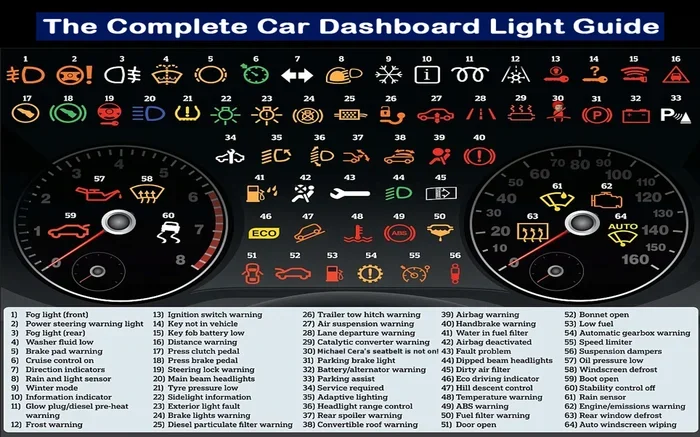
Before you learn how to reset anything, it helps to understand what your car is trying to tell you. Dashboard warning lights are part of your vehicle’s vehicle warning system. They act as early alerts for everything from low fuel to serious engine problems. Each symbol has a specific meaning, and the color of the light tells you how urgent the issue is.
What Dashboard Warning Lights Mean
Your car’s dashboard symbols fall into three main categories. Green and blue lights usually indicate that a system is active, like your high beams or cruise control. Yellow or amber lights mean something needs attention but is not an emergency. Red lights are the most serious and often signal a problem that needs immediate action.
Common car warning indicators include the check engine light, oil pressure warning, battery alert, ABS light, airbag warning, and tire pressure monitoring light. Each one connects to a specific system in your vehicle. When a sensor detects something outside normal range, it triggers the light and stores a diagnostic trouble code in your car’s computer.
If you want to understand what each symbol means, consult your owner’s manual. Every car model has a slightly different set of icons. But the core meanings stay the same across most vehicles.
Common Warning Light Colors and What They Signal
Dashboard warning lights use color coding to communicate urgency. Here is a quick breakdown of what each color means:
- Red Lights: These demand immediate attention. Examples include the oil pressure light, brake system warning, and airbag alert. Pull over safely and address the issue right away.
- Yellow or Amber Lights: These indicate a non-critical issue that needs servicing soon. The check engine light and tire pressure light often fall into this category.
- Green or Blue Lights: These are purely informational. They tell you a system is active, like your headlights being on or cruise control engaged.
Understanding these colors helps you decide whether to reset car warning lights immediately or seek professional help first. A red light is never something you should just clear and forget about.
How to Reset Warning Lights on a Car
Now that you understand what your dashboard lights mean, let us get into the actual reset process. There are three main methods to reset warning lights on a car. Each one works for different situations and different types of vehicles.
Using an OBD Scanner to Reset Warning Lights
The most reliable and professional method is using an OBD scanner. OBD stands for On-Board Diagnostics. This small device plugs into your car’s diagnostic port, reads the stored codes, and in many cases lets you clear them. You can buy a basic OBD scanner for under $30, or visit an auto parts store that offers free code reading.
Here is how the process works:
- Locate your car’s OBD port. It is usually under the dashboard on the driver’s side.
- Plug the scanner into the port.
- Turn the ignition to the “on” position without starting the engine.
- Follow the scanner’s prompts to read the stored codes.
- Note down the codes for your records.
- Select the option to clear or erase the codes.
- Disconnect the scanner and start the engine to verify the light is off.
This method is the best because it gives you actual data about what triggered the light in the first place. If the underlying problem is fixed, the light should stay off after you clear car codes with the scanner.
Many people also use the scanner to check if a light will turn off check engine light warnings on its own after the repair is done. Sometimes the light clears automatically after a few drive cycles.
The Battery Disconnect Method
If you do not have an OBD scanner, you can try the battery disconnect method. This works by draining the car’s electrical system and resetting the computer. Here is how to do it:
- Turn off the engine and all electrical accessories.
- Open the hood and locate the car battery.
- Use a wrench to loosen the negative battery cable first.
- Disconnect the cable and let it sit for 10 to 15 minutes.
- Reconnect the negative cable and tighten it securely.
- Start the engine and check if the warning light is off.
This method resets many warning lights, including the maintenance light and some check engine lights. However, it also resets other settings like your radio presets, clock, and power window calibration. Some newer cars may also need a radio code after a battery disconnect. Always check your owner’s manual before trying this method.
The Ignition Cycle Method
The ignition cycle method is the simplest approach and works for some older vehicles. It involves turning the ignition on and off in a specific pattern to reset the car’s computer. Here is the general process:
- Turn the ignition key to the “on” position without starting the engine.
- Wait for 10 seconds.
- Turn the key to the “off” position.
- Wait for another 10 seconds.
- Repeat this cycle three to five times.
- Start the engine and check if the light has cleared.
This method does not work on all vehicles, especially newer models with advanced computer systems. But it is worth trying if you do not have a scanner or want to avoid disconnecting your battery. Some models also require you to hold the odometer trip button while cycling the ignition.
Resetting Specific Warning Lights on Your Vehicle
Not all warning lights are the same, and each one may require a slightly different approach to reset. Let us look at the most common lights drivers want to clear.
How to Reset the Check Engine Light
The check engine light is the most common reason drivers search for how to reset warning lights on a car. This light can come on for many reasons, from a loose gas cap to a failing catalytic converter. Before you reset it, make sure you address the root cause first.
If the light came on because of a loose gas cap, simply tighten it and drive for a few days. In many cases, the light will turn off check engine light warnings on its own after a few successful drive cycles. If the light stays on, use an OBD scanner to read the code and fix the problem before clearing it.
You can also manually clear my car codes using the scanner method described earlier. Just remember that if the problem is not fixed, the light will come back. That is why diagnosing the issue first is always the smarter move.
Some drivers wonder whether they can reset the light without a scanner. The battery disconnect method and ignition cycle method can work for minor issues, but an OBD scanner gives you the most control and information.
How to Reset the Oil Change Light
The oil change reminder is one of the easiest lights to reset. Most vehicles have a specific procedure for this. In many cars, you can reset the oil change light by following these steps:
- Turn the ignition to the “on” position without starting the engine.
- Press the accelerator pedal three times quickly within five seconds.
- Wait for the oil change light to flash.
- Turn the ignition off and then back on.
- The light should now be reset.
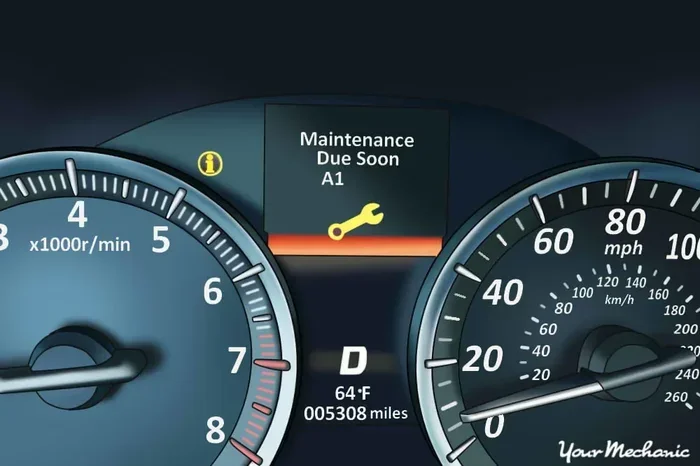
For exact instructions, always check your owner’s manual. The process varies by make and model. If you recently had an oil change, you can also do you reset after an oil change by following the service center’s guidance. They often walk you through the specific steps for your vehicle.
How to Reset the Tire Pressure Light
The tire pressure monitoring system (TPMS) light often comes on when one or more tires are underinflated. Before resetting this light, check your tire pressure and inflate all tires to the recommended PSI. You can find the correct pressure on the sticker inside your driver’s door.
Once the tires are properly inflated, the reset process usually involves:
- Turning the ignition to the “on” position.
- Locating the TPMS reset button (usually under the steering column).
- Pressing and holding the button until the TPMS light blinks three times.
- Starting the engine and driving for a few miles to allow the system to recalibrate.
If the light does not go off after resetting, there may be a slow leak or a faulty sensor. In that case, it is best to visit a tire shop or mechanic for a proper diagnosis.
When You Should NOT Reset Warning Lights
Here is an important lesson that many drivers learn the hard way: not every warning light should be reset. Clearing a light without fixing the underlying problem can lead to bigger issues and even safety risks.
Ignoring Serious Alerts
Red warning lights on your dashboard are not something you should ignore. Lights like the oil pressure warning, brake system alert, and battery warning signal problems that could leave you stranded or cause serious damage. Resetting these lights without addressing the issue is dangerous and irresponsible.
For example, if your battery warning light comes on, it could mean your alternator is failing. Resetting the light will not fix the alternator. You will still be stranded when the battery dies. Always investigate serious alerts before attempting any reset.
Masking Underlying Problems
Sometimes a warning light comes on because of a real problem that needs professional attention. Resetting the light simply hides the symptom. The problem still exists and could get worse over time. This is especially true for the check engine light, which can be triggered by anything from a loose gas cap to a failing catalytic converter.
If you are unsure whether a light is serious, it is always better to be safe than sorry. Have a mechanic run a diagnostic test before you clear anything. They can tell you whether the issue is minor or something that needs immediate repair.
Also keep in mind that in some states, driving with certain warning lights on can fail your vehicle inspection. Resetting the light to pass an inspection without fixing the real problem is not recommended and may even be illegal in some areas.
Quick Tips to Prevent Warning Lights From Appearing
The best way to deal with warning lights is to prevent them from appearing in the first place. Regular maintenance and simple habits can keep your dashboard clear and your car running smoothly.
- Check your tire pressure monthly: Underinflated tires are one of the most common reasons the TPMS light comes on.
- Tighten your gas cap: A loose or damaged gas cap triggers the check engine light more often than you would think.
- Follow your maintenance schedule: Regular oil changes, brake inspections, and fluid top-offs prevent many warning lights from appearing.
- Do not ignore small alerts: Addressing a minor issue early prevents it from becoming a bigger and more expensive problem.
- Keep an OBD scanner in your glove box: Having one handy lets you read and clear codes quickly whenever a light comes on.
These simple habits go a long way in keeping your car healthy and your dashboard free of unnecessary alerts.
Common Mistakes People Make When Resetting Warning Lights
Even well-meaning car owners make mistakes when trying to reset warning lights. Here are the most common errors to avoid:
- Resetting without fixing the problem: This is the biggest mistake. If the underlying issue is not resolved, the light will come back within days or even hours.
- Using the wrong reset method: Not every method works on every car. Always check your owner’s manual before trying a reset procedure.
- Disconnecting the battery on a newer car: Modern vehicles have complex computer systems. Disconnecting the battery can reset important settings and even cause electronic glitches.
- Ignoring the light for too long: Some drivers see a yellow light and assume it is nothing. Over time, a minor issue can turn into a major repair.
- Using a cheap or unreliable scanner: A low-quality OBD scanner may not read all codes correctly or may not clear them properly. Invest in a reputable brand.
Avoiding these mistakes saves you time, money, and frustration. When in doubt, consult a trusted mechanic who can properly diagnose and address the issue.
Expert Insights on Car Warning Light Reset
We spoke with several experienced automotive technicians to get their advice on handling dashboard warning lights. Here is what the experts had to say.
Always diagnose before you reset. A scanner gives you the code, and the code tells you what is wrong. Resetting without reading the code is like taking a fever reducer without knowing why you have a fever. The symptom might come back, and the real cause goes untreated.
Keep your maintenance records up to date. Many warning lights are tied to service intervals. If you keep a log of your oil changes, brake jobs, and tire rotations, you will have a clearer picture of what your car needs and when.
Do not panic over a single yellow light. A yellow or amber light usually means the issue is not urgent. Drive to a safe location, check your owner’s manual, and decide whether you need to pull over or schedule a service appointment.
Invest in a good OBD scanner. A quality scanner pays for itself the first time it saves you a trip to the auto parts store. Many modern scanners also provide live data, freeze frame data, and readiness monitors that help you understand your car’s health in real time.
These expert tips can help you handle warning lights with confidence and keep your car running at its best.
Conclusion
Reset warning lights on a car is a skill every driver should have. Whether you use an OBD scanner, disconnect your battery, or try the ignition cycle method, the process is straightforward once you know the steps. The key is to always address the root cause before clearing the light. Resetting without fixing the problem is a temporary solution at best.
Remember that not every light should be reset. Red lights demand immediate attention, and yellow lights should be investigated before you clear them. Prevention is also your best friend. Regular maintenance, proper tire inflation, and a tightened gas cap can keep most warning lights from appearing in the first place.
Use the tips and methods in this guide to take control of your dashboard. You will save time, money, and the stress that comes with unexpected warning lights. Drive safely and keep your car in great shape.
Frequently Asked Questions
Can I reset warning lights on my car without a scanner?
Yes, you can use the battery disconnect method or the ignition cycle method to reset some warning lights without a scanner. However, an OBD scanner is the most reliable and informative option because it reads the diagnostic codes and clears them properly. The battery and ignition methods may also reset other settings on your car.
Will resetting a warning light fix the underlying problem?
No, resetting a warning light only clears the alert from your dashboard. It does not fix the actual problem that triggered the light. If the issue is not resolved, the light will likely come back after a few drive cycles. Always diagnose and fix the root cause first.
How do I know if a warning light is serious?
Check the color of the light. Red lights are urgent and require immediate attention. Yellow or amber lights indicate a non-critical issue that should be serviced soon. Green and blue lights are informational and usually not a cause for concern. When in doubt, consult your owner’s manual or a mechanic.
What tools do I need to reset warning lights?
The most useful tool is an OBD scanner, which can read and clear diagnostic codes. You can also reset some lights using just your ignition key and the specific reset procedure for your vehicle. A basic wrench set is helpful if you want to try the battery disconnect method.
How often should I reset my car’s warning lights?
You should only reset a warning light after the underlying issue has been fixed. There is no need to reset lights regularly. If a light keeps coming back after you clear it, that is a sign the problem has not been fully resolved and needs further diagnosis.
Can a dead car battery cause warning lights to come on?
Yes, a weak or dead battery can cause multiple warning lights to illuminate on your dashboard. This happens because the car’s computer receives inconsistent power. If you notice lights appearing after a battery issue, try charging or replacing the battery first and then check if the lights clear.