How to Use Trip A and Trip B for Better Fuel Economy
Learning how to use Trip A and Trip B is one of the simplest ways to improve your fuel economy and save money at the pump. These two trip meters let you track different journeys, reset distances, and monitor your average fuel efficiency over time. Whether you commute to work or take a weekend road trip, mastering these tools gives you real insight into your driving patterns and fuel costs.
Have you ever wondered what your car is really telling you about fuel use? Most drivers glance at the fuel gauge and move on. But your dashboard holds two powerful tools that can change the way you think about gas mileage. These tools are called Trip A and Trip B. They are small trip meters hidden in your dashboard display, and they can help you track fuel economy like never before.
Many car owners never touch these features. They drive for years without resetting a single number. But once you learn how to use Trip A and Trip B, you unlock a window into your driving behavior. You see exactly how far you go, how much fuel you burn, and where you can improve. This guide walks you through everything you need to know. We will cover what each trip meter does, how to reset them, and how to use the data to save real money on fuel.
The beauty of trip meters is their simplicity. You do not need expensive apps or fancy gadgets. Your car already has everything built in. You just need to know where the buttons are and what to do with them. By the end of this article, you will feel confident using both trip meters every single time you drive. Let us get started.
Key Takeaways
- Trip A tracks one journey: Use it for daily commutes, fuel fill-ups, or any single trip you want to measure separately.
- Trip B tracks another journey: Perfect for comparing different routes, work vs. personal driving, or long-distance travel.
- Resetting is easy: A simple button press resets either trip meter back to zero when you start a new measurement period.
- Fuel economy tracking becomes accurate: By logging distances and fuel used between resets, you get true miles per gallon data.
- Driving habits improve fast: Once you see your fuel consumption numbers, you naturally adjust your driving to save more gas.
- Both digital and analog cars support trip meters: Most vehicles made after 2000 have digital trip A and Trip B displays on the dashboard.
- Small habits lead to big savings: Using trip meters consistently over weeks and months reveals patterns that help you cut fuel costs significantly.
📑 Table of Contents
What Are Trip A and Trip B?
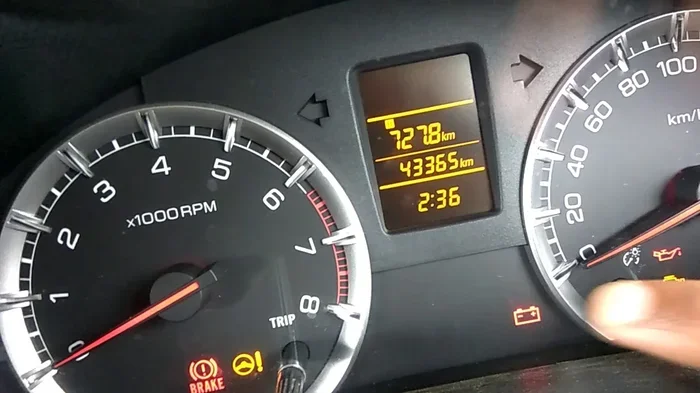
Trip A and Trip B are two separate trip odometers built into your car’s dashboard. Each one tracks a different distance independently. They let you measure specific journeys without affecting your main odometer reading. Think of them as two little mileage counters that live inside your car’s computer.
Your main odometer shows the total distance your car has ever traveled. That number never resets. Trip A and Trip B are different. You can reset either one whenever you want. This makes them perfect for tracking individual trips, comparing routes, or measuring fuel economy over set periods.
How Trip A Works
Trip A is the first trip meter. Most drivers use it to track their daily commute or a specific journey. For example, you might reset Trip A every time you fill up your fuel tank. Then you drive as normal. When you fill up again, you check the distance shown on Trip A. That number tells you exactly how far you traveled on that tank of gas.
Trip A is also great for tracking short trips. Maybe you want to know the distance from your home to the grocery store. Reset Trip A, drive there and back, and you have your answer. It is a simple tool that many people overlook entirely.
How Trip B Works
Trip B is the second trip meter. It works the same way as Trip A but tracks a completely separate distance. This is where things get useful. You can use Trip B to monitor a different route, a second vehicle, or a long-distance journey.
Some drivers use Trip B to track their work commute while using Trip A for personal errands. Others use Trip B during road trips to measure daily driving distances. The flexibility is the real strength here. You get two independent measurements running at the same time.
Why Use Trip Meters for Fuel Economy?
Tracking fuel economy by hand is a hassle. You would need to write down every fill-up, record the distance, and do math every time. Trip meters take all that effort away. They give you a clean, accurate distance number that pairs perfectly with your fuel receipts.
When you combine trip meter data with fuel purchase records, you get a clear picture of your true fuel economy. No guessing. No estimates. Just real numbers that help you make better decisions about how and where you drive.
Compare Routes Easily
Do you have two ways to get to work? One might be shorter but slower. The other might be longer but faster with better traffic flow. By using Trip A for one route and Trip B for the other, you can compare fuel use over time. After a few weeks of data, you will know which route actually saves you more gas.
This kind of comparison is impossible without trip meters. The fuel gauge alone cannot tell you which route is more efficient. But the numbers on your dashboard can.
Spot Inefficient Driving Habits
Once you start tracking fuel economy with trip meters, bad habits become obvious. You might notice that your fuel consumption spikes on certain days. Maybe you are idling too long, accelerating too hard, or driving above the speed limit more than you realize.
The data does not lie. When you see a drop in fuel economy, you naturally start thinking about what changed. Did you take a different route? Drive more aggressively? Carry extra weight in the trunk? Trip meters help connect your driving behavior to real fuel costs.
How to Reset Trip A and Trip B
Resetting your trip meters is simple. Almost every car made in the last 20 years has a trip reset button on the dashboard or steering wheel controls. The exact location varies by vehicle, but the process is nearly identical across all makes and models.
Step-by-Step Reset Guide
Follow these steps to reset either trip meter:
- Locate the trip button on your dashboard or steering wheel. It is often labeled “Trip” or “Reset.”
- Press the button once to cycle through the display options. You should see Trip A, Trip B, and your main odometer.
- Select the trip meter you want to reset.
- Press and hold the button for two to three seconds.
- The number will flash and then return to zero.
That is it. Your trip meter is now ready to track a new journey. Make sure you reset at the right time for the best results. Resetting before a fuel fill-up gives you the most accurate fuel economy data.
Common Reset Mistakes to Avoid
- Resetting too early: Do not reset Trip A mid-trip if you want an accurate distance reading. Wait until the journey is complete.
- Forgetting which trip is which: Trip A and Trip B run independently. Make sure you know which one you are looking at before you reset.
- Resetting after a long trip: If you use Trip B for a road trip, do not reset it until you have recorded the full distance.
- Confusing trip meters with the main odometer: The main odometer cannot be reset. Only Trip A and Trip B reset.
Using Trip A and Trip B Together for Maximum Savings
The real power of trip meters comes when you use both at the same time. Each one serves a different purpose, and together they give you a complete fuel tracking system right on your dashboard.
Set Up a Fuel Tracking Routine
Here is a simple routine that works well for most drivers. Start by resetting Trip A every time you fill up your fuel tank. Drive normally. When you fill up again, record the distance on Trip A and the amount of fuel you purchased. Divide the distance by the fuel used to get your miles per gallon for that tank.
At the same time, keep Trip B running for a longer period. Maybe you track Trip B over an entire month. This gives you a broader view of your average fuel economy. Comparing short-term Trip A data with longer-term Trip B data reveals trends you might otherwise miss.
Track Commute vs. Personal Driving
Many drivers have two distinct driving patterns. They commute to work on weekdays and run personal errands on weekends. Trip A can track your work commute. Trip B can track your personal driving. Over time, you will see which type of driving uses more fuel and where you can make changes.
For example, you might find that your weekend errands burn more fuel per mile because of short trips and stop-and-go traffic. Short trips are notoriously hard on fuel economy. The engine does not reach optimal operating temperature, so it uses more gas. Once you know this, you can plan your errands more efficiently by combining trips into a single outing.
Monitor Fuel Economy After Car Maintenance
Trip meters are excellent tools for checking whether maintenance tasks are working. After an oil change, new air filter, or tire rotation, reset Trip A and track your fuel economy over the next few tanks. Compare those numbers to your previous data. You might discover that a simple maintenance task improved your fuel efficiency by a noticeable margin.
This kind of before-and-after comparison gives maintenance real meaning. You are not just spending money on service. You are investing in better fuel economy and a healthier vehicle.
Trip Meter Features in Modern Vehicles
Today’s cars come with advanced trip meter features that go far beyond simple distance tracking. Many newer vehicles display fuel economy data, average speed, and estimated range right alongside the trip meter numbers.
Digital Dashboard Displays
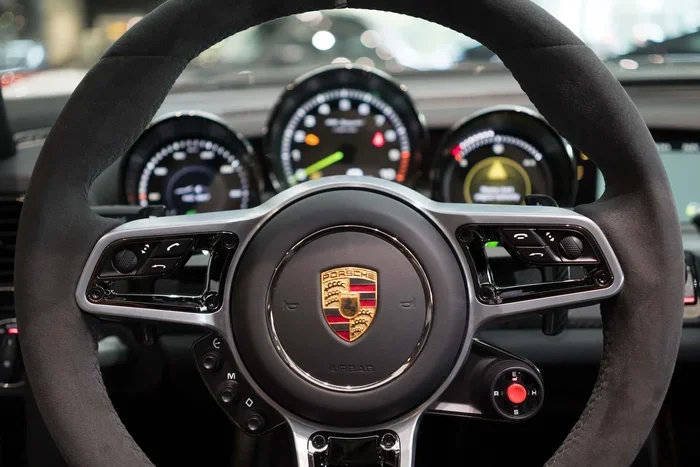
Most cars built after 2010 have multi-function digital displays. These screens show Trip A distance, Trip B distance, fuel economy in real time, and even the distance to empty. You can switch between these displays using steering wheel controls or dashboard buttons.
Some vehicles allow you to customize what information appears on each screen. You can set Trip A to show total distance and Trip B to show average fuel economy. Check your owner’s manual to see what customization options are available for your specific model.
Smartphone Integration and Apps
While your car’s built-in trip meters are powerful, you can enhance them with smartphone apps. Many apps sync with your car’s onboard computer or use GPS to track distance and fuel economy automatically. These apps often provide charts, graphs, and trend analysis that go beyond what your dashboard can show.
However, the built-in trip meters still have one big advantage. They are always there, they do not need a phone connection, and they draw no extra power. For simple, reliable fuel tracking, your car’s trip meters remain the best tool you have.
Common Questions About Trip A and Trip B
Drivers often have the same questions about trip meters. Here are answers to the most common ones.
Does resetting Trip A affect my main odometer? No. The main odometer and trip meters are completely separate. Resetting Trip A or Trip B has zero effect on your total mileage reading.
Can Trip A and Trip B show different units? In most vehicles, both trip meters display the same unit (miles or kilometers). You cannot set one to miles and the other to kilometers. Check your owner’s manual for specific details about your vehicle.
What happens if I accidentally reset Trip B? No worries. You simply reset it again and start fresh. The old data is gone, but you can begin tracking a new journey immediately.
Do trip meters drain the battery? No. Trip meters use minimal power from the car’s electrical system. They draw far less energy than the radio or headlights. You can leave them running indefinitely without any battery concerns.
Can I use Trip A and Trip B on a rental car? Absolutely. Rental cars have trip meters just like personal vehicles. Use Trip A to track the rental period distance and Trip B for any side trips you take. This helps you understand your actual usage and avoid unnecessary mileage charges.
Why does my Trip A number keep going up even when I am not driving? This is rare but can happen if there is a electrical issue or if the trip meter display is stuck. Try turning the car off and on again. If the problem persists, consult a mechanic to check the dashboard computer.
Conclusion
Learning how to use Trip A and Trip B is one of the easiest ways to take control of your fuel economy. These two small trip meters give you powerful data about every journey you make. They help you compare routes, track fuel use, and identify wasteful driving habits. Best of all, they are already built into your car, and they cost nothing extra to use.
Start simple. Reset Trip A at every fuel fill-up. Let Trip B run for longer tracking periods. Over time, the numbers will tell a story about how you drive and where you can improve. You will notice patterns you never saw before. You will make smarter decisions about which routes to take and how to adjust your driving style.
The road to better fuel economy starts with a single button press. Find your trip reset button, set Trip A to zero, and begin tracking. You will be surprised at how quickly the data adds up and how much money you can save. Your car has been trying to tell you this information all along. Now you know how to listen.