How to Turn On MMI in Audi Q5 A Simple Step by Step Process
Turning on the MMI in your Audi Q5 is easier than you think. This guide walks you through every step, from pressing the power button to exploring your infotainment features. Whether you are a new Audi owner or just need a quick refresher, you will find everything you need right here.
If you just got behind the wheel of an Audi Q5, you might be wondering how to bring the screen to life. The MMI system, which stands for Multi Media Interface, is the brain of your car’s tech experience. It controls everything from navigation to music to your phone connections. Knowing how to turn on MMI in Audi Q5 is the first step to unlocking all of these features.
Many new drivers feel a little overwhelmed by the technology packed into modern Audis. The good news is that the process is straightforward. You do not need to be a tech expert to get started. In this guide, we will walk you through every step in plain, simple language. By the end, you will feel confident firing up your MMI system every time you get in the car.
The Audi Q5 comes loaded with advanced features designed to make your drive safer and more enjoyable. The MMI display sits right in the center of your dashboard, giving you quick access to controls and information. Understanding how to power it on and navigate the basics will save you time and frustration. Let us dive right in.
Key Takeaways
- Simple Startup: Turning on MMI in Audi Q5 takes just a few seconds with the power button or the auto-start feature.
- Multiple Methods: You can start the system using the central console knob, the home button, or through the vehicle settings menu.
- Phone Pairing: MMI supports seamless phone connectivity, so you can make calls and stream music right away.
- Troubleshooting Tips: A soft reset or system restart can fix most common MMI glitches and freezing issues.
- Regular Maintenance: Keeping your MMI software updated ensures smooth performance and access to the latest features.
📑 Table of Contents
Understanding the MMI System in Your Audi Q5
The MMI system is Audi’s proprietary infotainment platform. It combines audio, navigation, communication, and vehicle settings into one easy-to-use interface. Think of it as the command center for your car’s technology. When you learn how to turn on MMI in Audi Q5, you are opening the door to a smarter driving experience.
The system has evolved over the years, and newer Q5 models come with even more capabilities. Depending on your model year, you might have a standard display or the larger augmented reality navigation screen. Either way, the startup process remains similar. Here is a quick look at what the MMI system does:
- Navigation: Get turn-by-turn directions to your destination with real-time traffic updates.
- Audio Controls: Stream music, tune into radio stations, and adjust sound settings.
- Phone Connectivity: Make hands-free calls and access your contacts list safely.
- Vehicle Settings: Adjust climate control, driver assistance features, and display preferences.
- Car Information: Check fuel levels, tire pressure, oil life, and maintenance reminders.
Before you start the system, make sure your car is in park or has the engine running. The MMI display needs power from the vehicle to operate. If you are trying to pair your phone for the first time, you may also want to check how to put your phone on pairing mode so the connection goes smoothly.
Step-by-Step Guide to Turning On MMI in Audi Q5
Now let us get into the actual steps. Starting your MMI system is quick and simple. Follow along with each step below, and you will have your screen up in no time.
Step 1: Start Your Vehicle
First, make sure your Audi Q5 is powered on. Press the engine start button with your foot on the brake pedal. The dashboard lights will come on, and the MMI system will begin its boot-up sequence. On most models, the screen activates automatically when you start the engine. This auto-start feature is designed for convenience, so you do not have to do anything extra.
If the screen does not light up, do not worry. There are a few other ways to wake it up, which we will cover next.
Step 2: Press the Home Button
Look at the center console, right below the MMI display. You will see a button with a house icon. Press it once. This is the home button, and it takes you straight to the main MMI screen. On some models, pressing the MENU button on the steering wheel also brings up the interface.
If the display is completely dark, try pressing and holding the power button located on the top right corner of the screen. Hold it for about three seconds until the Audi logo appears and the system starts loading.
Step 3: Use the MMI Control Knob
The MMI knob sits between the front seats on the center console. It lets you scroll through menus and select options. Once the screen is on, rotate the knob to browse different categories like Media, Navigation, Phone, and Vehicle. Click the knob in to select an option you want to open.
You can also use the touchscreen on newer Q5 models. Simply tap any icon on the screen to open that section. The touch response is smooth and responsive, making it easy to navigate even while driving.
Step 4: Access the Main Menu
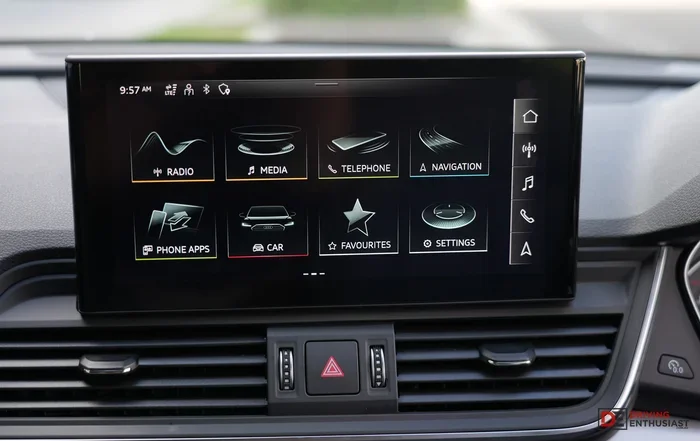
Once the MMI is on, you will see the home screen. From here, you can access all the major features of your system. Use the knob or touchscreen to scroll to the section you want. For example, tap Media to play music, or tap Navigation to enter a destination.
If you want to go back to the home screen at any time, just press the HOME button again. This is one of the most useful shortcuts to remember when you are exploring the system.
Step 5: Customize Your MMI Settings
After turning on MMI in Audi Q5, take a few minutes to personalize your settings. Go to the Setup or Settings menu, which is usually represented by a gear icon. From here, you can adjust the display brightness, set your preferred language, configure sound profiles, and more.
You can also set up your phone under the Phone section. This is where you connect your device for hands-free calling and audio streaming. If you are unsure how to pair your iPhone, check out our guide on how to pair your iPhone to your car for a detailed walkthrough.
Exploring MMI Features After Startup
Once you know how to power up the system, it is time to explore what it can do. The MMI interface is designed to be intuitive, but it does have a lot of layers. Let us look at the main features you will encounter.
Navigation and Maps
The navigation feature is one of the most used functions in the MMI system. Enter your destination using the on-screen keyboard or by speaking a voice command. The system will calculate the best route and guide you with turn-by-turn directions. On models with augmented reality navigation, the camera feed from your grill is overlaid with directional arrows on the screen.
You can also save favorite locations and recent destinations for quick access. This saves you time when you are driving to places you visit often, like your office or the gym.
Audio and Entertainment
The Media section lets you control your music and audio sources. You can switch between radio, Bluetooth, USB, and Apple CarPlay or Android Auto. The sound quality in the Audi Q5 is excellent, and the MMI system gives you full control over equalizer settings and speaker balance.
If you want to stream music from your phone, make sure Bluetooth is enabled on both devices. For a seamless experience, consider learning how to put your phone on pairing mode before getting into the car. This way, the connection is ready the moment you sit down.
Phone and Communication
The MMI system supports hands-free calling through Bluetooth. Once your phone is paired, you can make and receive calls using the steering wheel controls or the on-screen interface. Your contacts are displayed on the screen, so you can quickly dial without taking your hands off the wheel.
This feature is especially helpful for safety. Keeping your eyes on the road and your hands on the wheel reduces the risk of accidents. Many drivers find that the phone integration alone makes the MMI system worth using every day.
Vehicle Information and Settings
Under the Vehicle menu, you can access a wealth of information about your Audi Q5. Check your tire pressure, fuel range, oil life percentage, and maintenance schedules. You can also adjust driving modes, customize the driver assistance features, and set up the display theme.
Some Q5 models also support the Homelink system, which lets you control your garage door opener directly from the car. If you are curious whether your vehicle has this feature, you can learn more about it by checking how to know if your car has Homelink.
Troubleshooting Common MMI Issues
Even though the MMI system is reliable, you might run into occasional issues. A blank screen, frozen display, or slow response can be frustrating. Here are some common problems and how to fix them.
MMI Screen Won’t Turn On
If your display stays dark even after starting the engine, try a soft reset. Turn off the car, remove the key or press the engine start button again, and wait about 30 seconds. Restart the vehicle, and the MMI should boot up normally. This simple trick resolves most startup issues.
Another thing to check is the fuse box. A blown fuse related to the infotainment system can prevent the screen from powering on. If the soft reset does not work, a visit to your Audi dealer or a qualified mechanic is a good next step.
MMI Freezes or Runs Slowly
Sometimes the MMI system can become unresponsive, especially after a long drive or when many apps are running in the background. A system restart usually fixes this. Hold down the power button for about 10 seconds until the screen goes black and the Audi logo reappears. The system will reboot within a minute or two.
You should also check for software updates. Audi periodically releases updates that improve performance and add new features. Keeping your system up to date is one of the best ways to prevent slowdowns and glitches.
Bluetooth Connection Problems
If your phone will not connect to the MMI system, try deleting the device from the Bluetooth list and pairing it again. Make sure your phone is discoverable and within range. For detailed pairing instructions, you can refer to our guide on how to pair your iPhone to your car, which covers the process step by step.
Also, check that Bluetooth is enabled on your phone and that the MMI system is set to accept new connections. Sometimes the system defaults to a “do not disturb” mode that blocks incoming connections until you manually adjust the settings.
Tips for Getting the Most Out of Your MMI System
Now that you know how to turn on and use your MMI system, here are some expert tips to enhance your experience.
Use Voice Commands
The MMI system supports voice control, which is a great way to keep your eyes on the road. Press and hold the voice button on the steering wheel, then speak your command. You can ask for directions, call a contact, or change the radio station without touching the screen.
Keep Your Software Updated
Audi releases software updates that bring new features and fix bugs. Check with your dealer or use the myAudi app to see if an update is available for your vehicle. Updating regularly keeps your MMI system running at its best.
Learn the Shortcuts
Spend a few minutes learning the key shortcuts. The home button, the menu button, and the back button are your best friends. Once you memorize them, navigating the system becomes second nature. You will spend less time fumbling with menus and more time enjoying your drive.
Explore the Sound Settings
The Audi Q5 comes with a premium sound system in most trims. Take time to explore the equalizer and sound stage settings in the MMI menu. Adjusting the bass, treble, and balance can make a huge difference in your listening experience, whether you are on a short commute or a long road trip.
Set Up Your Favorites
Save your most-used navigation destinations, favorite radio stations, and frequently called contacts in the MMI system. This saves you time and makes the system feel personalized to your needs. You can access these favorites quickly from the home screen every time you start the car.
Maintaining Your MMI System for Long-Term Performance
Like any technology in your car, the MMI system benefits from regular care. Keeping it clean, updated, and well-maintained ensures it lasts for the life of your vehicle. Here are a few simple maintenance tips.
- Clean the Screen Gently: Use a soft microfiber cloth to wipe the display. Avoid harsh chemicals or abrasive materials that could damage the screen coating.
- Restart Regularly: Just like your smartphone, the MMI system benefits from occasional restarts. Reboot the system once a month to clear temporary files and keep things running smoothly.
- Check for Updates: Visit your Audi dealer or check the myAudi app for available software updates. These often include performance improvements and new features.
- Protect from Overheating: Park in the shade when possible, especially in hot weather. Excessive heat can affect the performance and lifespan of the electronic components.
- Use Genuine Accessories: When adding cables or adapters, choose OEM or certified accessories. Cheap aftermarket products can cause connection issues or even damage the system.
Taking care of your MMI system is not complicated, but it makes a big difference over time. A well-maintained system responds faster, looks sharper, and provides a better overall experience every time you drive.
Understanding how to turn on MMI in Audi Q5 is just the beginning. Once you get comfortable with the basics, you will start to appreciate all the ways this system enhances your daily drive. From navigation to entertainment to vehicle diagnostics, the MMI is truly the heart of your Audi Q5’s technology.
Remember, every feature is designed with your safety and convenience in mind. Take the time to explore, customize, and maintain your system. You will be glad you did. And if you ever run into issues, the troubleshooting tips in this guide should help you get back on track quickly.
The Audi Q5 is a remarkable vehicle, and the MMI system is one of the reasons it stands out in the luxury SUV segment. By mastering the startup process and learning how to navigate the features, you get more value out of your investment. Drive smart, stay connected, and enjoy every mile.
Frequently Asked Questions
How do I turn on the MMI screen in my Audi Q5?
Press the engine start button with your foot on the brake. The MMI screen should activate automatically. If it does not, press and hold the power button on the top right corner of the display for about three seconds until the Audi logo appears.
Why is my Audi Q5 MMI screen black and won’t turn on?
A black screen usually means the system needs a soft reset. Turn off the car, wait 30 seconds, and restart it. If the screen still does not light up, check the fuse box or visit an Audi dealer for professional diagnosis.
Can I control the MMI system without touching the screen?
Yes, you can use the MMI control knob on the center console or voice commands through the steering wheel. The voice control feature lets you navigate menus, make calls, and set destinations hands-free.
How do I connect my phone to the MMI system?
Go to the Phone section in the MMI menu and select Bluetooth. Make sure Bluetooth is enabled on your phone and that it is in pairing mode. For detailed instructions, you can follow our guide on how to put your phone on pairing mode.
What should I do if the MMI system freezes?
Hold down the power button for about 10 seconds until the screen goes black and reboots. The system should restart within a minute or two. Keeping your software updated helps prevent freezing and slowdowns.
How often should I update my Audi Q5 MMI software?
Check for updates every few months or whenever you visit your Audi dealer. Software updates improve performance, fix bugs, and sometimes add new features to your MMI system. You can also check through the myAudi app for the latest available updates.
=== CONCLUSION ===
Learning how to turn on MMI in Audi Q5 is a simple process that opens up a world of convenience and technology. From pressing the power button to exploring navigation, audio, and phone features, the MMI system is designed to make your life easier on the road. With the step-by-step instructions in this guide, you should feel confident getting your system up and running every time you get behind the wheel.
Remember to keep your software updated, restart the system occasionally, and take advantage of voice commands and shortcuts for the best experience. A little time spent learning your MMI system pays off in smoother, safer, and more enjoyable drives. Your Audi Q5 is packed with technology, and now you know exactly how to use it.