Does the Kia K5 Have Wireless CarPlay Here Is the Answer
The Kia K5 does offer wireless CarPlay, but availability depends on your trim level and model year. Higher trims and newer model years come with wireless smartphone integration built right into the infotainment system. If your model does not have it, a wireless adapter can add this feature easily.
You have probably wondered, does the Kia K5 have wireless CarPlay? The answer is yes, and it is a game-changer for drivers who want seamless smartphone integration behind the wheel. The Kia K5 Wireless CarPlay feature lets you connect your iPhone without fumbling with cables every time you get in the car. This means your music, navigation, and hands-free calling all work wirelessly through the car’s infotainment system. Whether you drive a base model or the sporty Kia K5 GT, wireless CarPlay availability depends on your trim level and model year.
In this guide, we will break down everything you need to know about Kia K5 Wireless CarPlay. We will cover which trims have it, how to set it up, common problems, and whether a wireless adapter is worth buying. By the end, you will know exactly what to expect from CarPlay compatibility on the Kia K5.
The Kia K5 is one of the most popular midsize sedans on the road today. It offers a polished multimedia system, sharp styling, and modern car technology that keeps drivers connected. As phones become more central to daily life, features like wireless mirroring and Bluetooth connectivity are no longer nice-to-have extras. They are essential. That is exactly why wireless CarPlay matters so much in a car like the Kia K5.
Key Takeaways
- Wireless CarPlay is available on select Kia K5 trims: Higher trim levels and newer model years include this feature as standard or optional.
- Setup is simple and fast: You can pair your iPhone wirelessly in just a few steps through the head unit.
- A wireless adapter works for older models: If your Kia K5 does not have built-in wireless CarPlay, a wireless adapter is an affordable solution.
- Wired and wireless both work well: Each option has pros and cons for daily driving.
- Common issues are easy to fix: Disconnects and lag can usually be solved with a quick reset or software update.
- Android Auto is also available: Many Kia K5 models support both Apple CarPlay and Android Auto wirelessly.
- Check your model year first: Wireless CarPlay became more widely available starting with the 2021 Kia K5 refresh.
📑 Table of Contents
Does the Kia K5 Have Wireless CarPlay
The short answer is yes, but with some important details. Kia K5 Wireless CarPlay availability varies depending on the trim level and model year you choose. Newer models from 2021 onward are much more likely to include wireless Apple CarPlay as standard or optional equipment. Older models from before the 2021 refresh may only offer wired USB connection for CarPlay.
Trim Level Matters
The Kia K5 trim levels play a big role in determining whether you get wireless smartphone integration. The base LX and S trims on older model years may come with a head unit that only supports wired CarPlay. However, the EX, Turbo, and GT trims on newer models are much more likely to include wireless mirroring as part of the package.
Here is a quick look at what to expect across the range:
- Base trims (LX, S): May only offer wired CarPlay via USB on older model years.
- Mid-level trims (EX): Often include wireless CarPlay on models from 2021 onward.
- Upper trims (Turbo, GT): Typically come with wireless CarPlay and advanced infotainment system features.
- Kia K5 GT: Almost always includes wireless Apple CarPlay and Android Auto as standard.
Model Year Differences
The 2021 Kia K5 refresh brought a major upgrade to the multimedia system. This update expanded CarPlay compatibility to more trims and introduced wireless support as a standard or optional feature. If you are shopping for a used Kia K5, always check the model year and trim before assuming you will get wireless CarPlay. A 2020 or older model may require a wired USB connection to use CarPlay features.
Kia K5 Wireless CarPlay Trim Levels and Model Years
Understanding which Kia K5 trim levels support wireless smartphone integration can save you a lot of confusion at the dealership. CarPlay compatibility is not the same across every model year, and the differences can be significant. Let us look at the details more closely.
2021 and Newer Models
The 2021 Kia K5 introduced a completely redesigned infotainment system with a larger touchscreen and improved Bluetooth connectivity. Wireless Apple CarPlay became available on many trims, especially the EX and above. The Kia K5 GT trim comes with the most advanced multimedia system and typically includes wireless CarPlay as standard.
Here are the key highlights for 2021 and newer models:
- Wireless Apple CarPlay is available on EX, Turbo, and GT trims.
- Android Auto wireless support is also included on most higher trims.
- The head unit supports wireless mirroring without any extra accessories.
- Some base trims may still require a wired USB connection for CarPlay.
2020 and Older Models
If you are looking at a pre-2021 Kia K5, the wireless CarPlay story is different. Many 2020 and older models only support wired CarPlay through a USB connection. The infotainment system on these earlier models is still very capable, but it lacks the convenience of wireless mirroring.
For older models, here is what you should know:
- Wired CarPlay via USB is standard on most trims.
- Wireless CarPlay is generally not available from the factory.
- A wireless adapter can add this feature to older models.
- The head unit on older models may need a firmware update for best performance.
Quick Comparison Table
| Model Year | Trims with Wireless CarPlay | Wired CarPlay Available | Wireless Adapter Needed |
|---|---|---|---|
| 2021 and newer | EX, Turbo, GT (most trims) | Yes | Usually no |
| 2020 | Limited (varies by trim) | Yes | Often yes |
| 2019 and older | Rare or none | Yes | Yes |
How to Set Up Wireless CarPlay on the Kia K5
Setting up Kia K5 Wireless CarPlay is straightforward once you know the steps. The process is slightly different depending on whether your car has the newer infotainment system or an older one. But in most cases, you can be up and running in under a minute.
Step-by-Step Setup Guide
Follow these steps to get wireless mirroring working on your Kia K5:
- Start your car and make sure the infotainment system is on.
- On your iPhone, go to Settings and tap General.
- Select CarPlay and choose your Kia K5 from the list of available vehicles.
- Tap Settings next to your car name and select Wireless.
- Wait for the wireless connection to establish. You should see the CarPlay home screen on your touchscreen.
That is it. Your Kia K5 Wireless CarPlay is now active. The next time you get in the car with your iPhone, it should connect automatically as long as Bluetooth and Wi-Fi are turned on.
Quick Tips for First-Time Setup
- Make sure your iPhone is running the latest iOS version for the best CarPlay compatibility.
- Delete old CarPlay pairings if you are having trouble connecting.
- Restart both your phone and the car’s head unit if the connection fails.
- Keep your phone within a few feet of the dashboard for the strongest wireless signal.
- Turn off other Bluetooth devices nearby to avoid interference with Bluetooth connectivity.
Expert Insight
Car technology experts recommend keeping your phone’s software updated. Apple regularly improves wireless CarPlay performance with each iOS update. A simple update can fix connection drops and improve hands-free calling quality. It is one of the easiest ways to keep your Kia K5 Wireless CarPlay running smoothly.
Wireless vs Wired CarPlay on the Kia K5
Both wireless CarPlay and wired CarPlay get the job done, but they offer different experiences. Understanding the differences helps you decide which option works best for your daily driving routine.
Pros and Cons of Wireless CarPlay
Wireless CarPlay on the Kia K5 offers real convenience. You do not need to plug in your phone every time you get in the car. The connection is automatic, and your infotainment system stays clean without cable clutter. Voice commands work seamlessly, and wireless mirroring feels more natural during daily use.
However, there are a few downsides to consider:
- Wireless CarPlay uses more battery on your phone compared to a wired connection.
- The connection can occasionally drop if your phone is far from the dashboard.
- Wireless Apple CarPlay requires a compatible head unit, which may not be present on older models.
- Some users report slightly slower load times for apps and maps with wireless mirroring.
Pros and Cons of Wired CarPlay
Wired CarPlay through a USB connection is reliable and consistent. The connection never drops, and data transfers faster, which means maps and apps load quicker. It also charges your phone while you drive, which is a big plus for long trips.
The downsides are simple:
- You need to plug and unplug your phone every time.
- Cables can fray or break over time.
- Cable clutter on the dashboard can look messy.
- It is less convenient for quick trips where you just want to hop in and go.
Comparison Table
| Feature | Wireless CarPlay | Wired CarPlay |
|---|---|---|
| Setup Convenience | Automatic, no cables | Requires USB cable each time |
| Connection Stability | Good, occasional drops | Very stable |
| Speed | Slightly slower | Faster app and map loading |
| Phone Charging | No charging during use | Charges while connected |
| Cable Clutter | None | Visible cable on dashboard |
| Battery Usage | Higher drain | Lower drain |
| Best For | Daily convenience | Long trips and reliability |
Quick Tips
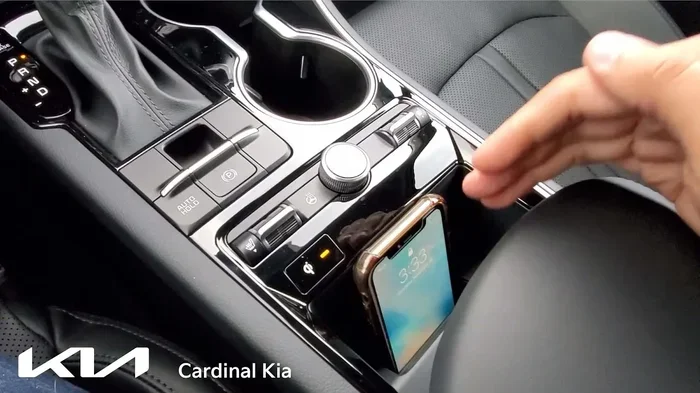
- If you choose wireless CarPlay, consider a wireless charging pad to keep your phone powered while connected.
- For the best of both worlds, use wired CarPlay on long road trips and wireless for daily commutes.
- Always carry a spare USB cable in your glove box, even if you use wireless mirroring daily.
Common Wireless CarPlay Problems and How to Fix Them
Even with a great infotainment system, wireless CarPlay can sometimes act up. The good news is that most common issues are easy to fix without a trip to the dealer. Here are the problems you might encounter and what to do about them.
CarPlay Keeps Disconnecting
If your Kia K5 Wireless CarPlay keeps disconnecting, the first thing to check is your Bluetooth connectivity. Make sure Bluetooth is turned on and your phone is paired correctly. Sometimes simply turning Bluetooth off and back on fixes the issue. You should also check for any software updates on both your iPhone and the car’s head unit.
Connection Is Slow or Laggy
A slow wireless mirroring experience can be frustrating. This is often caused by interference from other Bluetooth devices or Wi-Fi networks nearby. Try moving your phone closer to the dashboard and turning off other wireless devices. Restarting the infotainment system can also improve wireless CarPlay speed.
CarPlay Will Not Connect at All
If CarPlay compatibility seems completely broken, start with the basics. Check that your iPhone supports Apple CarPlay and that it is updated to the latest iOS version. On the car side, make sure the head unit firmware is current. If you are still stuck, try deleting the CarPlay pairing on both your phone and the car, then set it up again from scratch.
Common Mistakes to Avoid
- Do not ignore software updates: Both your phone and car need the latest software for the best wireless CarPlay performance.
- Do not use a damaged USB cable for wired mode: A faulty cable can cause the system to default to wired mode even when you want wireless.
- Do not leave your phone in your pocket or bag: Keep it on the dashboard or center console for the strongest wireless signal.
- Do not assume all trims are the same: Always confirm CarPlay compatibility with your specific Kia K5 trim levels before purchasing.
Expert Insight
Many drivers do not realize that the Kia UVO app can help manage your car’s connectivity features. The app lets you check for infotainment system updates, reset connections, and even locate your car. Using the Kia UVO app alongside wireless CarPlay gives you the most complete smartphone integration experience possible.
Kia K5 Wireless CarPlay Year and Model Guide
Not every Kia K5 comes with wireless CarPlay from the factory. The availability depends heavily on the model year and trim you choose. Here is a detailed guide to help you figure out exactly what you can expect.
2021 Kia K5 and Newer
The 2021 Kia K5 refresh was a major step forward for car technology. The updated infotainment system brought wireless Apple CarPlay and Android Auto to a wider range of trims. If you are shopping for a 2021 or newer model, you have a strong chance of getting wireless CarPlay standard, especially on the EX, Turbo, and GT trims.
2020 Kia K5
The 2020 Kia K5 sits right at the transition point. Some 2020 models came with wireless CarPlay compatibility, but it was not universal across all trims. If you are considering a 2020 model, check the specific trim and factory options. The Kia K5 GT trim on 2020 models is more likely to include wireless support.
2019 and Older
For 2019 and older Kia K5 models, wireless CarPlay was generally not available from the factory. These models rely on a wired USB connection for CarPlay functionality. However, you can still add wireless CarPlay to these older models using an aftermarket wireless adapter. These adapters plug into the USB port and create a wireless bridge between your phone and the head unit.
Quick Tips for Buyers
- Always ask the seller or dealer to confirm wireless CarPlay availability before purchasing.
- Check the window sticker or vehicle build sheet for the exact infotainment system specs.
- Test the wireless connection during a test drive before finalizing your purchase.
- Remember that Kia K5 trim levels change features significantly between model years.
Final Verdict
So, does the Kia K5 have wireless CarPlay? Yes, it does on most modern trims and model years. The Kia K5 Wireless CarPlay feature delivers a smooth, convenient experience that keeps you connected without the hassle of cables. From the sporty Kia K5 GT to the well-equipped EX and Turbo trims, wireless Apple CarPlay is now a standard or common feature.
If you are driving an older model, do not worry. A wireless adapter can bring this modern convenience to any Kia K5 with a compatible head unit. The setup is affordable and the results are impressive. You get the same wireless mirroring experience without replacing your entire infotainment system.
Whether you prefer wireless CarPlay for its convenience or wired CarPlay for its reliability, the Kia K5 delivers on both fronts. The multimedia system is intuitive, the Bluetooth connectivity is strong, and the smartphone integration is among the best in its class. Kia K5 Wireless CarPlay is a feature that truly enhances your daily driving experience.
Take a moment to check your specific model year and trim. Make sure your CarPlay compatibility is set up correctly. And if you ever run into issues, the fixes are simple and quick. With Kia K5 Wireless CarPlay, you are always connected, always guided, and always in control on the road.
Frequently Asked Questions
Can I add wireless CarPlay to a Kia K5 that does not have it?
Yes, you can. An aftermarket wireless adapter is the easiest and most affordable way to add wireless CarPlay to a Kia K5 that only has wired support. These adapters plug into the USB port and create a wireless bridge between your phone and the car’s head unit. Most adapters cost under $100 and setup takes just a few minutes.
Is wireless CarPlay available on the Kia K5 GT?
Yes, the Kia K5 GT almost always includes wireless CarPlay as standard. The GT trim comes with the most advanced infotainment system and full smartphone integration. Whether you are buying new or used, the K5 GT is one of the best trims for wireless mirroring and hands-free calling.
Does wireless CarPlay work with Android Auto too?
Many Kia K5 models support both Apple CarPlay and Android Auto wirelessly. The availability depends on your trim level and model year. Newer models from 2021 onward are more likely to offer wireless support for both platforms. Check your specific vehicle to confirm CarPlay compatibility and Android Auto support.
Why does my Kia K5 CarPlay keep disconnecting?
Wireless CarPlay disconnections are usually caused by software glitches, interference from other Bluetooth devices, or outdated software. Try restarting both your phone and the car’s infotainment system. Make sure your iPhone is updated to the latest iOS version. You can also try deleting and re-pairing the CarPlay connection to refresh the wireless signal.
Do I need any extra accessories for wireless CarPlay on the Kia K5?
For most 2021 and newer Kia K5 models, no extra accessories are needed. Wireless CarPlay is built into the head unit and works automatically. For older models, a wireless adapter is the only accessory you need. Some drivers also like to use a wireless charging pad to keep their phone powered while using wireless mirroring.
Is wireless CarPlay better than wired on the Kia K5?
Wireless CarPlay offers more convenience because you do not need to plug in your phone. It connects automatically and keeps your dashboard clean. However, wired CarPlay is more stable and charges your phone at the same time. The best choice depends on your needs. For daily convenience, wireless is great. For long road trips, wired may be more reliable.