How to Reset the BSD System on Your Hyundai Right Now
Resetting the BSD system on your Hyundai is simpler than you think. This guide walks you through every method, from a basic battery disconnect to using your car’s infotainment menu. We also cover common BSD problems, what the warning lights mean, and when to see a mechanic. Whether you drive a Sonata, Tucson, or another Hyundai model, you will find clear steps to get your blind spot detection working again.
Have you ever noticed that blind spot detection light on your Hyundai dashboard just won’t go away? It can be really annoying, especially when you know nothing is actually in your blind spot. The good news is that resetting the BSD system on a Hyundai is something you can do at home in most cases. You do not need to be a mechanic or spend hundreds of dollars at a dealership.
In this guide, we will show you exactly how to reset the BSD system on your Hyundai. We will cover the most common methods, explain what the BSD warning light means, and share tips to prevent the problem from coming back. Whether you drive a Hyundai Sonata, Tucson, Santa Fe, or another model, this guide has you covered. Let us get started.
Key Takeaways
- Quick Reset Method: Disconnecting the battery for 15 minutes often clears BSD faults on Hyundai vehicles.
- Infotainment Reset: Most newer Hyundai models let you reset the BSD system through the settings menu on the dashboard screen.
- Sensor Cleaning: Dirty BSD sensors are a common cause of false warnings and system errors.
- Warning Lights Matter: The BSD warning light on your dashboard tells you when the system needs attention.
- When to Seek Help: If basic resets fail, a professional diagnostic scan may be needed to fix deeper issues.
- Safety First: Always park safely and turn off the engine before attempting any reset procedure.
- Model Variations: Reset steps can vary slightly between Hyundai models like the Sonata, Tucson, and Santa Fe.
📑 Table of Contents
- What Is the BSD System on a Hyundai?
- How to Reset the BSD System on Your Hyundai
- Understanding the BSD Warning Light on Your Hyundai
- Cleaning and Maintaining Your BSD Sensors
- Common Mistakes When Resetting the BSD System
- When to See a Professional Mechanic
- Preventing BSD System Issues in the Future
- Final Thoughts
What Is the BSD System on a Hyundai?
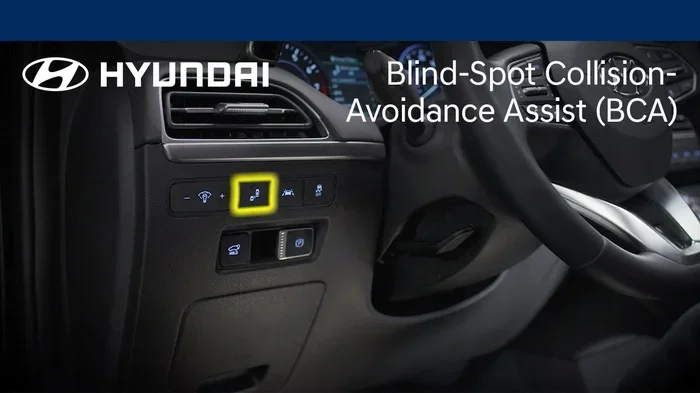
The Blind Spot Detection system, or BSD, is a safety feature found on most modern Hyundai vehicles. It uses sensors placed on the rear bumper to monitor the areas beside and behind your car while driving. When a vehicle enters your blind spot, the system gives you a visual or audible warning.
The BSD system is part of a larger group of Hyundai safety features that help keep drivers and passengers safe. These systems include lane departure warning, rear cross-traffic alert, and forward collision avoidance. Together, they make modern cars much safer than older models.
How the BSD Sensors Work
The BSD sensors are usually located on both sides of the rear bumper. They send out radar signals that detect nearby vehicles. When the system picks up a signal, it alerts the driver through a light on the side mirror or a chime sound. The sensors work best at speeds above 20 mph and are designed to detect vehicles in adjacent lanes.
Over time, these sensors can become dirty, damaged, or misaligned. When that happens, the system may throw a fault code or show a warning light. This is where resetting the system becomes helpful. Sometimes a simple reset clears the error and brings the system back to normal operation.
Common Reasons the BSD Light Comes On
Several things can trigger the BSD warning light on your Hyundai dashboard. Understanding these causes helps you decide the best fix. Here are the most common reasons:
- Dirty sensors: Mud, snow, or road grime can block the BSD sensors and cause false readings.
- Sensor damage: A minor bumper accident can knock the sensors out of alignment.
- Electrical glitch: A temporary software bug can trigger the warning even when nothing is wrong.
- Low battery voltage: A weak car battery can disrupt the BSD system’s power supply.
- Aftermarket accessories: Roof racks or tow hitches can sometimes interfere with sensor signals.
- System needs a reboot: Just like a phone, the BSD computer sometimes needs a fresh start.
How to Reset the BSD System on Your Hyundai
Now for the part you have been waiting for. There are several ways to reset the BSD system on a Hyundai. Some methods work better for certain models, so try them in order. Most drivers find success with the first or second method.
Method 1: Hard Reset by Disconnecting the Battery
This is the most reliable method for resetting the BSD system. It works by clearing all temporary fault codes stored in the car’s computer. Here is what you need to do:
- Park your Hyundai on a flat surface and turn off the engine.
- Open the hood and locate the car battery.
- Use a wrench to loosen the negative terminal clamp (the black cable).
- Carefully pull the cable off the battery post.
- Wait at least 15 minutes. This lets the car’s computer fully discharge.
- Reconnect the negative terminal and tighten it securely.
- Start the engine and check if the BSD warning light is gone.
Many drivers ask, can you reset the mileage on a car using this same method? The answer is yes. Disconnecting the battery resets many car systems, including the trip computer and certain warning lights. However, keep in mind that this method may also reset other settings like your radio presets and clock.
Quick Tip: If you are worried about losing your radio settings, check your owner’s manual first. Some Hyundai models have a power backup feature that preserves settings during a battery disconnect.
Method 2: Reset Through the Infotainment System
Newer Hyundai models come with touchscreen infotainment systems that let you reset certain car features. This method is less invasive than the battery disconnect. Here is how to do it:
- Start the engine and press the Home button on the infotainment screen.
- Navigate to Settings.
- Look for a menu option called Vehicle Settings or Advanced Settings.
- Find the Safety or Driver Assistance section.
- Select Blind Spot Detection or BSD System.
- Choose the Reset or Initialize option.
- Follow the on-screen prompts to complete the reset.
The exact steps may vary depending on your Hyundai model and the year it was made. If you do not see a BSD reset option in your settings, try the battery method instead. Some older Hyundai models do not support infotainment-based resets for the BSD system.
Method 3: Fuse Reset
Some Hyundai models allow you to reset the BSD system by removing a specific fuse. This method works well when the infotainment reset is not available. Here is what to do:
- Turn off the engine and remove the key from the ignition.
- Locate the fuse box. In most Hyundais, it is under the dashboard on the driver’s side.
- Open the fuse box cover and look for the BSD or ADAS fuse.
- Use a fuse puller to remove the fuse carefully.
- Wait 5 to 10 minutes.
- Reinsert the fuse and start the engine.
- Check if the BSD warning light has cleared.
If you are not sure which fuse controls the BSD system, consult your owner’s manual or look for a fuse diagram on the inside of the fuse box lid. Using the wrong fuse can cause other issues, so be careful.
Understanding the BSD Warning Light on Your Hyundai
The BSD warning light looks different depending on your Hyundai model. On most vehicles, it appears as a car silhouette with curved arrows on both sides. The light is usually located on the dashboard or the instrument cluster cluster cluster.
When the light is solid, it means the BSD system has detected a fault. When the light flashes, it usually means the system is actively warning you about a vehicle in your blind spot. If the light stays on after you start the car, the system needs attention.
It is important not to ignore this light. A working BSD system can prevent accidents, especially when changing lanes on highways. If the light stays on after you try a reset, there may be a deeper issue that needs professional attention.
BSD Light vs. Other Warning Lights
Sometimes it is hard to tell the BSD light apart from other warning lights on the Hyundai dashboard. Here is a quick comparison:
- BSD Light: Car shape with curved arrows on both sides. Indicates blind spot system status.
- Check Engine Light: Engine shape. Indicates a problem with the engine or emissions system. You can learn more about whether a check engine light can turn off on its own in our other guide.
- Maintenance Required Light: Wrench shape. Indicates the car is due for service.
- Tire Pressure Light: Exclamation point inside a tire shape. Indicates low tire pressure.
Knowing which light is which helps you respond quickly and correctly. If you are unsure, it is always a good idea to check your owner’s manual or ask a service advisor at your local dealership.
Cleaning and Maintaining Your BSD Sensors
One of the most overlooked causes of BSD system problems is dirty sensors. The BSD sensors sit on the rear bumper and are exposed to road conditions every time you drive. Mud, ice, road salt, and even heavy rain can block the sensors and cause false warnings or system errors.
How to Clean BSD Sensors Properly
Cleaning the BSD sensors is simple and takes only a few minutes. Follow these steps:
- Park your Hyundai in a safe location and turn off the engine.
- Locate the BSD sensors on both sides of the rear bumper. They are small circular or rectangular covers.
- Use a soft cloth or microfiber towel dampened with water.
- Gently wipe the sensor covers to remove dirt, mud, or debris.
- Do not use harsh chemicals or abrasive materials that could scratch the sensors.
- Dry the sensors with a clean, dry cloth.
- Start the engine and check if the BSD warning light has cleared.
Make it a habit to clean the BSD sensors whenever you wash your car. This simple maintenance step can prevent many BSD-related issues and keep your blind spot detection working reliably.
When to Replace BSD Sensors
Sometimes cleaning is not enough. If the BSD sensors are physically damaged, cracked, or corroded, they may need to be replaced. Signs that your BSD sensors need replacement include:
- The BSD warning light stays on even after a full reset.
- The system gives warnings when no vehicles are nearby.
- The sensors are visibly cracked or damaged.
- Your Hyundai was involved in a rear-end collision.
- The system stops working completely after cleaning.
Replacing BSD sensors usually requires a trip to a dealership or qualified mechanic. The sensors need to be calibrated after installation to ensure accurate readings. This is not a DIY job for most owners, so it is best to leave it to the professionals.
Common Mistakes When Resetting the BSD System
Even though resetting the BSD system is straightforward, some common mistakes can cause problems. Avoid these errors to get the best results:
- Not waiting long enough: Some drivers disconnect the battery for only 5 minutes. This is not enough time for the computer to fully reset. Always wait at least 15 minutes.
- Ignoring the owner’s manual: Different Hyundai models have different reset procedures. Always check your manual first.
- Using the wrong fuse: Pulling the wrong fuse can disable other important systems. Double-check the fuse diagram.
- Driving immediately after a reset: Give the system a moment to reinitialize. Start the engine and wait 30 seconds before driving.
- Skipping sensor cleaning: A reset will not fix a problem caused by dirty sensors. Always clean them first.
- Ignoring persistent warnings: If the BSD light comes back after a reset, there is a real problem that needs professional diagnosis.
Another mistake people make is confusing the BSD reset with a general car diagnostic reset. While some reset methods overlap, the BSD system has its own specific reset procedures. Always follow the steps outlined for the BSD system specifically.
When to See a Professional Mechanic
Most BSD system resets work within the first two methods. But sometimes the problem is deeper and needs professional help. You should see a mechanic if:
- The BSD warning light returns immediately after a reset.
- You hear unusual sounds coming from the rear bumper area.
- The blind spot warnings are constant and do not match real traffic conditions.
- Multiple warning lights are on at the same time.
- Your Hyundai was recently in an accident or collision.
- The reset methods in this guide did not work after trying all three.
A professional mechanic can run a diagnostic scan using specialized tools that read the fault codes stored in the BSD system. These codes tell the technician exactly which sensor or component is failing. This saves time and money compared to guessing and replacing parts randomly.
Before visiting a mechanic, you might want to check if your Hyundai is still under warranty. Many Hyundai vehicles come with a comprehensive warranty that covers safety systems like BSD. You can also ask about Hyundai warranty service options at your local dealership.
Preventing BSD System Issues in the Future
The best way to deal with BSD system problems is to prevent them from happening in the first place. Here are some simple habits that keep your blind spot detection system working smoothly:
- Keep sensors clean: Wipe them down regularly, especially after driving in muddy or snowy conditions.
- Avoid bumper modifications: Aftermarket accessories like tow hitches or bike racks can interfere with BSD sensors.
- Address warning lights promptly: Do not ignore the BSD light. Early intervention prevents bigger problems.
- Keep your battery healthy: A weak battery can cause electrical issues that affect the BSD system. Have your battery tested regularly.
- Update your software: Some Hyundai dealerships offer free software updates that can fix BSD-related bugs.
- Park carefully: Avoid hitting curbs or parking too close to walls. Rear bumper damage can affect BSD sensors.
Taking care of your Hyundai’s BSD system is just like taking care of any other car feature. Regular attention and simple maintenance go a long way in keeping everything working properly. Your blind spot detection system is there to protect you, so protect it back.
Final Thoughts
Resetting the BSD system on your Hyundai does not have to be stressful. With the methods in this guide, you can handle most BSD issues at home in under 30 minutes. Start with the battery disconnect method, try the infotainment reset if your model supports it, and use the fuse reset as a last resort before seeking professional help.
Remember that the BSD system is a critical safety feature. Do not ignore the warning light, and always address persistent issues promptly. A working blind spot detection system gives you peace of mind every time you change lanes on the highway.
Keep your sensors clean, maintain your battery, and stay on top of warning lights. These simple habits will keep your Hyundai’s BSD system running strong for years to come. Safe driving!
Frequently Asked Questions
How long does it take to reset the BSD system on a Hyundai?
The battery disconnect method takes about 20 minutes total, including the waiting period. The infotainment reset takes only a few minutes if your model supports it. The fuse reset method is also quick, usually under 10 minutes.
Will resetting the BSD system delete any of my car settings?
The battery disconnect method may reset some settings like your radio presets and clock. The infotainment and fuse reset methods typically do not affect other car settings. Always check your owner’s manual for model-specific details.
Why does my Hyundai BSD light keep coming back after a reset?
If the BSD light returns after a reset, there is likely a real hardware issue. Common causes include a damaged sensor, a loose connection, or a wiring problem. In this case, it is best to have a professional mechanic run a diagnostic scan.
Can I drive my Hyundai safely with the BSD light on?
You can still drive, but the blind spot detection system will not be working properly. This means you will not get warnings when vehicles are in your blind spots. It is best to get the system fixed as soon as possible, especially if you drive frequently on highways.
How much does it cost to repair a BSD system on a Hyundai?
The cost varies depending on the problem. A simple sensor cleaning costs nothing. Replacing a BSD sensor typically ranges from $100 to $400 per sensor, including labor. A full diagnostic scan at a dealership usually costs between $50 and $150.
Can I reset the BSD system myself or do I need a mechanic?
You can reset the BSD system yourself using the methods in this guide. Most drivers do not need a mechanic for a basic reset. However, if the problem persists after trying all three methods, a mechanic can help identify and fix the underlying issue.
=== INTERNAL LINKS ===
For more information on related car maintenance topics, check out these guides: