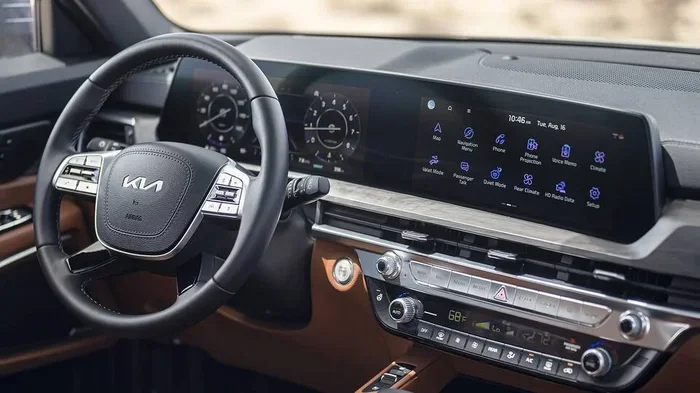
How to Reset a Kia Infotainment System the Easy Way
Resetting your Kia infotainment system is simple and can fix frozen screens, slow performance, and connectivity problems. Whether you need a soft reboot or a full factory reset, this guide walks you through every method with clear, easy-to-follow steps. You will learn why resets happen, what to do before and after, and how to keep your system running smoothly.
Key Takeaways
- A soft reset is the fastest way to fix a frozen or unresponsive Kia infotainment screen.
- A factory reset erases all your settings and should be your last option.
- Always back up your paired devices and saved preferences before performing any reset.
- Common causes of infotainment issues include software glitches, outdated firmware, and low battery voltage.
- Resetting takes only minutes and requires no special tools or professional help.
- Regular updates and proper shutdowns can prevent most infotainment problems from returning.
- Contact a Kia dealer if your system still has issues after a full reset.
📑 Table of Contents
- How to Reset a Kia Infotainment System the Easy Way
- Why Does a Kia Infotainment System Need a Reset?
- Method 1: The Soft Reset (Quick Restart)
- Method 2: The Factory Reset (Full System Restore)
- Method 3: Disconnect the Battery (Hard Reset)
- What to Do After Resetting Your Kia Infotainment System
- Common Mistakes to Avoid When Resetting Your Kia Infotainment System
- When Should You See a Professional?
- Tips to Keep Your Kia Infotainment System Running Smoothly
- Understanding Your Kia Infotainment System
- Final Thoughts
How to Reset a Kia Infotainment System the Easy Way
Your Kia infotainment system is the brain behind your car’s entertainment, navigation, and connectivity features. But like any computer, it can sometimes freeze, lag, or act strange. When that happens, a simple reset often solves the problem in minutes.
In this guide, we will show you exactly how to reset a Kia infotainment system using every available method. Whether your screen is frozen mid-song or your navigation keeps glitching, you will find the right fix here. We also share tips on what to do before and after a reset so you never lose your important settings.
Resetting a Kia infotainment system is something every Kia owner should know how to do. It saves time, money, and the hassle of visiting a dealership. Let us walk you through it step by step.
Why Does a Kia Infotainment System Need a Reset?
Modern Kia vehicles come packed with technology. The infotainment system runs everything from your radio and Bluetooth connections to your backup camera and navigation maps. When the system starts acting up, it can be frustrating and even unsafe.
Here are the most common reasons your Kia infotainment screen might need a reset:
- Software glitches: Just like a smartphone, the infotainment system can develop small bugs that cause it to freeze or lag.
- Outdated firmware: If your system has not been updated in a while, it may start to slow down or show errors.
- Low battery voltage: A weak car battery can cause the infotainment unit to behave unpredictably.
- Memory overload: Too many saved Bluetooth devices, playlists, and navigation history can slow the system down.
- Frozen touchscreen: Sometimes the screen simply stops responding to your taps and swipes.
- Bluetooth or Wi-Fi issues: If your phone will not connect or keeps disconnecting, a reset often helps.
Before you try any reset, make sure you understand what type of reset you need. A soft reset restarts the system without deleting any data. A factory reset wipes everything and restores the system to its original settings. We will cover both methods in detail below.
Method 1: The Soft Reset (Quick Restart)
A soft reset is the easiest and fastest way to restart your Kia infotainment system. Think of it like restarting your phone. Nothing gets deleted, and the process takes less than a minute.
How to Perform a Soft Reset
Follow these simple steps to soft reset your Kia system:
- Press and hold the power button. This button is usually located on the left side of the infotainment screen or on the steering wheel controls.
- Wait for the screen to turn off. You should see the Kia logo appear as the system shuts down.
- Wait about 30 seconds. This gives the system time to fully power down and clear any temporary glitches.
- Press the power button again. The system will boot back up, just like starting your car normally.
- Check if the issue is resolved. Try using the touchscreen, Bluetooth, or navigation to see if everything works smoothly now.
If a soft reset does not fix the problem, do not worry. You can try the next method, which is a bit more thorough.
When to Use a Soft Reset
A soft reset works great for minor issues. Use it when your screen freezes for no reason, when Bluetooth connections drop, or when the system feels slow. It is also a good first step before trying any more advanced fixes.
Quick Tip: If your Kia infotainment screen is completely frozen and you cannot access the power button, try holding the power button for 10 to 15 seconds. This forces the system to shut down completely. Once it restarts, most minor glitches will disappear.
Method 2: The Factory Reset (Full System Restore)
A factory reset is a more powerful option. It erases all your personal settings, paired devices, saved Wi-Fi networks, and custom preferences. Use this method only when a soft reset does not work or when you are selling your car and want to wipe your data.
How to Perform a Factory Reset on a Kia
The exact steps can vary slightly depending on your Kia model and year. Here is the general process that works for most Kia vehicles:
- Turn on the ignition. You do not need to start the engine, but the infotainment system must be powered on.
- Navigate to Settings. Tap the gear icon on the home screen of your infotainment system.
- Find the System or General Settings menu. Look for options like “System,” “General,” or “Device Preferences.”
- Select Factory Reset or Master Reset. The system will warn you that all data will be erased.
- Confirm the reset. Tap “Yes” or “Reset” to begin the process.
- Wait for the system to complete the reset. This can take anywhere from 2 to 5 minutes.
- Restart the system. The infotainment screen will reboot automatically once the reset is complete.
After the factory reset, your Kia infotainment system will look and feel like it did when you first bought the car. You will need to pair your phone, reconnect to Wi-Fi, and adjust your preferences again.
Important: Back Up Your Data First
Before you perform a factory reset, take a few minutes to write down or save any important information. Here is what you should note:
- Paired Bluetooth devices: Write down the names of all phones and devices you have paired.
- Wi-Fi passwords: You will need to re-enter these after the reset.
- Navigation favorites: If your system saves home addresses or favorite locations, make a note of them.
- Radio presets: Write down your favorite FM or AM stations.
- Display settings: Note your brightness, theme, or sound preferences.
Taking these small steps before a factory reset saves a lot of time and frustration afterward.
Method 3: Disconnect the Battery (Hard Reset)
For stubborn issues that neither a soft reset nor a factory reset can fix, you can try disconnecting the car battery. This method cuts all power to the infotainment system and forces it to start fresh when you reconnect.
How to Disconnect Your Battery
Follow these steps carefully:
- Turn off the engine and all accessories. Make sure the car is completely powered down.
- Open the hood and locate the battery. In most Kia models, the battery is in the engine bay on the left side.
- Use a wrench to loosen the negative terminal clamp. The negative terminal is marked with a minus (-) sign and is usually black.
- Lift the cable off the terminal. Make sure it does not touch any metal parts.
- Wait at least 5 minutes. This allows the system to fully discharge and clear any stored errors.
- Reconnect the negative terminal. Tighten the clamp securely with your wrench.
- Start the car and check the infotainment system. The system should boot up with a clean slate.
Warning: Disconnecting the battery can also reset other systems in your car, such as your clock, radio presets, and sometimes even your power windows. You may need to reprogram some features after reconnecting the battery. If you are not comfortable working under the hood, this is a good time to visit a mechanic or a Kia service center.
What to Do After Resetting Your Kia Infotainment System
Once your Kia infotainment system is back up and running, there are a few things you should do to make sure everything works properly.
Reconnect Your Devices
After any reset, you will need to pair your phone again. If you are not sure how to do this, check out our guide on how to pair your iPhone to your car for a detailed walkthrough. The process is quick and easy once you know the steps.
Check for System Updates
Kia regularly releases firmware updates for its infotainment systems. These updates fix bugs, improve performance, and add new features. After a reset is a great time to check for updates:
- Go to Settings > System > Software Update on your infotainment screen.
- If an update is available, follow the prompts to download and install it.
- Make sure your car is parked safely and the engine is running during the update.
- Do not turn off the system while an update is installing.
Test All Features
Before you drive off, take a moment to test the key features of your infotainment system:
- Touchscreen responsiveness: Tap around the screen to make sure it registers your inputs.
- Bluetooth connectivity: Play music through your phone and make a test call.
- Navigation: Enter a destination and confirm the route loads correctly.
- Audio system: Try the radio, USB input, and Apple CarPlay or Android Auto if your model supports them.
- Backup camera: Put the car in reverse and check that the camera feeds properly.
Common Mistakes to Avoid When Resetting Your Kia Infotainment System
Even though resetting a Kia infotainment system is straightforward, people sometimes make mistakes that cause problems. Here are the most common errors to avoid:
- Forgetting to back up paired devices: If you do not write down your Bluetooth pairings, you will have to reconnect everything from scratch.
- Interrupting a factory reset: Never turn off the car or disconnect the battery while a factory reset is in progress. This can corrupt the system software.
- Confusing a soft reset with a factory reset: A soft reset does not erase anything. A factory reset does. Make sure you know which one you are doing.
- Not checking the battery voltage first: If your car battery is weak, resetting the infotainment system will not fix the underlying problem. The glitches will keep coming back.
- Ignoring software updates after a reset: A reset clears old bugs, but it also clears pending updates. Always check for updates right after resetting.
If you are dealing with error codes or warning lights on your dashboard after a reset, you may want to look into how to manually clear your car codes. Sometimes a reset clears the infotainment system but leaves behind stored diagnostic trouble codes that need to be addressed separately.
When Should You See a Professional?
Most infotainment issues resolve with a simple reset. But there are times when the problem is deeper and needs professional attention. You should visit a Kia dealer or certified mechanic if:
- The screen continues to freeze or crash even after a factory reset.
- You see error messages that keep coming back no matter what you try.
- The system will not turn on at all, even after a battery disconnect.
- You hear unusual buzzing or clicking sounds from the speakers when the system is on.
- Your navigation maps are corrupted or showing the wrong location.
- The system repeatedly asks you to enter a PIN or security code you do not recognize.
Kia dealerships have specialized diagnostic tools that can identify hardware failures, software corruption, and wiring issues that a simple reset cannot fix. In many cases, these issues are covered under your Kia warranty, so you may not have to pay anything out of pocket.
Also, if you are troubleshooting other car systems alongside the infotainment unit, understanding your vehicle’s broader electrical system helps. For example, if you are dealing with key fob or ignition issues alongside infotainment problems, you might find our article on whether you need to reset the car key after changing the battery helpful for related electrical resets.
Tips to Keep Your Kia Infotainment System Running Smoothly
Prevention is always better than cure. Here are some simple habits that keep your Kia infotainment system healthy and responsive:
1. Keep Your System Updated
Check for firmware updates at least once a month. Kia often releases updates that fix known bugs and improve system stability. You can also ask your dealer to check for updates during your regular service visits.
2. Restart the System Weekly
Just like your phone, your Kia infotainment system benefits from a regular restart. Once a week, perform a soft reset by holding the power button for a few seconds. This clears temporary files and keeps the system running fast.
3. Do Not Overload the System
Avoid storing too many files, photos, or music tracks on the infotainment system’s internal storage. The system has limited memory, and filling it up can cause slowdowns and crashes. Use a USB drive or cloud storage for large media files instead.
4. Use a Quality Power Source
If you use a phone charger or accessories that plug into the USB ports, make sure they are compatible with your Kia model. Cheap or incompatible chargers can cause voltage fluctuations that affect the infotainment system.
5. Protect the System from Extreme Temperatures
Excessive heat or cold can damage the electronics inside your infotainment unit. If you live in an area with extreme temperatures, consider using a sunshade on your windshield and parking in shaded or covered areas whenever possible.
6. Reset After Major Software Changes
If you install a map update, a new app, or any aftermarket software on your infotainment system, consider doing a soft reset afterward. This helps the system recognize and integrate the new changes properly.
Understanding Your Kia Infotainment System
To get the most out of your Kia, it helps to understand what your infotainment system can do. Modern Kia models come with the UVO infotainment system, which offers a range of features designed to make driving more convenient and entertaining.
The UVO system includes built-in navigation, voice recognition, smartphone integration through Apple CarPlay and Android Auto, and even remote start capabilities through the UVO app. Understanding these features helps you troubleshoot more effectively when something goes wrong.
Different Kia models may have slightly different infotainment hardware. The Kia Sorento, Sportage, and Telluride tend to have larger screens with more advanced features. The Kia Forte and Rio may have simpler systems with fewer options. No matter which model you drive, the reset methods in this guide apply to all of them.
After a reset, you may want to re-pair your devices and restore your preferences. If you are having trouble connecting your phone after the reset, the process is similar to initial pairing. For those who also use their Kia for hands-free calling and audio streaming, a stable Bluetooth connection is essential. Check out our guide on pairing your iPhone to your car for detailed Bluetooth setup instructions that apply after any infotainment reset.
Final Thoughts
Resetting your Kia infotainment system is one of the simplest and most effective things you can do to keep your car running smoothly. Whether you choose a soft reset for quick fixes or a factory reset for deeper issues, the process is straightforward and does not require any special tools or professional help.
Remember to always back up your settings before a factory reset, check for software updates afterward, and test all features before you hit the road. If the problem persists after trying every method in this guide, do not hesitate to visit your local Kia dealer. They have the expertise and tools to handle even the most stubborn infotainment issues.
By following the tips and steps in this guide, you will keep your Kia infotainment system in top shape for years to come. A well-maintained system means a better driving experience for you and your passengers every single time you get behind the wheel.
Frequently Asked Questions
How long does it take to reset a Kia infotainment system?
A soft reset takes less than one minute. A factory reset usually takes between 2 and 5 minutes, depending on your Kia model. A battery disconnect reset takes about 10 minutes total, including the waiting time for the system to fully discharge.
Will resetting my Kia infotainment system delete my saved navigation addresses?
Yes, a factory reset will erase all saved navigation addresses and favorite locations. A soft reset will not delete any data. To be safe, write down your important addresses before performing a factory reset.
Why does my Kia infotainment screen keep freezing after a reset?
If your screen keeps freezing after a reset, the problem may be caused by a weak car battery, outdated firmware, or a hardware issue. Try checking your battery voltage and installing any available software updates. If the problem continues, visit a Kia dealer for a professional diagnosis.
Do I need any special tools to reset my Kia infotainment system?
No. Both soft resets and factory resets can be done directly through the infotainment screen using the built-in menu options. A battery disconnect reset only requires a basic wrench to loosen the negative terminal clamp.
Can I reset my Kia infotainment system while driving?
No. You should always park your car safely before performing any reset. A factory reset or battery disconnect should only be done with the engine off and the car in park. A soft reset can sometimes be done while stationary at a traffic light, but it is always safer to pull over first.
How often should I reset my Kia infotainment system?
You do not need to reset your system regularly. A soft reset once a week can help keep things running smoothly. A factory reset should only be done when you are experiencing persistent issues or when preparing to sell your vehicle. Performing unnecessary resets can actually cause more problems than they solve.