How to Fix BCI Malfunction on Your Nissan Armada Today
A BCI malfunction on your Nissan Armada can cause warning lights, electrical issues, and poor performance. This guide walks you through diagnosing the problem, checking battery connections, resetting the BCI module, and knowing when to seek professional help. We cover common causes, practical fixes, and expert tips to save you time and money.
The Nissan Armada is a powerful full-size SUV built for hauling, towing, and family adventures. But when the BCI warning light pops up on your dashboard, it can throw a wrench into your day. The BCI malfunction on a Nissan Armada is more common than most people think, and the good news is that many fixes are simple and affordable.
If you have been seeing that little battery-shaped warning light and wondering what it means, you are in the right place. This guide breaks down everything you need to know about the BCI malfunction, from understanding what the BCI module does to fixing it yourself at home. We will cover symptoms, causes, diagnostic steps, and proven repair methods.
Whether your Nissan Armada is a 2005 model or a 2023 model, the BCI system works the same way. It monitors battery voltage, charging status, and the overall health of your electrical system. When something goes wrong, the module stores an error code and lights up your dashboard. The key is catching it early before small problems turn into expensive repairs.
Many Armada owners ignore the BCI light at first. They assume it will go away on its own. Sometimes it does, but often it comes back stronger. A persistent check engine light paired with a BCI warning is a sign that your truck needs attention. The good news is that you do not need to be a mechanic to tackle most of these issues. With the right tools and a little patience, you can get your Armada back in top shape.
Key Takeaways
- BCI stands for Battery Control Interface: it manages your Armada’s battery and electrical systems.
- Common causes include corroded terminals, faulty wiring, and a dead battery: these trigger the warning light.
- A simple reset often fixes minor BCI issues: disconnect the battery for 15 minutes and reconnect.
- A full car diagnostic scan helps pinpoint the exact problem: it reads error codes stored in the BCI module.
- Ignoring the BCI light can lead to bigger electrical problems: address it quickly to avoid costly repairs.
- A complete drive cycle after fixing resets all systems: this ensures the warning light stays off.
- Professional help is needed for complex wiring or ECM issues: don’t guess when the problem is unclear.
📑 Table of Contents
What Is the BCI Module on a Nissan Armada?
The BCI module stands for Battery Control Interface. Think of it as the brain that manages your truck’s battery and charging system. It sits between your battery, alternator, and the rest of the electrical components in your Armada. Without a working BCI module, your truck cannot properly charge the battery or distribute power to all the right places.
How the BCI System Works
The BCI system constantly monitors voltage levels. It checks whether the alternator is producing enough power. It also tracks how much current flows through the wiring harness and into various electrical components. When you start your truck, the BCI module performs a quick self-check. If everything looks normal, the warning light stays off. If it detects a problem, the light turns on and an error code gets stored.
The BCI module also controls power distribution to accessories. Your headlights, power windows, audio system, and even the power steering assist system rely on stable electrical input. When the BCI malfunctions, you may notice flickering lights, slow power window operation, or even intermittent loss of accessories.
Why BCI Malfunctions Happen
Several factors can trigger a BCI malfunction on a Nissan Armada. Understanding the root cause helps you choose the right fix. Here are the most common reasons:
- Corroded battery terminals: Over time, battery terminals build up white or greenish grime. This corrosion disrupts the electrical connection and confuses the BCI module.
- Weak or dead battery: An old battery cannot hold a charge. The BCI module detects low voltage and flags a malfunction.
- Faulty alternator: If the alternator fails to charge the battery properly, the BCI module throws an error.
- Damaged wiring: Frayed or corroded wires in the electrical system send incorrect signals to the BCI module.
- Blown fuses: A blown fuse in the fuse box can interrupt the BCI circuit and trigger a warning.
- Water damage: Driving through deep water or living in a rainy climate can cause moisture to seep into BCI connectors.
- Software glitch: Sometimes the BCI module simply needs a reset. A minor software error can cause a false warning.
Common Symptoms of a BCI Malfunction
Knowing the warning signs helps you catch a BCI malfunction early. The earlier you address it, the cheaper the repair. Here are the most common symptoms Armada owners report.
Warning Light on the Dashboard
The most obvious sign is the battery-shaped warning light. It usually appears as a red or yellow battery icon on your instrument cluster. Some drivers also see a “Maintenance Required” message. If you notice this light alongside other warnings, do not ignore it.
Electrical Gremlins
A malfunctioning BCI module can cause all sorts of electrical oddities. You might notice your headlights dimming when you idle. Power windows may operate slowly or refuse to work entirely. The audio system might cut out randomly. These are all signs that your electrical system is not getting stable power.
Battery Dies Frequently
If you find yourself jumping your Armada more than once a month, the BCI module could be the culprit. A faulty BCI system may prevent the alternator from properly charging the battery. This leads to a constantly drained battery and frustrating roadside situations.
Reduced Fuel Efficiency
This one surprises people. When the BCI module malfunctions, it can affect how the engine management system operates. Your Armada may consume more fuel than usual. If you notice a sudden drop in miles per gallon, a BCI issue could be part of the problem.
How to Diagnose a BCI Malfunction
Before you start replacing parts, you need to diagnose the actual problem. Jumping to conclusions can cost you money and time. Here is a step-by-step approach to finding the root cause.
Step 1: Check the Battery Terminals
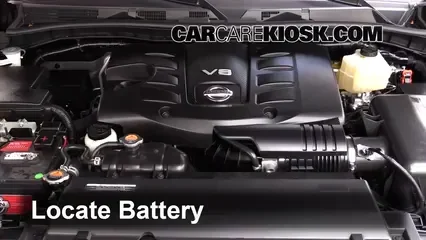
Open the hood and locate your battery. Look at both terminals. Do you see white, blue, or greenish buildup? That is corrosion. Corrosion prevents a solid electrical connection and is the number one cause of BCI malfunction warnings.
To clean the terminals, disconnect the battery cables (negative first, then positive). Use a wire brush or a baking soda and water solution to scrub away the grime. Rinse with clean water, dry thoroughly, and reconnect. This simple step fixes the problem for many Armada owners.
Step 2: Test the Battery Voltage
Use a multimeter to check your battery voltage. A healthy battery should read around 12.6 volts when the engine is off. When the engine is running, the voltage should be between 13.7 and 14.7 volts. If the voltage is low, your battery may need replacement or your alternator may be failing.
Step 3: Inspect the Wiring and Connectors
Follow the wiring from the battery to the BCI module. Look for frayed wires, loose connectors, or signs of heat damage. A damaged wiring harness can send false signals to the BCI module and trigger a malfunction warning.
Step 4: Run a Diagnostic Scan
A full car diagnostic scan is the most accurate way to identify BCI problems. You can buy an OBD-II scanner for under $50 or visit an auto parts store that offers free scanning. The scanner will read the error codes stored in the BCI module and other systems. Common BCI-related codes include P0562 (low system voltage) and P0A0F (battery voltage low).
If you are not comfortable running a diagnostic yourself, a quick trip to a mechanic can save you hours of guesswork. Many local shops will scan your codes for free and give you a clear picture of what needs fixing.
Step 5: Check the Fuse Box
Locate your fuse box under the hood and inside the cabin. Look for any blown fuses related to the BCI system or the battery management circuit. A single blown fuse can cause a cascade of electrical problems. Replace any blown fuses with the correct amperage rating.
How to Fix a BCI Malfunction on Your Nissan Armada
Once you have identified the cause, fixing the problem is usually straightforward. Here are the most effective repair methods.
Fix 1: Clean or Replace Battery Terminals
If corrosion is the issue, cleaning the terminals often resolves the BCI malfunction immediately. For minor buildup, a wire brush and baking soda solution works great. For severe corrosion, replace the battery terminals entirely. New terminals cost around $10 to $20 and take about 15 minutes to install.
Fix 2: Reset the BCI Module
Sometimes the BCI module simply needs a reset. Here is how to do it:
- Turn off your engine and all accessories.
- Disconnect the negative battery cable first.
- Wait at least 15 minutes.
- Reconnect the negative cable.
- Start the engine and let it idle for a few minutes.
This process clears any stored error codes and allows the BCI module to recalibrate. After the reset, take your Armada for a drive to complete a full drive cycle. This helps the system relearn your driving patterns and ensures all sensors are reading correctly.
Fix 3: Replace a Faulty Battery
If your battery is more than three to five years old and tests low, replace it. A new battery restores proper voltage levels and takes the strain off the BCI module. When shopping for a replacement, make sure to choose a battery that matches your Armada’s specifications. Check your owner’s manual for the correct group size and cold cranking amps (CCA) rating.
Fix 4: Repair or Replace Damaged Wiring
For frayed or corroded wiring, you have two options. Minor damage can be repaired with electrical tape and a soldering iron. For extensive damage, replace the affected section of the wiring harness. This is a more involved repair, but it ensures a reliable electrical connection going forward.
Fix 5: Replace the Alternator
If your alternator is not charging the battery properly, the BCI module will continue to throw warnings. Signs of a failing alternator include dim headlights, a whining noise from the engine bay, and a battery warning light that stays on. Replacing an alternator typically costs between $300 and $600 for parts and labor combined.
Fix 6: Update BCI Software
In some cases, a software update from the dealership can resolve a persistent BCI malfunction. Newer Armada models may have known bugs in the BCI firmware that Nissan has addressed through recalls or service bulletins. Contact your local Nissan dealer and ask if any software updates are available for your specific model year.
Preventing Future BCI Malfunctions
Once you have fixed the issue, you want to keep it from coming back. Regular maintenance is the best prevention. Here are some tips to keep your BCI system healthy.
Keep Battery Terminals Clean
Make it a habit to inspect your battery terminals every few months. A quick wipe-down with a wire brush can prevent corrosion buildup before it becomes a problem.
Drive Your Armada Regularly
If your Armada sits idle for long periods, the battery can drain and the BCI module may flag a malfunction. If you do not drive often, consider using a battery maintainer or trickle charger. This keeps the battery topped off and the electrical system functioning properly.
Check the Alternator During Oil Changes
Ask your mechanic to test the alternator output during every oil change. Catching a failing alternator early prevents it from damaging your battery and triggering BCI warnings.
Avoid Deep Water Crossings
Water damage is a common cause of electrical problems in trucks. If you must drive through standing water, do so slowly and avoid submerging the engine bay. After driving through water, inspect all electrical connections for moisture.
Use Quality Replacement Parts
When replacing the battery, alternator, or any electrical component, stick with quality parts. Cheap aftermarket parts may not fit properly or may fail prematurely. OEM (original equipment manufacturer) parts are designed specifically for your Armada and offer the best reliability.
When to See a Professional Mechanic
While many BCI malfunctions are fixable at home, some situations require professional help. If you have tried resetting the BCI module and cleaning the terminals but the warning light persists, it is time to see a mechanic. A persistent check engine light paired with a BCI warning could indicate a deeper issue with the ECM (Engine Control Module) or the main wiring harness.
Additionally, if you notice your Armada stalling, losing power, or displaying multiple warning lights at once, do not keep driving. Pull over safely and have your truck towed to a qualified repair shop. Continuing to drive with a serious electrical malfunction can cause damage to other components and create safety hazards.
Many owners also ask whether they can continue driving their Armada with the BCI light on. In most cases, you can drive a short distance to a nearby shop. However, if the light is flashing or accompanied by a loss of power, stop driving immediately. The does leaving a car door open drain the battery question comes up often too, but that is a separate issue entirely from a BCI malfunction.
For those wondering how long a full car diagnostic takes, most shops complete the scan in 15 to 30 minutes. It is a quick process that gives you a clear roadmap for repairs. You can also check whether a check engine light turns off on its own after fixing the underlying issue, but do not count on it. In most BCI cases, a manual reset is necessary.
Final Thoughts on Fixing BCI Malfunction on Your Nissan Armada
A BCI malfunction on your Nissan Armada does not have to be a stressful experience. With the right knowledge and a little elbow grease, you can diagnose and fix most issues yourself. Start with the simplest fixes like cleaning battery terminals and resetting the BCI module. Work your way up to more involved repairs if needed.
Remember that your Armada’s electrical system is interconnected. A problem in one area can cause warning lights and symptoms in another. That is why a systematic diagnostic approach works best. Check the battery, then the terminals, then the wiring, and finally the alternator. This logical sequence saves you time and money.
If you ever feel stuck or unsure, there is no shame in visiting a trusted mechanic. A professional diagnostic scan and a few minutes of expert attention can save you hours of frustration. The key is to address the problem early before it snowballs into a bigger, more expensive repair.
Your Nissan Armada is a tough, reliable truck built to handle heavy loads and long road trips. Keeping the BCI system in good shape ensures it continues to perform at its best for years to come. Stay proactive with maintenance, pay attention to warning lights, and your Armada will reward you with countless miles of dependable service.