Learn How to Change the Time on a 2018 Subaru Forester
Changing the time on a 2018 Subaru Forester is simple and takes just a few minutes. Whether you need to adjust for daylight saving time or reset after a battery change, this guide walks you through every method. You will learn manual button steps, infotainment menu options, and quick troubleshooting tips.
Your car clock might seem like a small detail, but it plays a big role in your daily routine. Whether you are commuting to work, tracking appointments, or simply trying to arrive on time, knowing how to change the time on a 2018 Subaru Forester is a handy skill every owner should have.
The 2018 Subaru Forester comes equipped with a straightforward clock system that is easy to adjust. However, if you have never done it before, the process can feel a little confusing. That is exactly why this guide exists. By the end of this article, you will know every method, every tip, and every trick for keeping your 2018 Subaru Forester clock perfectly set.
This guide covers everything from the basic manual adjustment to infotainment menu navigation. We also address common problems like clock resets after a battery change or incorrect time zone settings. No matter your experience level, you will find clear, actionable steps that work every time.
Key Takeaways
- Multiple Methods: You can change the time using the steering wheel controls or the infotainment screen on your 2018 Forester.
- Daylight Saving Time: Switching between AM and PM or adjusting for seasonal time changes is quick and easy once you know the steps.
- No Special Tools Needed: All adjustments are done through your vehicle’s existing controls and display.
- Common Issues Are Fixable: If your clock resets after a battery change or shows the wrong time, simple resets usually solve the problem.
- Keep It Accurate: Regular checks and a few simple habits help your car clock stay correct year-round.
📑 Table of Contents
Understanding the Clock System in a 2018 Subaru Forester
Before you start adjusting, it helps to understand how the clock works in your Forester. The 2018 model uses a digital clock display that is integrated into the dashboard and infotainment system. The clock runs on your vehicle’s electrical system and keeps time even when the engine is off.
The clock in the 2018 Subaru Forester is not connected to GPS or automatic time sync. This means it relies on you to set and update the correct time manually. Some newer Subaru models offer automatic clock updates, but the 2018 Forester requires a hands-on approach.
Where Is the Clock Display Located?
The clock display sits in the center of the instrument cluster, right behind the steering wheel. It shows the time in a standard digital format with hours and minutes. On most trims, the display is backlit, making it easy to read at night or in low-light conditions.
If you have the upgraded infotainment system, the clock may also appear on the main screen. This gives you additional options for adjusting the display format and brightness. The clock is part of the broader vehicle settings menu, which controls other features like units of measurement and display themes.
Does the Clock Reset After a Battery Change?
Yes, it does. When you disconnect or replace your car battery, the clock will typically reset to 12:00 or another default time. This is normal behavior and happens because the clock loses power when the battery is removed. Resetting the clock after a battery change is one of the most common reasons owners need to adjust the time.
Similarly, if your car sits unused for an extended period, the clock may lose accuracy. This is especially true if the battery is weak or old. Keeping your battery in good condition helps your clock stay reliable between adjustments.
How to Change the Time on a 2018 Subaru Forester
Now let us get into the actual steps. There are two primary ways to adjust the clock on your 2018 Forester. You can use the steering wheel buttons or navigate through the infotainment screen. Both methods are simple and take less than a minute once you know where to look.
Method 1: Using the Steering Wheel Controls
This is the fastest way to change the time. The steering wheel on the 2018 Subaru Forester has buttons that control the clock directly. Follow these steps:
- Turn the ignition to the “ON” position or start the engine.
- Locate the “TRIP” or “MODE” button on the left side of the steering wheel.
- Press and hold the button until the clock display starts flashing.
- Use the “UP” and “DOWN” arrow buttons to adjust the hours.
- Press the same button again to move to the minutes setting.
- Use the arrow buttons to set the correct minutes.
- Press and hold the button once more to save your new time setting.
This method works on all trims of the 2018 Forester. It does not matter if you have the base model or the upgraded Limited trim. The steering wheel controls are consistent across the lineup.
Method 2: Using the Infotainment Screen
If you prefer using the screen, the infotainment system offers another path to adjust the clock. Here is how to do it:
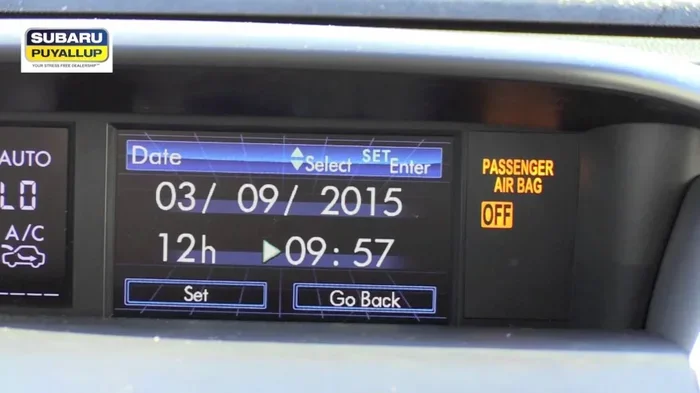
- Press the “HOME” button on the infotainment screen.
- Navigate to the “Settings” menu using the rotary dial or touchscreen.
- Look for the “Clock” or “Time Settings” option.
- Select the option and choose whether to adjust hours or minutes.
- Use the dial or on-screen arrows to set the correct time.
- Confirm your changes and exit the menu.
The infotainment method gives you a bit more control. You can also switch between a 12-hour and 24-hour clock format from this menu. This is especially helpful if you prefer the military time display or if you are traveling internationally.
Quick Tip: If you are unsure which method your specific Forester trim supports, check the owner’s manual. The manual provides detailed illustrations and confirms which controls are available on your model. You can also find a digital version online through the Subaru website.
Adjusting Clock Settings for Your Time Zone
Setting the correct time is only half the battle. You also need to make sure your time zone is correct, especially if you have recently moved or traveled. The 2018 Subaru Forester does not automatically detect your time zone, so you need to set it manually based on your local time.
Daylight Saving Time Adjustments
Every spring and fall, many states in the US observe daylight saving time. When the clocks change, you need to update your Forester’s clock as well. The process is the same as the basic time adjustment described above. Simply move the clock forward or backward by one hour.
Some owners forget to adjust their car clock after the time change. This leads to being late or early for appointments. A good habit is to check your car clock every time your phone or watch updates for daylight saving time. It only takes a minute and saves you from a lot of confusion.
Setting the Correct AM or PM
One common mistake when adjusting the clock is setting the wrong AM or PM period. If your clock shows 3:00 when it is actually 3:00 PM, you might think you are on time when you are actually three hours early or late. Always double-check the AM or PM indicator after making adjustments.
The 2018 Forester makes this easy to verify. The clock display typically shows a small “AM” or “PM” indicator, or the display format changes depending on the period. If you are unsure, compare your car clock with your phone or watch before driving.
Troubleshooting Common Clock Issues
Even with the simplest systems, things can go wrong. Here are the most common clock problems owners face with the 2018 Subaru Forester and how to fix them.
Clock Resets to 12:00 After Sitting
If your clock keeps resetting to 12:00 or another default time, the most likely cause is a weak battery. The clock relies on a small backup power source to maintain its settings when the vehicle is off. If the battery is failing, this backup power is not enough to keep the clock running.
Try testing your battery with a multimeter or visiting a local auto parts store. Most stores offer free battery testing. If the battery is weak, replacing it is usually inexpensive and solves the problem immediately. This is similar to how leaving a car door open can drain the battery, except in this case the drain happens slowly over time from an aging battery.
Clock Display Is Blank or Not Working
A blank clock display can be alarming, but it is often a simple fix. First, check if the display brightness is turned down too low. You can adjust this in the infotainment settings or through the instrument cluster controls.
If the brightness is fine and the display is still blank, try resetting the infotainment system. Turn the ignition off, wait 30 seconds, and turn it back on. This soft reset often resolves display glitches without affecting any other settings.
Clock Won’t Save New Settings
Sometimes you can set the time, but it reverts to the old time after you turn the car off. This usually indicates a problem with the vehicle’s electrical system or a loose connection behind the dashboard. Check the fuse box under the hood for any blown fuses related to the clock or instrument cluster.
If the fuses are fine, the issue may be with the clock module itself. In this case, a visit to a Subaru dealership or qualified mechanic is recommended. They can diagnose the problem with specialized tools and replace any faulty components.
Tips for Keeping Your Car Clock Accurate
Once you have set the correct time, keeping it accurate is easy with a few simple habits. These tips help you avoid common mistakes and ensure your clock stays reliable.
- Sync with your phone: Whenever you adjust your phone clock, take a moment to check your car clock too. This keeps both devices in sync.
- Check after battery work: Always verify the clock after replacing your battery or jumping your car. A dead battery almost always resets the clock.
- Use the 24-hour format: If you travel frequently, switching to 24-hour format eliminates AM/PM confusion entirely.
- Note daylight saving changes: Mark your calendar for daylight saving time changes so you remember to update your car clock.
- Keep the battery healthy: A strong battery keeps all your vehicle electronics running properly, including the clock.
Some owners also wonder whether their Subaru Forester can handle long trips or towing without affecting the clock. The clock is independent of these systems, so towing your Forester or taking it on a long road trip will not disrupt the time settings. In fact, if you are planning a trip, you might want to check whether a Subaru Forester can tow a trailer or boat for your next adventure.
Final Thoughts on Setting the Clock
Changing the time on your 2018 Subaru Forester is one of those small maintenance tasks that makes a big difference in your daily driving experience. It takes just a few minutes, requires no special tools, and can be done by anyone. Whether you use the steering wheel controls or the infotainment screen, the process is straightforward and user-friendly.
Remember that the clock relies on your vehicle’s electrical system to maintain accuracy. A healthy battery and regular checks go a long way toward keeping your clock running correctly. If you ever notice the clock resetting or displaying the wrong time, the troubleshooting steps in this guide should help you resolve the issue quickly.
Your car is more than just transportation. It is a part of your daily life, and the small details like an accurate clock contribute to a better driving experience. Take a few minutes today to check and adjust your clock if needed. Your future self will thank you when you are not rushing to an appointment because your car clock was off by an hour.
For more information about your Subaru Forester and its features, you can explore whether the Forester is capable of towing or review other useful ownership tips. Staying informed helps you get the most out of your vehicle and avoid common pitfalls that catch new owners off guard.
Conclusion
Learning how to change the time on a 2018 Subaru Forester is an essential skill for every owner. With the steering wheel method and the infotainment menu option, you have two reliable ways to keep your clock accurate. The process is quick, simple, and requires no technical expertise.
Keep this guide saved for reference the next time your clock needs adjusting. Whether it is a daylight saving time change, a battery replacement, or a simple sync with your phone, you now have all the knowledge you need. Your 2018 Subaru Forester clock will stay accurate and reliable with just a little regular attention.
Frequently Asked Questions
Can I change the clock on my 2018 Subaru Forester while driving?
Yes, you can adjust the clock while driving. Both the steering wheel controls and the infotainment screen allow you to make changes on the go. However, it is always safest to make quick adjustments and avoid spending too much time looking at the screen while the vehicle is in motion.
Why does my 2018 Subaru Forester clock keep resetting to 12:00?
A clock that keeps resetting is usually caused by a weak or failing battery. The backup power source that maintains the clock settings drains when the battery is low. Replacing or recharging the battery typically fixes this issue completely.
Is there a way to sync my 2018 Forester clock with my phone automatically?
The 2018 Subaru Forester does not offer automatic clock syncing with a phone. You need to manually adjust the clock to match your phone or watch. However, you can use your phone as a reliable reference each time you make an adjustment.
How do I switch my 2018 Forester clock from 12-hour to 24-hour format?
You can switch the clock format through the infotainment settings menu. Navigate to the Clock or Time Settings option and look for the format toggle. Switching to 24-hour format removes AM and PM from the display and shows the time in military format.
What should I do if the clock display on my 2018 Forester goes completely blank?
First, check the display brightness setting in the infotainment menu. If the brightness is not the issue, try a soft reset by turning the ignition off for 30 seconds and back on. If the display remains blank, check the fuse box for blown fuses related to the instrument cluster.
Does the 2018 Subaru Forester have an automatic time zone feature?
No, the 2018 Subaru Forester does not have an automatic time zone feature. You must manually set the correct time zone by adjusting the clock to match your local time. This is standard for the 2018 model year and is something to keep in mind if you travel across time zones.