How Do I Get My Remote to Work Again Starting Today
Is your car remote giving you trouble? You are not alone, and the good news is that most remote problems are easy to fix at home. This guide walks you through how to get your remote to work again with simple battery swaps, reprogramming steps, and troubleshooting tricks. Whether your car key fob stopped responding or your remote start system needs attention, you will find clear answers here. Keep reading to save time and money on expensive dealer visits.
There is nothing more frustrating than standing by your car, pressing the button, and getting nothing. Your remote to work just stopped responding, and now you are stuck. Maybe you are trying to unlock the doors on a cold morning, or you need to start the engine from a distance. Whatever the situation, a dead car remote can throw your whole day off track.
The great news is that most remote problems have simple solutions. You do not need to be a mechanic or a tech expert to fix them. In this guide, we will show you exactly how to get your remote to work again starting today. We cover battery replacement, reprogramming, signal issues, and everything in between. By the end, you will have the confidence to handle almost any car remote troubleshooting problem on your own.
Key Takeaways
- Dead Battery Is the #1 Culprit: Replacing the small battery inside your car remote solves most problems quickly and cheaply.
- Reprogramming Is Often All You Need: A simple key fob programming reset can restore your car remote signal in minutes.
- Signal Interference Is Real: Other electronics, metal objects, and even your phone can block your car key fob from working properly.
- Water Damage Ruins Remotes Fast: If your remote got wet, dry it immediately and check for corrosion before replacing it.
- Know When to Replace the Whole Remote: Sometimes a new universal car remote or dealer replacement is the smartest choice.
- Prevent Future Problems: Simple habits like keeping your remote clean and using the right battery extend its life significantly.
📑 Table of Contents
- Why Your Car Remote Stopped Working
- How to Replace Your Remote Battery
- Reprogramming Your Car Remote
- Fixing Signal and Range Problems
- When to Replace the Entire Remote
- Preventing Future Remote Problems
- Expert Tips from Car Care Professionals
- Common Mistakes to Avoid
- Frequently Asked Questions
- Conclusion
Why Your Car Remote Stopped Working
Before you start fixing anything, it helps to understand what went wrong. Car remotes use a small radio signal to communicate with your vehicle. When something interrupts that signal or the remote loses power, it stops working. The causes are usually simple and easy to address.
The Most Common Reasons Remotes Fail
Let us look at the top reasons your key fob not working might be happening. These are the problems we see most often in everyday car care.
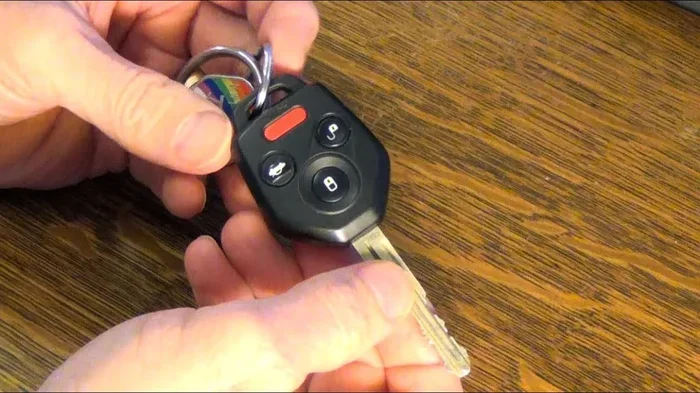
- Dead or weak battery: The coin-sized battery inside your remote typically lasts one to two years. Once it fades, the signal gets weaker until it disappears completely.
- Signal interference: Other electronic devices, tall buildings, or even your garage door opener can block the car remote signal from reaching your car.
- Water or moisture damage: A dropped remote in a puddle or sweat from your pocket can short out the internal circuits.
- Worn-out buttons: Over time, the rubber contacts inside the remote wear down, making buttons unresponsive.
- Need for reprogramming: After a battery change or a power surge, the remote sometimes loses its pairing with the car.
- Broken internal circuit: Drops and impacts can crack the circuit board inside the remote, causing permanent failure.
Once you narrow down the cause, fixing the problem becomes much easier. Most of the time, it is something quick and painless.
How to Replace Your Remote Battery
Swapping out the battery is the first thing you should try. It takes about two minutes and costs less than five dollars. Here is exactly how to do it.
Step-by-Step Battery Replacement
- Find the right battery type. Most car remotes use a CR2032 coin battery. Check your owner’s manual or look at the old battery to confirm.
- Open the remote case. Use a small flathead screwdriver or a coin to gently pry open the back cover. Some remotes have a tiny release slot.
- Remove the old battery. Note which side faces up. Take a picture if you are unsure so you do not mix up the orientation.
- Insert the new battery. Place it in the same position as the old one. Push it down gently until it clicks into place.
- Snap the case back together. Press firmly around the edges until the two halves lock in place.
- Test the remote. Stand near your car and press the unlock button. You should hear the doors respond right away.
If replacing the battery does not fix the problem, do not worry. There are several other things you can try before calling a professional.
Reprogramming Your Car Remote
Sometimes a fresh battery is not enough. Your key fob programming may need a reset. This happens more often than you might think, especially after a battery change or if your car battery was recently disconnected.
General Reprogramming Steps
Every car brand has slightly different steps, but the basic process is similar across most models. Here is a general guide that works for many vehicles.
- Sit inside your car with all doors closed. Make sure no other keys or remotes are nearby that could interfere.
- Turn the ignition to the ON position. Do not start the engine. Just move the key or push the start button so the dashboard lights come on.
- Press and hold the lock button on your remote. Keep holding it while you do the next step.
- Turn the ignition OFF, then back to ON within five seconds. This cycle tells the car to enter programming mode.
- Release the lock button. The doors should lock and unlock, confirming you are in programming mode.
- Press the lock button on your remote again. You should hear a confirmation tone or see the lights flash.
- Turn the ignition OFF and test your remote. Step outside and try locking and unlocking your car.
If these steps do not work for your specific vehicle, check your owner’s manual or search online for your car model’s exact programming sequence. Car remote troubleshooting guides for specific brands are widely available and easy to follow.
Fixing Signal and Range Problems
Sometimes your remote works fine but only from very close range. If you have to stand right next to your car to get a response, something is interfering with the remote control car signal path.
Common Causes of Weak Signal
- Low battery power: Even if the remote turns on, a weak battery may not send a strong enough signal to reach your car.
- Nearby electronics: Cell phones, laptops, and other remotes can create interference that blocks your car key fob signal.
- Metal obstructions: Keys stacked with other metal objects in your pocket can weaken the signal before it leaves your hand.
- Cold weather: Extreme cold reduces battery performance temporarily, which can shorten your remote’s range in winter.
- Damaged remote antenna: Some vehicles have an internal antenna that receives the remote signal. If it fails, the car will not respond.
Quick Tips to Improve Remote Range
- Hold the remote flat against your chin when pressing the button. Your body acts as a signal booster.
- Stand away from other electronic devices when using your remote.
- Replace the battery as soon as you notice the range getting shorter.
- Keep your remote in a fabric pouch instead of a metal keychain holder.
These small changes can make a big difference in how well your car remote signal reaches your vehicle.
When to Replace the Entire Remote
Not every remote problem can be fixed with a battery or a reset. Sometimes the remote itself is damaged beyond repair, and you need a replacement. Here is how to decide.
Signs You Need a New Remote
- The remote has visible cracks or damage to the casing.
- Buttons feel mushy or do not spring back at all.
- The remote has been exposed to water and still does not work after drying.
- You have tried a new battery and reprogramming with no success.
- The remote is more than five years old and showing general wear.
Your Replacement Options
You have several paths when choosing a car key replacement. Each has its own pros and cons.
| Option | Cost Range | Pros | Cons |
|---|---|---|---|
| Dealer Replacement | $50 – $200 | Guaranteed compatibility, full programming support | Most expensive option, longer wait time |
| Aftermarket Remote | $15 – $50 | Affordable, widely available online | May need extra programming, fit can vary |
| Universal Remote | $10 – $30 | Very budget-friendly, works with many models | Not all features may work, setup can be tricky |
| Refurbished Remote | $20 – $60 | Mid-range price, often pre-programmed | Quality varies, limited warranty |
If you go the aftermarket or universal route, make sure to confirm compatibility with your car model before purchasing. Many online sellers list compatible vehicle makes and models clearly. A universal car remote can be a great budget option if you are comfortable with a bit of self-installation.
Preventing Future Remote Problems
Once you get your remote to work again, you want to keep it working. A little preventive care goes a long way toward avoiding future headaches.
Simple Habits That Extend Remote Life
- Use the right battery: Always choose a quality brand like Energizer or Duracell for your key fob battery. Cheap batteries can leak and damage the remote.
- Keep it dry: Do not leave your remote in the cup holder where rain or spilled drinks can reach it.
- Clean the contacts: Once or twice a year, wipe the battery contacts with a dry cloth to prevent buildup.
- Store it safely: Avoid dropping your remote or placing heavy objects on it. The internal circuit board is fragile.
- Replace the battery proactively: When you notice the range getting shorter, swap the battery right away instead of waiting for it to die completely.
These small efforts add up. A well-maintained remote can last for many years without any issues.
Expert Tips from Car Care Professionals
We asked experienced car care technicians for their top advice on car remote troubleshooting. Here is what the experts want you to know.
Tip 1: Always carry a spare remote. If your primary remote fails, a backup keeps you from being stranded. Keep one at home and one in a safe place.
Tip 2: Do not ignore warning signs. If your remote starts acting flaky, do not wait for it to stop working entirely. Early intervention with a battery swap or reprogramming can save you from bigger problems later.
Tip 3: Know your vehicle’s manual programming mode. Every car is different. Spending ten minutes reading about your specific model’s programming process can save you a costly trip to the dealer.
Tip 4: Keep your car battery healthy. A weak car battery can cause remote problems even when the remote itself is fine. Regular car care includes checking your battery voltage and replacing it on schedule.
Tip 5: Consider a smart key upgrade. If your vehicle supports it, upgrading to a proximity key or smart key system can eliminate many traditional remote problems altogether.
Common Mistakes to Avoid
When trying to fix a remote, people often make mistakes that make the problem worse. Here are the most common ones to watch out for.
- Using the wrong battery type: A battery that is slightly different in size may fit but not make proper contact, leaving you thinking the remote is broken.
- Forcing the remote open: Prying too hard can crack the casing and damage the circuit board inside.
- Touching the wrong contacts: When replacing the battery, touching both terminals with metal tools can cause a small short circuit.
- Skipping the reprogramming step: After a battery change, many remotes need to be reprogrammed. Skipping this step is the most common reason a new battery does not fix the problem.
- Buying the cheapest remote online without checking compatibility: A remote that does not match your vehicle model will not work, no matter how good the deal looks.
Avoiding these mistakes can save you time, money, and a lot of frustration.
Frequently Asked Questions
How do I know if my car remote battery is dead?
Signs of a dead battery include the remote not working from more than a few feet away, buttons feeling less responsive, or the remote needing multiple presses to unlock the doors. Replacing the battery is the first step to fix these issues and get your remote to work again.
Can I program a new remote myself?
Yes, most car remotes can be programmed at home using the steps in your owner’s manual. The process usually involves a sequence of key turns and button presses inside the vehicle. If you are unsure, search for a video tutorial specific to your car model for a visual walkthrough.
How much does it cost to replace a car remote?
Costs vary widely depending on the option you choose. A universal car remote can cost as little as ten to thirty dollars, while a dealer replacement may run fifty to two hundred dollars. Aftermarket remotes from online retailers typically fall in the fifteen to fifty dollar range.
What should I do if my remote gets wet?
Remove the battery immediately and let the remote dry completely for at least twenty-four hours. Use a soft cloth to absorb moisture and avoid using heat like a hairdryer, which can damage internal components. Once dry, insert a new battery and test the remote before assuming it is broken.
Why does my remote work sometimes but not others?
This is usually a signal interference or weak battery issue. Other electronics, metal objects, or even cold weather can weaken the car remote signal temporarily. Try replacing the battery first, then move away from other devices when using the remote to see if the problem clears up.
How long does a car remote battery last?
A typical key fob battery lasts between one and two years, depending on how often you use the remote. If you live in a cold climate or use features like remote start frequently, the battery may drain faster. Keep an eye on the range and replace the battery proactively before it dies completely.
Conclusion
Getting your remote to work again does not have to be complicated or expensive. Start with the simplest fix: a new battery. If that does not solve the problem, try reprogramming the remote or checking for signal interference. Most car remote troubleshooting can be done at home in under ten minutes.
Remember the key takeaways from this guide. Replace your battery with the right type, keep your remote dry and clean, and reprogram it after any battery change. When a replacement is needed, you have affordable options ranging from universal remotes to dealer replacements. Regular car care habits will keep your remote working reliably for years to come.
Now that you know exactly how to get your remote to work again, you can take action today. Do not let a stubborn remote ruin your morning or your schedule. Try these steps, and you will likely have your car remote back in working order before lunch. Share this guide with a friend who might be dealing with the same frustration. A working remote is a small thing that makes a big difference in your daily life.