Do You Have to Pay for the Toyota App to Use Remote Start
Do You Have to Pay for the Toyota App to Use Remote Start? The short answer is no, you don’t always have to pay. Toyota offers a free trial period that lets you use remote start without any upfront cost. After the trial ends, a subscription fee applies to keep the features active.
Many Toyota owners wonder if they need to pay to use the remote start feature through the Toyota app. The answer depends on your model year, subscription plan, and whether you are still within the free trial period. Do You Have to Pay for the Toyota App to Use Remote Start? In most cases, you can use the app and its remote start function for free at first, but ongoing use typically requires a paid subscription. This guide breaks down everything you need to know, from the initial download and setup to the long-term costs and what the subscription actually includes.
The Toyota app connects your smartphone to your vehicle using Bluetooth or cellular connectivity. It lets you lock the doors, check fuel levels, and start the engine from a distance. Remote start is especially handy in cold climates where you want to warm up the cabin before you get in. Not every Toyota model came with factory remote start, but the app can add this capability to many newer vehicles. Understanding the cost structure helps you avoid surprises on your monthly bill.
The app itself is free to download from the Apple App Store or Google Play Store. You simply search for the Toyota app, install it, and create an account. The free download does not mean all features are free forever. Toyota uses a connected services model where basic features remain free, but advanced functions like remote start require a subscription after the trial period ends. This model is similar to how many other automakers handle their smartphone apps today.
Key Takeaways
- Free Trial Available: Toyota provides a free trial period (usually 1 year) for the app’s remote start feature, so you can test it without paying upfront.
- Subscription Required After Trial: Once the trial ends, you need a paid subscription to continue using remote start and other connected services.
- Cost Varies by Plan: Subscription fees depend on the plan you choose, ranging from basic connectivity to premium features like remote start and lock/unlock.
- Dealer Installation May Be Needed: Some Toyota models require a dealer visit to activate remote start, but the app itself is free to download.
- Key Fob Battery Matters: The remote start function relies on your key fob battery, so keeping it fresh ensures reliable operation.
- No Extra Hardware for Most Models: If your Toyota came with remote start from the factory, the app works seamlessly without additional parts.
📑 Table of Contents
Understanding the Toyota App and Remote Start
What Does the Toyota App Actually Do?
The Toyota app is part of Toyota Connected Services. It acts as a bridge between your smartphone and your vehicle’s onboard system. Through the app, you can perform several actions without touching the key fob. You can lock and unlock the doors, honk the horn, locate your car using GPS tracking, and of course, start the engine remotely. The app also provides vehicle health reports and maintenance reminders.
Remote engine start is one of the most popular features. It allows you to turn on the ignition from a distance, letting the heater or air conditioner run before you arrive. Some models even allow you to set a specific temperature for climate control pre-conditioning. This means your car is comfortable the moment you step inside. The app uses bluetooth connectivity to communicate with the vehicle when you are nearby, and cellular data when you are further away.
How Remote Start Works with Your Toyota
When you press the remote start button in the app, a signal is sent to your Toyota’s telematics module. The module then starts the engine and activates the climate control if programmed. The vehicle remains in a ready state, but the doors stay locked for safety. You can set a timer for how long the engine runs, typically up to 10 or 15 minutes. If you do not cancel the remote start, the engine will shut off automatically after the timer expires.
Not all Toyota models support remote start through the app. Vehicles that were built with a remote start factory option usually work seamlessly. For models that did not come with factory remote start, the app might still offer the feature through a dealer-installed module. This is where Toyota dealer service becomes important. A trained technician can install the necessary hardware and pair it with the app.
Is Remote Start Available on All Toyota Models?
Remote start availability depends on the model and trim level. Most newer Toyota Camry, RAV4, and Highlander trims include factory remote start. Older models or base trims might not have it. The Toyota app will show which features are supported for your specific vehicle when you register it. If your car does not support remote start natively, you may still be able to add it through a dealer accessory. Check with your dealer to confirm compatibility before purchasing a subscription.
Do You Have to Pay for the Toyota App to Use Remote Start?
The Short Answer: Free to Start, Then a Fee
The direct answer to Do You Have to Pay for the Toyota App to Use Remote Start is that you do not pay upfront. Toyota offers a free trial period that gives you full access to remote start and other connected services. During this trial, you can use the app exactly as if you had a paid subscription. The trial length varies, but it is commonly one year from the date you first register your vehicle.
After the free trial ends, you must choose a paid plan to continue using remote start. If you do not subscribe, the app will revert to basic functions like lock/unlock and vehicle locator. The remote start button will no longer work until you renew or start a new trial. This structure encourages you to try the service risk-free while giving Toyota a way to sustain its connected car platform.
Why Does the App Ask for a Subscription?
Toyota invests heavily in vehicle connectivity infrastructure. The app requires servers, software updates, and cellular data networks to function. The subscription fee helps cover these ongoing costs. It also funds features like real-time traffic updates, emergency assistance, and over-the-air software updates. Think of it as a monthly service for your car’s digital features, much like a streaming service for your entertainment system.
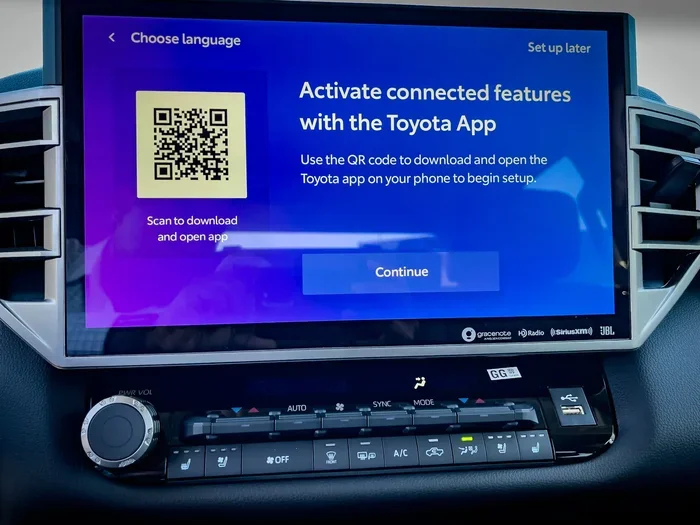
The subscription also supports the Toyota infotainment system. Many newer Toyotas come with a large touchscreen that integrates directly with the app. The remote start feature sends commands through this system, which relies on a stable cellular connection. Without a subscription, the telematics module may not maintain its data link, cutting off all remote features.
What Happens If You Don’t Pay?
If you let the subscription lapse, you lose access to premium features. Remote start will stop working, and you will not be able to lock or unlock the car from the app. The GPS tracking and vehicle health reports may also become unavailable. Your car will still function normally with the physical key fob, but the smart features go dormant. You can always reactivate the service later by starting a new subscription or taking advantage of another promotional trial.
Some owners choose to use only the free features and rely on the physical key fob for daily operations. This is a valid choice if you do not mind stepping outside to start the car. However, the convenience of remote start is a major selling point for many Toyota owners, especially those in harsh weather climates.
The Free Trial Period: What You Get
How Long Is the Free Trial?
The free trial period typically lasts for one year. Some newer vehicles may come with a three-year trial included at the time of purchase. The exact length depends on your model year and the region where you bought the car. When you first register your Toyota in the app, it will display the remaining trial time. You can also check this information in your owner’s manual or by contacting a dealer.
The trial begins on the date you activate the app and link it to your vehicle. You do not need to enter a payment method to start the trial, though you may be asked to provide one to ensure a smooth transition to a paid plan if you choose to continue. Toyota sends reminders before the trial expires, giving you time to decide whether the subscription is worth the cost.
What Features Are Included During the Trial?
During the free trial, you get full access to the Toyota Connected Services suite. This includes remote start, lock/unlock, horn and lights activation, vehicle finder, and climate control pre-conditioning. You can also receive maintenance alerts and roadside assistance coordinates. The trial is essentially a complete preview of everything the app can do.
The trial is a great way to test how useful remote start is in your daily routine. You can try starting the car from your bedroom on a cold morning or cooling it down on a hot day. If you find the feature indispensable, you can then choose a subscription plan that fits your budget. If you rarely use it, you can simply let the trial expire without any charge.
How to Start Your Free Trial
Starting the trial is straightforward. Download the Toyota app, create an account, and enter your vehicle identification number (VIN). The app will recognize your model and activate the trial automatically. You may need to pair your phone with the vehicle using Bluetooth. Once paired, you can explore all the features right away. No credit card is required to begin the trial, though you might be prompted to add one for future billing convenience.
Subscription Plans and Monthly Costs
Breakdown of Toyota Connected Services Tiers
Toyota offers different tiers of connected services. The exact names and prices can vary by region, but the general structure remains consistent. The basic tier usually includes emergency assistance, roadside support, and vehicle diagnostics. The premium tier adds remote start, lock/unlock, and climate control features. Some plans also include GPS tracking and smart device integration.
The subscription fee is typically charged on a monthly or annual basis. Monthly plans offer flexibility, while annual plans often come with a discount. Toyota occasionally runs promotions that extend the free trial or reduce the first-year cost. Keep an eye out for these offers when you are considering a subscription.
Comparing Plans: Basic vs. Premium
The basic plan focuses on safety and diagnostics. You get emergency calling, roadside assistance coordinates, and maintenance reminders. The premium plan builds on that with all the convenience features. You can start the engine, control the climate, and lock or unlock the doors from anywhere. The premium plan is the one most people think of when they ask about the Toyota app remote start cost.
Here is a simple comparison of what each tier typically offers:
- Basic Plan: Emergency assistance, roadside support, vehicle health reports, maintenance alerts.
- Premium Plan: All basic features plus remote start, lock/unlock, horn and lights, climate pre-conditioning, GPS finder.
Can You Cancel Anytime?
Yes, you can cancel your subscription at any time. There is no long-term contract. If you decide the premium features are not worth the monthly fee, you can switch back to the basic plan or cancel entirely. Your remote start feature will stop working, but the app will still function for basic tasks. Canceling is easy to do through the app settings or your online Toyota account portal.
How to Activate Remote Start Using the App
Downloading and Installing the Toyota App
First, download the Toyota app from your device’s app store. The app is free and compatible with both iOS and Android. Once installed, open it and create an account using your email address. You will need to provide your VIN to link the app to your specific vehicle. The app will then check for available features and start the free trial if eligible.
Pairing Your Phone with Your Vehicle
To use remote start, you must pair your phone with the vehicle’s telematics system. Go to the app’s settings and follow the on-screen instructions. You will typically need to enable Bluetooth and location services on your phone. The app will guide you through the pairing process step by step. Once paired, you should see a confirmation that your vehicle is connected.
Step-by-Step Remote Start Process
1. Open the Toyota app on your smartphone.
2. Ensure you have a stable internet connection (Wi-Fi or cellular).
3. Tap the remote start icon on the home screen.
4. Confirm the action when prompted.
5. Wait a few seconds for the engine to start.
6. Check the app dashboard to confirm the vehicle is running.
7. Walk to your car and enter using the physical key or keyless entry.
The entire process takes less than a minute. You can set the climate control before starting the engine so the cabin is ready when you arrive.
Tips for Using Remote Start Safely
Always park your car in a well-ventilated area before using remote start. Never use it in an enclosed garage, as carbon monoxide can build up quickly. Set a timer so the engine does not run longer than necessary. Keep your key fob inside the vehicle while the engine is running remotely, as the car will not shift out of park without the fob present. These simple habits keep you and your family safe.
Troubleshooting Common Remote Start Issues
Why Won’t My Car Start Remotely?
Several factors can prevent remote start from working. The most common reason is that the subscription has expired or the free trial has ended. Check your app dashboard for the subscription status. Another cause is a weak key fob battery. The remote start function relies on the fob’s battery to confirm the command. If the battery is low, replace it. You can learn more about key fob battery replacement and whether dealerships handle it for free in our article Do Dealerships Replace Key Batteries For Free.
A weak 12V vehicle battery can also stop remote start from working. If your car sits unused for a long time, the auxiliary battery may drain. In that case, you might need to jump start your Toyota hybrid or conventional Toyota using the 12V battery terminals. Always keep jumper cables or a portable jump starter in your trunk for emergencies.
Key Fob Battery Problems and Solutions
The key fob battery is a small but critical component. Most Toyota key fobs use a CR2032 coin battery. When the battery weakens, the fob’s range decreases and remote start may fail. You can replace the battery yourself with a small flathead screwdriver. If you are unsure, many dealerships will replace the battery for free or a small fee. Check our guide on Do Dealerships Replace Key Batteries For Free for more details. Keeping a spare battery in your glove box is a smart habit.
When to Contact Toyota Dealer Service
If you have tried all the basic troubleshooting steps and remote start still does not work, it is time to contact a professional. You can reach out to Toyota dealer service for help. They can run diagnostics on the telematics module, check the subscription status, and inspect the vehicle’s electrical system. You can visit any Toyota dealership for service, regardless of where you purchased the vehicle. Our article Can I Take My Toyota To Any Dealership For Service explains this in more detail.
Dealers can also update the software on your telematics module. Sometimes a simple firmware update resolves connectivity issues that prevent remote start from functioning. They can also confirm whether your specific model supports the feature and if any additional hardware is needed.
Conclusion
Do You Have to Pay for the Toyota App to Use Remote Start? The clear answer is that you do not have to pay immediately. Toyota gives you a generous free trial to enjoy remote start and all the connected features at no cost. Once the trial ends, a subscription fee is required to keep the premium features active. The cost is reasonable for the convenience and comfort it provides, especially during extreme weather.
The app is free to download, and the setup process is simple. You can manage your subscription directly from your phone, and cancel anytime if the service does not meet your needs. Whether you use the free trial or opt for a paid plan, the Toyota app adds real value to your ownership experience. Remote start is no longer a luxury reserved for high-end trims; it is accessible to many Toyota owners through a simple smartphone connection.
Take a few minutes to explore the app, check your trial status, and decide if a subscription makes sense for your lifestyle. With the right plan, you can warm up your car on a frosty morning or cool it down before you even step inside. The choice is yours, and the flexibility is entirely in your hands.
Frequently Asked Questions
Is the Toyota app remote start really free?
The app itself is free to download, and you get a free trial period (usually one year) that includes remote start. After the trial, a subscription fee applies to continue using the feature.
Can I use remote start without a subscription?
You can use remote start during the free trial. Once the trial ends, the feature is disabled unless you activate a paid subscription plan. Basic features like lock/unlock may remain free depending on your plan.
How much does the Toyota remote start subscription cost?
Prices vary by region and plan. Toyota typically offers monthly and annual options. The premium plan that includes remote start usually costs between $80 and $150 per year, but check the app for current pricing.
Do I need a dealer to set up remote start?
Most newer Toyotas with factory remote start do not need a dealer. You simply download the app, pair your phone, and start using it. For models without factory remote start, a dealer may need to install an accessory module.
What happens if I don’t pay for the subscription after the trial?
The app will revert to basic functions. Remote start, lock/unlock from the app, and GPS tracking will stop working until you reactivate a subscription or start a new trial.
Can I use remote start if my key fob battery is dead?
No, the key fob battery must have enough charge for the remote start command to be verified. Replace the battery if the fob is unresponsive. You can find guidance on free key fob battery replacement at dealerships in our article Do Dealerships Replace Key Batteries For Free.