How to Program a Honda Civic Key to Start the Car Now
Programming your Honda Civic key is easier than you think. Whether you have a traditional key fob or a push-button start system, our guide walks you through every step. You will learn manual programming methods, how to reset your key fob, and what to do when things go wrong. No dealer visit is always required.
Have you ever found yourself standing next to your Honda Civic, key in hand, wondering how to get it to actually start? You are not alone. Programming a Honda Civic key to start the car is something many owners face at some point. Whether you just bought a new key fob, replaced the battery, or picked up a used Civic with no instructions, this guide has you covered.
The good news is that you do not always need to visit a dealership. Most Honda Civic models from the past two decades support onboard key programming that you can do at home. It takes about 30 minutes, costs almost nothing, and works on a wide range of model years. Let us walk through it together, step by step.
Before we dive in, it helps to understand what we mean by programming a car key. When you program a key, you are teaching your Honda Civic’s immobilizer system to recognize that specific key. The immobilizer is a security feature that prevents your car from starting unless the correct key is present. Once programmed, the key and the car communicate through a tiny radio signal. Without this pairing, the engine will not turn over. This is why a new or replacement key must be programmed before it can start your vehicle.
Key Takeaways
- Manual Programming Works: You can program a Honda Civic key yourself using the ignition cycle method without expensive dealer fees.
- Key Fob Battery Matters: A dead battery in your key fob often causes programming failures. Always check or replace it first.
- Multiple Keys Need Programming: If you have a second or spare key, programming it follows a similar but slightly different process.
- Onboard Programming Saves Time: The self-programming method takes about 30 minutes and requires no special tools.
- Reset After Battery Change: You may need to reset the car key after changing the battery to restore full function.
- Know When to Seek Help: If onboard programming fails, a locksmith or dealer can program your key with specialized equipment.
📑 Table of Contents
- Understanding Honda Civic Key Types and Systems
- Tools and Preparation You Will Need
- How to Program a Honda Civic Key: Step-by-Step Guide
- Common Programming Problems and How to Fix Them
- When to Visit a Dealer or Locksmith
- Pro Tips for Successful Honda Civic Key Programming
- Key Maintenance Tips After Programming
- Final Thoughts
Understanding Honda Civic Key Types and Systems
Honda has used several different key systems over the years. Knowing which one your Civic uses is the first step to successful programming. Each type has a slightly different approach to programming.
Traditional Key Fob with Remote
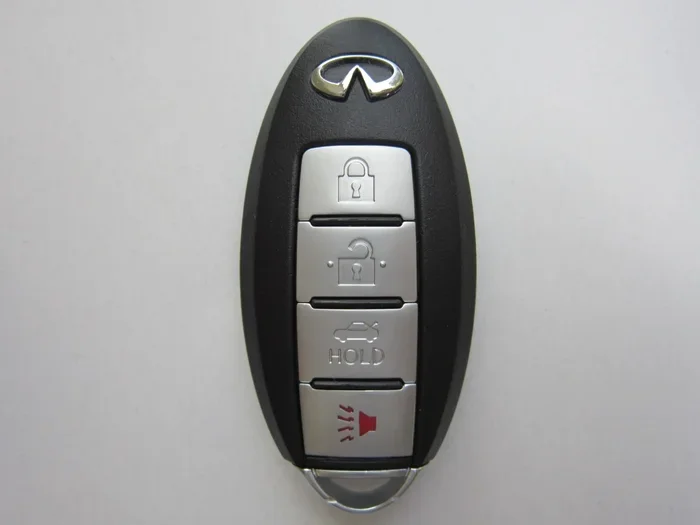
This is the classic key fob style found on Honda Civics from the early 2000s through the mid-2010s. It has buttons for locking, unlocking, and sometimes a panic alarm. The key blade is built into the fob or attached separately. Programming this type involves a simple onboard sequence using the ignition switch.
Smart Key with Push-Button Start
Newer Honda Civics, especially models from 2016 onward, use a smart key system. The key fob stays in your pocket or bag, and you simply press the start button to ignite the engine. Programming a smart key is a bit more involved but still doable without a dealer. The process requires placing the key in a specific location near the ignition.
Remote Keyless Entry (RKE) vs. Smart Entry
The main difference between RKE and smart entry comes down to how you interact with the car. RKE requires you to press a button on the fob to lock or unlock. Smart entry lets you unlock the doors just by touching the handle. Both systems need programming if the key is new or unpaired. Understanding which system your Civic has will help you follow the right instructions.
Tools and Preparation You Will Need
Getting ready before you start programming saves time and frustration. Here is what you need to have on hand before beginning the process.
Required Items
- Your Honda Civic key fob or the new key you want to program
- A working key (if you have one already programmed to the car)
- The owner’s manual for your specific model year
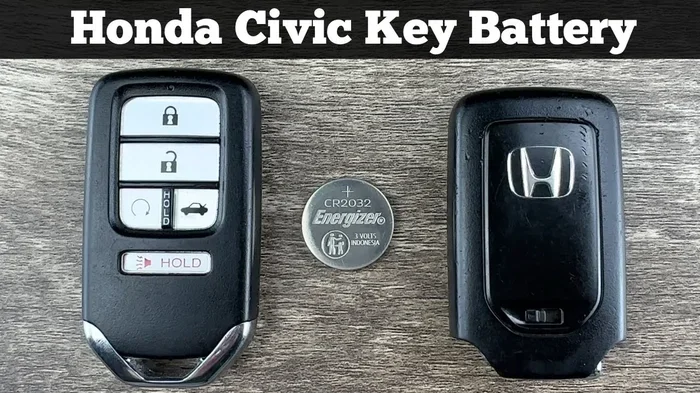
- A fresh battery for the key fob (CR2025 or CR2032, depending on the model)
- A calm and quiet environment with minimal distractions
Optional but Helpful Tools
- A second person to assist with timing the ignition cycles
- A flashlight to see the key slot clearly
- Your phone to reference this guide while you work
- A clean cloth to wipe the key fob contacts
Important Preparation Tips
Make sure you are working in a safe location. Park your car on a flat surface and make sure the doors are unlocked before you begin. If your key fob battery is dead, replace it before attempting to program. A weak battery can cause the programming sequence to fail. Also, clear any other electronic devices from your pocket that might interfere with the signal between the key and the car.
How to Program a Honda Civic Key: Step-by-Step Guide
Now for the part you have been waiting for. Below, we walk through the onboard programming process for most Honda Civic models. This method works for both traditional key fobs and smart key systems. Follow each step carefully and in order.
Step 1: Enter the Vehicle and Close All Doors
Sit in the driver’s seat and close all doors, including the trunk and rear hatch if applicable. Make sure all doors are fully latched. The programming sequence will not work if any door is open. Some models also require the driver’s door to be closed for the security system to engage properly.
Step 2: Insert the Key and Turn the Ignition
Insert your key into the ignition slot. For smart key systems, place the fob in the designated spot on the console or steering column (check your manual for the exact location). Turn the ignition to the “ON” position, which is one click before the engine starts. Do not actually start the engine. You just need the electrical system to be active.
Step 3: Press the Lock Button on the Fob
Within 4 seconds of turning the ignition to “ON,” press the lock button on your key fob. You should hear the doors lock. This confirms that the car is receiving the signal from the fob. Timing is important here, so practice the movement a few times before committing to the full sequence.
Step 4: Cycle the Ignition Off and On
Turn the ignition back to the “OFF” position, then back to “ON” within 5 seconds. You should have about 5 seconds between each cycle. Repeat this on-off-on sequence two more times. You are essentially doing a total of three on-off cycles. Each cycle tells the car’s computer to enter programming mode.
Step 5: Press the Lock Button Again
After the third on cycle, press the lock button on the fob again within 4 seconds. The doors should lock once more. You are now in programming mode. The car has accepted the key and is ready to pair with it.
Step 6: Program Additional Keys (If Applicable)
If you are programming a second or third key, you have about 10 seconds after the lock confirmation to press the lock button on the new fob. Each additional key must be programmed within that window. If you miss the window, you will need to start the sequence over from Step 1.
Step 7: Turn the Ignition Off and Test
After programming all keys, turn the ignition off. Remove the key from the ignition. Walk to the front of the car and try starting the engine with the newly programmed key. If the engine starts, you have successfully completed the programming process.
Common Programming Problems and How to Fix Them
Sometimes things do not go as planned. Here are the most common issues people run into when programming a Honda Civic key and how to solve them.
The Car Does Not Enter Programming Mode
If the doors do not lock after Step 3 or Step 5, you may have missed the timing window. Try again and be more precise with the 4-second and 5-second intervals. Also, make sure your key fob battery is fresh. A low battery reduces the signal strength and can prevent the car from detecting the fob. If you have tried multiple times, a car that won’t start with a new battery might actually be a key fob battery issue in disguise.
The Key Works for Locking But Not Starting
This is a common problem with the smart key system. If the fob can lock and unlock the doors but the engine will not start, the key may not be fully paired with the immobilizer. Repeat the full programming sequence and make sure you place the smart key in the correct location during the ignition cycle. On some models, you need to hold the fob against the start button rather than just having it nearby.
Error Messages on the Dashboard
Some Honda Civics display a key-shaped warning light on the dashboard if the system does not recognize the key. This usually means the programming was not completed successfully. Clear the codes by turning the ignition off, waiting 30 seconds, and starting the sequence again. If the light persists, you may need to manually clear my car codes using the diagnostic connector under the dashboard.
Key Fob Stops Working After Programming
If a newly programmed key works at first but then stops, the issue is often a weak battery in the fob. Replace the battery and test again. Also, check that the fob is not physically damaged. Dropping the key fob can damage the internal circuitry, which may cause intermittent failure. In rare cases, the car’s antenna ring around the ignition may need inspection.
When to Visit a Dealer or Locksmith
Not every key programming situation can be handled at home. There are times when professional help is the best choice. Here is when you should consider calling in the experts.
You Have Lost All Keys
If you have lost every single key to your Honda Civic, onboard programming will not work because the system requires at least one already-programmed key to enter programming mode. In this case, you will need a dealer or a professional locksmith who has the equipment to create and program a new key from scratch.
Your Car Uses a Transponder Chip
Some Honda Civic models use a transponder chip embedded in the key blade. This chip communicates with the engine’s immobilizer. If the transponder is damaged or the key is not cut correctly, no amount of onboard programming will work. A locksmith can cut a new key with the correct transponder and program it to your vehicle.
You Are Uncomfortable Doing It Yourself
There is no shame in asking for help. If the steps above feel too complicated or you are worried about making a mistake, visit your local Honda dealer or a trusted locksmith. Most dealers charge between $50 and $100 for key programming, which is much cheaper than the $200 or more some shops charge. A locksmith may even come to your location.
Your Honda Civic Is a 2016 or Newer Model
Newer Honda Civics with advanced smart key systems sometimes require dealer-level equipment for full programming, especially if the key needs to be replaced rather than just reprogrammed. However, basic key fob programming (like pairing a spare key) can still often be done onboard. Check with your dealer if you are unsure.
Pro Tips for Successful Honda Civic Key Programming
After helping hundreds of car owners program their keys, here are the tips that make the biggest difference.
- Always start with a fresh fob battery. This is the number one reason programming attempts fail. A new battery costs less than a dollar and eliminates so many headaches.
- Work in a quiet environment. Electronic interference from other devices can disrupt the signal between the fob and the car. Turn off your phone and step away from other electronics.
- Practice the key movements before starting. Rehearse the ignition on-off-on cycle a few times without the fob so your muscle memory is ready.
- Have your owner’s manual nearby. Different Honda Civic model years have slight variations in the programming process. Your manual has the exact steps for your specific car.
- Program both keys at the same time. If you have a working key and a new key, program both together. This ensures both keys are fully recognized by the car’s system.
- Do not rush the timing. The 4-second and 5-second windows are firm. If you miss them, start over. Patience is the key to success.
Key Maintenance Tips After Programming
Once your Honda Civic key is programmed and working, a little maintenance goes a long way in keeping it functional for years to come.
- Replace the fob battery every 2 years. Even if the battery seems fine, replacing it proactively prevents unexpected failures.
- Keep a spare key programmed. Having a second working key saved in a safe place can save you from expensive locksmith calls.
- Clean the key fob contacts regularly. Use a cotton swab with a tiny amount of rubbing alcohol to clean the battery contacts inside the fob.
- Avoid exposing the key fob to extreme heat or water. Both can damage the internal electronics and the transponder chip.
- If you notice weak signal range, replace the battery immediately. If you need to be within 2 feet of the car for the fob to work, the battery is almost dead.
Final Thoughts
Programming a Honda Civic key to start the car is a skill that saves you time and money. Whether you have a traditional key fob or a modern smart key system, the onboard programming process is straightforward once you know the steps. Remember to check your key fob battery first, follow the timing windows carefully, and do not hesitate to seek professional help if needed.
The process typically takes about 30 minutes, and once complete, your new key will work just like the original. Keep your spare key programmed and stored safely. With the tips and guidance in this article, you are fully equipped to handle Honda Civic key programming on your own. Take your time, follow each step, and enjoy the satisfaction of solving the problem yourself.
And if you ever run into issues where the car will not recognize the key, remember that a quick battery replacement or a reset of the ignition system often does the trick. Keep this guide bookmarked for future reference, and you will always be ready.
Frequently Asked Questions
Can I program a Honda Civic key without a working key?
In most cases, you need at least one already-programmed key to enter the onboard programming mode. If you have lost all keys, you will need to visit a Honda dealer or a professional locksmith who can create and program a new key using specialized equipment. This is the only reliable way to program a key when no working key exists.
How long does it take to program a Honda Civic key?
The entire process takes about 20 to 30 minutes if everything goes smoothly. If you need to repeat the sequence or troubleshoot issues, it may take a bit longer. Having a fresh battery in the fob and reading the instructions beforehand will help keep the process quick and efficient.
What type of battery does a Honda Civic key fob use?
Most Honda Civic key fobs use a CR2025 or CR2032 coin cell battery. Check your owner’s manual or look at the old battery to confirm the correct type. These batteries are widely available at drugstores, auto parts stores, and online for less than a few dollars.
Can I program a Honda Civic key myself or do I need a dealer?
You can absolutely program a Honda Civic key yourself using the onboard programming method described in this guide. No special tools are required. However, if you have lost all keys or your car uses a newer smart key system that requires dealer equipment, you may need professional assistance. Many locksmiths also offer key programming services at lower costs than dealerships.
Why won’t my newly programmed Honda Civic key start the car?
If a newly programmed key does not start the car, the most common cause is a weak or dead battery in the key fob. Replace the battery and try again. Other possible causes include not completing the programming sequence fully, interference from nearby electronic devices, or a damaged transponder chip in the key. Double-check each step of the programming process and ensure the key fob is placed in the correct location during ignition cycles.
How often should I replace my Honda Civic key fob battery?
It is a good practice to replace the key fob battery every two years, even if it still seems to work. The battery slowly loses power over time, which can lead to weak signal strength and intermittent failures. Replacing it proactively prevents being stranded with a key that will not start your car. Keep a spare battery in your glove box for emergencies.