Why Is My Bluetooth Not Working in My Car Right Now
Bluetooth problems in your car can be frustrating, but they are usually easy to fix. Whether your phone won’t pair, audio keeps cutting out, or the connection drops randomly, this guide covers every common cause and solution. You will learn simple troubleshooting steps, expert tips, and preventive measures to keep your Bluetooth connectivity working smoothly every time you drive.
You are driving to work, ready to enjoy your favorite playlist or take a hands-free call, and then it happens. Your Bluetooth not working in car again. The screen shows no connection. Your phone says it is paired, but no sound comes through. It is one of those small frustrations that can ruin your whole morning.
The good news is that Bluetooth troubleshooting is usually straightforward. Most problems come down to simple settings, software glitches, or minor interference. In this article, we will walk you through every possible reason your car Bluetooth connection has failed and show you exactly how to fix it. Whether you drive a sedan, SUV, or truck, these tips apply to almost every vehicle with wireless capabilities.
We will cover everything from basic restart tricks to advanced fixes like clearing your Bluetooth cache and updating firmware. By the end, you will know exactly what to do when your wireless pairing suddenly stops working. Let us get your music and calls flowing again.
Key Takeaways
- Restart Both Devices: A simple restart of your phone and car infotainment system fixes most Bluetooth connection issues.
- Check Bluetooth Settings Carefully: Make sure Bluetooth is turned on, visible, and not connected to another device nearby.
- Remove Old Pairings: Deleting saved devices and re-pairing often resolves stubborn connection problems.
- Update Software Regularly: Outdated firmware on your car stereo or phone can cause Bluetooth not connecting errors.
- Watch for Interference: Other wireless devices, metal surfaces, and distance can weaken your Bluetooth range.
- Clear the Bluetooth Cache: Resetting network settings on your phone removes corrupted data that blocks pairing.
- Know When to Get Help: If none of the fixes work, a professional mechanic or dealer may need to inspect your car audio system.
📑 Table of Contents
- Why Bluetooth Connectivity Fails in Cars
- Common Reasons Your Bluetooth Stops Working
- How to Fix Bluetooth Problems in Your Car
- Bluetooth Troubleshooting: Step-by-Step Solutions
- Comparison: Common Bluetooth Problems and Their Solutions
- When to Seek Professional Help
- How to Prevent Bluetooth Issues in the Future
- Frequently Asked Questions
- Conclusion
Why Bluetooth Connectivity Fails in Cars
Bluetooth technology has been around for decades, but it still relies on radio waves to send data between devices. Your car audio system and your phone communicate through short-range wireless signals. When something disrupts that communication, the connection drops or fails to form in the first place.
Understanding why Bluetooth connectivity fails helps you fix the problem faster. Here are the most common reasons your car stereo Bluetooth stops working:
Signal Interference
Bluetooth operates on the 2.4 GHz frequency band. This is the same band used by Wi-Fi routers, microwaves, and other wireless devices. When multiple devices crowd this frequency, they can interfere with each other. If you have a GPS unit, a dash cam, or even a smart watch connected nearby, they may compete for the same signal space.
Physical barriers also matter. Metal roofs, tinted windows with metallic layers, and even large cargo boxes can weaken the Bluetooth range between your phone and car. The farther apart your devices are, the weaker the signal becomes.
Software Glitches
Both your phone and your car infotainment system run on software. Like any software, it can have bugs. A sudden glitch in the Bluetooth driver or the operating system can prevent your devices from recognizing each other. This happens more often after a software update or when your phone storage is nearly full.
Hardware Limitations
Older car models may have Bluetooth compatibility issues with newer phones. Bluetooth versions evolve, and older hardware may not support the latest protocols. If your car was made before 2015, its car stereo Bluetooth module might struggle with modern devices.
Common Reasons Your Bluetooth Stops Working
Before you panic, take a breath. Most Bluetooth not connecting issues fall into a handful of repeatable causes. Let us break them down one by one so you can identify what is happening in your specific situation.
Your Phone Is Connected to Another Device
This is the number one culprit. Your phone might still be connected to your headphones, your smart watch, or even your home speaker. When your phone tries to wireless pairing with your car, it gets confused because it is already streaming audio somewhere else.
Quick fix: Turn off Bluetooth on your phone for ten seconds, then turn it back on. This forces your phone to drop all current connections and start fresh.
Your Car Infotainment System Has a Memory Limit
Most car entertainment systems can only store a limited number of paired devices. If you have paired more than five or six phones, the system may start refusing new connections. It may also forget older pairings to make room for new ones.
This is especially common in families where multiple drivers share the same vehicle. Each phone takes up a slot, and eventually the system runs out of room.
Your Phone’s Bluetooth Cache Is Corrupted
Your phone saves data about every device it has ever paired with. Over time, this Bluetooth cache can become corrupted. When the cache is damaged, your phone may show the car as paired but refuse to actually stream audio or connect for calls.
Clearing this cache is one of the most effective Bluetooth troubleshooting steps, and we will cover exactly how to do it later in this guide.
Firmware Is Outdated
Your car’s infotainment system runs on firmware, just like your phone runs on an operating system. If the firmware is outdated, it may not work well with newer phones or the latest Bluetooth versions. Car manufacturers regularly release updates to fix Bluetooth compatibility issues.
Unfortunately, many car owners never update their firmware. They do not even know it exists. This simple oversight can cause persistent connection problems.
Bluetooth Is Turned Off or in Airplane Mode
It sounds too simple, but it happens all the time. Someone toggles Bluetooth settings off without realizing it. Or they switch their phone to airplane mode, which disables all wireless connections including Bluetooth.
Always double-check that Bluetooth is enabled on both your phone and your car system before moving on to more complex fixes.
How to Fix Bluetooth Problems in Your Car
Now that you know the most common causes, let us get into the solutions. Follow these steps in order, and you will solve the problem in most cases.
Step One: Restart Both Devices
This is the golden rule of tech troubleshooting, and it works more often than people realize. Restarting your phone clears temporary memory and resets all wireless connections. Restarting your car infotainment system does the same for the car side.
For your phone, simply power it off and back on. For your car, turn the ignition off, wait thirty seconds, and turn it back on. This gives both systems a clean slate to attempt device pairing again.
Step Two: Delete Old Pairings and Re-Pair
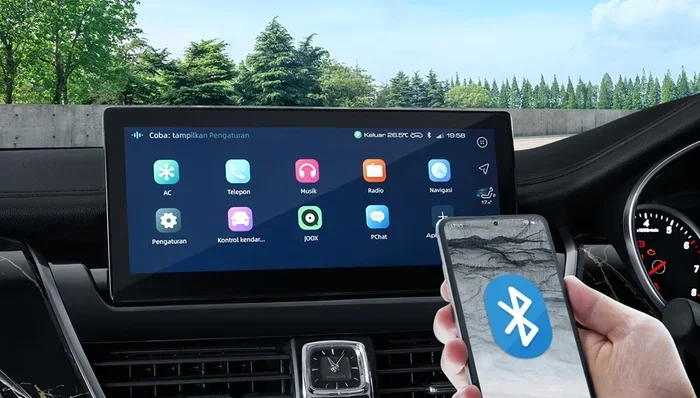
Go into your phone’s Bluetooth settings and forget the car. Do the same on the car’s infotainment screen. Then start fresh. Make your car visible, search for it on your phone, and enter the PIN if required.
This process clears any corrupted pairing data and forces both devices to establish a clean Bluetooth connection. It solves the problem about 70% of the time.
Step Three: Clear the Bluetooth Cache on Your Phone
On Android phones, go to Settings, then Apps, then find the Bluetooth Share app. Tap Storage and then Clear Cache. On iPhones, you need to reset all network settings. Go to Settings, General, Reset, and tap Reset Network Settings.
Warning: Resetting network settings on an iPhone will erase all saved Wi-Fi passwords. Make sure you know your Wi-Fi password before doing this.
Step Four: Check for Software Updates
Update your phone’s operating system first. Then check if your car manufacturer has released any firmware updates. Many modern cars allow you to check for updates directly in the infotainment settings menu.
If your car does not support over-the-air updates, visit your dealer. They can often update the firmware for free or at a low cost. This is one of the best Bluetooth troubleshooting steps for long-term reliability.
Step Five: Reset Network Settings on Your Car
Some car systems have a factory reset option for the infotainment unit. This resets all Bluetooth pairings, Wi-Fi connections, and saved preferences. Check your car’s manual for the exact steps.
Use this option as a last resort before visiting a mechanic. It wipes everything and gives your system a completely fresh start.
Bluetooth Troubleshooting: Step-by-Step Solutions
Sometimes the problem is not obvious. Your Bluetooth settings might look fine, but something subtle is blocking the connection. Here are targeted solutions for specific symptoms.
No Sound at All
If your phone connects to the car but you hear no audio, check the audio source on your car’s display. Make sure it is set to Bluetooth or Aux, not radio or USB. Also check your phone’s volume and the car’s volume separately. Both need to be turned up.
On some cars, you must manually select the Bluetooth audio profile. Look for options like Media Audio or Audio Streaming in the Bluetooth settings menu.
Calls Work but Music Does Not
This usually means your phone is connected for calls only but not for media streaming. Go to your phone’s Bluetooth settings, find your car, and make sure the Media Audio toggle is turned on.
On some Android phones, you also need to enable the “Audio Share” or “Media Output” option in the Bluetooth details screen.
Connection Keeps Dropping
Intermittent dropouts are often caused by distance or interference. Stay within 30 feet of your car when trying to connect. Park in a clear area away from other wireless devices.
If the problem happens while driving, it may be caused by a weak signal in certain areas. Try moving your phone to a different location in the car, such as the passenger seat or the center console.
Your Phone Shows the Car but Will Not Pair
This is a classic Bluetooth error that usually means the car’s system is full. Delete some old paired devices from the car’s memory. Then try pairing again.
If that does not work, toggle Bluetooth off on both devices for 30 seconds and turn them back on. This refreshes the discovery process.
Comparison: Common Bluetooth Problems and Their Solutions
| Problem | Likely Cause | Fix |
|---|---|---|
| No connection at all | Bluetooth turned off or hidden | Turn Bluetooth on and make car visible |
| Paired but no sound | Wrong audio profile selected | Enable Media Audio in settings |
| Connection drops randomly | Interference or distance | Move phone closer, reduce wireless devices |
| Phone shows car but won’t pair | Car memory full | Delete old pairings and retry |
| Audio stutters or cuts out | Firmware outdated | Update car firmware and phone OS |
| Works sometimes, not always | Corrupted Bluetooth cache | Clear cache and re-pair devices |
When to Seek Professional Help
Most Bluetooth troubleshooting steps you can do yourself. But sometimes the problem is deeper than a software glitch. Here are signs that you need professional assistance:
- Bluetooth never works after a factory reset. This could indicate a hardware failure in your car’s infotainment unit.
- The Bluetooth module does not appear in your car’s settings at all. A dead Bluetooth module needs replacement.
- You get error codes on your dashboard. Modern cars display specific error messages when the car audio system has a problem.
- None of the fixes in this guide work after multiple attempts. There may be an underlying issue with your Bluetooth driver or antenna.
A certified mechanic or your car dealer can run diagnostic tests on the infotainment system. They have specialized tools that can check the Bluetooth antenna, firmware integrity, and hardware health. In most cases, a Bluetooth module replacement costs between 150 and 400 dollars, depending on your car model.
How to Prevent Bluetooth Issues in the Future
Prevention is always better than cure. Once you get your Bluetooth connectivity working again, take these simple steps to keep it running smoothly.
Keep Your Software Updated
Update your phone regularly. Check your car’s infotainment system for firmware updates at least once every three months. Manufacturers release updates that fix Bluetooth compatibility bugs and improve performance.
Limit Paired Devices
Only keep devices paired that you actually use. Delete old phones, tablets, or devices that no longer need access to your car’s system. This keeps your car stereo Bluetooth memory clean and reduces confusion.
Avoid Interference Sources
Try not to place multiple wireless devices right next to your car’s antenna. If you use a dash cam or GPS unit, position it away from the phone mount. Reducing wireless clutter improves your Bluetooth range and connection stability.
Restart Your System Monthly
Make it a habit to restart your phone and car infotainment system once a month. This clears temporary files and refreshes all wireless connections. It is one of the easiest Bluetooth troubleshooting habits you can build.
Use High-Quality Audio Profiles
Make sure your phone is using the correct Bluetooth profile for audio. The HFP (Hands-Free Profile) handles calls, while A2DP (Advanced Audio Distribution Profile) handles music. If one is disabled, you will lose that function even though the other works fine.
Frequently Asked Questions
Why does my Bluetooth keep disconnecting from my car while driving?
This is usually caused by signal interference or distance. Metal body panels, other wireless devices, and even your phone case can weaken the signal. Try moving your phone to a different spot in the car and reducing the number of active wireless devices. If the problem persists, update your car’s firmware and your phone’s operating system.
How do I make my car Bluetooth visible for pairing?
Go to your car’s infotainment settings, find the Bluetooth menu, and select the option to make the system visible or discoverable. On most cars, this option stays active for two to three minutes. During that window, search for available devices on your phone and select your car to begin wireless pairing.
Can too many paired devices cause Bluetooth problems?
Yes, absolutely. Most car infotainment systems can only store between five and ten paired devices. When the memory is full, the system may refuse new connections or forget older pairings. Delete devices you no longer use to keep your Bluetooth settings running smoothly.
Does phone case material affect Bluetooth connectivity?
Some phone cases, especially those with metal plates or thick magnetic covers, can block Bluetooth signals. If you notice connection issues, try removing your phone case temporarily. If the connection improves, switch to a thinner or non-metallic case.
Is it safe to reset network settings on my phone?
Yes, it is completely safe. Resetting network settings only clears saved Wi-Fi passwords, Bluetooth pairings, and cellular settings. It does not delete any personal data like photos, apps, or contacts. After the reset, you simply reconnect to your Wi-Fi and re-pair your devices.
Why does my Bluetooth work with calls but not with music?
This happens when the media audio profile is disabled. Go to your phone’s Bluetooth settings, tap on your car, and make sure the Media Audio or Audio Streaming option is turned on. On some cars, you also need to select the correct audio source, such as BT Audio or Media, on the car’s display.
Conclusion
Dealing with Bluetooth not working in car issues does not have to be a daily struggle. Most problems stem from simple causes like corrupted caches, outdated firmware, or full device memory. With the steps outlined in this guide, you can diagnose and fix the majority of Bluetooth connectivity problems on your own.
Start with the basics: restart both devices, delete old pairings, and check your Bluetooth settings. Move on to clearing your cache and updating software if those simple steps do not work. And remember, prevention goes a long way. Keep your software updated, limit paired devices, and restart your system regularly.
Bluetooth troubleshooting does not require technical expertise. It just requires patience and a systematic approach. The next time your car Bluetooth connection fails, you will know exactly what to do. You will get back to enjoying hands-free calls, streaming music, and navigating with confidence. Keep this guide bookmarked for the next time you need it, and your drives will stay connected and hassle-free.