How to Turn On Traction Control in Your Volkswagen Jetta
Turning on traction control in your Volkswagen Jetta is simple and can keep you safe on slippery roads. The traction control system helps prevent wheel slip when driving on wet or icy surfaces. Most Jetta models let you activate it with the push of a button near the steering wheel or on the center console.
Driving a Volkswagen Jetta feels great. The car handles well, gets decent gas mileage, and gives you a smooth ride. But when the road gets wet or icy, things can get tricky fast. That is where traction control comes in. If you have ever felt your wheels spinning out on a rainy morning, you know how scary that moment can be. Traction control helps you stay safe by stopping your wheels from slipping when the surface is bad. In this guide, we will walk you through exactly how to turn on traction control in your Volkswagen Jetta. We will also cover what the symbols mean, when to turn it off, and how to fix common problems. By the end, you will feel confident handling your Jetta in any weather.
So, what exactly is traction control? Think of it as a helper that works behind the scenes. When one of your wheels starts spinning faster than the others, the system kicks in. It slows down that wheel automatically so you can keep moving straight. This feature is part of a bigger safety package that includes electronic stability control and the anti-lock braking system. Together, these systems make sure your car stays on the road where it belongs. Most modern Jettas come with traction control turned on by default. But sometimes you need to turn it off, or you might need to turn it back on after a system reset. Let us dive into the details.
Key Takeaways
- Easy Activation: Most Volkswagen Jettas have a dedicated traction control button that is simple to locate and use.
- Safety First: Traction control works alongside your anti-lock braking system to improve vehicle stability on slippery roads.
- Dashboard Symbols Matter: Understanding the traction control warning light helps you spot problems early.
- Manual Reset Is Possible: You can manually clear traction control codes if needed, just like how to manually clear car codes.
- Weight Affects Traction: Carrying heavy loads changes how your traction system performs, similar to how weight capacity impacts overall handling.
- Check Engine Connection: Sometimes the traction control light links to broader issues, which may cause your check engine light to behave unexpectedly.
📑 Table of Contents
- Understanding Traction Control in the Volkswagen Jetta
- Where Is the Traction Control Button on a Volkswagen Jetta?
- Step-by-Step Guide to Turning On Traction Control
- Understanding Traction Control Dashboard Symbols
- Common Traction Control Problems and How to Fix Them
- When Should You Turn Off Traction Control?
- Maintaining Your Traction Control System
- How Traction Control Affects Fuel Efficiency
- Expert Tips for Driving With Traction Control
- Key Takeaways
- Conclusion
Understanding Traction Control in the Volkswagen Jetta
Before you learn how to flip the switch, it helps to understand what traction control does and why it matters. The system uses sensors on each wheel to monitor speed. If it detects that one wheel is spinning faster than the others, it reduces engine power or applies the brakes to that wheel. This happens in milliseconds. You might never even notice it working unless you are paying close attention.
The Volkswagen Jetta has had traction control as a standard feature for many years now. Whether you drive a newer model or an older one, the basics remain the same. The system works best when the road is wet, snowy, or icy. It also helps during sudden acceleration on loose surfaces like gravel or dirt. However, there are times when you might want to turn it off. For example, if your car gets stuck in snow or mud, spinning the wheels can actually help you get unstuck. We will talk more about when to turn it off later in this guide.
How Traction Control Works With Other Safety Systems
Traction control does not work alone. It is part of a team of safety features in your Jetta. The anti-lock braking system, or ABS, stops your wheels from locking up when you brake hard. Electronic stability control, or ESC, helps you stay on track during sharp turns. Traction control focuses on acceleration. Together, these three systems create a strong safety net for everyday driving.
Here is a simple way to think about it. Imagine you are driving on a wet highway. You hit the gas to merge onto a faster road. Without traction control, your wheels might spin and you could lose control. With traction control on, the system gently limits wheel spin. You get a smooth, safe merge. All of this happens without you lifting your foot off the gas pedal. That is the power of this feature.
Where Is the Traction Control Button on a Volkswagen Jetta?
Finding the traction control button on a Volkswagen Jetta is usually straightforward. But the exact location depends on your model year and trim level. Let us break it down by the most common setups.
Button Location in Newer Jetta Models (2019 and Later)
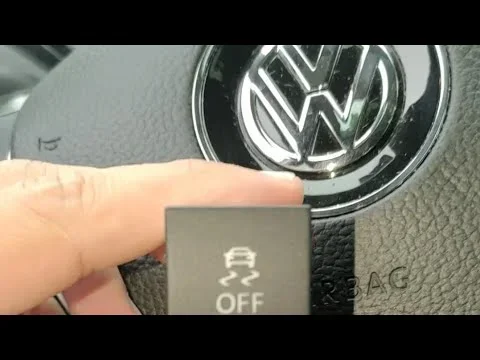
If you drive a newer Volkswagen Jetta, the traction control button is typically located on the left side of the steering wheel. Look for a button with a symbol that looks like a car with wavy lines behind it. This is the standard traction control icon. Pressing this button turns the system on or off. A warning light on your dashboard will confirm the status.
In some trims, you may also find a drive mode selector dial near the center console. The Jetta SEL and higher trims sometimes include drive modes like Normal, Snow, and Off Road. Switching to Snow mode effectively activates enhanced traction control settings. This gives you extra grip in slippery conditions without needing to toggle the main button.
Button Location in Older Jetta Models (2010-2018)
For older Jetta models, the button placement can vary a bit more. In many 2010 to 2018 Jettas, you will find the traction control switch on the center console, near the gear shifter. It is a small button with the same wavy-line icon. Some models also have a switch near the left knee area under the steering column. Check your owner manual if you have trouble finding it.
One thing to note about older models is that the traction control system may default to off if you have previously turned it off. The system does not always remember your last setting after you turn the car off and on again. So every time you start the engine, double-check that the system is active if you need it.
Step-by-Step Guide to Turning On Traction Control
Now that you know where the button is, let us walk through the steps to turn traction control on. This process is simple and takes only a few seconds.
Step 1: Start Your Jetta. Turn the ignition key or press the start button. Make sure the engine is running and the dashboard lights come on.
Step 2: Locate the Traction Control Button. Find the button with the traction control icon on the steering wheel or center console. The icon usually shows a car with squiggly lines beneath the tires.
Step 3: Press the Button. Give it a quick press. You should see a light appear on the dashboard. This light confirms that the system is active.
Step 4: Check the Dashboard Symbol. The traction control warning light should look like a car with wavy lines. If the light stays on constantly, the system is off. If it flashes briefly and then turns off, the system is on and working normally.
Step 5: Test the System. Drive on a safe, wet surface and gently press the gas pedal. You should feel the system engage if the wheels start to slip. This confirms everything is working properly.
Understanding Traction Control Dashboard Symbols
Your Volkswagen Jetta uses dashboard lights to communicate the status of the traction control system. Learning what these symbols mean can save you a lot of confusion and worry.
Traction Control Active Symbol
When traction control is turned on and functioning normally, you may see a brief flash of the wavy-line icon when you start the car. This is the system performing a self-check. After a few seconds, the light should go away. This means everything is working as it should.
Traction Control Warning Light
If the traction control warning light stays on while you are driving, it usually means one of two things. Either the system has been manually turned off, or there is a malfunction. A steady yellow or amber light typically indicates a problem with the system. In this case, you should have the car checked by a mechanic. The issue could be a faulty wheel speed sensor or a problem with the system module.
Traction Control Off Symbol
When you manually turn off traction control, the dashboard will display a steady light with the wavy-line icon. Some drivers prefer to turn it off when they are stuck in snow or mud. In those situations, allowing the wheels to spin can help you gain momentum and get unstuck. Just remember to turn it back on when you are back on solid ground.
Common Traction Control Problems and How to Fix Them
Like any car system, traction control can run into issues from time to time. Here are the most common problems Jetta owners face and what you can do about them.
Traction Control Light Stays On
A constantly lit traction control light is the number one complaint among Jetta owners. The most common cause is a faulty wheel speed sensor. Each wheel has a sensor that feeds data to the traction control system. When one sensor fails or gets dirty, the system cannot work properly. Cleaning or replacing the sensor usually fixes this issue.
Another possible cause is a low battery voltage. If your car battery is weak, the traction control system may not receive enough power to function. This can trigger the warning light even when the system is working fine. A simple battery test at any auto parts store can rule this out.
System Not Responding
Sometimes you press the traction control button but nothing happens. The light does not change, and the system does not engage. This could be a blown fuse or a wiring issue. Check the fuse box under the hood for the traction control fuse. If the fuse is good, the problem may be with the control module itself. In that case, a visit to a qualified mechanic is the best next step.
System Turns Off by Itself
If your traction control keeps turning off without you pressing the button, the system might be detecting a fault. The car’s computer disables traction control when it senses a problem elsewhere. For example, if the ABS system has a fault, the traction control system may also shut down. This is a safety feature designed to prevent further damage. Having the error codes read with an OBD-II scanner can help identify the root cause.
When Should You Turn Off Traction Control?
While traction control is a great safety feature, there are specific situations where turning it off makes sense. Understanding when to do this can help you avoid getting stuck or wasting time.
When Your Car Is Stuck in Snow or Mud. If you are stuck and the wheels are spinning in place, traction control will try to stop the spinning. This actually works against you because you need the wheels to spin to dig out. Turning off traction control lets the wheels spin freely so you can rock the car back and forth and gain traction.
When Driving on Deep Snow or Ice. Some drivers prefer to drive with traction control off on very icy roads. The reasoning is that the system may interfere with gentle wheel spin that helps you maintain momentum on ice. However, this is a debated topic among driving experts. For most drivers, keeping traction control on is the safer choice.
When Racing or Driving on a Track. If you are on a closed track or racing, turning off traction control gives you more control over wheel spin. This allows for better acceleration out of corners. But this only applies to controlled environments, not public roads.
Remember to always turn traction control back on when you return to normal driving conditions. Leaving it off on public roads reduces your safety margin significantly.
Maintaining Your Traction Control System
Keeping your traction control system in good shape is easier than you might think. A few simple habits can prevent most problems before they start.
- Keep Your Sensors Clean. The wheel speed sensors can collect dirt and debris over time. Wipe them down during routine car washes or when you notice the warning light.
- Check Your Tire Condition. Worn tires reduce traction and put extra strain on the traction control system. Rotate your tires regularly and replace them when the tread gets low.
- Address Warning Lights Promptly. If a dashboard light comes on, do not ignore it. The longer you wait, the worse the problem can get. A quick diagnostic check can save you from bigger repairs later.
- Keep Your Battery Healthy. A weak battery can cause all sorts of electrical gremlins, including traction control issues. Test your battery at least once a year, especially before winter.
- Read Your Owner Manual. Your specific Jetta model may have unique features or maintenance requirements. The owner manual is the best resource for model-specific guidance.
How Traction Control Affects Fuel Efficiency
You might wonder if traction control affects your gas mileage. The short answer is yes, but only slightly. When traction control is active, it can limit wheel spin during acceleration. This means the engine does not waste energy spinning uselessly on a slippery surface. In fact, traction control can slightly improve fuel efficiency on wet or icy roads by preventing wasted wheel spin.
On dry, clear roads, traction control has almost no impact on fuel economy. The system sits quietly and does not interfere with normal driving. So you do not need to worry about turning it on for fear of wasting gas. It is designed to work seamlessly in the background without any noticeable effect on your daily fuel consumption.
Expert Tips for Driving With Traction Control
Here are some expert tips to help you get the most out of your Volkswagen Jetta’s traction control system.
Tip 1: Do Not Rely on Traction Control Alone. Traction control helps, but it is not a magic solution. You still need to drive carefully, especially in bad weather. Reduce your speed, increase your following distance, and avoid sudden movements.
Tip 2: Keep Your Tires Properly Inflated. Underinflated tires reduce the contact patch and make traction control work harder. Check your tire pressure at least once a month. The recommended pressure for your Jetta can be found on the sticker inside the driver door frame.
Tip 3: Learn What Your Dashboard Lights Mean. Taking five minutes to study your dashboard symbols can save you a lot of stress on the road. Print out a cheat sheet from the internet and keep it in your glove box. When a light comes on, you will know exactly what it means and what to do.
Tip 4: Use Snow Mode When Available. If your Jetta has a drive mode selector, use the Snow mode in winter conditions. This setting adjusts throttle response and traction control behavior for better grip on slippery surfaces. It is a simple change that makes a real difference.
Key Takeaways
- Easy Activation: Most Volkswagen Jettas have a dedicated traction control button that is simple to locate and use.
- Safety First: Traction control works alongside your anti-lock braking system to improve vehicle stability on slippery roads.
- Dashboard Symbols Matter: Understanding the traction control warning light helps you spot problems early.
- Manual Reset Is Possible: You can manually clear traction control codes if needed, just like how to manually clear car codes.
- Weight Affects Traction: Carrying heavy loads changes how your traction system performs, similar to how weight capacity impacts overall handling.
- Check Engine Connection: Sometimes the traction control light links to broader issues, which may cause your check engine light to behave unexpectedly.
Conclusion
Knowing how to turn on traction control in your Volkswagen Jetta is a simple skill that can make a big difference in your safety. Whether you are dealing with a rainy morning commute or a snowy winter drive, traction control gives you an extra layer of confidence on the road. We have covered where the button is, what the dashboard symbols mean, when to turn the system off, and how to fix common problems. The key is to stay proactive. Check your dashboard lights regularly, keep your sensors clean, and always drive according to the conditions.
If you ever notice a warning light that stays on, do not ignore it. Addressing small issues early can prevent bigger headaches down the road. Your Volkswagen Jetta is a well-built car with smart safety features. Take the time to understand them, and they will take care of you when it matters most. Stay safe out there, and happy driving.
Frequently Asked Questions
Can I drive my Volkswagen Jetta without traction control?
Yes, you can drive without traction control, but it is not recommended for normal road conditions. Traction control helps prevent wheel slip on wet, icy, or loose surfaces. Driving without it increases the risk of losing control, especially in bad weather. Only turn it off when you need extra wheel spin to get unstuck in snow or mud.
Why is my traction control light flashing in my Jetta?
A flashing traction control light usually means the system has detected a fault. This could be caused by a bad wheel speed sensor, a low battery, or a problem with the ABS system. In some cases, the light may turn off after a few drives if the issue is temporary. If it stays on, have a mechanic run a diagnostic check to find the root cause.
Can traction control help me stop faster on icy roads?
Traction control primarily helps with acceleration, not braking. It prevents wheels from spinning when you press the gas. For better stopping power on ice, your anti-lock braking system (ABS) plays the bigger role. However, traction control does contribute to overall vehicle stability, which can help you maintain control during slippery conditions.
How do I reset the traction control system on a Volkswagen Jetta?
To reset the system, turn the ignition off and wait for about 30 seconds. Then turn the ignition back on and press the traction control button to reactivate the system. If the warning light stays on after a reset, there may be an underlying issue that needs professional diagnosis. You can also clear fault codes using an OBD-II scanner, similar to how to manually clear car codes.
Does turning off traction control save fuel in my Jetta?
No, turning off traction control does not save fuel. In fact, traction control can slightly improve fuel efficiency on slippery roads by preventing wasted wheel spin. On dry roads, the system has no impact on fuel consumption. It is always better to keep traction control on for safety reasons unless you are in a situation where you need the wheels to spin freely.
Can a dead battery cause the traction control light to come on?
Yes, a weak or dead battery can cause the traction control light to illuminate. The system relies on stable electrical power to function properly. If your battery voltage drops too low, the traction control module may shut down or display a warning. Have your battery tested if you notice the traction control light along with other electrical issues in your car.