Do You Reset After an Oil Change and Why It Matters
Do You Reset After an Oil Change? Many drivers skip this quick step, but it can prevent confusing warning lights and keep your engine running smoothly. In this guide, you’ll learn exactly why resetting matters, how to do it, and the most common mistakes to avoid. It only takes a few minutes and could save you from costly repairs.
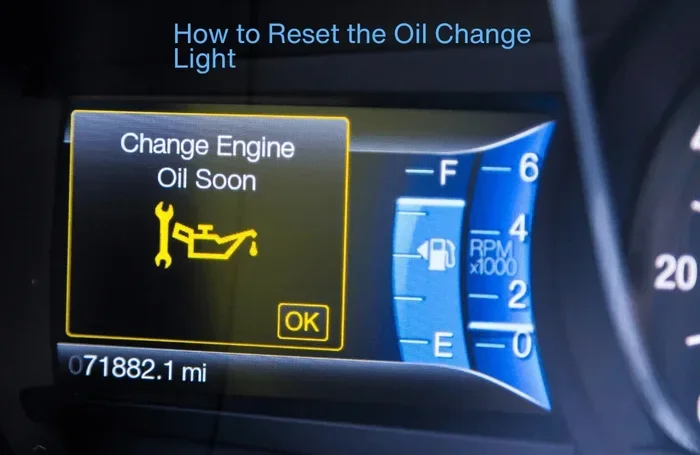
Have you ever driven away from the auto shop and wondered if you missed a step? You just paid for an oil change, and the mechanic hands you the keys. Everything seems fine. But then, a few days later, that little yellow light on your dashboard starts blinking. It says “Change Engine Oil” or “Service Required.” You just had the oil changed. What went wrong? The answer is simple. You probably did not reset the system. Do You Reset After an Oil Change? This is a question many car owners overlook. Yet it is one of the easiest ways to keep your vehicle running smoothly and avoid unnecessary trips to the shop.
Resetting after an oil change is not just a technical chore. It is a small habit that protects your car’s health. When you change the oil, you replace old, dirty fluid with fresh, clean oil. This extends the life of your engine. But your car’s computer does not know that on its own. It relies on a counter or sensor to track when the next oil change is due. If you do not reset that counter, the light stays on. It can confuse you and even trigger false alarms. Resetting after an oil change takes only a few minutes. It can save you from headaches and unexpected repair bills. Think of it as closing the loop on your oil change service. You did the work. Now you tell the car’s brain that the job is done.
In this guide, I will walk you through everything you need to know. I will explain what resetting means, why it matters, and how to do it for different car brands. I will also share common mistakes and quick tips. By the end, you will feel confident handling this simple maintenance task yourself. Do You Reset After an Oil Change? Yes, and here is why it matters.
Key Takeaways
- Reset after every oil change: It clears the maintenance light and keeps your service history accurate.
- It takes only a few minutes: The process is simple and often free.
- Methods vary by car brand: Check your owner’s manual for the exact steps.
- Forgetting to reset can cause confusion: A stuck oil change light may trigger unnecessary worry.
- DIY oil changes need a reset too: Even if you change the oil yourself, reset the system.
- Professional help is available: A mechanic can reset it quickly if you’re unsure.
📑 Table of Contents
- Do You Reset After an Oil Change? The Simple Answer
- Understanding the Oil Change Reminder System
- Why Resetting Matters for Your Vehicle
- How to Reset After an Oil Change (Step-by-Step)
- Does the Type of Oil Affect the Reset?
- Common Mistakes People Make After an Oil Change
- When to Seek Professional Help
- Conclusion: Why Resetting After an Oil Change Matters
Do You Reset After an Oil Change? The Simple Answer
The short answer is yes. You should reset your car after every oil change. This applies whether you visit a mechanic or you do it yourself at home. The reset clears the oil change reminder on your dashboard. It also tells the car’s computer that fresh oil is now in the engine. Without a reset, the system keeps counting down from the old service date. This can lead to early or late warnings. Both are problematic. A stuck light can distract you while driving. It may also make you ignore other real issues. Resetting ensures your service interval stays accurate. It keeps your maintenance schedule on track.
Some modern cars have an oil life system that automatically calculates when the next change is needed. This system uses driving habits, engine temperature, and mileage. It is smarter than a simple mileage counter. But even these advanced systems need a manual reset after an oil change. The reset tells the computer that the oil has been replaced. It resets the internal clock. This is true for most vehicles on the road today. Whether you drive a Toyota, Honda, Ford, or Chevrolet, the reset step is essential. It is a tiny action with a big impact. Skipping it is like throwing away the receipt after a purchase. You lose the proof that you did the work.
Understanding the Oil Change Reminder System
The Oil Life System Explained
Your car has a small computer that monitors engine health. This computer tracks oil quality and usage. It is called the oil life system or oil life monitor. The system uses sensors to measure stress on the oil. It looks at factors like engine temperature, idle time, and driving style. When the oil degrades past a certain point, the system triggers a warning. This warning is the maintenance light on your dashboard. It is not a check engine light. It is specifically for scheduled services like oil changes. The light is your car’s way of saying, “It is time for service.”
Resetting tells the computer that you have completed the service. It clears the counter and starts a new cycle. Think of it like setting a timer after you cook a meal. The timer counts down to zero. When the meal is done, you reset the timer for the next use. The same idea applies here. The oil change reminder counts down from the last service. After you add fresh oil, you reset it. This keeps the system in sync with your actual maintenance. Without this reset, the reminder stays active. It can nag you for weeks or even months. That is annoying and confusing.
Dashboard Indicator vs. Check Engine Light
Many drivers confuse the maintenance light with the check engine light. They are very different. The check engine light means a serious problem with the engine or emissions system. It requires immediate attention. The maintenance light is just a friendly reminder. It tells you that a routine service is due. It is not an emergency. However, if you ignore the maintenance light for too long, it can become a problem. Old oil loses its lubricating properties. It can cause increased friction and heat. Over time, this can lead to engine wear. So while the light is not an alarm, you should still take it seriously. Reset it after you complete the service.
How the Reset Button Works
The reset button is usually a small switch or a sequence of buttons on the dashboard or steering wheel. Some cars have a dedicated reset stalk near the steering column. Others use the infotainment screen. When you press the right combination, the computer clears the counter. It sets the oil life system back to 100% or full. This tells the car that fresh oil is now circulating. The dashboard indicator turns off. The service interval starts counting again from zero. It is a simple electronic reset. It does not change any mechanical parts. It only updates the software counter. That is why it is so easy to do.
- Oil life system uses real-time driving data to estimate oil degradation.
- Maintenance light indicates due service, not a mechanical failure.
- Reset button clears the counter and starts a new service interval.
- Dashboard indicator is different from the check engine light.
- Service interval is personalized to your driving habits.
Why Resetting Matters for Your Vehicle
Preventing False Warning Lights
A stuck oil change light can drive anyone crazy. You just had the oil changed. The mechanic hands you a receipt. You drive home, and the light is still on. It blinks on the highway. It distracts you. It makes you wonder if something is wrong with the engine. In most cases, nothing is wrong. The light is simply a reminder that has not been reset. This is a false alarm. It causes unnecessary stress. You might even pull over to check the oil level, even though it is fine. Resetting the system turns off the light. It gives you peace of mind. It also keeps your dashboard clean and easy to read. You want to see real warnings, not phantom ones.
Quick Tips: Always reset the system right after the oil change. Do not wait until you get home. The sooner you reset, the sooner the light goes off. If you forget, you can still reset later. But it is best to make it a habit. Ask the mechanic to do it for you. Many shops will reset the system as part of their oil change service. If they forget, you can do it yourself in minutes.
Maintaining Accurate Service Intervals
Your car’s service schedule is based on the oil life system. When you reset after each oil change, you keep that schedule accurate. Accurate records help you track maintenance over time. They also help you know when the next change is due. This is useful if you sell the car. A full service history boosts resale value. Buyers like to see that the owner kept up with oil changes. They also like to see that the maintenance light was properly reset. A car with a constantly lit oil change light looks neglected. It raises red flags. Resetting shows that you take care of your vehicle.
Protecting Your Engine Warranty
If your car is still under warranty, keeping a proper maintenance record is crucial. Many manufacturers require proof of regular oil changes. They want to see that you followed the service interval they recommend. If you skip the reset, your records might show gaps. A gap could give the warranty department a reason to deny a claim. For example, if your engine develops a problem, they might say you did not maintain the oil properly. Resetting the system after each change proves you stayed on schedule. It is a small step that protects your warranty. It could save you thousands of dollars in repairs. Always keep your receipts and reset records together. A simple spreadsheet or a photo of the dashboard after the reset can serve as proof.
What Happens If You Never Reset?
Ignoring the reset might seem harmless at first. The light stays on, but the car still runs. Over time, though, the confusion builds. You start to ignore all dashboard lights. You might miss a real warning. Old oil breaks down and loses its ability to protect engine parts. Metal parts grind against each other. This leads to increased wear. In the worst case, you could face an engine failure. The cost of a new engine is huge. A simple reset could have prevented it. The oil change interval is designed to keep your engine in top shape. Honoring it with a reset is the smart move.
How to Reset After an Oil Change (Step-by-Step)
Common Methods for Different Car Brands
Every car brand has its own reset procedure. The steps can vary from one model to another. I will cover the most common methods below. Always check your owner’s manual first. The manual has the exact steps for your specific vehicle. If you do not have the manual, you can find it online. Most automakers offer free PDF versions on their websites.
Here is a comparison table of reset methods for popular brands:
| Car Brand | General Reset Steps | Typical Time |
|---|---|---|
| Toyota | Turn key to ON (do not start). Press and hold the trip meter reset button. Turn key to OFF, then back to ON. Hold button until the light flashes and resets. | 1-2 minutes |
| Honda | Press the INFO button on the steering wheel. Scroll to “Oil Life System.” Press and hold the button until the system resets to 100%. | 1 minute |
| Ford | Use the steering wheel controls. Press Menu. Scroll to Vehicle Info. Select Reset Maintenance. Follow on-screen prompts. | 2 minutes |
| Chevrolet | Press the SETUP button on the steering wheel. Scroll to Vehicle Info. Select Oil Life System. Press and hold the reset button until it shows 100%. | 1-2 minutes |
| BMW | Turn ignition to ON. Press and hold the trip button. Turn ignition to OFF, then back to ON. Hold trip button until “Reset?” appears. Confirm. | 2 minutes |
| Jeep | Turn the key to ON. Use the steering wheel buttons to navigate to Settings. Select Vehicle Info. Choose Reset Oil Life. Follow prompts. | 1-2 minutes |
| Nissan | Turn ignition to ON. Press and hold the trip meter button for several seconds. The display will show the reset option. Select it. | 1 minute |
These are general steps. Some models may have slight differences. The reset procedure is usually found in the owner’s manual under “Maintenance” or “Instrument Cluster.” If you cannot find it, a quick search online for your specific model and year will give you a step-by-step guide. I always recommend writing down the steps or taking a photo with your phone. That way, you do not have to look them up again next time.
Quick Tips for a Smooth Reset
- Reset immediately after the oil change. Do not wait. The sooner, the better.
- Have the owner’s manual handy. It is your best friend for any car task.
- Use the correct button sequence. Pressing the wrong button can sometimes trigger other settings.
- Check if the light turns off. After resetting, start the engine and look at the dashboard. The light should be gone.
- Repeat if necessary. Sometimes the reset does not work the first time. Try again following the steps exactly.
- Know your car’s infotainment system. Many newer cars use a touchscreen menu. Look for “Vehicle Settings” or “Maintenance.”
Expert Insights: “I always tell my customers to reset the system before they leave the shop. It takes ten seconds and prevents a lot of confusion later. If they do it themselves, I walk them through the steps once so they feel confident. The most common issue is people forgetting, and then they come back a week later with the light still on. It is an easy fix, but it is better to prevent it.” – A certified mechanic with 15 years of experience.
Does the Type of Oil Affect the Reset?
You might wonder if using synthetic oil changes the reset process. The answer is no. The reset procedure is the same whether you use conventional oil or full synthetic. However, the oil life system may adjust the next service interval based on the oil type. Synthetic oil often lasts longer. The system might recommend a longer interval before the next change. This is normal. It does not mean you should skip the reset. Always reset after every oil change, regardless of the oil you use. Fresh synthetic oil deserves a fresh start on the counter.
Common Mistakes People Make After an Oil Change
Forgetting to Reset the System
This is the number one mistake. You pay for the oil change. You drive away. You forget about the reset. A week later, the light comes on. You panic. You think the oil change did not work. You might even go back to the shop for nothing. The mechanic checks the oil. It is fine. Then they reset the system and you feel silly. This happens all the time. It is an easy mistake to make. The best way to avoid it is to make resetting part of the oil change routine. Treat it like a checklist item. Change oil, check tire pressure, reset the system. Do it in that order. Write it on a sticky note if you need to. Some people even set a phone reminder right after they leave the shop.
Using the Wrong Reset Procedure
Every car is different. The reset steps for a Toyota are not the same as for a Honda. Using the wrong sequence can sometimes put the car into a diagnostic mode. It might clear other settings too. For example, some button combinations can reset the radio station presets or the clock. To avoid this, always follow the correct procedure for your vehicle. If you are unsure, ask the mechanic to do it. Most shops will reset the system for free as part of their oil change service. Do not be afraid to ask. It is your right as a car owner. I have seen people hold down the wrong buttons for minutes, only to accidentally turn off the radio or change the language setting. A little preparation saves time and frustration.
Resetting Before the Oil Change
I mentioned this briefly, but it deserves its own note. Some people reset the system before they even change the oil. Why? Maybe they read an article that said to reset. Or they think it will clear a warning. But resetting before the oil change does nothing useful. It just clears the counter. The old oil is still dirty. The engine is still running on worn-out fluid. You have not fixed the problem. Always change the oil first. Then reset the system. This order matters. It ensures the computer knows fresh oil is now in the engine. It starts the countdown for the next service at zero.
Ignoring the Light After a Reset
Sometimes you reset the system, but the light stays on. This is rare, but it can happen. It might mean the reset was not successful. It could also indicate a deeper issue. The oil pressure sensor might be faulty. The oil life system might need a professional scan tool to reset. In this case, a trip to the dealership or a trusted mechanic is necessary. They have diagnostic equipment that can communicate with the car’s computer. They can clear the code and get the light off. This is not something you should ignore. A persistent warning light could signal a real problem. Do not assume it is just a reset issue if the light remains after you have followed the correct procedure.
When to Seek Professional Help
Reset Issues After a DIY Oil Change
Doing your own oil change can save money. It is a satisfying DIY project. But it also means you are responsible for the reset. If you cannot figure out the procedure, do not worry. You have options. Many auto parts stores will reset the system for free. They have the tools and the manuals. You can also visit a quick-lube shop. They will do it in minutes. Some mechanic shops charge a small fee for the reset if it is not part of an oil change service. That fee is usually under $20. It is worth it if you are stuck. Do not let a simple reset turn into a frustrating experience. Your local oil change service center can handle this in a flash.
Persistent Warning Lights
Another reason to seek help is if the light stays on after a reset. This is rare, but it can happen. It might indicate a deeper issue. The oil pressure sensor could be faulty. The oil life system might need a professional scan tool to reset. In this case, a trip to the dealership or a trusted mechanic is necessary. They have diagnostic equipment that can communicate with the car’s computer. They can clear the code and get the light off. This is not something you should ignore. A persistent warning light could signal a real problem. Do not assume it is just a reset issue if the light remains after you have followed the correct procedure.
Cost of Professional Reset
Most dealerships and independent shops will reset the system for free if you are having an oil change done. If you are not having the oil changed, some shops charge a small diagnostic fee. This fee typically ranges from $10 to $30. It is a small price for peace of mind. If you are unsure about the reset procedure, it is always worth asking. A professional can also check your oil level and top it off if needed. This is a good opportunity to get a quick inspection. They can spot other issues before they become big problems.
Conclusion: Why Resetting After an Oil Change Matters
Do You Reset After an Oil Change? Yes, and it is one of the simplest things you can do for your vehicle. Resetting after every oil change keeps your dashboard clear. It maintains an accurate service history. It prevents false alarms and unnecessary trips to the shop. It takes just a few minutes. It costs nothing. It is a small habit that pays off big time. Your car works hard for you every day. It deserves a little attention after each oil change. Next time you get an oil change, make the reset your final step. You will thank yourself later. Keep your engine oil fresh and your reset procedure consistent. That is the secret to long-lasting car health. A simple reset today can prevent big problems tomorrow.
Frequently Asked Questions
Is resetting after an oil change really necessary?
Yes, it is necessary. Resetting clears the maintenance light and tells the car’s computer that fresh oil is now in the engine. Without a reset, the warning light stays on and the service interval becomes inaccurate.
How long does it take to reset the oil change light?
It usually takes only one to two minutes. The exact time depends on your car brand and the reset method. Most procedures involve a few simple button presses on the steering wheel or dashboard.
Can I reset the system myself, or do I need a mechanic?
You can reset it yourself in most cases. All you need is your owner’s manual or a quick online search for your specific model. If you are unsure, any auto parts store or quick-lube shop can do it for free.
What happens if I reset the system before changing the oil?
Resetting before the oil change clears the counter but does not change the old oil. The engine still runs on degraded fluid. You should always change the oil first, then reset the system to start a fresh service interval.
Will resetting affect my car’s warranty?
Yes, it can help protect your warranty. Keeping a record of oil changes and proper resets shows that you followed the manufacturer’s maintenance schedule. This can prevent disputes if a warranty claim is ever needed.
Does synthetic oil require a different reset procedure?
No, the reset procedure is the same for synthetic and conventional oil. The car’s computer does not know what type of oil you used. It only tracks the service interval. You reset it the same way after any oil change.