What To Do If Your Car Wont Recognize Your Key Fob
A car that won’t recognize your key fob is frustrating but usually fixable. The most common culprits include a dead key fob battery, signal interference, a faulty transponder, or a drained vehicle computer. This guide walks you through every possible solution step by step.
You walk up to your car on a busy morning. You press the button on your key fob. Nothing happens. You press it again. Still nothing. Your car won’t recognize your key fob, and now you’re standing in the parking lot wondering what went wrong.
This situation happens to millions of drivers every year. Sometimes the fix is as simple as swapping out a battery. Other times, it points to a deeper key fob troubleshooting issue that needs professional attention. Either way, knowing what to check and when to act can save you time, money, and a lot of stress.
In this article, we cover every reason your electronic key might stop being recognized. We also give you clear, actionable steps to fix the problem yourself or know when to seek help. Let’s get into it.
Key Takeaways
- Dead battery is the #1 cause: Replacing the key fob battery solves most recognition problems.
- Signal interference is common: Metal objects, electronic devices, and even your pocket can block the signal.
- Reprogramming often works: A simple reset or reprogram can restore communication between your fob and car.
- Water damage kills fobs: If your fob has been wet, the internal circuitry may be damaged beyond repair.
- Know when to call a pro: Ignition switch failures and immobilizer issues need a trained automotive locksmith or dealer.
- Preventive care extends fob life: Regular battery swaps and proper storage keep your remote keyless entry working smoothly.
📑 Table of Contents
- Why Your Car Won’t Recognize Your Key Fob
- Quick Fixes You Can Try Right Now
- Key Fob Battery Problems and Solutions
- Signal Interference and Electronic Issues
- When to Reprogram or Replace Your Key Fob
- Preventing Key Fob Recognition Problems
- When to Call a Professional
- Comparison: DIY Fix vs. Professional Help
- Key Takeaways
- Conclusion
Why Your Car Won’t Recognize Your Key Fob
Before you start fixing anything, it helps to understand what’s actually happening. Your key fob sends a low-frequency radio signal to your car. The car’s remote keyless entry system picks up that signal and unlocks the doors or starts the engine. When something breaks that chain, your car stops recognizing the fob.
Here are the most common reasons this chain breaks:
- Dead key fob battery — The fob can’t send a strong enough signal.
- Signal interference — Other electronics or metal objects block the transmission.
- Faulty transponder chip — The internal chip that authenticates your key is damaged.
- Drained car battery — The vehicle’s computer system doesn’t have enough power to detect the fob.
- Water or moisture damage — Liquid gets inside the fob and shorts the circuitry.
- Worn-out key fob — The fob has reached the end of its lifespan.
- Immobilizer system error — The car’s security system locks out the fob mistakenly.
Each of these causes has a different fix. Let’s walk through them one by one.
Quick Fixes You Can Try Right Now
Before you run out and buy a new car key replacement, try these simple steps. Many drivers solve the problem in under five minutes.
Step 1: Check the Distance
Move closer to your car. Stand within a few feet of the driver’s door. Some push button start systems need the fob very close to work. If you have the fob in your pocket and it’s far from the car, the signal might be too weak to register.
Step 2: Remove Metal Obstructions
Take the fob out of your pocket if it’s sitting next to keys, coins, or other metal objects. Metal can block the key fob signal and prevent recognition. Place the fob flat against the start button or the door handle and try again.
Step 3: Try the Backup Method
Most modern cars have a backup way to start the engine. Look for a small slot near the start button or steering column. Place the fob directly into that slot. This bypasses the wireless signal and uses a direct connection. If the car starts this way, the wireless system is the problem — not the fob itself.
Step 4: Cycle the Car Battery
Open the hood and disconnect the car battery for about 30 seconds. Reconnect it. This resets the car’s computer system. Sometimes the vehicle security system simply needs a reboot to recognize the fob again.
Step 5: Press the Lock and Unlock Buttons
Stand close to the car and press both the lock and unlock buttons on your remote keyless entry fob. Do this three times in a row. This can re-establish the connection between the fob and the car in some models.
Key Fob Battery Problems and Solutions
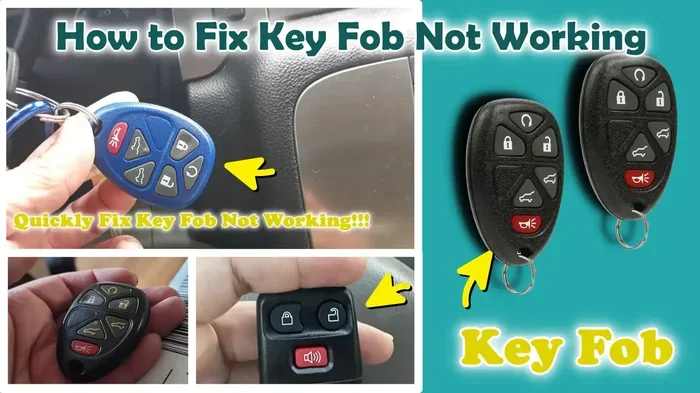
The single most common reason a key fob not recognized issue occurs is a dead battery. Key fob batteries are small, usually CR2025 or CR2032 coin cells, and they don’t last forever.
Signs Your Key Fob Battery Is Dying
Watch for these warning signs before the battery dies completely:
- The fob works only when you hold it very close to the car.
- You need to press the button multiple times for it to respond.
- The range of the remote gets shorter over time.
- The fob buttons feel less responsive or mushy.
- The car dashboard shows a low battery warning for the fob.
How to Replace the Key Fob Battery
Replacing the battery is easy and costs just a few dollars. Here’s how:
- Find the small seam or groove along the edge of your key fob.
- Use a small flathead screwdriver or a coin to gently pry the fob open.
- Remove the old battery and note which side faces up.
- Insert a new battery of the same type, matching the positive and negative sides.
- Snap the fob back together and test it near your car.
Quick Tip: Always carry a spare battery in your glove box. A dead fob battery can strike at the worst possible moment, and having a spare saves you from being stranded.
When Battery Replacement Doesn’t Help
If you swap in a fresh battery and the car won’t start or still won’t recognize the fob, the problem is deeper. The battery might be fine, but something else in the key fob troubleshooting chain is broken. Move on to the next sections to dig further.
Signal Interference and Electronic Issues
Your key fob communicates using radio waves. Those waves travel through the air, but they can be blocked or confused by other electronic signals. This is called signal interference, and it’s more common than most drivers realize.
What Causes Signal Interference?
Several everyday items can disrupt the communication between your fob and your car:
- Other key fobs — If you carry multiple fobs close together, they can confuse the car’s receiver.
- Electronic devices — Phones, tablets, and USB chargers emit signals that can overlap with your fob’s frequency.
- Metal structures — Parking garages, tall buildings, and even metal car roofs can block the signal.
- Power lines and transformers — These emit strong electromagnetic fields that interfere with weak fob signals.
- Other vehicles — Sometimes a nearby car with a similar fob frequency causes a mix-up.
How to Fix Interference Problems
Start by moving away from other electronics. Step away from your phone, remove other fobs from your pocket, and walk a few feet away from walls or metal structures. Try again. In most cases, the fob will work once the interference is removed.
Expert Insight: If you notice your fob only fails in certain parking lots or garages, interference is likely the cause. Try standing in an open area away from other vehicles and electronics before assuming the fob is broken.
When to Reprogram or Replace Your Key Fob
Sometimes the fob battery is fine and there’s no interference, but the car still won’t recognize it. In these cases, the fob may need to be reprogrammed or replaced entirely.
Key Fob Reprogramming Basics
Reprogramming means teaching your car to recognize the fob again. The process varies by car brand and model, but here’s a general overview:
- Sit in the driver’s seat with all doors closed.
- Turn the ignition to the “On” position without starting the engine.
- Press and hold a specific button combination on the fob (check your owner’s manual for exact steps).
- Wait for the dashboard lights to flash, which confirms the car is in programming mode.
- Press the fob buttons to complete the pairing process.
- Turn the ignition off and test the fob.
Some newer cars require a dealer-level tool for reprogramming. In those cases, you’ll need to visit a dealership or a qualified automotive locksmith.
When Reprogramming Isn’t Enough
If reprogramming fails, the internal components of the fob may be damaged. Common causes of internal damage include:
- Water exposure — Even a small splash can corrode the circuit board inside the fob.
- Physical impact — Dropping the fob on hard surfaces can crack the internal chip.
- Heat damage — Leaving the fob in a hot car or in direct sunlight can warp the circuitry.
- Age — After several years of use, the internal components simply wear out.
When internal damage is the issue, you have two options: buy a replacement fob or get the old one repaired. Replacement fobs cost anywhere from $50 to $300 depending on your car’s make and model. A car key replacement from the dealer is the most reliable option, but aftermarket fobs work well for many vehicles.
Common Mistakes When Replacing a Key Fob
- Buying the wrong fob model — Always double-check your car’s year, make, and model before purchasing.
- Skipping the programming step — A new fob won’t work until it’s properly programmed to your car.
- Using a non-OEM battery — Cheap batteries die faster and may not provide enough voltage for the fob to work reliably.
- Ignoring the backup physical key — Most fobs come with a hidden mechanical key. Use it to unlock the door if the fob completely fails.
Preventing Key Fob Recognition Problems
The best way to deal with a key fob not recognized situation is to prevent it from happening in the first place. A few simple habits can keep your remote keyless entry system working smoothly for years.
1. Replace the Battery on a Schedule
Don’t wait for the fob to die. Replace the battery every two to three years. Set a calendar reminder if it helps. This one habit prevents most key fob not working situations.
2. Store Your Fob Properly
Keep your fob away from extreme heat, cold, and moisture. Don’t leave it on the dashboard in direct sunlight. Store it in a dry, cool place when you’re not using it.
3. Avoid Carrying Too Many Electronics Together
As we covered earlier, signal interference is real. Keep your fob separate from other key fobs, phones, and electronic devices when possible.
4. Handle Your Fob with Care
Key fobs are small and get tossed around a lot. They fall on hard floors, get sat on, and get jostled in pockets and bags. Treat your fob gently to avoid internal damage to the transponder key chip inside.
5. Keep a Spare Fob on Hand
Always have a backup. If your primary fob stops working, a spare gets you to the dealer or locksmith without being stranded. Many people forget they have a spare until they need it desperately.
When to Call a Professional
Not every problem can be solved at home. Here are the signs that you need professional help with your key fob not detected issue:
- The fob still doesn’t work after replacing the battery and reprogramming it.
- The car’s dashboard shows a security warning or immobilizer light.
- You notice physical damage to the fob, like cracks or water marks.
- Multiple fobs for the same car stop working at the same time.
- The car starts with the backup slot method but won’t recognize the fob wirelessly.
In these situations, the problem likely involves the car’s immobilizer system, the ignition switch, or the vehicle’s central computer module. These are complex systems that require specialized diagnostic tools and expertise. A certified automotive locksmith or your car dealer can run a full diagnostic scan and pinpoint the exact issue.
Common Mistakes to Avoid: Don’t try to open or repair the fob yourself if you’re not experienced. Opening the fob can damage the delicate internal components, and void any remaining warranty. Don’t ignore a persistent key fob not recognized issue either. What starts as a minor annoyance can quickly become a major problem if the underlying cause is a failing immobilizer or ignition switch.
Comparison: DIY Fix vs. Professional Help
| Factor | DIY Fix | Professional Help |
|---|---|---|
| Cost | Low (battery: $5-$10) | Moderate to high ($50-$300+) |
| Time Required | 5-15 minutes | 1-3 days (including wait time) |
| Best For | Battery issues, signal interference | Internal damage, immobilizer faults |
| Tools Needed | Small screwdriver, spare battery | Diagnostic scanner, programming tools |
| Risk Level | Low | Low (when using a certified pro) |
| Long-Term Fix | Temporary if the fob is damaged | Permanent when the root cause is addressed |
Use this table as a quick guide. If the problem is simple, save yourself the trip and try the DIY route first. If it’s complex, don’t waste time guessing — call a professional.
Key Takeaways
- A dead key fob battery is the most common cause of recognition failure. Replace it first before trying anything else.
- Signal interference from electronics and metal objects can temporarily block your fob. Move away from these and try again.
- Reprogramming your fob often restores communication between the fob and your car’s computer system.
- Water damage and physical impact can permanently damage the fob’s internal components. Handle your fob with care.
- Call a professional if basic fixes don’t work. Immobilizer and ignition issues need expert diagnosis.
- Preventive maintenance — regular battery swaps and proper storage — keeps your fob working reliably for years.
Conclusion
A car that won’t recognize your key fob can throw a wrench into your entire day. But the good news is that most causes are simple and fixable. Start with the battery. Move on to signal checks and reprogramming. And know when it’s time to call in the experts.
Taking care of your key fob with regular maintenance and proper storage goes a long way. You’ll avoid most recognition problems before they even start. And when something does go wrong, you’ll know exactly what to do.
Don’t let a dead fob leave you standing in the parking lot. Use the steps in this guide, keep a spare battery handy, and stay calm. Your car will be running again before you know it.
Frequently Asked Questions
Why does my key fob work sometimes but not others?
This is usually caused by signal interference or a weak battery. When the fob battery is low, it sends a weaker signal that only works at close range. Interference from other electronics or metal objects can also cause inconsistent behavior. Try replacing the battery first, then check for interference sources near where the fob fails.
How much does it cost to replace a key fob battery?
A key fob battery typically costs between $5 and $10. You can buy them at most grocery stores, drugstores, and online retailers. The replacement process is simple enough that most people can do it at home without any tools beyond a small flathead screwdriver.
Can a dead car battery cause the key fob not to work?
Yes, absolutely. Your car’s computer system needs power to detect and communicate with the key fob. If the car battery is dead or nearly dead, the system can’t recognize the fob even if the fob itself is working perfectly. Jump-starting or replacing the car battery often solves this problem.
How do I know if my key fob needs reprogramming?
If you replaced the battery and the fob still doesn’t work, or if the car was recently serviced and the fob stopped being recognized, reprogramming may be needed. Other signs include the fob working intermittently or the car showing a security warning on the dashboard. Check your owner’s manual for reprogramming steps specific to your vehicle model.
Can water damage permanently destroy a key fob?
Yes, water can permanently damage a key fob if the internal circuitry gets wet and isn’t dried quickly. Even small amounts of moisture can corrode the circuit board over time. If your fob has been exposed to water, open it up, let it dry completely, and replace the battery. If it still doesn’t work after that, you’ll likely need a replacement fob.
Should I buy an OEM or aftermarket key fob?
OEM (Original Equipment Manufacturer) fobs are made by your car’s manufacturer and are guaranteed to work with your vehicle. Aftermarket fobs are cheaper and often work well, but quality varies. If you want reliability and don’t mind paying a bit more, go with OEM. If you’re on a budget, a reputable aftermarket fob is a solid choice — just make sure it’s compatible with your car’s year and model.