How to Reset Volvo XC90 Maintenance Light Step by Step
Resetting the Volvo XC90 maintenance light is a simple process you can do at home in minutes. Whether your service interval indicator is flashing after an oil change or a routine service, this guide walks you through every method. You will learn the instrument cluster reset procedure, manual clearing tips, and how to avoid common mistakes that cause the light to return.
Every Volvo XC90 owner eventually faces that annoying little light on the dashboard. It pops up after an oil change or a service interval and just sits there, reminding you of maintenance you have already done. If you are wondering how to reset Volvo XC90 maintenance light, you are in the right place.
This guide gives you a clear, step-by-step walkthrough that works for most XC90 model years. We will cover the instrument cluster method, the manual button approach, and troubleshooting tips when things do not go as planned. No dealership visit required. No expensive mechanic bill either.
Understanding your Volvo XC90 maintenance light starts with knowing what it actually means. The light is part of your vehicle’s onboard computer system. It tracks mileage and time intervals to remind you when service is due. Once you complete the maintenance, the light needs a manual reset. This article shows you exactly how to do that.
Key Takeaways
- Easy DIY Process: You can reset the Volvo XC90 maintenance light without visiting a dealership or mechanic.
- Multiple Methods Available: The instrument cluster menu and manual button combination both work for resetting the service indicator.
- Common Mistakes Cause Recurrence: Not following the correct sequence or skipping steps often makes the light come back.
- Regular Maintenance Matters: Keeping up with your Volvo service schedule helps prevent unwanted warning lights.
- When to Seek Help: If the light persists after resetting, there may be an underlying issue that needs professional diagnosis.
📑 Table of Contents
- Understanding the Volvo XC90 Maintenance Light
- How to Reset Volvo XC90 Maintenance Light Using the Instrument Cluster
- Manual Reset Method for Older Volvo XC90 Models
- Common Mistakes When Resetting the Maintenance Light
- When to Seek Professional Help
- Preventing Future Maintenance Light Issues
- Comparison of Reset Methods
- Key Takeaways
Understanding the Volvo XC90 Maintenance Light
The maintenance light on your Volvo XC90 is different from the check engine light. It is specifically tied to your service schedule. When your car reaches a certain mileage or time period, the instrument cluster displays a reminder. This is your vehicle telling you it is time for an oil change, inspection, or other routine service.
Many owners confuse the maintenance light with other dashboard warnings. The maintenance required light typically shows a wrench icon or the text “Service Required.” It does not mean something is broken. It simply means your car is due for scheduled upkeep. Clearing the light after you complete the service keeps your dashboard clean and your mind at ease.
Why the Maintenance Light Comes On
Several triggers cause the Volvo XC90 maintenance light to activate. The most common reason is reaching the oil change interval. Volvo recommends specific mileage gaps between oil changes, and the onboard computer tracks this for you. Other reasons include:
- Reaching the next scheduled service interval
- Completing an oil change and forgetting to reset the counter
- Time-based service reminders, usually every 6 months or 12 months
- Aftermarket modifications that affect the service tracking system
- Battery replacement that resets the onboard computer
Knowing why the light comes on helps you address the root cause. If you just changed your oil but the light stayed on, you simply need to reset the counter. If the light keeps coming back after a reset, there may be a deeper issue worth investigating.
How to Reset Volvo XC90 Maintenance Light Using the Instrument Cluster
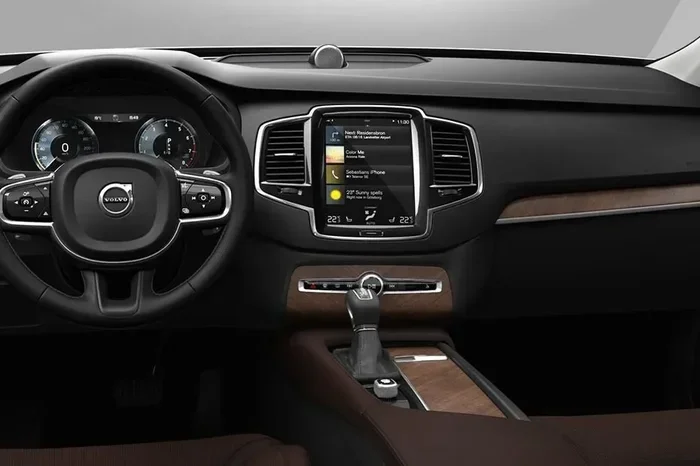
The most common method involves the instrument cluster behind your steering wheel. This approach works for most XC90 models from recent years. You do not need any special tools or expensive diagnostic equipment. Just follow these steps carefully.
Step-by-Step Instrument Cluster Method
Start by sitting in your Volvo XC90 and closing all doors. Turn the ignition to the on position without starting the engine. You should see the dashboard lights activate fully. Now look at the instrument cluster display.
Locate the trip meter buttons on the left side of the steering wheel or on the instrument panel itself. Press and hold the reset button. While holding it, turn the ignition off and then back on. Continue holding the button for several seconds until the display changes.
You should see the maintenance menu appear on the screen. Use the steering wheel buttons to navigate to the service interval reset option. Select it and confirm your choice. The display should now show that the maintenance light has been cleared. Turn the ignition off and back on again to verify the light is gone.
Quick Tip: If the light does not clear on the first try, repeat the process. Make sure you are holding the button long enough during the restart phase. Timing matters in this procedure.
Manual Reset Method for Older Volvo XC90 Models
Older XC90 models may not have the same digital menu system. These vehicles use a more straightforward manual reset process. The good news is that it is just as simple once you know the right sequence.
Finding the Reset Button
Open your driver’s side door and look at the lower left side of the dashboard. Near the driver’s seat, you will find a small panel with several buttons. One of these buttons is the trip odometer reset. There may also be a separate maintenance reset button depending on your model year.
Turn the ignition to the on position. Press and hold the trip reset button. While continuing to hold it, turn the ignition off. Wait a few seconds, then turn the ignition back on while still holding the button. The maintenance light should start flashing, indicating it is in reset mode.
Release the button and press it again briefly. The display should show the service interval resetting to zero. Turn the ignition off and start the engine to confirm the maintenance light is no longer visible on your dashboard.
Expert Insight: If you cannot find the reset button, consult your Volvo XC90 owner manual. The exact location and button layout vary slightly between model years. The manual will have a diagram showing the precise spot.
Common Mistakes When Resetting the Maintenance Light
Many people run into trouble because of small errors during the reset process. These mistakes can cause frustration and sometimes even make the light come back. Knowing what to avoid saves you time and effort.
Mistake 1: Not Holding the Button Long Enough
The most common error is releasing the reset button too early. The system needs you to hold the button through the entire ignition cycle. If you let go too soon, the reset will not register. Hold the button firmly for at least 10 to 15 seconds during the key cycle.
Mistake 2: Starting the Engine During the Process
Some owners accidentally start the engine while trying to reset the light. The engine running changes the electrical state of the system. This can interrupt the reset sequence. Keep the engine off during the key transitions and only start it after the reset is complete.
Mistake 3: Confusing the Trip Meter with the Maintenance Reset
The trip meter and the maintenance light are two different systems. Resetting your trip odometer does not clear the maintenance light. Make sure you are accessing the service interval menu, not the trip display. On some models, you need to scroll through different display modes to find the maintenance option.
Mistake 4: Ignoring the Underlying Service Need
Sometimes the maintenance light comes on because you genuinely need service. Resetting the light without completing the required maintenance is a bad idea. Your Volvo is designed to track service intervals for a reason. Regular upkeep keeps your car running smoothly and prevents costly repairs down the road.
If you have been putting off an oil change, the maintenance light is trying to tell you something. Clear the light only after you have completed the service. This keeps your vehicle in good shape and your reset meaningful.
When to Seek Professional Help
Most of the time, resetting the Volvo XC90 maintenance light is a straightforward task. But there are situations where professional help makes sense. If the light keeps returning after a proper reset, something else is going on.
A persistent maintenance light could indicate a sensor issue, a faulty instrument cluster, or a problem with the onboard computer system. In these cases, clearing the light yourself will only provide temporary relief. The light will return within days or even hours.
You can also try manually clearing your car codes if you suspect a stored error is triggering the maintenance reminder. However, if you are not comfortable working with your vehicle’s electronics, a professional mechanic or Volvo dealership can run a full diagnostic check.
Visiting a dealership is another option, especially if your vehicle is still under warranty. Many owners ask whether they can take their vehicle to any dealership for service. The answer depends on your warranty terms and service plan. For routine maintenance light resets, though, you should be able to handle it yourself without any professional assistance.
Preventing Future Maintenance Light Issues
Once you have successfully reset the maintenance light, you want to keep it off. Regular maintenance and good habits help prevent unnecessary dashboard warnings. Here are some simple steps to keep your Volvo XC90 running smoothly.
- Follow the service schedule: Stick to the mileage and time intervals recommended by Volvo
- Reset after every service: Make it a habit to reset the maintenance light each time you complete a service
- Keep your records: Maintain a log of all oil changes, inspections, and repairs
- Check dashboard lights regularly: A quick glance at your instrument cluster during your morning drive can catch issues early
- Update your onboard computer: Some Volvo models benefit from software updates that improve service tracking accuracy
Taking care of your Volvo XC90 goes beyond just resetting lights. Regular car maintenance tips like checking your tire pressure, monitoring fluid levels, and staying on top of oil changes all contribute to a healthier vehicle. These small habits add up to fewer warning lights and fewer trips to the mechanic.
Another important aspect is understanding your vehicle’s dashboard warning lights. Not every light means the same thing. The maintenance light is informational, while the check engine light signals a potential problem. If you ever see the check engine light, you can learn more about what it means and whether you can drive with it on. Some lights are harmless, while others require immediate attention.
Comparison of Reset Methods
Different Volvo XC90 model years may require different reset approaches. Here is a quick comparison of the two main methods.
| Method | Best For | Difficulty | Tools Needed |
|---|---|---|---|
| Instrument Cluster Menu | Newer XC90 models with digital display | Easy | None |
| Manual Button Reset | Older XC90 models with analog gauges | Easy to Moderate | None |
| OBD-II Scanner | Persistent lights or error codes | Moderate | OBD-II diagnostic tool |
| Dealership Visit | Warranty-covered vehicles or complex issues | Easy | None (done by professional) |
The instrument cluster method works for most modern XC90s. The manual button method suits older models. If neither approach clears the light, an OBD-II scanner can read any stored codes that might be causing the issue. And if all else fails, a trip to the dealership remains a reliable option.
Key Takeaways
- Simple Process: Resetting the Volvo XC90 maintenance light takes just a few minutes and requires no special tools.
- Two Main Methods: Use the instrument cluster menu for newer models or the manual button combination for older ones.
- Avoid Common Mistakes: Hold the button long enough, keep the engine off during the process, and do not confuse the trip meter with the maintenance reset.
- Reset After Service: Always clear the light after completing the actual maintenance to keep accurate service records.
- Know When to Get Help: A persistent light may indicate a deeper issue that needs professional diagnosis or equipment like a diagnostic scanner.
- Prevent Future Issues: Following your Volvo service schedule and checking dashboard lights regularly keeps your XC90 in top shape.
Resetting the Volvo XC90 maintenance light is one of those small car care tasks that makes a big difference. It keeps your dashboard clean, your service records accurate, and your mind focused on the road. With the steps outlined in this guide, you should feel confident tackling the reset yourself.
Remember that the maintenance light exists to keep your vehicle in top condition. Clear it after you complete your service, and use the reminder as a cue to stay on top of your car care routine. A well-maintained Volvo XC90 delivers the safety, comfort, and performance you expect from this premium SUV.
If you ever run into trouble or the light keeps coming back, do not hesitate to consult a professional. Sometimes the issue goes deeper than a simple reset. But for most owners, the methods in this guide will solve the problem quickly and easily. Happy driving, and keep that maintenance schedule on track.
Frequently Asked Questions
How do I reset the maintenance light on a Volvo XC90 after an oil change?
After completing your oil change, turn the ignition to the on position without starting the engine. Press and hold the trip reset button on the instrument cluster. While holding it, turn the ignition off and then back on. Continue holding until the maintenance menu appears, then select the service interval reset option. The light should clear once you confirm the reset.
Why does my Volvo XC90 maintenance light keep coming back after I reset it?
If the maintenance light returns shortly after resetting, it usually means the service interval has not been properly updated in the onboard computer. This can happen if the reset was not completed correctly. It may also indicate an underlying sensor issue or a stored diagnostic code. Try clearing the light again following the exact steps, and if it persists, consider using an OBD-II scanner or visiting a professional.
Can I drive my Volvo XC90 with the maintenance light on?
Yes, you can safely drive your Volvo XC90 with the maintenance light on. The light is a reminder for scheduled service and does not indicate a mechanical failure. However, it is best to address the service need promptly to keep your vehicle running at its best and to avoid potential issues from delayed maintenance.
What is the difference between the maintenance light and the check engine light on a Volvo XC90?
The maintenance light is a scheduled service reminder tied to mileage or time intervals. It does not signal a problem with your vehicle. The check engine light, on the other hand, indicates a potential issue detected by the onboard diagnostics system. If your check engine light is on, it is worth investigating further, as it may point to an actual mechanical or electrical problem.
Do I need any special tools to reset the Volvo XC90 maintenance light?
No special tools are needed for most Volvo XC90 models. The reset can be done using the buttons on your steering wheel or instrument cluster. For older models, the manual button method requires no equipment at all. If the light persists and you suspect a deeper issue, an OBD-II diagnostic scanner can help read stored codes, but it is not necessary for a standard maintenance light reset.
Will resetting the maintenance light void my Volvo XC90 warranty?
No, resetting the maintenance light does not void your warranty. The light is simply a service reminder and clearing it after completing your scheduled maintenance is completely normal. Your warranty covers repairs and services regardless of whether the maintenance light is displayed. Keep your service records to prove you followed the recommended maintenance schedule.