How to Reset the Brake Pad Sensor on Your BMW Today
Resetting the brake pad sensor on your BMW is a simple maintenance task you can do at home with basic tools. This guide walks you through the exact steps for different BMW models, explains when and why you need to reset the sensor, and highlights common pitfalls. Whether you use the iDrive system or prefer a manual approach, you will find clear instructions to get the job done right.
That yellow brake warning light on your BMW dashboard can be nerve-wracking. You just replaced your brake pads, but the light stays on. What gives? The answer is simple: you need to reset the brake pad sensor. This small but important step often gets overlooked, and it can leave you wondering if something is still wrong with your brakes.
In this guide, we will walk you through exactly how to reset the brake pad sensor on your BMW. Whether you drive an E46, F30, G20, or any other BMW model, the process is more straightforward than you might think. We will cover the iDrive method, the manual approach, and everything in between. By the end, you will feel confident tackling this job yourself.
Brake pad sensors are small wiring devices that sit against your brake pads. They monitor pad wear and trigger a dashboard warning when the pads get thin. After installing new pads, the sensor needs recalibration. Without the reset, your BMW keeps telling you that your brakes are worn out, even when they are brand new. Let us fix that.
Key Takeaways
- Know When to Reset: The brake pad sensor needs resetting after every pad replacement to clear the warning light.
- Two Main Methods: You can reset the sensor through the BMW iDrive system or manually using a tool or connector trick.
- Avoid Common Mistakes: Forgetting to check the sensor connector or using the wrong procedure for your model can cause errors.
- Safety First: Always let the car cool down and disconnect the battery before working on brake components.
- Model Variations Matter: Different BMW models may require slightly different reset procedures.
- Post-Reset Verification: Always confirm the warning light is off and the system reads correctly after resetting.
📑 Table of Contents
Understanding the BMW Brake Pad Sensor
Before you dive into the reset process, it helps to understand what the brake pad sensor actually does. This tiny component plays a big role in your BMW’s safety system.
What Does the Brake Pad Sensor Do?
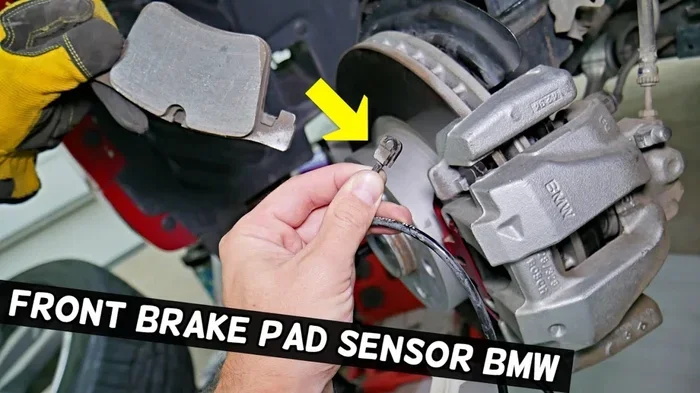
The brake pad sensor is a small wire that clips onto your brake pads. It sits in contact with the pad surface and monitors wear. When the pads wear down to a certain thickness, the sensor completes a circuit and sends a signal to the BMW’s computer. This triggers the warning light on your dashboard.
Think of it as a wear indicator. It is designed to tell you exactly when it is time for new pads. Once you install fresh pads, the sensor needs to be reset so it knows the pads are new again.
Why Resetting Matters
Ignoring the reset means your dashboard will keep displaying the brake warning. This can be distracting and annoying. Worse, some BMW models may limit certain features or display false alerts during inspections. Resetting the sensor ensures your dashboard accurately reflects your actual brake condition.
Additionally, leaving the old sensor on new pads can lead to inaccurate readings over time. The sensor wire can get damaged if not properly repositioned after a pad change. Always inspect the sensor during replacement.
How to Reset the Brake Pad Sensor on Your BMW
Now let us get into the actual reset process. BMW offers a couple of ways to reset the brake pad sensor. The method you choose depends on your model year and what tools you have available.
Method 1: Reset Through the iDrive System
Most modern BMW models allow you to reset the brake pad sensor through the iDrive infotainment system. This is the easiest and most common method. Here is how to do it step by step:
- Start your BMW and let the engine run for a few seconds.
- Press the Start/Stop button to turn on the electronics without starting the engine.
- Press the BC button on the steering wheel to access the main menu.
- Navigate to Settings using the steering wheel controls.
- Select Vehicle Status or Vehicle Information, depending on your model.
- Choose Service and then look for Brake Pad Wear.
- Select Reset and confirm the action.
The screen should display a confirmation message. Once you see it, the brake pad warning light should turn off within a few seconds. If it does not, try turning the car off and back on again.
Quick Tip: Some BMW models require you to hold the BC button for a few seconds to access the reset menu. Check your owner’s manual for model-specific instructions. The iDrive interface varies between the F-series, G-series, and older E-series models.
Method 2: Manual Reset Using a Tool
If your BMW does not support iDrive reset or if the system is not responding, you can try the manual method. This involves using a diagnostic tool or performing a simple wiring trick.
Using an OBD-II Diagnostic Tool
An OBD-II scanner is a handy tool for any BMW owner. You can plug it into the diagnostic port under your dashboard and clear the brake pad sensor code. Here is what to do:
- Locate the OBD-II port under the dashboard on the driver’s side.
- Plug in your scanner and turn the ignition to the ON position.
- Follow the scanner prompts to read the fault codes.
- Find the brake pad sensor code in the list of active codes.
- Select Clear Codes and confirm the action.
After clearing the codes, start the engine and check if the warning light is off. If you do not have an OBD-II scanner, many auto parts stores will clear codes for free.
The Wiring Trick Method
Some BMW owners prefer the wiring trick. This involves disconnecting and reconnecting the sensor connector to reset the system. Here is the process:
- Turn off the engine and let the car cool down completely.
- Locate the brake pad sensor near the rear brake calipers or front rotor area.
- Disconnect the sensor connector carefully.
- Wait about 30 seconds and then reconnect it firmly.
- Start the car and check if the warning light has cleared.
This method works on many BMW models but is not guaranteed for all. If the light persists, move on to the iDrive or OBD-II method.
When Should You Reset the Brake Pad Sensor?
Knowing when to reset the sensor is just as important as knowing how. Here are the key situations where a reset is necessary:
- After installing new brake pads: This is the most common reason. New pads mean the sensor needs recalibrating.
- After replacing the sensor itself: If you installed a new sensor wire, the system needs to recognize it.
- After brake rotor replacement: Some BMW models link the rotor and pad service intervals together.
- After a brake system bleed or service: Any major brake work may trigger the need for a sensor reset.
As a rule of thumb, always reset the sensor anytime you work on the brake system. It keeps your dashboard accurate and your mind at ease.
Common Mistakes to Avoid
Resetting the brake pad sensor sounds simple, but mistakes happen. Here are the most common errors BMW owners make and how to avoid them.
Forgetting to Inspect the Sensor Connector
One of the biggest mistakes is not checking the sensor connector during pad replacement. The connector can corrode, loosen, or get damaged over time. Always inspect it before and after the reset. A loose connector will cause the warning light to come back even after a successful reset.
Using the Wrong Reset Procedure
Not all BMW models use the same reset method. Older E-series models may require a different button sequence than newer G-series models. Using the wrong procedure can frustrate you and waste time. Always verify the correct method for your specific model and year.
Ignoring the Warning Light After Reset
If the warning light comes back shortly after resetting, something is wrong. Do not just reset it again and ignore it. The light returning could indicate an issue with the new pads, the sensor itself, or the wiring. Investigate the root cause before assuming the reset failed.
Skipping the Brake Fluid Check
While you are working on the brake system, always check the brake fluid level. Low brake fluid can trigger warnings that look similar to a pad sensor alert. Topping off the fluid is a quick and easy step that can save you from unnecessary troubleshooting.
If you want to learn more about clearing car codes manually, you can check out our guide on how to manually clear car codes for additional troubleshooting tips.
Tips for Maintaining Your BMW Brake System
Resetting the sensor is just one part of brake maintenance. Here are some tips to keep your BMW brakes in top shape between service intervals.
- Check pad thickness regularly: Inspect your pads every 5,000 miles or during tire rotations.
- Listen for grinding noises: A grinding sound means the pads are worn down and need immediate replacement.
- Monitor brake fluid levels: Low fluid can affect braking performance and trigger dashboard alerts.
- Rotate tires on schedule: Even tire wear helps your brakes last longer and perform better.
- Keep the sensor area clean: Dirt and debris around the sensor can cause false readings.
Regular maintenance goes a long way. Your BMW is an engineering marvel, and the brake system is no exception. Treat it well, and it will serve you reliably for years.
Brake Pad Sensor Reset Across BMW Models
Different BMW models have slightly different reset procedures. Here is a quick comparison to help you find the right method for your car.
| BMW Model Series | Reset Method | iDrive Supported? |
|---|---|---|
| E-Series (E46, E60, E70) | Manual or OBD-II tool | Limited |
| F-Series (F30, F10, F15) | iDrive System | Yes |
| G-Series (G20, G11, G05) | iDrive System | Yes |
| X-Series (X3, X5, X7) | iDrive System | Yes |
| Z-Series (Z4) | Manual or iDrive | Yes |
As you can see, newer models generally offer the easiest reset experience through iDrive. Older models may require a manual approach or a diagnostic tool. Always refer to your specific model’s owner manual for the most accurate instructions.
After resetting the brake pad sensor, if you notice other warning lights or issues, it may be worth checking related systems. For instance, if your check engine light is also on, understanding what triggers it can help you diagnose multiple issues at once. You can read about whether a check engine light can turn off on its own to better understand your BMW’s warning systems.
Final Thoughts
Resetting the brake pad sensor on your BMW is a quick and rewarding DIY task. It saves you a trip to the shop and gives you a better understanding of your vehicle. With the iDrive method, manual approach, or OBD-II tool, you have multiple options to get the job done.
Remember to always inspect your sensor and connector during pad replacement. Avoid the common mistakes we covered, and do not ignore a recurring warning light. Your BMW’s brake system is one of its most important safety features, and keeping it properly maintained is well worth the effort.
Now that you know how to reset the brake pad sensor, you can handle this maintenance task with confidence. Your BMW will thank you with a clean dashboard and reliable braking performance. Enjoy the drive!
Frequently Asked Questions
How do I know if my BMW brake pad sensor needs resetting?
The most obvious sign is a persistent brake warning light on your dashboard after replacing the pads. If the light stays on even with new pads installed, the sensor needs a reset. Some models also display a pad wear percentage on the iDrive screen that does not update until you reset it.
Can I drive my BMW with the brake pad sensor light on?
You can drive short distances, but it is not recommended. The light indicates the system thinks your pads are worn, which can be distracting and misleading. More importantly, if your pads are actually low, driving with the light on means you are risking brake performance. Always address the warning promptly.
Do I need special tools to reset the brake pad sensor?
For most modern BMW models, no special tools are needed. The iDrive system handles the reset with just the steering wheel controls. However, for older models or if the iDrive method fails, an OBD-II diagnostic scanner is helpful. Basic hand tools like a socket set are all you need to access the sensor connector.
How often should I replace my BMW brake pad sensors?
Brake pad sensors are single-use components. You should replace them every time you replace your brake pads. Reusing an old sensor can lead to inaccurate readings and premature warning light activation. They are inexpensive and an important part of a complete brake job.
Why does my brake pad warning light come back after resetting?
If the light returns after a reset, it usually means there is an underlying issue. Check that the new pads are properly seated and the sensor connector is firmly attached. Inspect the sensor wire for damage or corrosion. If everything looks correct, use an OBD-II scanner to check for remaining fault codes that may need clearing.
Is resetting the brake pad sensor the same as resetting the oil service interval?
No, they are different processes. The brake pad sensor reset clears the pad wear warning, while the oil service interval reset updates your maintenance schedule. BMW vehicles have separate reset procedures for each system, though both can typically be accessed through the iDrive menu or manual button sequences.