How to Clear Emergency Call Malfunction on BMW Today
A BMW emergency call malfunction can be frustrating, but it is usually fixable at home. This guide walks you through the exact steps to clear the error, reset your BMW’s telematics system, and prevent the problem from coming back. Whether you own a 3 Series, 5 Series, or X5, you will find practical solutions that work.
Your BMW’s emergency call system is one of the most important safety features you will ever have. It is designed to automatically contact emergency services when your car detects a serious accident. But what happens when that system throws a warning on your dashboard and refuses to work properly? A BMW emergency call malfunction can leave you feeling worried and confused.
The good news is that you do not need to panic. In most cases, this is a fixable problem. Whether the warning says “Emergency Call System Malfunction” or your iDrive screen shows a related error message, this guide will help you understand what is going on and how to fix it. We will cover every angle, from simple reboots to deeper troubleshooting steps. By the end, you will know exactly what to do.
The BMW emergency call system, also known as eCall or BMW ConnectedDrive Emergency Call, is a telematics feature. It uses an embedded SIM card and a GPS module to send your location to emergency responders after a collision. The system can also make manual calls if you press the SOS button on your roof console or mirror. When something goes wrong, a warning light or message appears on your dashboard or iDrive display.
Several things can trigger a BMW eCall malfunction warning. A weak cellular signal, a dead battery in the telematics module, outdated software, or a faulty SIM card are the most common culprits. Sometimes the issue is as simple as a temporary software glitch. Other times, it points to a deeper hardware problem that needs professional attention. Either way, knowing the root cause helps you choose the right fix.
Key Takeaways
- Restart the iDrive system: A simple reboot often clears temporary glitches in the BMW emergency call module.
- Check your SIM card and cellular connection: Most BMW eCall malfunctions stem from a lost cellular signal or expired SIM.
- Reset fault codes manually: Using an OBD-II scanner or BMW-specific tool can clear stored error codes tied to the emergency call system.
- Update BMW software: Outdated iDrive or ConnectedDrive software is a common cause of persistent malfunction warnings.
- Visit a BMW dealer if needed: Hardware failures in the telematics control unit may require professional diagnosis and replacement.
- Prevent future issues: Regular software updates and battery maintenance keep your BMW emergency call system running smoothly.
📑 Table of Contents
Understanding the BMW Emergency Call System
What Is the eCall Feature on a BMW?
BMW built the eCall system into many models starting in the mid-2010s. When your car senses a significant impact, it automatically dials the European emergency number (112) or connects to a BMW call center. The operator can then dispatch police, fire, or medical help to your exact GPS coordinates. Even if you are unconscious or unable to speak, the system transmits crash data and your location.
This feature is not just for European BMWs. Many North American and global models also include a version of this system, though it may connect to different emergency services depending on your region. The system relies on a built-in cellular modem, a GPS antenna, and the BMW ConnectedDrive telematics control unit. When any of these components fail, you will see a BMW emergency call malfunction message.
Common Warning Messages You May See
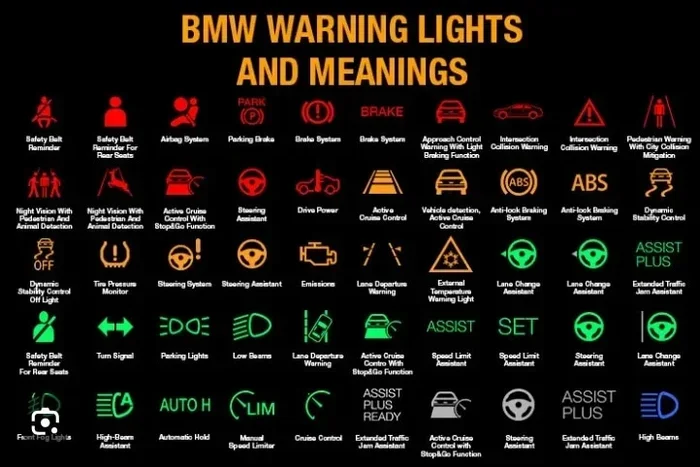
BMW owners report several different warning messages related to the emergency call system. Here are the most common ones:
- “Emergency Call System Malfunction” — This is the most direct warning. It means the system has detected a fault and cannot perform its automatic function.
- “ConnectedDrive Service Not Available” — This often accompanies the emergency call error and indicates a broader telematics problem.
- “SOS Function Currently Unavailable” — You may see this when trying to press the manual SOS button. It means the system cannot establish a connection.
- “Telematics Control Unit Fault” — A more technical message that points to a hardware or software issue in the control module.
- “Check BMW System” — A general warning that can encompass the emergency call system along with other connected features.
Each of these messages has a slightly different cause, but the troubleshooting steps overlap significantly. Let us walk through them now.
Step-by-Step Guide to Clear the Emergency Call Malfunction
Step 1: Restart Your BMW iDrive System
The easiest and most overlooked fix is a simple system restart. Just like your smartphone, the BMW iDrive infotainment system can experience temporary software glitches. A reboot clears the short-term memory and often resolves minor errors.
Here is how to do it:
- Press and hold the power button on your iDrive controller or touchscreen for about 10 seconds.
- Wait for the screen to go completely black.
- Wait another 30 seconds.
- Press the power button again to restart.
- Once the system boots back up, check if the emergency call warning is gone.
This method works about 40% of the time for temporary software glitches. It does not hurt to try first because it takes less than a minute. If the warning persists, move on to the next step.
Step 2: Check Your Cellular Signal and SIM Card
The BMW emergency call system needs a working cellular connection to function. If your car is parked in a garage, a tunnel, or a remote area with poor signal, the system may flag a malfunction. But if you are in an area with strong coverage and the warning still appears, the problem is likely deeper.
Here is what to check:
- SIM card status: BMW vehicles with the emergency call feature have a built-in SIM card. This SIM can expire or lose its activation. Contact your BMW dealer to verify the SIM status and renew it if needed.
- Cellular coverage: Try driving to a different location with better signal and see if the warning clears.
- Data subscription: Some BMW ConnectedDrive services require an active data plan. If your subscription has lapsed, the emergency call system may stop working.
Many owners do not realize that the BMW SIM card has a limited lifespan. After a few years, it needs to be refreshed or replaced by a dealer. This is one of the top reasons for a persistent BMW eCall malfunction.
Step 3: Reset the Telematics Control Unit
If restarting iDrive did not work, the next step is to reset the telematics control unit. This is the module that manages all connected services in your BMW, including emergency calls, remote start, and vehicle tracking.
You can try a soft reset by disconnecting the car battery for about 15 minutes. Here is how:
- Turn off the engine and all electrical systems.
- Open the hood and locate the negative battery terminal.
- Use a wrench to loosen the cable and disconnect it.
- Wait 15 minutes.
- Reconnect the cable and tighten it securely.
- Start the car and let the systems reinitialize.
This method resets all electronic modules in your BMW, including the telematics unit. When the car restarts, it will re-establish connections with the cellular network. In many cases, this clears the emergency call malfunction warning. However, be aware that you may need to re-enter your radio presets and Bluetooth pairings.
Step 4: Clear Fault Codes with a Diagnostic Tool
Sometimes the BMW emergency call system stores fault codes even after the underlying issue is resolved. These codes keep the warning active on your dashboard. To fully clear the malfunction, you need to read and erase these codes using a diagnostic tool.
You have a few options:
- BMW ISTA diagnostic software: This is the official BMW dealer tool. You can access it at a BMW dealership or through a qualified independent shop that has ISTA access.
- OBD-II scanner: A generic OBD-II scanner can read and clear some codes, but it may not fully access the telematics module. A BMW-specific scanner works better.
- DIY code clearing: Some owners have had success clearing codes by disconnecting the battery, as described above. This method does not require any special equipment.
If you want to try clearing codes yourself, you can also check how to manually clear your car codes for general guidance on the process. Just keep in mind that BMW-specific modules may need a more advanced tool.
Step 5: Update BMW Software and iDrive System
Outdated software is one of the most common causes of the BMW emergency call malfunction. BMW regularly releases updates for the iDrive system and the ConnectedDrive platform. These updates fix bugs, improve connectivity, and address known issues with the eCall system.
Here is how to check for updates:
- Automatic updates: Some newer BMW models download updates over the air when parked and connected to Wi-Fi. Check your iDrive settings under “Software Update” to see if an update is available.
- Dealer updates: Visit your BMW dealer and ask them to check for any pending software updates. Many dealers will perform updates for free or at a low cost.
- ConnectedDrive portal: You can also check your BMW account online at the ConnectedDrive portal to see if your vehicle has any available updates.
Updating your software is one of the best ways to prevent the emergency call malfunction from returning. BMW has released several patches specifically addressing eCall connectivity issues across various model years.
When to Visit a BMW Dealer
Signs That the Problem Is Hardware-Related
Not all BMW emergency call malfunctions are software issues. Some point to a hardware failure that you cannot fix at home. Here are the signs that you need professional help:
- The warning message returns immediately after you clear it.
- Your BMW will not connect to the cellular network even in areas with strong signal.
- The SOS button on your roof console does not light up or respond when pressed.
- You notice other electronic systems behaving erratically alongside the emergency call warning.
- Your BMW battery voltage is low and does not hold a charge.
These symptoms suggest a problem with the telematics control unit, the GPS antenna, or the internal SIM card module. A BMW dealer has the diagnostic equipment and technical knowledge to pinpoint the exact component that has failed. They can then replace the faulty part and reprogram the system.
Cost Considerations for Repairs
The cost of repairing a BMW emergency call malfunction varies widely. A simple SIM card renewal might cost nothing or a small monthly fee. A telematics control unit replacement can run anywhere from $500 to $1,500 depending on your BMW model and year. Software updates are usually free at the dealer.
If your BMW is still under warranty, these repairs may be covered. Check your warranty terms or speak with your dealer before authorizing any work. Some extended warranty plans also cover telematics components, so it is always worth checking.
How to Prevent Emergency Call Malfunctions in the Future
Regular Maintenance Tips
Prevention is always better than cure. Here are some simple habits that keep your BMW emergency call system healthy:
- Keep your software updated: Always install BMW software updates as soon as they become available.
- Monitor your SIM card status: Check with your dealer every couple of years to make sure your BMW SIM card is still active.
- Maintain your car battery: A weak battery can cause all kinds of electronic glitches, including telematics errors. Have your battery tested regularly.
- Avoid aftermarket modifications: Installing aftermarket electronics without proper integration can interfere with the BMW telematics system.
- Keep your cellular plan active: If your BMW requires a data plan for ConnectedDrive services, make sure it stays current.
Quick Tips for Daily Drivers
Even if you do not have time for deep troubleshooting, a few daily habits go a long way:
- Restart your iDrive system once a month to clear temporary memory.
- Keep your phone paired via Bluetooth, as some BMW systems cross-reference phone connectivity with telematics.
- Do not ignore warning messages. The longer you wait, the more likely a minor issue becomes a major one.
- Keep a record of any error messages you see, including the exact wording and when they appear. This helps your dealer diagnose problems faster.
BMW Emergency Call System: Model-Specific Notes
BMW Models Most Affected by eCall Malfunctions
While any BMW can experience an emergency call malfunction, certain model years are more prone to the issue. The F-series (3 Series, 5 Series, X5) from 2013 to 2019 and the G-series (3 Series, 5 Series, X5) from 2019 onward have both reported eCall-related warnings. The F30 3 Series and F10 5 Series are particularly noted for SIM card activation issues in early production units.
If you own one of these models, staying on top of software updates is especially important. BMW issued several Technical Service Bulletins (TSBs) addressing the emergency call system on these platforms. Your dealer can check if any TSBs apply to your specific vehicle.
Differences Between BMW Generations
Older BMW models with the CCC (Car Communication Controller) iDrive system handle the emergency call feature differently than newer models with the ID7 or ID8 iDrive system. Newer systems have more robust error handling and can often self-correct minor faults. Older systems may need a manual reset or dealer intervention more frequently.
If you are upgrading from an older BMW to a newer one, you will notice that the emergency call system is more integrated and reliable in the latest generation vehicles. BMW has continuously improved the telematics hardware and software with each new platform.
Frequently Asked Questions
Can I still use my BMW if the emergency call system shows a malfunction?
Yes, the emergency call malfunction warning does not prevent you from driving your BMW. The car will operate normally in all other respects. However, you will not have the automatic emergency call protection if you are involved in an accident. It is important to address the issue as soon as possible to restore this safety feature.
How much does it cost to fix a BMW emergency call malfunction?
The cost depends entirely on the root cause. A software update or SIM card renewal may cost nothing or a small fee. A telematics control unit replacement can range from $500 to $1,500. If your BMW is under warranty, the repair may be fully covered. Always get a diagnosis from your dealer before committing to any expensive repairs.
Can I clear the emergency call malfunction myself?
In many cases, yes. A system restart, battery disconnect, or software update can clear the warning. However, if the issue is hardware-related, you will need a dealer or qualified technician to diagnose and fix the problem. Always try the simple fixes first before seeking professional help.
How do I know if my BMW SIM card has expired?
You can check your SIM card status by visiting the BMW ConnectedDrive portal online or by contacting your BMW dealer. The SIM card typically lasts between 3 and 5 years before it needs to be renewed. If you notice that your ConnectedDrive services are not working, an expired SIM is a likely cause.
Will the emergency call malfunction warning affect my BMW inspection or registration?
In most regions, the emergency call malfunction does not affect your vehicle inspection or registration. However, some states and countries are beginning to require functional emergency call systems as part of safety inspections. Check your local regulations to be sure.
Can I disable the BMW emergency call system if I do not want to use it?
Yes, you can deactivate the emergency call system in your BMW iDrive settings under the ConnectedDrive menu. However, we strongly recommend keeping it enabled. The emergency call system is a life-saving feature, and deactivating it means you lose automatic crash notification and roadside assistance benefits.