How to Turn Off Maintenance Required Light on a 2017 Camry
The maintenance required light on a 2017 Camry is a common dashboard indicator that signals your vehicle is due for scheduled service. This guide walks you through the exact steps to reset the maintenance required light on your 2017 Camry using the trip meter method. We also cover why the light comes on, whether it is safe to drive with it on, and how to avoid common reset mistakes.
That little wrench icon glowing on your dashboard can be annoying. If you own a 2017 Toyota Camry, you have probably seen the maintenance required light pop up at the worst possible moment. The good news is that turning it off is surprisingly simple. You do not need a mechanic, special tools, or even a manual to get it done.
This guide gives you a complete walkthrough for resetting the maintenance light on a 2017 Camry. We will explain exactly why the light appears, how to turn it off step by step, and what to do if it keeps coming back. Whether you are a first-time car owner or a seasoned driver, you will find practical advice here. Can I drive with a maintenance required light on in a Toyota? We will answer that too, so keep reading.
The Toyota Camry is one of the most reliable sedans on the road. Part of that reliability comes from following the recommended maintenance schedule. The maintenance light is your car’s way of reminding you that it is time for an oil change or other routine service. Ignoring it for a while will not hurt, but resetting it after service keeps your dashboard clean and your records accurate.
Key Takeaways
- Easy Reset Process: You can turn off the maintenance required light on a 2017 Camry in just a few minutes using the trip meter button.
- No Tools Needed: The reset procedure requires no special equipment or mechanic visits.
- Safe to Drive Short Term: The light is a reminder, not a danger signal, but you should still schedule service soon.
- Common Mistakes Exist: Holding the wrong button or resetting too early are the most frequent errors people make.
- Regular Maintenance Matters: Resetting the light is only half the job; following the maintenance schedule keeps your Camry running strong.
📑 Table of Contents
- Why Does the Maintenance Required Light Come On?
- Can You Drive With the Maintenance Light On?
- How to Turn Off the Maintenance Required Light on a 2017 Camry
- Understanding the Toyota Camry Maintenance Schedule
- What If the Maintenance Light Will Not Turn Off?
- How Often Should You Reset the Maintenance Light?
- Expert Insights on Toyota Dashboard Maintenance Lights
- Key Takeaways
- Conclusion
Why Does the Maintenance Required Light Come On?
The maintenance required light is not a warning of a mechanical problem. It is a service interval reminder. Toyota programs it to come on after a certain number of miles or a specific time period. For the 2017 Camry, this typically happens every 5,000 miles or six months, whichever comes first.
What Triggers the Light?
Several factors can trigger the maintenance indicator on your dash:
- Mileage milestone: Your Camry tracks miles since the last reset. Once it hits the set interval, the light activates.
- Time elapsed: Even if you do not drive many miles, the system counts months too.
- Oil life depletion: The oil life monitor tracks driving conditions and estimates when your oil needs changing.
- Other service items: Some routine inspections or fluid checks also trigger the reminder system.
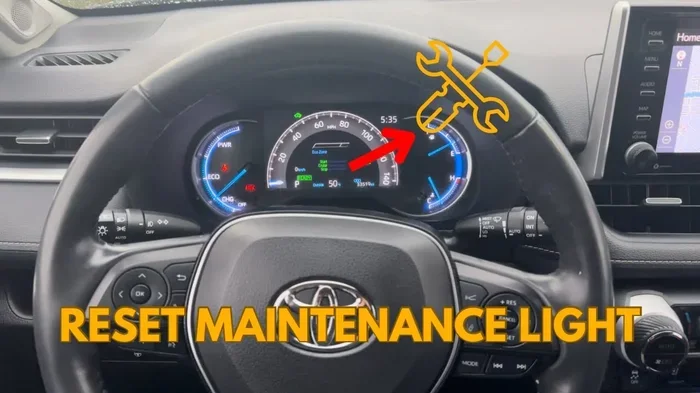
The light uses a small wrench icon to get your attention. It is different from the check engine light, which signals a specific problem. The maintenance light is simply a nudge to keep up with your Toyota maintenance routine. If you are unsure whether the light means something serious, it helps to understand the difference between warning lights on your dashboard.
Can You Drive With the Maintenance Light On?
Yes, you can drive your 2017 Camry with the maintenance required light on. The light does not affect your vehicle’s performance or safety. It is purely informational. Can I drive with a maintenance required light on in a Toyota? Absolutely. Your car will run just fine until you can get it serviced.
However, you should not ignore it for too long. The maintenance schedule exists to protect your engine and other components. Skipping oil changes or inspections for extended periods can lead to wear over time. Think of the light as a friendly reminder, not an emergency alert.
Does the Maintenance Light Stay On?
The light will stay on until you reset it or the service is performed. Some owners wonder, does the maintenance light stay on permanently if nothing is done? No, it will eventually turn off on its own after the service interval passes and you complete the next one. But it is much better to reset it yourself after each oil change or service visit.
Also, if your check engine light comes on alongside the maintenance light, that is a different situation. The check engine light indicates an actual issue that needs attention. You can read more about driving with the check engine light on a Camry to understand when to worry.
How to Turn Off the Maintenance Required Light on a 2017 Camry
This is the core of our guide. The reset process is straightforward and takes less than five minutes. Follow these steps carefully to avoid any confusion.
Step-by-Step Reset Instructions
- Turn the ignition to ON. Press the start button without pressing the brake pedal. The dashboard lights will illuminate, but the engine will not start.
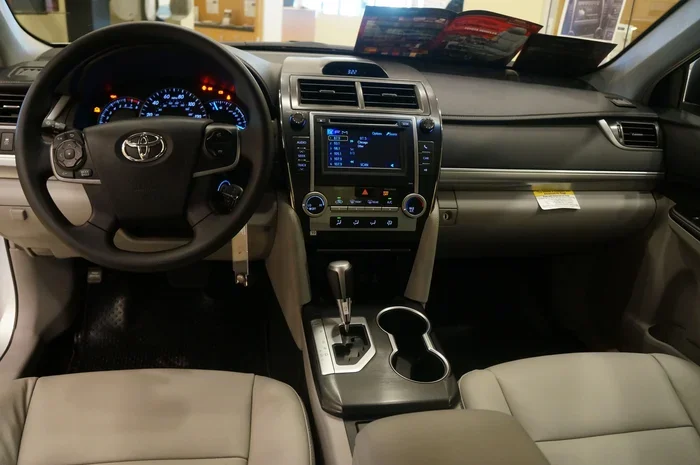
- Locate the trip meter reset button. On the 2017 Camry, this is the small button on the far left side of the instrument cluster, right behind the steering column. It is labeled with the word “Trip” or shows a reset symbol.
- Press and hold the trip reset button. Keep holding it down. The display will begin to change.
- Watch for the maintenance light to flash. After a few seconds of holding the button, the wrench icon will start blinking on the dashboard.
- Release the button. Once the light flashes, let go of the trip button.
- Turn the ignition off and then back on. This confirms the reset. The maintenance light should now be off.
That is it! Your 2017 Camry maintenance light should be off. If it is still on, double-check that you held the button long enough. The system needs a few seconds to register the command.
Quick Tips for a Successful Reset
- Make sure the car is in Park before you start the reset process.
- Press the button firmly. A light tap may not register with the system.
- Do not rush the process. Wait for the wrench icon to flash before releasing the button.
- Try again if the first attempt fails. Sometimes it takes two tries for the system to respond.
Common Mistakes to Avoid
Many people make small mistakes during the reset process. Here are the most common ones:
- Pressing the wrong button. The 2017 Camry has multiple buttons near the instrument cluster. Make sure you are pressing the trip reset button, not the mode or display button.
- Starting the engine during the process. If you press the brake and start the car, the reset will not work. Keep the engine off during the procedure.
- Releasing the button too early. The wrench icon needs to flash. If you release before it blinks, start over.
- Resetting before service is complete. Always get your oil changed or inspection done first, then reset the light. Resetting without actual service defeats the purpose.
Understanding the Toyota Camry Maintenance Schedule
Resetting the light is just one part of the equation. The real goal is keeping up with your Toyota Camry service schedule. The 2017 Camry follows Toyota’s recommended maintenance plan, which includes regular oil changes, tire rotations, fluid checks, and inspections.
What Service Does the Light Remind You About?
The maintenance required light on a 2017 Camry typically reminds you about:
- Engine oil and filter change: The most common trigger. Toyota recommends synthetic or conventional oil changes every 5,000 to 10,000 miles depending on driving conditions.
- Tire rotation: Helps ensure even tire wear and extends the life of your tires.
- Brake inspection: A quick check of pad thickness and rotor condition.
- Fluid level checks: Coolant, brake fluid, and transmission fluid levels should be verified periodically.
- Multi-point inspection: A general check of belts, hoses, filters, and other components.
Following this schedule helps your Camry last well beyond 200,000 miles. Many owners ask how long is 200,000 miles on a car and the answer is that with proper maintenance, a Camry can easily reach that milestone and beyond.
How Much Does Regular Maintenance Cost?
Routine maintenance costs vary, but staying on top of them saves money in the long run. Simple oil changes for a 2017 Camry typically range from $40 to $80 depending on your location and the type of oil used. If you are curious about what mechanics charge, the average rate for labor is quite reasonable for Toyota vehicles since they are among the most common cars serviced.
What If the Maintenance Light Will Not Turn Off?
Sometimes the reset process does not work the first time. If the maintenance light stays on after you follow the steps, do not panic. There are a few things you can try.
Troubleshooting Tips
- Try the reset process again. Make sure you are holding the trip button for at least 5 to 10 seconds. The wrench icon must flash before you release it.
- Check the battery. A weak battery can sometimes cause dashboard lights to behave oddly. If your battery is old, consider having it tested.
- Disconnect and reconnect the battery. As a last resort, you can disconnect the negative battery terminal for about 15 minutes and then reconnect it. This resets the entire electrical system, including the maintenance light.
- Visit a Toyota dealer or mechanic. If none of the above works, a professional can reset the light using a diagnostic tool. This is quick and usually inexpensive.
Remember, the maintenance light is not a sign of a serious problem. It is simply a reminder system. If you have recently completed service and the light remains on, it just needs a proper reset. Some owners also confuse the maintenance light with other dashboard indicators. If you are seeing multiple lights on your dash, it helps to understand what each one means.
How Often Should You Reset the Maintenance Light?
You should reset the maintenance required light every time you complete a scheduled service. This includes every oil change, tire rotation, or inspection. Resetting the light after each service keeps your records accurate and helps you track when the next service is due.
Some people wonder whether they need to reset the light at all. The answer is no, the light will eventually go away after the service interval passes. But resetting it manually gives you a clean start and a clear record of when your last service was completed. This is especially helpful if you plan to sell your vehicle or track maintenance history.
If you are thinking about selling or trading in your 2017 Camry, knowing the fair value of your car matters. Regular maintenance records, including properly managed service lights, can positively affect your vehicle’s value.
Expert Insights on Toyota Dashboard Maintenance Lights
Toyota engineers designed the maintenance reminder system to be simple and effective. Unlike some brands that use complex onboard computers, the 2017 Camry uses a straightforward interval-based system. This means the light comes on at a set mileage or time, and it stays on until you reset it manually.
Experts recommend treating the maintenance light as part of a broader vehicle maintenance routine. Here are a few professional tips:
- Keep a service log. Write down every oil change, inspection, and reset date. This helps you stay organized and proves maintenance history if you ever sell the car.
- Do not ignore other lights. The maintenance light is different from the check engine light, oil pressure light, or battery light. Each one signals something different.
- Follow the severe service schedule if needed. If you drive in stop-and-go traffic, extreme heat, or dusty conditions, Toyota recommends following the severe service interval, which is more frequent.
Key Takeaways
- Simple Reset Process: Use the trip meter button to reset the maintenance required light in under five minutes.
- Hold the Button Long Enough: Wait for the wrench icon to flash before releasing the trip button.
- Safe to Drive: The maintenance light does not affect your ability to drive the 2017 Camry safely.
- Reset After Every Service: Keep your maintenance records accurate by resetting the light after each oil change or inspection.
- Troubleshooting Exists: If the light will not turn off, try the process again, check the battery, or visit a professional.
- Follow the Maintenance Schedule: Regular service keeps your Camry reliable for hundreds of thousands of miles.
Conclusion
Turning off the maintenance required light on a 2017 Camry is one of the easiest things you can do as a car owner. The process takes just a few minutes and requires nothing more than the trip meter button on your dashboard. Whether you have just gotten an oil change or you are resetting the light after completing your own service, the steps are the same every time.
Remember that the maintenance light is a helpful tool, not a cause for alarm. It keeps you on track with your Toyota Camry maintenance schedule and helps your vehicle run at its best. By following the reset steps in this guide, you can clear that annoying wrench icon and get back to enjoying your drive.
If you ever find yourself unsure about other dashboard lights or vehicle features, you are not alone. Many Camry owners have questions about their maintenance system, and understanding it is the first step toward confident car ownership. Keep up with your service, reset the light after each visit, and your 2017 Camry will reward you with years of dependable performance.
Frequently Asked Questions
How do I reset the maintenance required light on a 2017 Camry?
Turn the ignition to ON without starting the engine. Press and hold the trip reset button behind the steering column until the wrench icon on the dashboard starts flashing. Release the button, turn the ignition off, then back on. The maintenance light should now be off.
Can I drive my 2017 Camry with the maintenance required light on?
Yes, the maintenance required light is simply a reminder that your vehicle is due for scheduled service. It does not affect your car’s performance or safety. However, you should get your Camry serviced as soon as possible and then reset the light.
Why does the maintenance light keep coming back after I reset it?
If the maintenance light returns shortly after resetting, it usually means the service interval has been reached again or the reset was not completed properly. Make sure you held the trip button until the wrench icon flashed. If the problem continues, visit a Toyota dealer or mechanic for assistance.
What is the difference between the maintenance light and the check engine light on a Camry?
The maintenance light is a service interval reminder and is not a sign of a mechanical problem. The check engine light indicates an actual issue detected by the onboard diagnostics system. If both lights are on at the same time, address the check engine light first since it signals a specific problem that needs attention.
How often does the maintenance required light come on for a 2017 Camry?
The maintenance required light on a 2017 Camry typically activates every 5,000 miles or six months, whichever comes first. This aligns with Toyota’s recommended maintenance schedule for oil changes and routine inspections.
Can I reset the maintenance light myself or do I need a mechanic?
You can absolutely reset the maintenance light yourself. No mechanic or special tools are required. The process uses the trip meter button on the instrument cluster and takes less than five minutes. If you are unable to reset it after a few tries, a mechanic can do it quickly with a diagnostic tool.