How Do I Update My Toyota RAV4 Software Step by Step
Updating your Toyota RAV4 software is essential for fixing bugs, adding features, and improving safety. This step-by-step guide shows you how to check your current version, update via USB or over-the-air, and know when to visit a dealership. You’ll learn the common mistakes to avoid and how to troubleshoot if something goes wrong.
If you own a Toyota RAV4, you might be asking how to update Toyota RAV4 software. Keeping your vehicle’s software current is one of the simplest ways to boost performance, fix bugs, and improve safety. A Toyota RAV4 software update can add new features to your infotainment system, refine the hybrid powertrain, and even address recall notices. Many owners overlook this maintenance step, but it only takes a few minutes and can save you from costly repairs later.
Whether you prefer a DIY approach or want to visit a professional, this guide walks you through every step. You’ll learn how to check your current software version, use a USB update method, and understand when a dealership visit is necessary. I’ll also share common mistakes to avoid and tips to ensure a smooth process.
Think of a software update like a tune-up for your car’s computer. Just as you change oil to keep the engine running right, updating the software keeps the electronic systems running at their best. Let’s dive into the details.
Key Takeaways
- Regular updates improve performance: Keeping your Toyota RAV4 software current ensures smoother operation and fewer glitches.
- Two main update methods: You can update via USB drive or through a Toyota dealership’s diagnostic tool.
- Check your version first: Always verify your current software version before starting the update process.
- Dealership updates are free: Many software updates, especially recall-related ones, are performed at no cost.
- Safety first: Never interrupt a software update, as it can brick your system.
- MyT app connectivity: Some RAV4 models support over-the-air updates through the Toyota app.
📑 Table of Contents
Why Updating Your Toyota RAV4 Software Matters
Software updates are not just about adding new music apps. They address critical issues that can affect how your RAV4 drives. Toyota releases updates to improve the infotainment system, refine the hybrid system, and patch security vulnerabilities. Ignoring updates can lead to glitches, reduced fuel efficiency, or even safety risks.
For example, some updates fix bugs in the collision avoidance system. Others improve the accuracy of the navigation maps. If you notice your RAV4 acting strangely, an outdated software version could be the culprit. Regular updates also ensure your vehicle stays compliant with any manufacturer recalls. A recall update is especially important because it can affect safety systems like braking or airbag deployment.
Benefits of Keeping Software Current
- Improved reliability: Updates often fix bugs that cause unexpected warning lights or system freezes.
- Enhanced safety: Updates can improve automatic emergency braking and lane departure alerts.
- Better fuel economy: Hybrid system calibrations may be refined to squeeze more miles out of each gallon.
- New features: Some updates add wireless Apple CarPlay or Android Auto compatibility.
- Recall compliance: Certain recalls require a software fix that only a dealership can provide.
How to Check Your Current Software Version
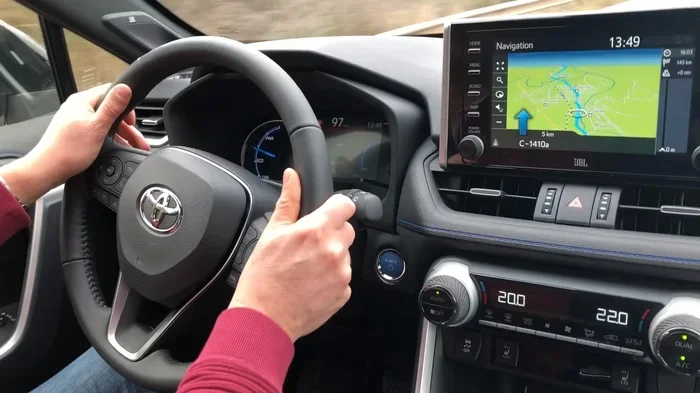
Before you start, you need to know what version you have. Checking the current software version is quick and easy. On most Toyota RAV4 models, you can find this information in the infotainment system settings.
Turn on the vehicle without starting the engine. Press the menu button on the touchscreen. Navigate to Settings, then select Vehicle Information. Look for Software Version or System Version. Write down the version number and date. This helps you determine if an update is available and which update you need.
You can also check the version through the Toyota app if your RAV4 has MyT connectivity. The app displays the current software version and notifies you when an update is ready. This is especially handy for over-the-air updates on newer models. Keeping a record of your software version makes it easy to track when the next update is due.
Step-by-Step Guide to Update Toyota RAV4 Software
Updating your Toyota RAV4 software can be done in a couple of ways. The method you choose depends on your model year and the type of update available. Here are the primary approaches.
Method 1: USB Update (For Most RAV4 Models)
A USB update is the most common DIY method. You will need a formatted USB drive with at least 2 GB of free space. Follow these steps carefully.
- Visit the Toyota website or contact your dealer to request the latest software file for your specific RAV4 model.
- Download the file and save it to the root directory of your USB drive. Do not put it in a folder.
- Turn the ignition to the ON position (do not start the engine).
- Insert the USB drive into the port usually located in the center console or glove box.
- The system should detect the update automatically. Follow the on-screen prompts to begin the installation.
- Wait for the process to complete. Do not turn off the ignition or remove the USB drive during this time.
- Once finished, remove the USB drive and restart the vehicle. Verify the new version in the settings.
Quick Tip: Always use a blank USB drive formatted as FAT32. Using a drive with existing files can cause the update to fail. Also, make sure your battery is fully charged before starting.
Method 2: Over-the-Air Update (For Connected RAV4 Models)
If your RAV4 has built-in Wi-Fi or MyT connectivity, you might be able to update the software wirelessly. This is the easiest method because it requires no USB drive or dealership visit.
Make sure your vehicle is parked in a safe location with a stable Wi-Fi connection. Go to the Settings menu on the infotainment screen. Select Software Update. If an update is available, you will see a notification. Tap Download and follow the prompts. The vehicle will install the update automatically. The entire process can take 20 to 45 minutes, and you should not drive the vehicle during this time.
Method 3: Dealership Update (The Most Reliable Option)
For major updates or recall-related fixes, a dealership visit is often the best choice. A technician connects a Toyota Techstream diagnostic tool to the OBD-II port under your dashboard. This tool communicates directly with the vehicle’s engine control module and other modules to flash the latest software.
Many owners prefer this method because it ensures the update is applied correctly. If you are not comfortable with a USB update, you can simply upgrade your vehicle’s software at the dealership. They will also check for any pending recalls and apply them for free.
Another reason to visit a dealer is if you are unsure whether your RAV4 is eligible for a particular update. The technician can run a diagnostic check and confirm the exact software version your vehicle needs. This is similar to how you would take your Toyota to a dealership for service for routine maintenance.
Quick Tips and Troubleshooting
Quick Tips for a Successful Update
- Back up your settings: Some updates reset custom preferences. Note your radio stations and seat positions before starting.
- Use a short USB cable: A long cable can cause connection issues. Keep the drive plugged in directly.
- Update during cool weather: Extreme heat can affect the installation process and battery performance.
- Read the release notes: Toyota often lists what each update fixes. This helps you decide if you need it immediately.
What to Do If the Update Fails
Sometimes a software update can fail or get stuck. This is rare but can happen. If the update freezes or your RAV4 displays an error message, do not panic. Here is what you should do.
First, try turning the ignition off and waiting for 10 minutes. Then turn it back on and check if the system responds. If the infotainment screen is completely blank, you may need to disconnect the battery for a few minutes to reset the system. Reconnect the negative terminal, wait a few seconds, and reconnect it.
If the problem persists, you should visit a Toyota dealership. A technician can use the Toyota Techstream tool to manually reflash the software. They can also check if the USB drive was formatted correctly or if the downloaded file was corrupted. Remember, interrupting an update can sometimes leave the system in a partial state, so professional help is often the safest route.
When to Visit a Toyota Dealership for a Software Update
While many updates can be done at home, some situations require a professional touch. Knowing when to seek help can save you time and prevent damage to your RAV4’s systems.
You should definitely visit a dealership if your RAV4 is subject to a recall that requires a software fix. Recalls are serious and must be addressed promptly. A dealership will perform the update at no cost to you. You can also check your warranty status by looking up your VIN, and if your vehicle is still under warranty, the dealership will handle the update as part of your coverage.
Another good time to visit a dealership is if you have a very old RAV4 model that does not support USB updates or over-the-air methods. Older models may need a diagnostic tool that only a dealer has access to. Similarly, if you are uncomfortable working with electronics or USB drives, letting a professional handle the firmware update is the smartest choice.
Regular RAV4 scheduled service intervals are also a great opportunity to have the software checked. During a major service, technicians often review the current software and apply any available updates. This keeps your vehicle running smoothly and ensures you do not miss important fixes.
Common Mistakes to Avoid During a Toyota RAV4 Software Update
Even with the best intentions, people make mistakes during software updates. Here are the most common errors and how to avoid them.
- Using the wrong USB drive: Not all USB drives work with Toyota systems. Use a drive that is 32 GB or smaller and formatted as FAT32. Larger drives may not be recognized.
- Skipping the pre-update checklist: Before starting, make sure your battery is fully charged. A low battery can cause the update to fail midway.
- Interrupting the process: Do not start the engine, press any buttons, or open doors while the update is running. Any disruption can corrupt the software.
- Ignoring recall notices: If Toyota issues a recall for a software problem, do not ignore it. A recall update is critical for safety and may affect your vehicle’s warranty.
- Downloading files from unofficial sources: Only obtain software files from the official Toyota website or your dealership. Unofficial files can contain malware or incorrect versions.
Expert Insight: Many RAV4 owners do not realize that software updates can also improve the power steering response and adjust the automatic high beams calibration. These small tweaks make a noticeable difference in daily driving comfort. Always treat a Toyota RAV4 software update as an essential part of vehicle maintenance, not an optional chore.
Conclusion
Updating your Toyota RAV4 software does not have to be intimidating. Whether you choose the USB method, an over-the-air update, or a visit to the dealership, the process is straightforward and well worth the effort. Regular updates keep your infotainment system running smoothly, enhance safety features, and ensure your RAV4 stays compliant with the latest recalls.
Remember to check your current software version first, use the right tools, and never interrupt an update in progress. If you run into trouble, a quick trip to the dealer can solve the problem. By staying on top of your Toyota RAV4 software update schedule, you protect your investment and enjoy a better driving experience for years to come.
Frequently Asked Questions
Can I update my Toyota RAV4 software myself?
Yes, you can update the software yourself using a USB drive if your model supports it. You just need to download the correct software file from Toyota’s website, format a USB drive as FAT32, and follow the on-screen prompts. If you are not comfortable with this process, you can always visit a Toyota dealership.
How long does a Toyota RAV4 software update take?
A USB update typically takes between 15 and 30 minutes, depending on the size of the update. Over-the-air updates can take 20 to 45 minutes. During the update, the vehicle must remain in park with the ignition on. Do not turn off the engine or remove the USB drive while the process is running.
Is a Toyota RAV4 software update free?
Yes, most software updates are completely free. Toyota provides updates to fix bugs, address recalls, and improve system performance at no cost. If you visit a dealership, the technician will apply the update as part of your service, and you will not be charged for the software itself.
What happens if I interrupt a Toyota RAV4 software update?
Interrupting a software update can cause serious problems, including a corrupted system or a blank infotainment screen. If the update is interrupted, you may need to have a technician reflash the software using a diagnostic tool. Always ensure your battery is fully charged and avoid driving the vehicle during an update.
Do I need Wi-Fi to update my Toyota RAV4 software?
Not necessarily. You can update via a USB drive without any internet connection. However, if your RAV4 has MyT connectivity, you can perform an over-the-air update using Wi-Fi. Some models also allow you to download the update file to your phone and then transfer it via USB.
How do I know if my Toyota RAV4 needs a software update?
You can check the current software version in the infotainment system settings under Vehicle Information. If your version is older than the latest available, you should update. You may also receive a notification through the Toyota app if your vehicle is connected. Signs that you need an update include unexplained warning lights, system freezes, or reduced feature functionality.