How Do I Turn My Mazda Screen Back On Again Today
Dealing with a blank Mazda screen can be frustrating, but the fix is often simpler than you think. This guide walks you through every method to turn your Mazda screen back on, from soft resets to battery checks. You will learn the most common reasons your display goes dark, how to prevent it from happening again, and when it is time to see a professional. Follow these proven steps and get your Mazda infotainment system working again today.
There is nothing worse than turning the key in your ignition and being greeted by a completely dark center screen. Whether you drive a Mazda 3, a Mazda CX-5, or another model, the infotainment display is the brain of your car’s modern features. When it goes black, you lose your navigation, your music, your rearview camera, and sometimes even your climate controls. The good news is that you can usually bring that screen back to life with a few simple steps. This guide shows you exactly how to turn your Mazda screen back on again today.
Before you panic or call a mechanic, take a deep breath. Most Mazda screen issues are temporary and easy to fix. You do not need special tools or expensive parts. In fact, many drivers solve this problem in under ten minutes right in their driveway. We will walk you through every possible solution, starting with the easiest fix and moving to more advanced troubleshooting. By the end of this article, you will know exactly what to do and why your screen went dark in the first place.
Key Takeaways
- Soft Reset Works Most of the Time: A simple restart of your Mazda infotainment system resolves the majority of screen blackouts without any tools.
- Check the Power and Ground Connections: Loose wiring or a weak battery is often the hidden culprit behind a Mazda screen that will not turn on.
- Know When to Seek Help: If basic fixes do not work, a certified Mazda technician can diagnose deeper electrical or hardware issues safely.
- Prevent Future Screen Problems: Regular software updates and smart usage habits keep your Mazda display working reliably for years.
- Voice Assistant Settings Can Affect the Screen: Sometimes the screen dims or turns off due to voice assistant mode settings that need adjusting.
- Pairing Issues May Cause Display Glitches: If your phone connection drops, it can affect the screen, so pairing your iPhone properly helps maintain a stable connection.
📑 Table of Contents
Understanding Your Mazda Screen System
Your Mazda infotainment system is more than just a fancy display. It connects to your audio system, your navigation software, your phone, and your car’s camera systems. When everything works, you barely notice it. But when it stops working, it is impossible to ignore. Understanding how the system operates helps you troubleshoot more effectively.
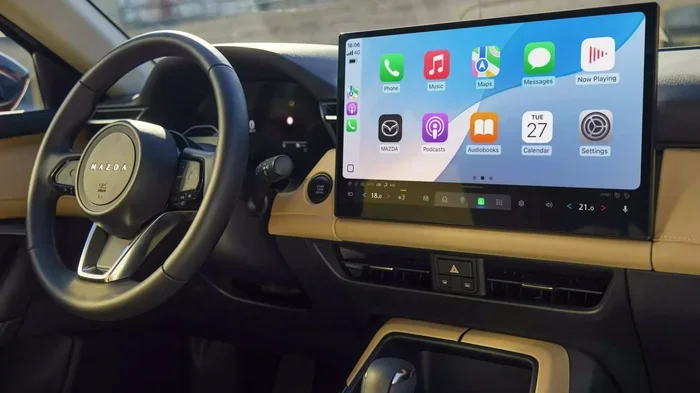
The Mazda screen uses a combination of software and hardware components. The display itself is an LCD or LED panel powered by the car’s electrical system. The brain behind the screen is a central processing unit that runs the Mazda Connect infotainment software. This software handles everything from radio tuning to Bluetooth connectivity to voice commands. When any part of this chain fails, the screen goes dark or becomes unresponsive.
How the Mazda Display Powers On
When you start your car, the infotainment system receives power through a dedicated fuse and wiring harness. The system boots up just like a computer. You see the Mazda logo, then the home screen appears. If the power supply is interrupted or the software crashes during boot-up, the screen stays black. This is the most common reason drivers search for how to turn their Mazda screen back on.
The screen also has an ambient light sensor. This sensor adjusts the brightness based on how dark it is outside. In some cases, this sensor can cause the screen to appear off when it is actually just very dim. Understanding this feature saves you from unnecessary panic.
Common Mazda Models Affected by Screen Issues
Screen problems are not limited to one model. The Mazda 3, Mazda 6, Mazda CX-5, Mazda CX-9, and Mazda CX-30 have all reported occasional display issues. Newer models with larger touchscreens tend to experience software glitches more often. Older models may face wiring and connection problems due to age. Regardless of your model, the troubleshooting steps in this guide apply across the lineup.
Common Reasons Your Mazda Screen Goes Black
Knowing why your screen went dark helps you choose the right fix. Here are the most common reasons a Mazda display stops working.
Software Freeze or Glitch
Just like your smartphone or laptop, the Mazda infotainment system can freeze. A software glitch can cause the screen to go completely black even though the car is running normally. This happens more often after a software update or when you have too many apps running in the background. A simple reset usually clears this up.
Power Supply Interruption
Your car battery powers the infotainment system. If the battery is weak or dying, the screen may not receive enough power to turn on. This is especially common in older vehicles or cars that sit unused for long periods. A low battery voltage can also cause the screen to flicker before going completely dark.
Loose or Damaged Wiring
Over time, the wires connecting your screen to the car’s electrical system can become loose. Vibrations from driving, temperature changes, and general wear and tear all contribute to this. A loose connection means the screen does not get a steady power supply, causing it to turn off unexpectedly.
Blown Fuse
Every electrical component in your Mazda has a fuse. If too much current flows through the circuit, the fuse blows and cuts power to the screen. This is a rare but possible cause of a black screen. Checking the fuse box is a quick step that can save you a lot of frustration.
Ambient Light Sensor Malfunction
Your Mazda screen has a sensor that detects surrounding light. If this sensor malfunctions, it may think it is bright outside and dim the screen to near-invisibility. This is not a true blackout, but it sure feels like one when you cannot see anything on the display.
Aftermarket Device Interference
Have you recently installed a dash cam, an amplifier, or any other aftermarket device? These additions can sometimes interfere with the Mazda electrical system. The extra power draw or signal interference can cause the screen to behave erratically or shut off completely.
Step-by-Step Guide to Turn Your Mazda Screen Back On
Now that you understand the common causes, let us get your screen working again. Follow these steps in order, starting with the simplest fix.
Step 1: Perform a Soft Reset
A soft reset is the easiest and most effective way to restart your Mazda infotainment system. It works just like restarting your phone. You are not deleting any data or changing any settings.
To perform a soft reset, press and hold the power button on your Mazda screen. The power button is usually located on the left side of the display or near the volume knob. Hold it for about ten to fifteen seconds. The screen will go completely black, then the Mazda logo will appear as the system restarts. Wait for the home screen to fully load before trying to use the display.
If the power button method does not work, you can also try turning your car off, removing the key from the ignition, and waiting sixty seconds. Then restart the car normally. This gives the entire electrical system a fresh start.
Step 2: Check the Battery Voltage
A weak battery is one of the top reasons a Mazda screen will not turn on. Before you assume the worst, check your battery voltage with a multimeter. A healthy battery should read at least 12.4 volts when the car is off and 13.7 to 14.7 volts when the engine is running.
If your battery voltage is low, try jump-starting your car. Sometimes the screen will not turn on because the battery cannot provide enough power during startup. After a successful jump start, let the engine run for a few minutes before checking the screen. If the battery is old or frequently dies, it may be time for a replacement.
Step 3: Inspect the Screen Fuse
Open your Mazda’s fuse box, which is usually located under the dashboard on the driver’s side or under the hood. Refer to your owner’s manual to find the fuse labeled for the infotainment system or the display. Pull out the fuse and inspect it for a broken metal strip inside.
If the fuse is blown, replace it with a new fuse of the same amperage. You can find the correct amperage rating in your owner’s manual or on the fuse box cover. After replacing the fuse, turn the car on and check if the screen powers up.
Quick Tip: Always keep a few spare fuses in your glove box. They cost almost nothing and can save you a tow truck visit.
Step 4: Check the Wiring Connections
If the fuse is fine, the next step is to check the wiring behind the screen. You will need to remove the trim panels around the display to access the connectors. Unplug the main cable connecting the screen to the car’s wiring harness, then plug it back in firmly.
Look for any signs of corrosion, fraying, or loose pins in the connector. Clean any corrosion with a small amount of electrical contact cleaner. Reassemble the panels and test the screen. This step fixes the problem more often than you might expect, especially in older Mazdas.
Step 5: Update the Infotainment Software
Mazda regularly releases software updates for its infotainment system. These updates fix bugs, improve performance, and resolve known screen issues. If your screen has been acting up, a software update might be the solution.
To check for updates, go to the Settings menu on your Mazda screen. Look for the System or Software Update option. If an update is available, follow the on-screen instructions to install it. Your car needs to be parked and the engine running during the update process. The screen may go dark during the update, which is completely normal. Do not turn off the car until the update is complete.
If your Mazda does not have a built-in update feature, visit your local Mazda dealership. They can check for available updates and install them for you, often for free.
Step 6: Disconnect and Reconnect the Battery
This method is more advanced but very effective. Disconnecting the battery resets the entire electrical system, including the infotainment module. Turn off the car and remove the key. Use a wrench to loosen the negative battery terminal cable and pull it off the battery post. Wait at least five minutes, then reconnect the cable and tighten it securely.
Start the car and check if the screen turns on. This method clears any stored error codes and forces the system to boot fresh. It is similar to unplugging your router to fix a home internet issue.
Important Note: Disconnecting the battery may reset your radio presets, clock, and some personalized settings. Make sure you know your radio station presets before doing this step.
Advanced Troubleshooting for Stubborn Screen Issues
If the basic steps above did not bring your Mazda screen back to life, do not give up yet. There are a few more things you can try before visiting a mechanic.
Check for Overheating
Mazda infotainment systems can overheat, especially in hot weather or after prolonged use. When the system overheats, it automatically shuts down the screen as a protective measure. If your car has been sitting in the sun for hours, let it cool down for fifteen to twenty minutes before trying to turn the screen on again.
You can also check the ventilation around the infotainment unit. Some Mazda models have a cooling fan for the electronics. If this fan is not working, the system may overheat frequently. A dealership can test the fan and replace it if needed.
Reset the Mazda Connect System
The Mazda Connect system is the software platform that runs your infotainment display. A full system reset can clear deep-rooted software issues that a simple restart cannot fix.
To reset the Mazda Connect system, go to the Settings menu. Navigate to the System tab and look for the Restore or Reset option. You may need to hold the power button and the volume knob simultaneously for a few seconds to access the hidden reset menu. The exact method varies by model year, so check your owner’s manual for specific instructions.
Check for Aftermarket Device Conflicts
If you recently added any aftermarket electronics to your Mazda, they could be causing the screen issue. Dash cams, backup cameras, phone chargers, and amplifiers all draw power from the car’s electrical system. Disconnect these devices one at a time and check if the screen comes back on.
Some aftermarket devices are not compatible with the Mazda infotainment system. They can send electrical noise through the wiring that disrupts the display. If you find the culprit, either remove the device or install a noise filter to prevent future issues.
Screen Brightness and Display Settings
Sometimes the screen is not actually off. It is just turned down so low that you cannot see it. Check your display brightness settings in the Mazda Connect menu. Turn the brightness all the way up and see if the image appears. Also check the auto-brightness setting. If auto-brightness is on and the sensor is dirty or malfunctioning, the screen may stay dim even in dark conditions.
You can also check the display timeout setting. Some Mazda models turn off the screen after a period of inactivity to save battery. If the timeout is set too short, you might think the screen is off when it is really just waiting for input. Tap the screen or press a button to wake it up.
Preventing Future Mazda Screen Problems
Once you get your Mazda screen working again, you want to keep it that way. Here are some simple habits that prevent screen issues from returning.
- Keep Your Software Updated: Regular updates fix bugs and improve system stability. Check for updates every few months or whenever you visit the dealership.
- Avoid Force Restarting the Screen: Do not repeatedly tap the screen or hold the power button for too long. This can cause software corruption over time.
- Keep the Battery Healthy: A strong battery is the foundation of a working infotainment system. Have your battery tested at every oil change, especially if your Mazda is over five years old.
- Be Careful with Aftermarket Devices: Only install devices from reputable brands and make sure they are compatible with your Mazda model.
- Keep the Screen Clean: Dust and grime on the screen can interfere with the touch sensors and the ambient light sensor. Use a soft microfiber cloth to clean the display regularly.
- Avoid Extreme Temperatures: Park in the shade when possible and use a sunshade in the summer. Extreme heat and cold both stress the electronic components of your infotainment system.
When to Seek Professional Help
Most Mazda screen issues resolve with the steps above. But some problems require professional attention. Here are signs that it is time to visit a Mazda dealership or qualified mechanic.
- The screen stays completely black even after a full battery disconnect and reset.
- You see flickering lines or dead spots on the display, which indicates a hardware failure.
- The screen turns on but the touchscreen does not respond to any input.
- You notice a burning smell or see smoke coming from the display area.
- The screen works intermittently, turning on and off randomly while driving.
- Multiple electrical systems in your car are failing at the same time.
A certified Mazda technician has access to diagnostic tools that can read error codes from the infotainment system. They can pinpoint whether the issue is with the screen itself, the wiring, the control module, or another component. Trying to repair a damaged screen on your own can void your warranty, so always check with the dealership first.
If your Mazda is still under warranty, the screen repair or replacement may be covered at no cost to you. Even if your warranty has expired, dealerships often offer competitive pricing on infotainment repairs compared to independent shops.
Frequently Asked Questions
Why did my Mazda screen suddenly go black while driving?
The most common reason is a software freeze or a momentary power interruption. The infotainment system uses the same electrical circuit as other components, and a brief voltage drop can cause the screen to shut off. Perform a soft reset by holding the power button for fifteen seconds. If the screen comes back on, the issue was likely a temporary glitch. If it stays black, check your battery voltage and the screen fuse.
How do I know if my Mazda screen is just dim or completely off?
Turn up the brightness manually in the display settings. If the image appears very faint but visible, the screen is dim, not off. A completely off screen will show no image at all, even at maximum brightness. Also check if the screen responds to touch. A dim screen will still register touch inputs, while a fully off screen will not.
Can a dead battery cause the Mazda screen to not turn on?
Absolutely. A weak or dead battery is one of the leading causes of a black Mazda screen. The infotainment system needs a steady power supply to operate. If your battery voltage is below 12.4 volts, the screen may not have enough power to turn on. Jump-starting the car or replacing the battery often solves this problem immediately.
Will resetting my Mazda screen delete my saved data?
A soft reset will not delete any of your saved data, including radio presets, Bluetooth pairings, or navigation favorites. However, a full factory reset of the Mazda Connect system may erase some personalized settings. Before performing a full reset, write down your important presets and settings. After the reset, you can restore them easily.
How much does it cost to replace a Mazda infotainment screen?
The cost varies widely depending on your Mazda model and the extent of the damage. A simple screen replacement for a Mazda 3 or Mazda CX-5 typically costs between $400 and $1,200 at a dealership. If the issue is with the wiring or a fuse, the repair cost is much lower, usually under $100. Always get a diagnostic estimate before committing to a screen replacement.
Can I drive my Mazda safely with the screen turned off?
Yes, you can still drive safely without the infotainment screen working. The basic driving functions of the car are not affected. However, you will lose access to your backup camera, navigation, Bluetooth music, and other convenience features. It is best to get the screen repaired as soon as possible, especially since the backup camera is essential for safe reversing.