How Do I Retrieve My Car Radio Code Without Stress
Car radio code retrieval is a simple process that can save you time and money. Whether your car stereo locked after a battery disconnect, this guide walks you through every method. You will learn how to find your radio serial number, use online code generators, and contact your dealership for help. By the end, you will know exactly how to get your radio working again fast.
There is nothing more frustrating than stepping into your car and seeing a blank radio display staring back at you. You turn the key, the dashboard lights up, but your car audio system demands a code you do not have. This happens more often than you might think, especially after a battery replacement or a power surge.
The good news is that car radio code retrieval is easier than most people believe. You do not need to be a mechanic or a tech expert. With the right information and a few simple steps, you can unlock your car stereo and get back to enjoying your music in minutes.
This guide covers every method you can use to retrieve your radio code. From finding your serial number to using online tools and contacting your dealer, we have got you covered. Let us walk through this together so you can get back on the road without any stress.
Key Takeaways
- Find Your Serial Number First: The radio serial number is the key to retrieving your code.
- Use Online Tools: Free radio code generators can decode your serial number quickly.
- Contact Your Dealership: Dealers can provide the code using your VIN number.
- Check Your Manual: The owner’s manual often contains the default code or retrieval steps.
- Avoid Common Mistakes: Entering wrong codes too many times can permanently lock your radio.
- Prevent Future Lockouts: Keep your serial number stored safely to avoid repeat issues.
📑 Table of Contents
Why Does Your Car Radio Ask for a Code?
Most modern vehicles come equipped with an anti-theft system built into the radio unit. This system was designed to deter thieves from stealing your car audio equipment. When the radio loses power or detects an unusual disconnection, it locks itself and asks for a security code.
Here are the most common reasons your radio lockout happens:
- Battery replacement or death: When you disconnect or replace your car battery, the radio loses its stored memory.
- Blown fuse: A power surge or electrical issue can reset the system.
- Aftermarket stereo installation: Removing or installing a new car stereo sometimes triggers the lockout.
- Routine service: Even a simple visit to the mechanic can cause a temporary power loss.
The lockout is not a malfunction. It is a security feature working exactly as intended. The problem is simply that you need the correct stereo code to turn it back on. Understanding this helps you approach the solution with confidence instead of frustration.
How the Anti-Theft System Works
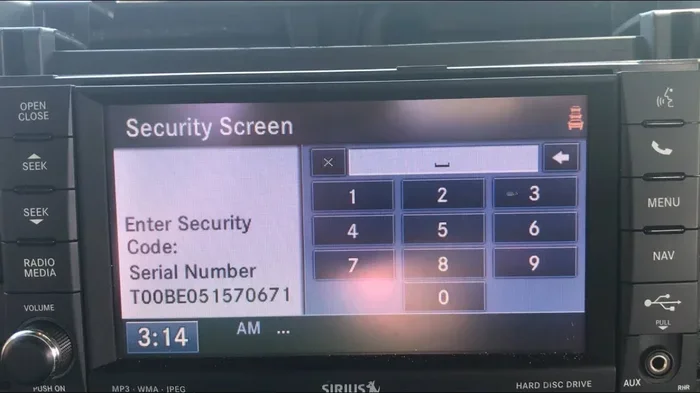
Your radio unit stores a unique anti-theft code in its memory chip. When the system detects a power interruption, it requires you to enter this code to restore function. The code is usually a four-digit number, though some systems use longer sequences. The radio display will typically show “CODE,” “SECURITY,” or a similar prompt when it is locked.
Each vehicle has a different code tied to its specific radio. This means the code for one car will not work for another. That is why finding the correct radio code retrieval method for your particular vehicle is so important.
How to Find Your Car Radio Serial Number
Before you can retrieve your code, you need your radio serial number. This number is the single most important piece of information in the entire process. Without it, most retrieval methods will not work. The good news is that finding it is usually straightforward.
Where to Look for the Serial Number
Your radio serial number can be found in several places:
- On the radio unit itself: Remove the radio from the dashboard (if you feel comfortable doing so). The serial number is printed on a label on the top or side of the unit.
- In the owner’s manual: Many manufacturers print the serial number on a card or page inside the manual. Check the section about the radio or audio system.
- On the dashboard: Some vehicles display the serial number on a small sticker or plate near the radio slot.
- Through the radio display: On many systems, you can press and hold certain buttons to reveal the serial number on the radio display.
Write down the serial number carefully. Even one wrong digit will give you an incorrect code. If you have trouble finding it, consult your vehicle’s owner’s manual or look up your specific make and model online.
Quick Tips for Finding Your Serial Number
- Take a photo of the serial number label so you always have a backup.
- Store the serial number in your phone or a safe place at home.
- If the label is worn or faded, try the button combination method on the radio display first.
- Never guess the serial number. Always read it exactly as printed.
Common Methods for Car Radio Code Retrieval
Now that you have your serial number, let us look at the most common ways to retrieve your radio code. Each method has its own advantages, and the best choice depends on your situation, your vehicle, and how quickly you need the code.
Method Comparison
| Method | Cost | Speed | Difficulty | Best For |
|---|---|---|---|---|
| Online Code Generator | Free or low cost | Fast (minutes) | Easy | People with the serial number who want a quick solution |
| Dealership | Free to moderate fee | Same day | Very easy | Those who prefer professional help and have their VIN |
| Owner’s Manual | Free | Instant (if code is listed) | Very easy | People who still have their manual |
| Radio Code Calculator | Free or low cost | Fast | Moderate | Tech-savvy users comfortable with math-based solutions |
| Aftermarket Radio Unlock Service | Low cost | Fast | Easy | Aftermarket or non-OEM radio units |
Using an Online Radio Code Generator
One of the fastest and most popular ways to perform car radio code retrieval is through an online code generator. These tools let you enter your radio serial number and sometimes your VIN number to generate the correct code. Many of these services are free, though some charge a small fee.
Here is how it typically works:
- Go to a reputable radio code website.
- Select your vehicle make, model, and year.
- Enter your radio serial number.
- Click generate or submit.
- Receive your code and enter it into the radio.
Make sure to use a trusted website. There are many scam sites out there. Look for reviews and stick with well-known services. If you are unsure, the dealership method is always a safe backup.
Contacting Your Dealership
Your vehicle’s dealership is one of the most reliable sources for radio code retrieval. They have access to manufacturer databases and can look up your code using your VIN number. This method is especially helpful if you do not have your serial number or if the online tools do not work for your vehicle.
Call your local dealer and provide them with your VIN. They may ask for proof of ownership. In most cases, they can provide the code for free or for a small service fee. This is often the best option if you feel uncomfortable doing it yourself.
Checking Your Owner’s Manual
Do not overlook your owner’s manual. Many manufacturers include the default radio code or the retrieval instructions right in the manual. Check the section about the audio system or the radio. If you have lost your manual, you can often download a free PDF from the manufacturer’s website.
Using a Radio Code Calculator
For those who like a hands-on approach, a radio code calculator can be a fun and effective tool. These are mathematical tools that use your serial number to calculate the code. They are available as apps, websites, or even printed charts for specific radio brands.
This method works well for popular brands like Blaupunkt, Pioneer, Sony, and Philips. However, it does not work for all systems, and the calculations can be complex for newer models.
Step-by-Step Guide to Retrieving Your Radio Code
Now let us walk through the actual process step by step. Follow these instructions carefully to avoid any issues with your car stereo or anti-theft system.
Step 1: Turn on the Radio
Start your vehicle and turn the radio on. If the radio is locked, you will see a code prompt on the radio display. The screen might say “CODE,” “—,” or “SECURITY.” Do not panic. This is normal.
Step 2: Locate the Buttons
Most radios use a combination of preset buttons (1 through 6) to enter the code. Some systems use the seek/tune buttons or a combination of both. Check your owner’s manual for the specific button layout for your radio model.
Step 3: Enter the Code
Using the preset buttons, enter each digit of your code one at a time. Press and hold each button for about one second. The display should show each digit as you enter it. If you make a mistake, wait for the prompt to reset and try again.
Expert Insight: Always double-check each digit before pressing confirm. Most systems allow only three to five attempts before they lock out permanently. This radio lockout can make the situation much worse and require professional help.
Step 4: Confirm the Code
After entering all digits, press the confirm button or hold down the last button for a few seconds. If the code is correct, the radio will unlock and return to normal function. You should hear sound through the speakers and see the radio interface on the radio display.
Common Mistakes to Avoid
- Entering the code too quickly: Wait for the prompt between each digit.
- Using the wrong serial number: Double-check every digit before proceeding.
- Exceeding the attempt limit: If you fail three to five times, stop and try a different method.
- Ignoring the owner’s manual: Different brands use different entry methods. Always check first.
- Using an untrusted code generator: Some websites provide incorrect codes that can further lock your radio.
Quick Tips for a Smooth Retrieval
- Have your serial number written down before you start.
- Make sure your vehicle is parked safely before you begin.
- If the radio does not respond after entering the code, turn it off and try again.
- Keep your owner’s manual handy for reference on button functions.
- Enter the code in a quiet environment so you can hear any beeps or confirmations.
When to Seek Professional Help for Radio Code Retrieval
Most of the time, you can retrieve your car radio code on your own using the methods above. However, there are situations where professional help is the best or only option. Knowing when to call in the experts can save you time and prevent further damage to your car audio system.
You should consider seeking professional help if:
- Your radio is completely unresponsive and does not show a code prompt.
- You have exceeded the allowed number of code attempts and the radio is now permanently locked.
- Your radio serial number is missing or illegible and you cannot retrieve it yourself.
- You have tried multiple online generators and none have provided a working code.
- Your radio is a rare or older model that is not supported by online tools.
Expert Insights on Professional Assistance
Automotive audio specialists and dealerships have access to proprietary tools that can bypass or reset the anti-theft system in some cases. They can also read the radio unit directly to extract the serial number if it is not visible. This is especially useful for older vehicles where labels have worn away over time.
If you go the dealership route, bring your vehicle registration and proof of ownership. Dealers need to verify that you are the rightful owner of the vehicle before providing the security code. This is a standard procedure and helps protect both you and the dealer.
For aftermarket radios, look for specialized audio shops that deal with your specific brand. They often have the tools and experience to handle tricky radio code retrieval situations that generic methods cannot solve.
Preventing Future Radio Lockouts
The best way to deal with a locked radio is to prevent it from happening in the first place. Taking a few simple precautions can save you from the hassle of car radio code retrieval in the future.
Store Your Serial Number Safely
Write down your radio serial number and keep it in a safe place. Consider storing it in your phone, in a cloud note, or in your owner’s manual pouch in the glove box. If you ever need to retrieve the code again, you will have it right at hand.
Be Careful with Battery Work
Whenever you disconnect your car battery for any reason, the radio will likely lock. If you know you will be working on the battery, note your serial number beforehand. Some people even keep a small notebook in the glove box specifically for this purpose.
Avoid Cheap Aftermarket Radios
If you are considering upgrading your car audio system, be aware that some cheap aftermarket radios have weaker or no anti-theft protection. While this might sound convenient, it also makes them more attractive targets for thieves. Stick with reputable brands and models that have good security features.
Keep Your Owner’s Manual Accessible
Your owner’s manual is a goldmine of useful information. Keep it in the glove box and refer to it regularly. Many people throw their manuals away and then regret it when they need to look something up. A simple habit of keeping the manual in the car can save you a lot of headaches.
Expert Insight on Long-Term Prevention
Some car owners choose to write their radio code directly on the radio unit with a permanent marker once they have retrieved it. While this is not recommended for everyone, it can be a lifesaver in an emergency. Just make sure the code is not visible to outsiders, as this could defeat the purpose of the anti-theft system.
Another pro tip is to take a photo of your serial number and code (once retrieved) and store it in a secure note on your phone. This gives you instant access wherever you are, whether at home, at a dealership, or on the road.
Final Thoughts
Car radio code retrieval does not have to be a stressful experience. With the right approach and the information in this guide, you can get your car stereo back up and running in no time. Start by finding your radio serial number, then choose the retrieval method that works best for your situation.
Remember to be patient and careful when entering the code. Most lockouts are temporary and easily resolved. If you run into trouble, your dealership and professional audio specialists are always there to help. Keep your serial number stored safely, and you will be prepared if this ever happens again.
The next time your radio display shows a code prompt, you will know exactly what to do. You have the knowledge, the tools, and the confidence to handle it like a pro. Enjoy your music and drive safely.
Frequently Asked Questions
Can I retrieve my car radio code for free?
Yes, many online radio code generators offer free services. You can also check your owner’s manual or contact your dealership, which often provides the code at no charge. Always try free options first before paying for any service.
What happens if I enter the wrong radio code too many times?
Most car radios allow three to five incorrect attempts before they lock out permanently. A permanent lockout may require professional help from a dealership or audio specialist to reset the system and retrieve the code safely.
Do I need my VIN number to retrieve the radio code?
It depends on the method. Some online generators require your VIN number along with the serial number. Dealerships almost always use your VIN to look up the code. However, some basic code generators only need the serial number.
Can I retrieve the radio code myself without any special tools?
Absolutely. Most retrieval methods only require your serial number and a computer or smartphone. You do not need any special tools or mechanical knowledge. The process is designed to be simple enough for any car owner to handle.
How long does car radio code retrieval take?
If you have your serial number, most online generators provide the code in just a few minutes. Contacting a dealership may take longer, sometimes a same-day visit. The actual code entry into the radio takes less than a minute once you have the correct digits.
Is car radio code retrieval the same for all vehicle brands?
No, the process varies by brand and model. Different manufacturers use different radio units, serial number formats, and code entry methods. Always refer to your specific vehicle’s owner’s manual or look up brand-specific instructions for the best results.